Pokémon Home is officially out! Here's how to sign up

Poki(C)mon HOME is finally here!
Poki(C)mon HOME is now officially out. After getting used to the ridiculous new Professor Oak, players are beginning to dive in and learn the basics of how the storage and cloud service works. Signing up for Poki(C)mon HOME is free, but there is a Premium subscription available for players who want it. The premium subscription includes the ability to transfer Poki(C)mon from your Poki(C)mon Bank account into your HOME account and expands the number of Poki(C)mon that can be deposited from 30 to a whopping 6,000, among other features. The subscription comes in various price points, but the cheapest plan starts at $16 per year.
Fans have been waiting a long time for a service like this, and now that it's out, the only step left is to sign up. The methods vary slightly depending on what platform you'll be using, but we've got you covered for both.
A new Professor Oak kicks off the surprise launch of Poki(C)mon Home on the Nintendo Switch?
How to sign up for Poki(C)mon HOME- How to sign up for Poki(C)mon HOME's basic subscription using Android devices
- How to sign up for Poki(C)mon HOME's basic subscription using Nintendo Switch
- How to sign up for the premium subscription on Nintendo Switch
- Download the Poki(C)mon HOME app for Android.
- Once you start the app, go through the prompts to set your language, location, and birth date.
After following the prompts, you'll be asked to link your Nintendo Account.


- After linking your account, select your name and starting icon. Don't worry, you can change both at any time.
- After an introduction from the new Grand Oak, you're all set to to explore the app!
- Head over to the Nintendo eShop on either your Nintendo Switch or on Nintendo's website and begin downloading.
After opening the app, you'll be prompted to choose your language and then scroll through a long terms of service.

Once agreeing to the terms, you'll be asked if you have downloaded the app on your mobile device yet. If you have, select "Yes," but if not, just go ahead and click no.

- After that, you'll get the introduction from Grand Oak, and you'll be all signed up!
- Go to the Nintendo eShop from your phone or your Switch and download Poki(C)mon HOME.
Once Poki(C)mon HOME is downloaded on your Switch, click on Poki(C)mon Home from the main Switch menu.


- Press A to get past the start menu.
This screen will appear. Click on Nintendo eShop.


- Choose the plan you want.
You'll be taken to the Nintendo eShop to complete your purchase. Click Proceed to Purchase if you're satisfied with your order.


- Select the payment method you wish to use.
A receipt for your order will appear. Click Next.


Select Return to Software.

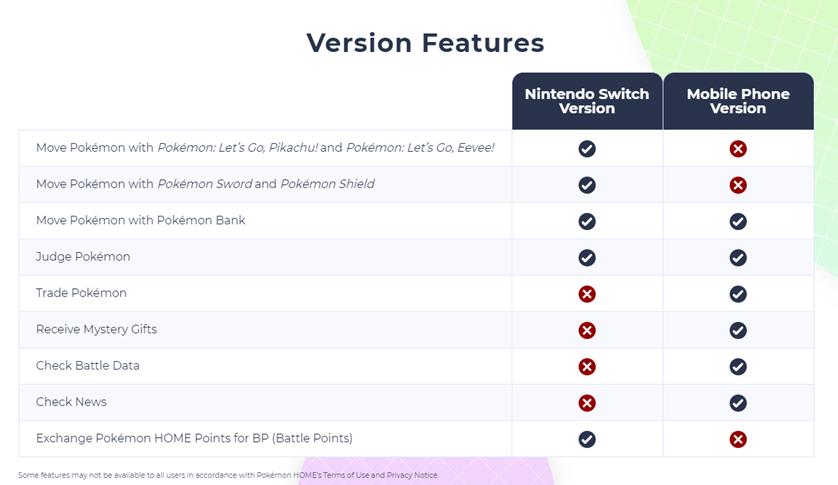
While all versions of Poki(C)mon HOME allow players to move Poki(C)mon with the Poki(C)mon Bank, there are some differences. The Nintendo Switch version of Poki(C)mon HOME does not allow players to trade, receive Mystery Gifts, or check the Battle Data and News tabs that are found in the mobile app.
On the other side, the mobile version of Poki(C)mon HOME does not let trainers move their Poki(C)mon using Poki(C)mon Sword or Shield or Poki(C)mon: Let's Go, Pikachu or Eevee. The mobile app also doesn't allow players to exchange Poki(C)mon HOME points for Battle Points, so it's important to know what you plan on doing before opening the different apps. You can also refer to the tab above from Nintendo for the key differences.
Have you tried out Poki(C)mon HOME yet?Poki(C)mon HOME hasn't been out for too long, but due to the demand of the app over the years, it's bound to be a popular pick amongst fans. Have you had a chance to check it out yet, and if so, are you enjoying it? Are there any features you wish made it but haven't appeared in the app? Make sure to let us know what you think of the app so far in the comments below!
Begin transferringPoki(C)mon HOME
Store and save your Poki(C)mon
Fans have been waiting for a long time, and it's finally here. Poki(C)mon HOME allows players to easily manage their Poki(C)mon collection by storing, saving, and transferring the pocket monsters across a variety of titles. By working with Poki(C)mon Bank, players can also bring almost all of their favorite Poki(C)mon with them into the future.