Acer Swift Go 16 AI (AMD Gorgon Point) Review: A balanced, affordable, big-screen portable
We're so used to testing cutting-edge, top-end laptops with high price tags that a decently equipped portable that isn't priced around $2,000 can feel refreshing. And with price increases happening seemingly everywhere, the average laptop buyer probably feels the same.
Enter Acer's Swift Go 16 AI, a 16-inch portable with an IPS touchscreen, a premium-ish metal shell, AMD Ryzen AI 7 445 processor, and 16GB of RAM paired with 1TB of storage, plus a 7-inch (diagonal) touchpad. It won't break any performance ground, but it was a solid deal when it was on sale for $799. At its current MSRP price of $1,149, it's a lot harder to argue for - especially when the silver-shelled Intel-based model (which halves the storage to 512GB but ups the screen tech to OLED) was on sale for just $699 at Best Buy when I wrote this.
Design of the Acer Swift Go 16 AI (Gorgon Point)The design of Acer's Swift Go 16 AI packs more positives than negatives, but it is still a mixed bag. Perhaps due to its size, it feels lighter than its 3.53-pound weight, and its aluminum shell (black with zig-zagging slim lines on the lid) puts it head and shoulders above budget offerings. It's also fairly svelte for a big-screen laptop, at 14 x 9.9 x 0.63 inches.
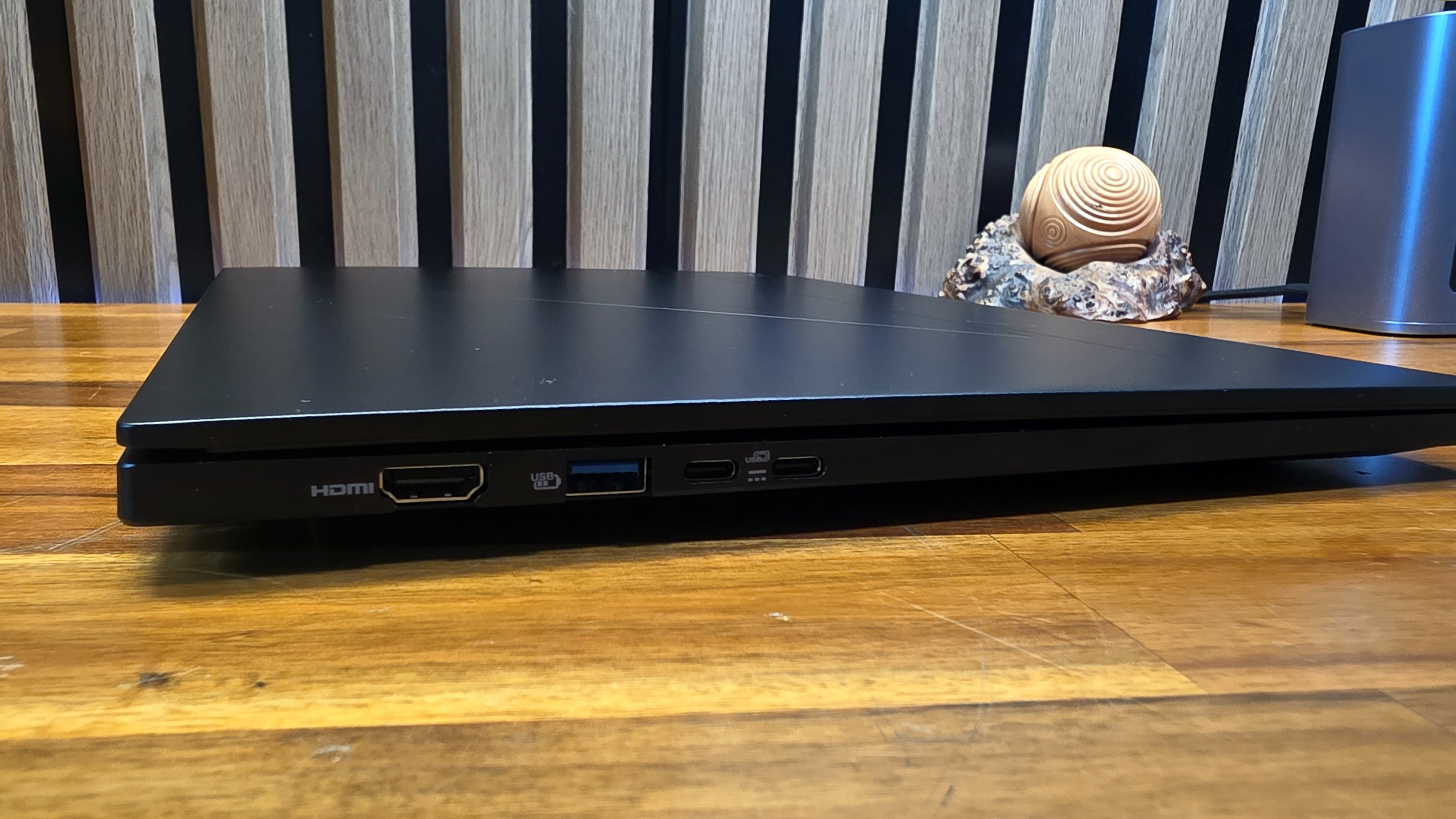
Port selection is also good, with a pair of USB-C ports, a USB-A port, and HDMI on the left edge.
The right edge houses a Kensington lock slot, another USB-A port, a headset jack, and a microSD card slot.
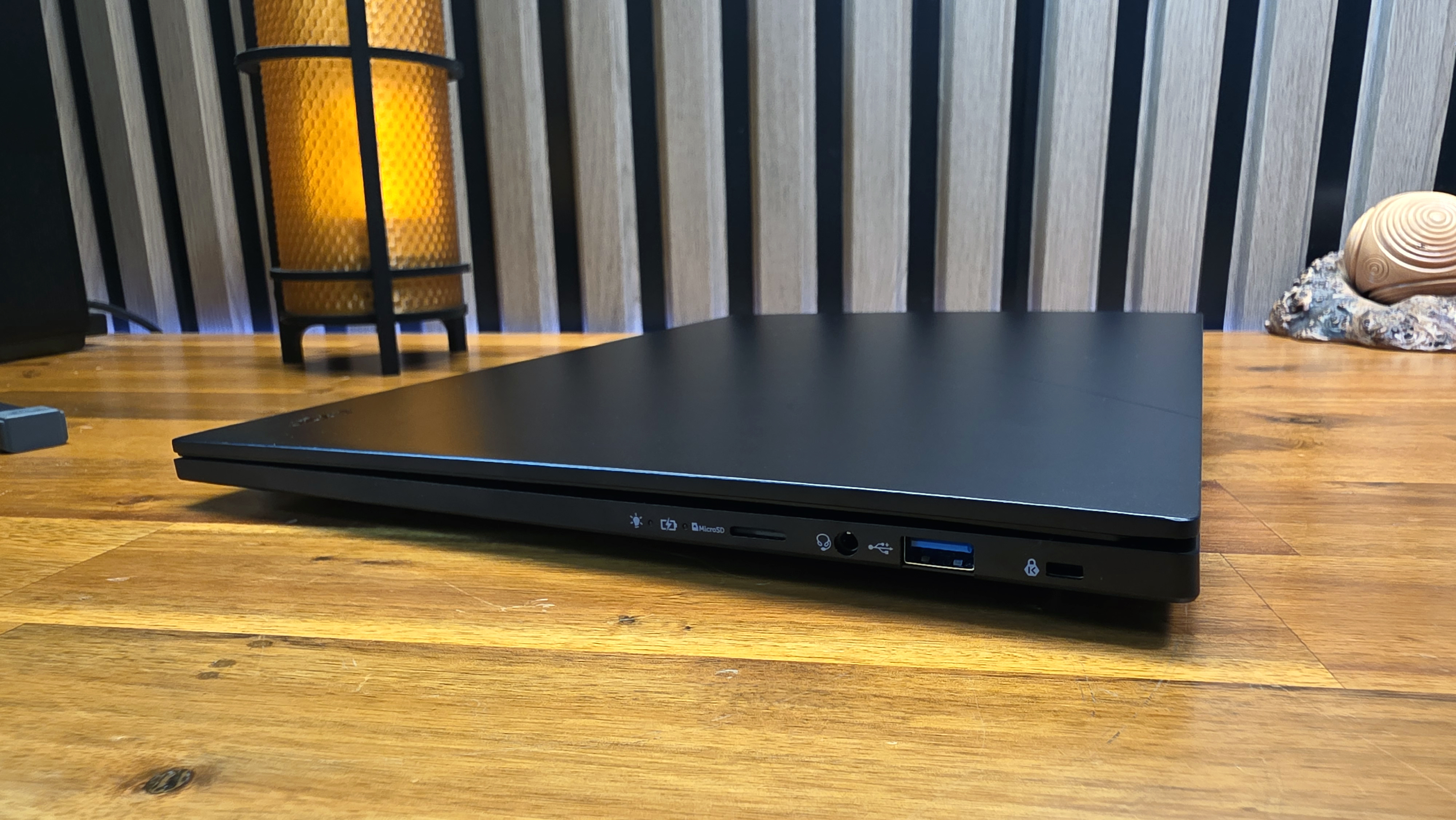
Also here is the charging indicator light, which is an odd choice since the charging ports are on the other side of the laptop. After plugging the laptop into the charger on my test bench, I had to lean across the laptop just to see if it was charging.
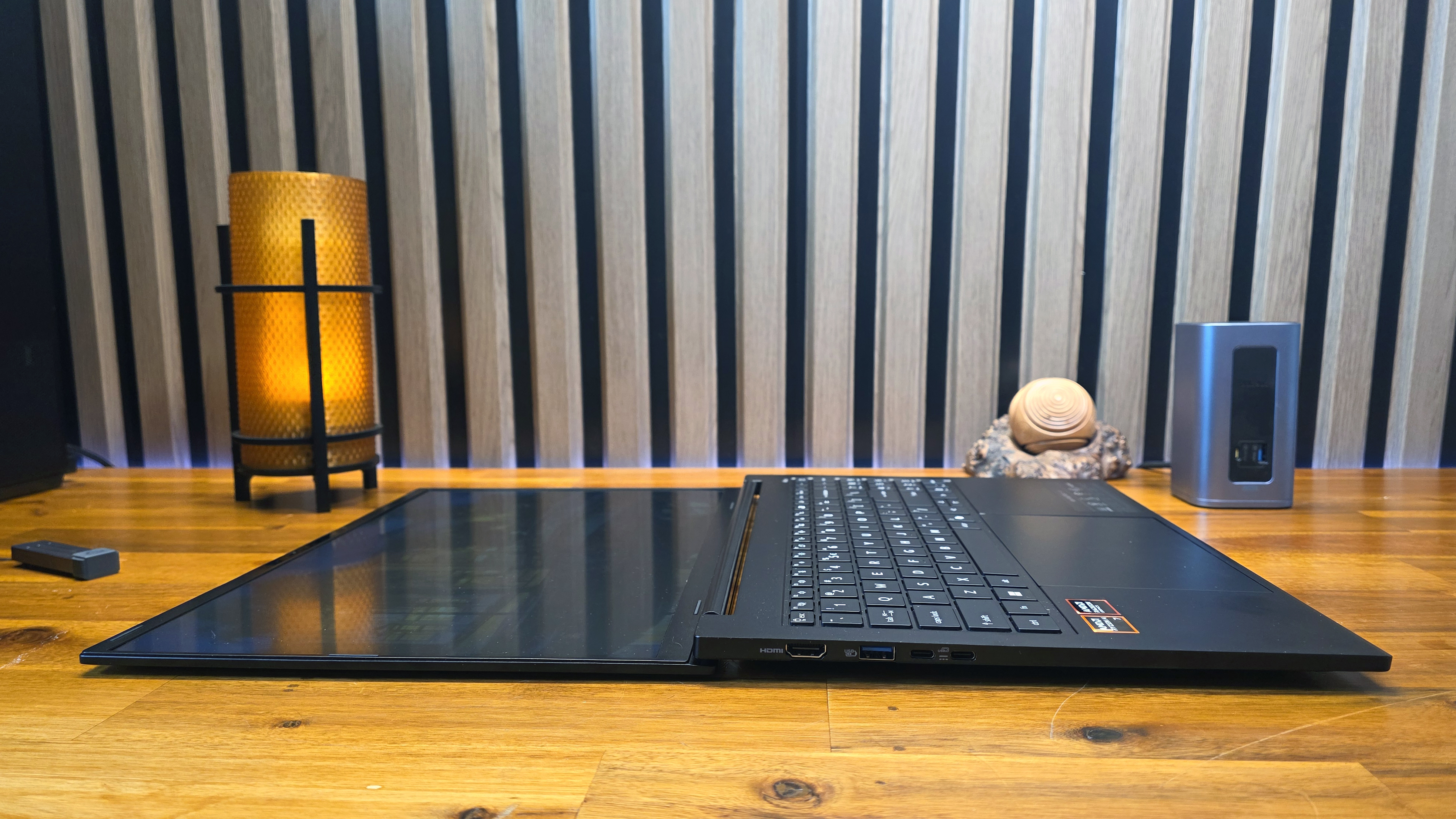
The hinge also lets the screen recline all the way down to 180 degrees, although doing this makes viewing angle issues pretty apparent, as you lose most of the visible brightness.
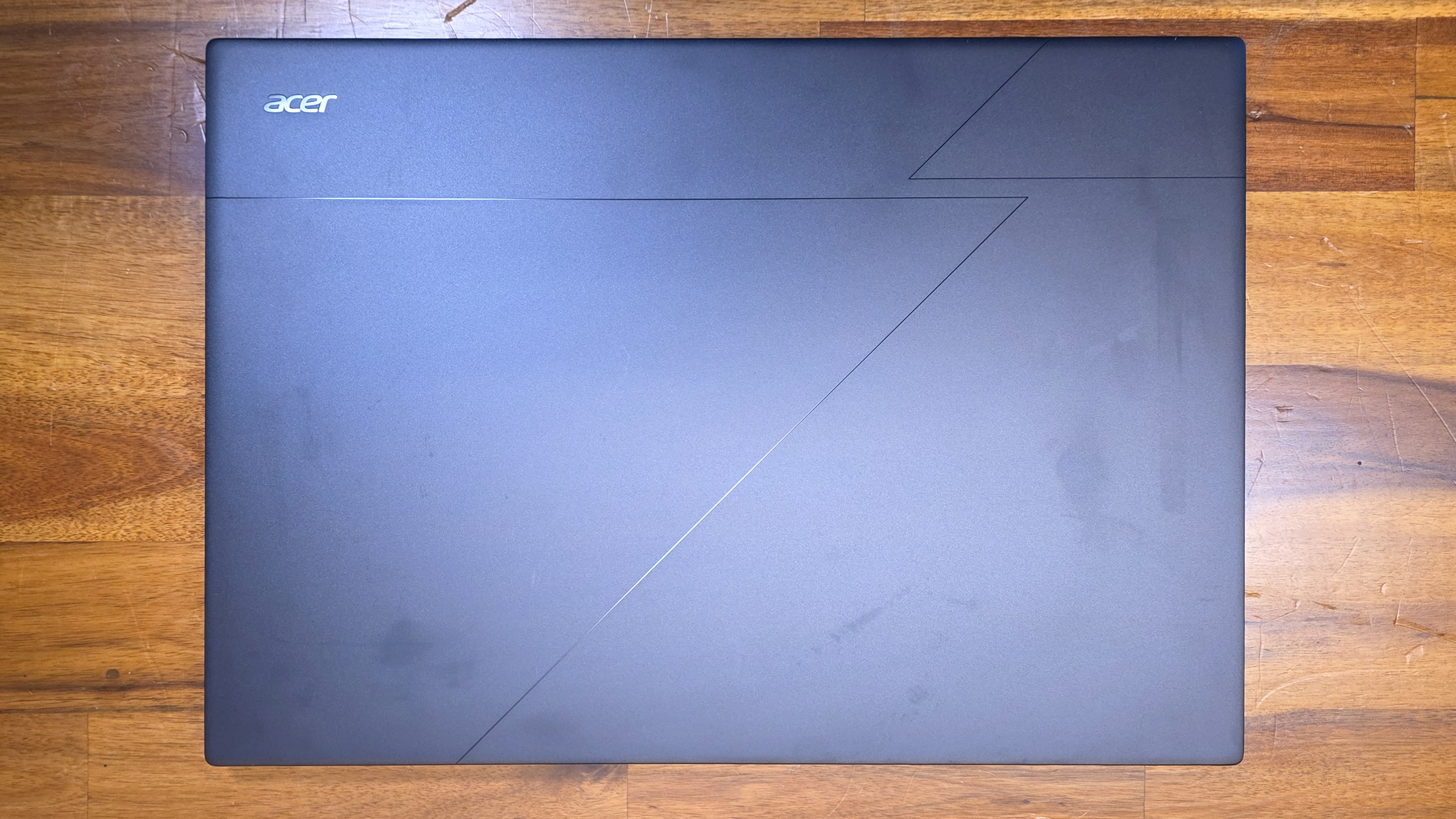
The metal shell also has more than a little flex, both on the lid and the keyboard, though I noticed it more on the lid every time I closed the laptop. The lid also developed smudges that I couldn't wipe away, even with a damp cloth and some elbow grease, during my time with it - and for a good chunk of that time it was just sitting untouched on my coffee table. Note, though, that the smudges are a lot less visible when the laptop isn't sitting under photography lights.
Acer Swift Go 16 AI (the SFG16-A71T-R5UY) SpecificationsCPU | AMD Ryzen AI 7 445 |
Graphics | AMD Radeon 840M (integrated) |
Memory | 16GB LPDDR5X |
Storage | 1TB PCIe Gen 4 SSD |
Dipslay | 16-inch, 1920 x 1200, IPS, 120 Hz |
Networking | Wi-Fi 7, Bluetooth 5.4 |
Ports | 2xUSB4 (Type-C), 2x USB 3.2 Gen 1 (Type-A), HDMI 2.1, MicroSD, headset jack |
Camera | 5MP IR |
Battery | 65 WHr |
Power Adapter | 100 W (USB-C) |
Operating System | Windows 11 Home |
Dimensions (WxDxH) | 14 x 9.89 0.63 inches (WDH) |
Weight | 3.53 pounds |
Price (as configured) | $1,149 MSRP |
Before jumping into the test results, a quick note about a unique (at least to me) issue I had when using the laptop: About half the time when I moved my hands toward the keyboard to type or launch a program, the screen would briefly dim, and then I would be kicked out to the Windows 11 login screen. This eventually happened so frequently that I thought the laptop had some sort of electrical defect, and asked Acer about the problem.
However, as I was demonstrating the issue to a colleague in the office, he wondered aloud whether my watch band might be causing it. I hadn't thought of that, as I've been testing laptops for well over a decade, much of that time while wearing a watch, and have never experienced this issue before. I've also had the current band for my Samsung Galaxy Watch 7 for about 14 months, during which time I've used countless laptops to a greater or lesser degree. But the band does have a magnetic clasp on the bottom, and sure enough, as soon as I took the band off, or even put it on my left wrist instead of my right, the issue where the screen went black and kicked me out to the login screen went away.
I tried replicating the issue with my watch band and several other laptops, but could not. So the Acer Swift Go 16 AI's lid sensor does seem particularly sensitive to magnets (I was also able to replicate the issue on the Acer using other magnets and the magnetic band from someone else's Apple Watch). But it's a quirk that will mostly plague left-handed people who have magnetic watch clasps - or the odd people like me who wear their watch also on their right wrist.
Productivity Performance on the Acer Swift Go 16 AIWe tested Acer's Swift Go 16 AI in its sole AMD-based Best Buy configuration, sporting a Ryzen AI 7 445 (Gorgon Point) CPU and integrated Radeon 840M graphics, as well as 16GB of LPDDR5X RAM and a 1TB SSD.
The Ryzen AI 7 445 is a mid-range chip in AMD's refreshed lineup, with six cores, 12 threads, and an NPU capable of 50 TOPS for all your Copilot+ and other local AI needs.
Most of the systems we've looked at this year are pricier than the Acer, which could make the laptop look bad in our charts. But our comparison systems also cost more. There's Apple's 13-inch MacBook Air ($1,299) using a 10-core M5, followed by two 14-inch laptops: Dell's XPS 14 ($2,199) leverages a Core Ultra X7 358H while Lenovo's Yoga Slim 7i Aura Edition ($1,629) uses a Core Ultra 7 355.
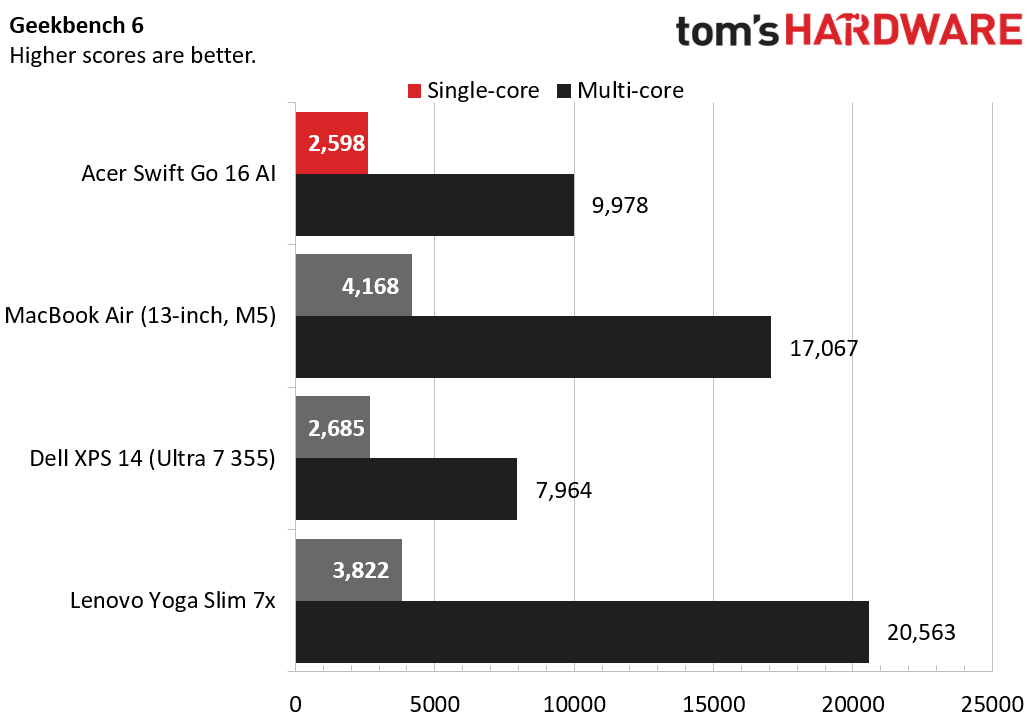
On Geekbench 6, the Swift 16 AI was able to hang with Dell's XPS 14, falling a bit behind in single-core, but landing ahead on the multi-core portion of the test. But the Arm-based laptops from Apple and Lenovo both easily outpaced the x86 competition.
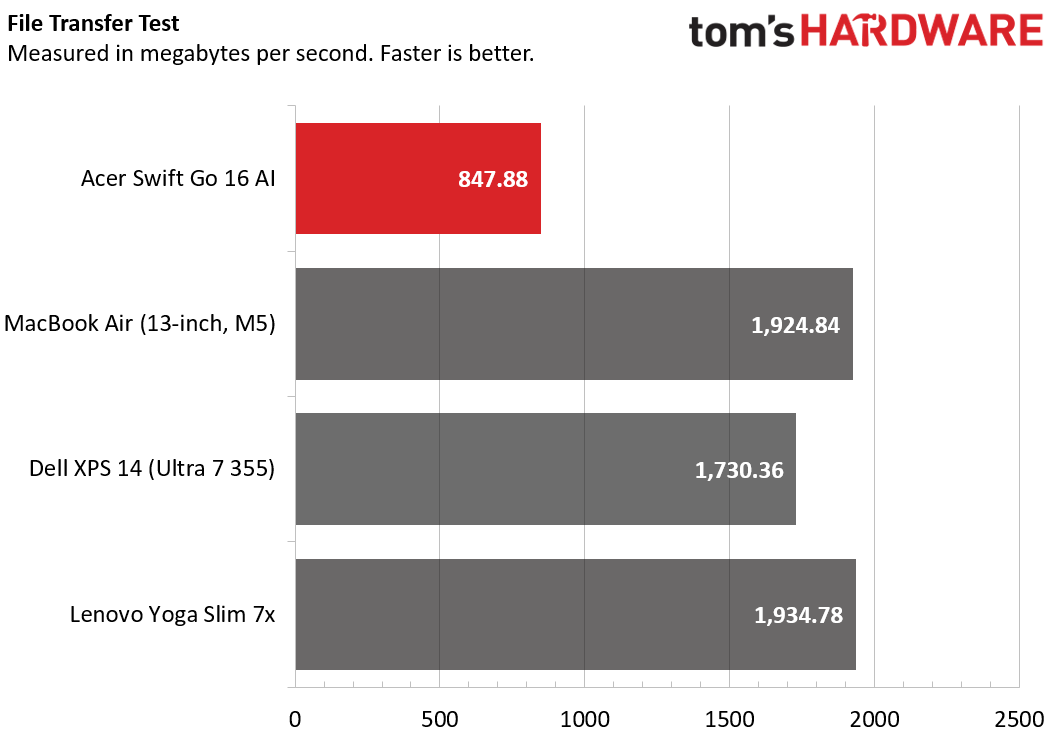
Things looked worse for the Acer laptop in our 25GB file transfer test. Despite the company calling the laptop's storage out as being PCIe 4, the tested speed of 847.88 MBps is less than half that of the drives in the competing laptops. Still, the Acer drive is fast enough that you won't likely notice the difference in most common tasks.
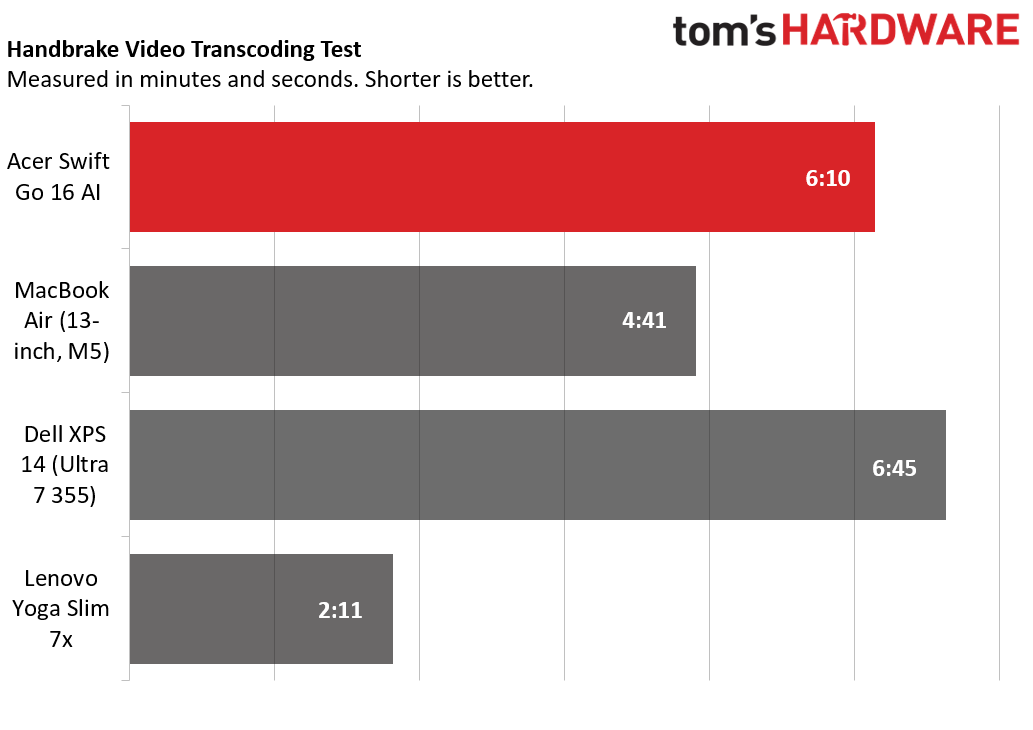
On Handbrake, the Acer managed to best the XPS 14 once again (thanks largely to its extra threads). But again, the Arm-based competition, and particularly Lenovo's Qualcomm-based Yoga Slim 7x, destroys the Acer, converting our 4K video to 1080p in roughly a third of the time it took the Swift Go 16 AI.
The Swift Go 16 AI's average transfer speed in our 25GB file transfer test was a slow (ish) 847.88 MBps. That's less than half the speed of any of its laptop competition here, but these are also all pricier laptops. Faster would certainly be better, but the drive in the Acer is plenty fast enough for typical mainstream tasks.
To stress test the CPU in laptops, we run 10 loops of Cinebench 2026. The system started with a score of 2,315, ramped as high as 2487 by the fourth run, and held fairly steady, dropping back to 2468 on the penultimate run, before recovering and finishing at 2,480. During the test, the laptop's Ryzen AI 7 445 CPU ran at an average frequency of 3.47 GHz.
Graphics on the Acer Swift Go 16 AIThe laptop's 840M graphics are integrated. But thanks to being paired with an X86 CPU, they can certainly run more games than the Arm-based Apple and Lenovo laptop competition. But on paper, the competition has a clear edge.
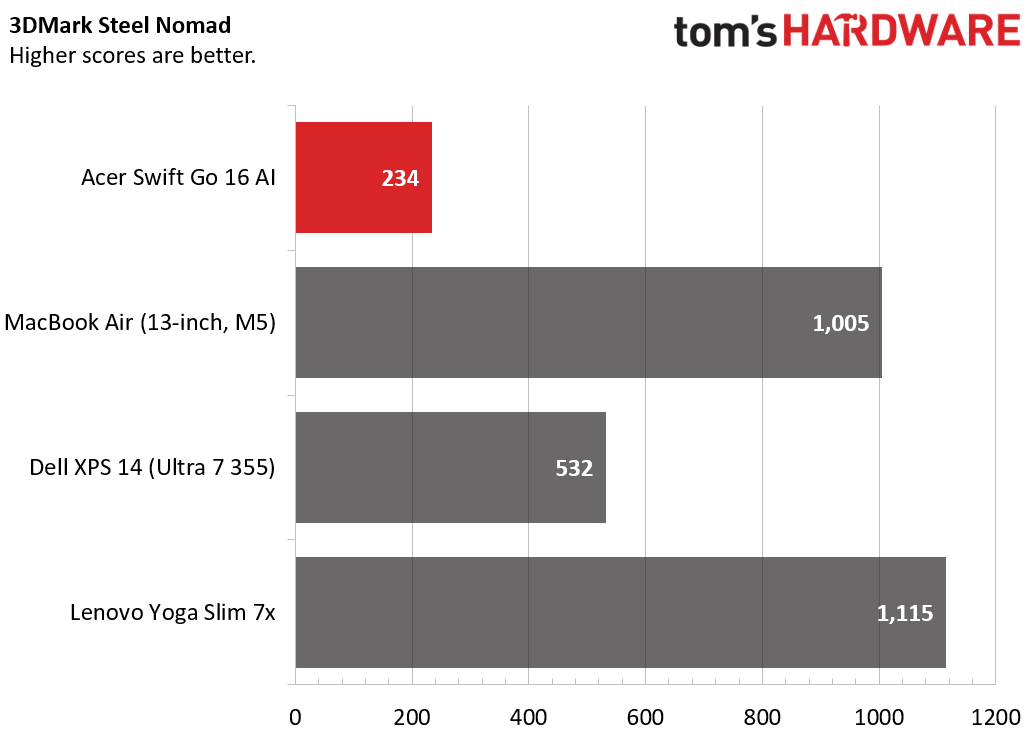
In 3DMark Steel Nomad, the Acer Swift Go 16 AI turned in a score of 234, which is slightly less than half that of the Dell XPS 14 (with its four Xe3 cores) more than doubled that, while both the MacBook Air and Lenovo Yoga Slim 7x quadrupled the Swift Go's showing. Again, though, keep in mind that the Acer, while not as powerful on the graphics front, will run more PC games than either the MacBook or Qualcomm-powered Lenovo.
Display on the Acer Swift Go 16 AIAcer sells the Swift Go 16 AI with a single panel in the AMD-based configuration, a 1,920 x 1,200-resolution IPS panel with a 120 Hz refresh rate. The Intel-based version ups the ante with an OLED display, which sounds like an upgrade, but Best Buy lists that screen at just 250 nits. The IPS screen on our AMD model at least gets brighter than that.
When I watched the story trailer for Marvel's Wolverine for the PS5, the dress Jean Gray wore in one scene was a vivid green, while the aura of her telekinesis popped in a hue somewhere between magenta and purple, while the often gore-speckled yellow of Logan's suit looked a bit subdued. In general, colors looked good, and brightness was sufficient. But I did miss the inky blacks of the OLED screens on my Lenovo X9 laptop and my LG TV. That said, if this laptop panel was what I used for work every day, I don't think I would have any serious complaints. It looks great unless you have something better to compare it to side-by-side.
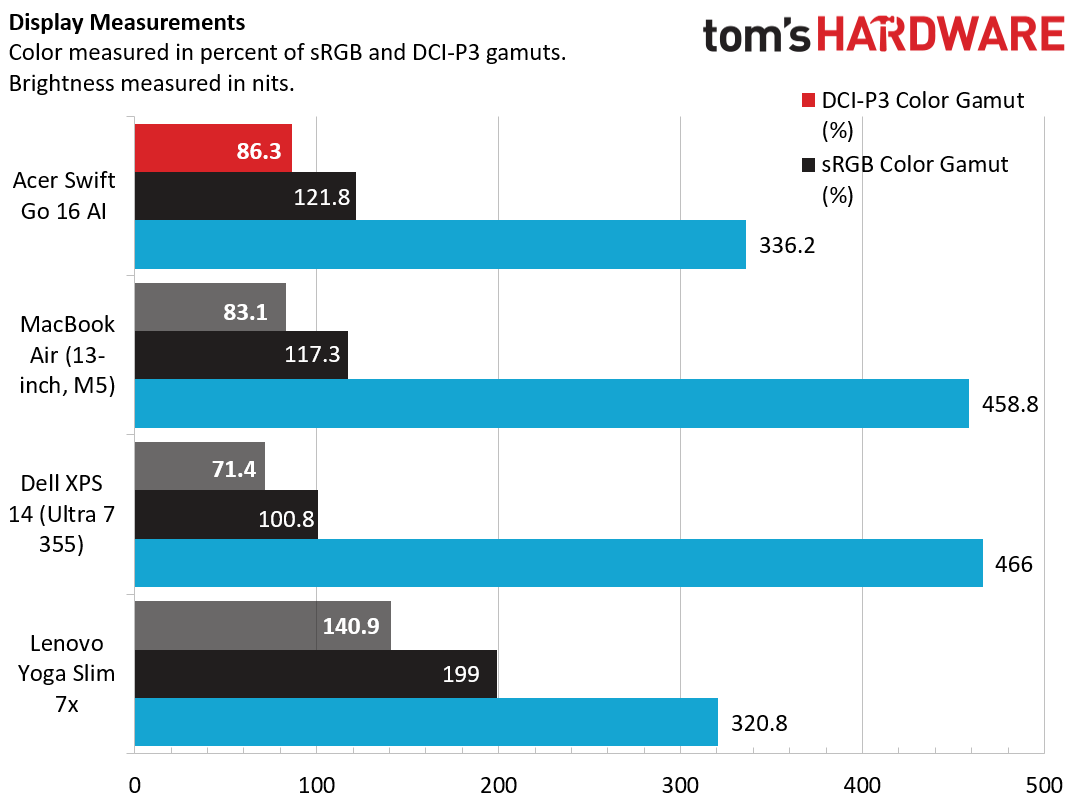
Our display testing pegged the Acer's screen at 336 nits, which edged out the Lenovo, but both the XPS 14 and Apple were significantly brighter. Still, the IPS Acer screen delivered more colors than the Dell or Apple laptops, with 121.8% of the sRGB gamut and 86.3% of the larger DCI-P3. In short, this is quite a good screen for a laptop that isn't a flagship machine. It's not the brightest of panels, and I did keep it mostly at 100% brightness while using it, it never once felt dimmer than I would have liked.
Keyboard and touchpad on the Acer Swift Go 16 AI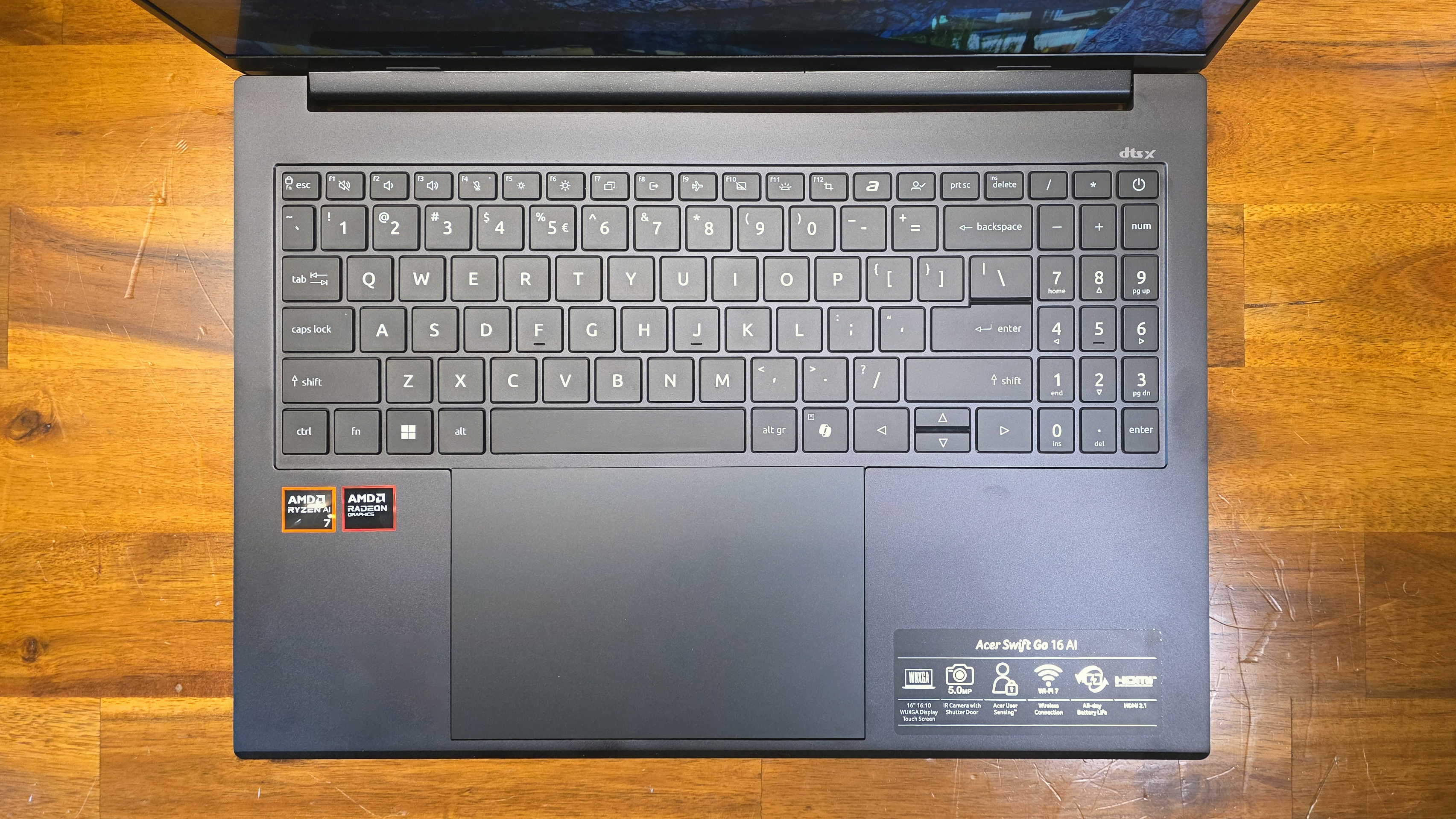
I found typing on the Acer Swift Go 16 AI to be largely fine, with no major complaints. The flat keys don't offer the best feel or the most generous key travel. And the left and right arrow keys look comically large compared to their up / down counterparts.
The real oddity here is the inclusion of a squished number pad. There clearly isn't room for anything larger, and I am sure those who find a number pad a necessity would rather have narrow numbers on the right side rather than no numbers. But the layout here makes the keyboard look and - to some extent - feel cramped. Considering this is a pretty large, 16-inch laptop, that's a somewhat impressive design achievement.
The large, 7-inch touchpad is one of the Swift Go 16 AI's stand-out features, and while nothing particularly ground-breaking, there are more features to cover than are typical in a laptop.
The touchpad isn't haptic, but it is covered in Corning Gorilla Glass, and feels fairly premium. It worked well for basic and multi-finger gesture tasks during my time with it. And for tasks like media control and meetings, there are backlit touch buttons that appear when you, say, go to YouTube or launch Teams, letting you control media, volume, and switch to full-screen playback.
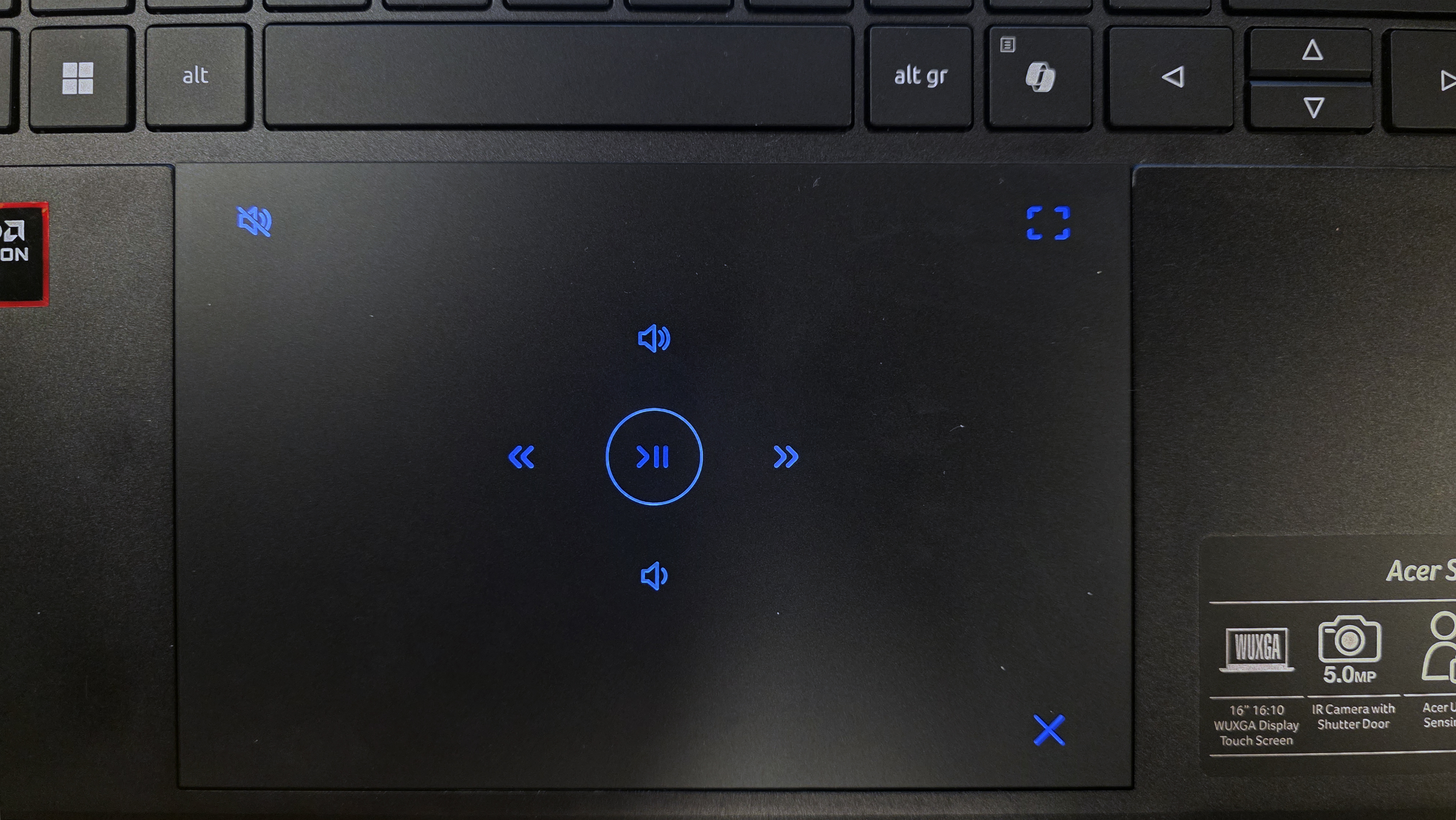
We've seen similar ideas from Acer and others. I'm not generally a fan of the general idea, but the touch features worked well enough to serve as controls while I watched YouTube. And Acer makes the buttons appear and disappear when you open compatible apps and websites, so it's not something you have to think about much. You can also turn it off by hitting the X on the bottom-right corner of the touchpad when the lighting appears.
Audio on the Acer Swift Go 16 AIThe pair of downward-firing speakers on the Swift Go 16 AI are fine for meetings and casually watching video or listening to music at a desk, but don't expect much in the way of bass or impressive volume. When I listened to my favorite test track, Buck-Tick's Muma - The Nightmare," cranking the volume to 100% filled my home office space, but the sound was a little harsh at that volume. Dropping down to 80% or below resulted in better sound, but of course less volume.
If you're the type that likes to fiddle with audio details, the DTS:X Ultra software is included. It lets you adjust the EQ and select from seven presets, but the Music setting was already enabled by default, so at least for listening, the Swift Go 16 AI's speakers sound about as good as they can out of the box.
In short, the speakers are OK for basic audio tasks, and are easily loud enough for watching video clips. But if you want to enjoy your audio, especially at higher volumes, consider pairing a decent Bluetooth speaker.
Upgradability of the Acer Swift Go 16 AIGetting inside Swift Go 16 AI isn't difficult, provided you have a Torx screwdriver set. Remove ten screws (the ones on the front edge are shorter, so be sure to keep them separate), and you should be able to pry off the bottom. I found a small plastic spudger helpful for getting started, but once I worked a few clips free, the metal bottom lifted right off.
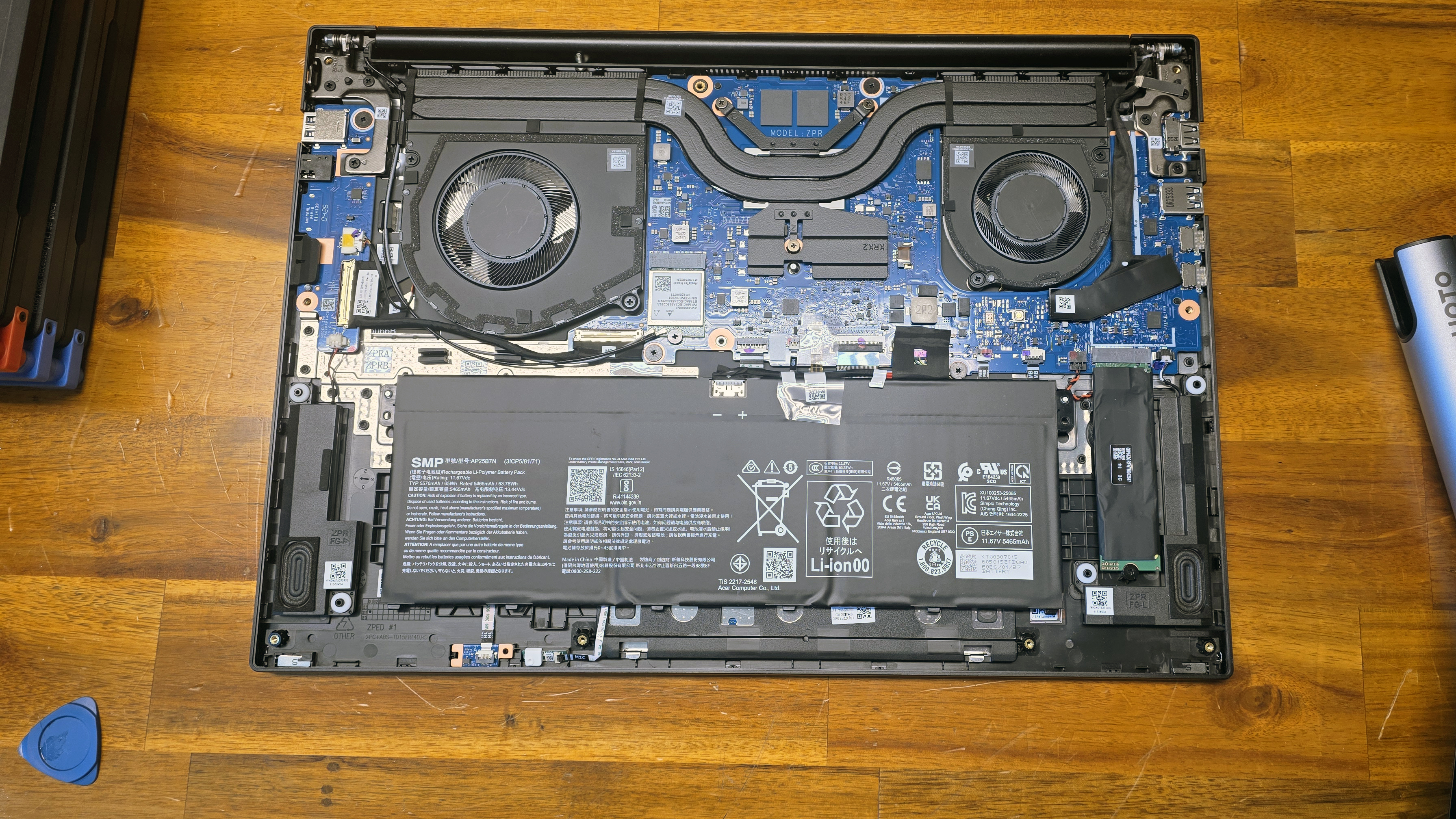
There's little to do while you're in there, though. You could swap the standard 2280 M.2 boot drive, or replace the MediaTek wireless card. But as is standard for anything that isn't a gaming laptop / workstation or a Framework these days, the RAM is soldered down.
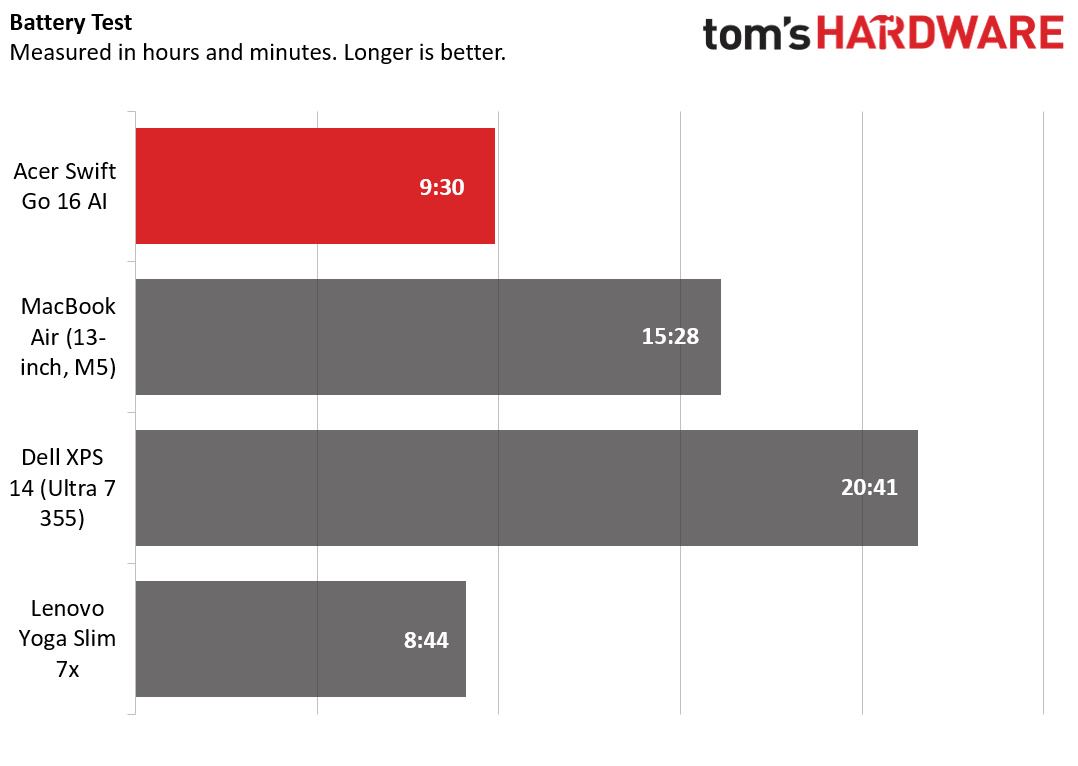
Battery life on the Acer Swift Go 16 AIUnplugged longevity isn't exactly a strong suit of this Acer, but it still manages a respectable 9.5 hours in our battery test, which consists of web browsing, running OpenGL tests, and streaming videos with the screen at 150 nits while connected to Wi-Fi. That was enough to beat the more powerful Lenovo by 46 minutes, but the Dell and Apple laptops did significantly better. Keep in mind, though, that the Acer has a larger, 16-inch screen than the competition here, which are 13- and 14-inchers, and there's not much to complain about. Battery life is solid, just like many aspects of the Swift Go 16 AI.
During our 10-loop Cinebench 2026 stress test, the Swift Go 16 AI's surface temperatures remained relatively tepid for a slim laptop. We measured a peak of 87 degrees Celsius on the touchpad, 100.5 between the G and H keys, and 114 C on the underside, near the back center. Internally, the Ryzen AI 7 445's average temperature was 66.9 C across all cores.
Webcam on the Acer Swift Go 16 AIThe webcam on the Swift Go AI is a step above mainstream options, at least on paper. It has an IR sensor for Windows Hello login, and Acer says the sensor supports IR and is capable of recording video up to 1800p at 30 FPS. The Camera app limited me to 2560 x 1600, which is still good for a mainstream laptop. Colors were generally accurate, and I did notice more detail in my beard than most 1080p models. But the camera still struggles with blown-out light from nearby windows.
Acer claims there is Temporal Noise Reduction at play here to keep pixels from looking grainy. Generally, I didn't see any graininess, but the process also results in images and video that look soft when viewed at full size. In all, webcam performance feels like more than an afterthought, but isn't the best I've seen. At this price, that's perfectly fine.
Software on the Acer Swift Go 16 AIThere is a significant amount of adware and software bloat pre-baked into this Acer's operating system. On the taskbar alone, you'll find pins for Forge of Empires, Dropbox, and Booking.com. The start menu includes a couple more games: Elvenar and Amazing Block Blast, as well as WhatsApp, LinkedIn, and AcerSense. I also found ExpressVPN in the installed apps folder.
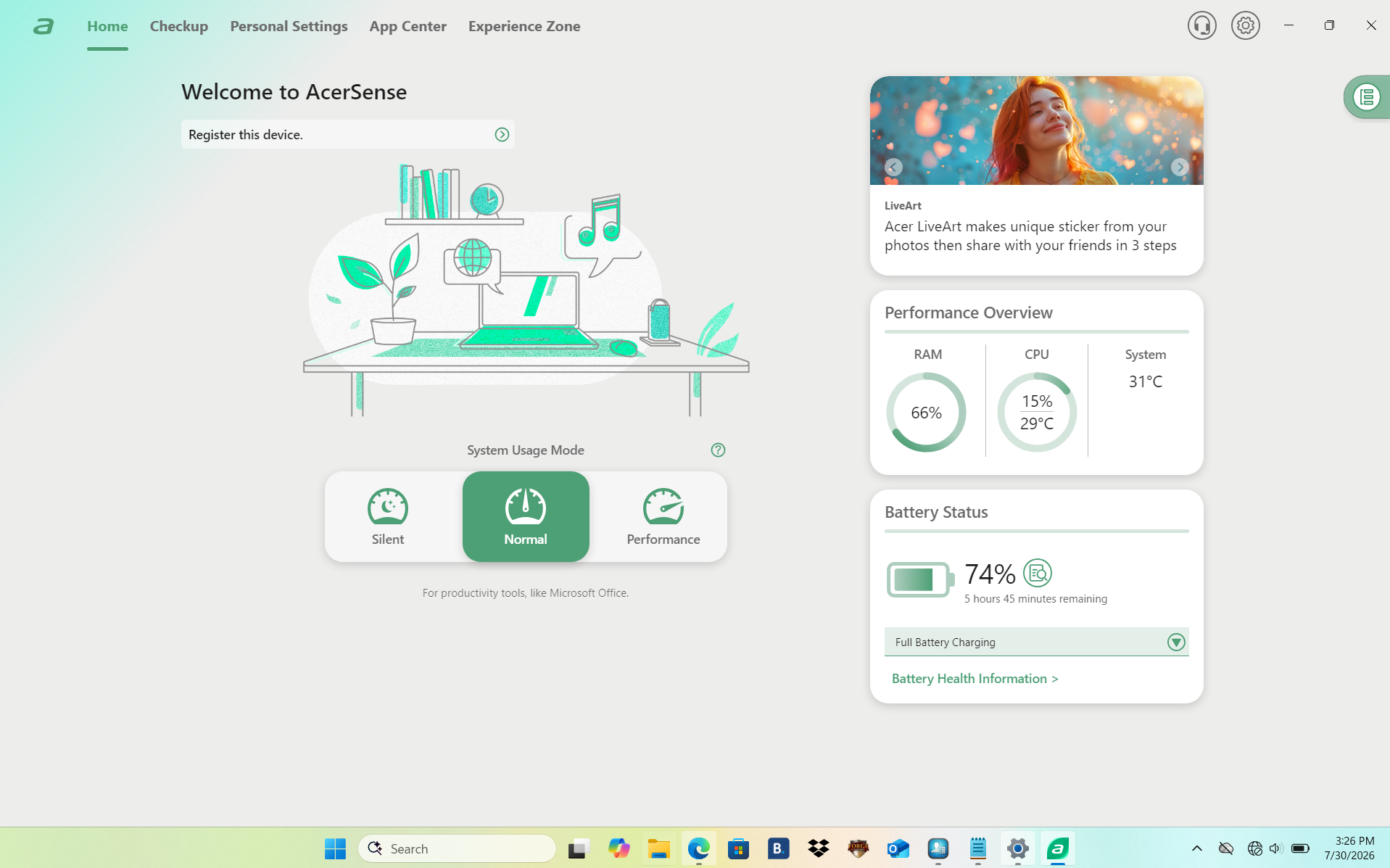
Oddly, AcerSense, the company's own app for checking the status and health of the laptop's various components, and changing power modes, wasn't actually installed. When I clicked on it, a launcher started downloading. I would just delete it, like most of the cruft here. If you're an absolute novice at recent versions of Windows, it might be a little helpful, but most of what it does and shows you is also available within Windows itself.
While I wouldn't quite call this a serious excess of unnecessary and unhelpful software (in other words, I have seen worse), there is quite a lot here. When the laptop is on sale for hundreds off its MSRP, it feels like a necessary evil in these days of higher prices. But if you're paying close to the $1,149 MSRP, you shouldn't have to deal with this much bloat.
Acer Swift Go 16 AI ConfigurationsAcer sells AMD and Intel versions of the Swift Go 16 AI at Best Buy. Our black AMD-based model ships with a Ryzen AI 7 445 CPU, 16GB of RAM, and a 1TB SSD. Its price ranged significantly from $799 to the $1,149 MSRP while I worked on this review. A higher-end AMD model ups the RAM to 32GB, the CPU to a Ryzen 9 465, for $1,499.
On the Intel side, there's an Intel Core Ultra 5 version that halves the storage (512GB) but opts for an OLED screen with the same 1,920 x 1,200 resolution. That was selling for an enticing $699 ($300 off) as I wrote this. If you can get it at that price, this model is the clear bargain of the bunch. But a beefier Intel option with a Core Ultra 7 355 and 32GB of RAM at $1,169 ($1,549 MSRP) also isn't bad if you need more power and memory.
Bottom LineIf you're after a larger-screen laptop that doesn't feel like a budget machine, there's a lot to like with the Swift Go 16 AI - especially when it's on sale. The AMD-based model we tested delivered solid performance and a good IPS screen. The SSD is slower than its pricier competition, but it wasn't so slow that you're likely to notice during typical tasks.
There is also more bloatware than is typical in laptops around the $1,000 price point, but it's easy enough to uninstall. Just keep an eye on the pricing, which swung significantly between $799, $999, and $1,049 in the weeks when I was working on this review. And don't discount the silver Intel Core Ultra 5 322-based model, which drops the storage down to 512GB, but includes an OLED screen. That model dipped as low as $699 in recent weeks, but has now jumped back up to $999. Either model is worth considering, and both are great values when priced below $800.