Asus ROG Swift PG32UCWM 32-inch OLED gaming monitor review: A flagship display with premium performance and imagery
With prices generally higher than their LCD counterparts, the best OLED gaming monitors remain a premium category. And within that, there are flagships even though you'll rarely see the words bad" and OLED" in the same sentence.
Asus ROG Swift displays represent an entire series of flagships, with every model featuring plenty of bells and whistles along with benchmark performance. I've looked at many of these in the past, and here, I have the latest one, the PG32UCWM. It's a 32-inch Tandem RGB Stripe OLED with 4K resolution at 240 Hz, FHD at 480 Hz, Adaptive-Sync, HDR10, DisplayHDR 400, Dolby Vision, and wide-gamut color. Let's take a look.
Asus ROG Swift PG32UCWM SpecsPanel Type / Backlight | Organic Light Emitting Diode (OLED) Tandem RGB Stripe |
Screen Size / Aspect Ratio | 32 inches / 16:9 |
Max Resolution and Refresh Rate | 3840x2160 @ 240 Hz |
1920x1080 @ 480 Hz | |
FreeSync and G-Sync Compatible | |
Native Color Depth and Gamut | 10-bit / DCI-P3 |
HDR10, DisplayHDR 400 True Black, Dolby Vision | |
Response Time (GTG) | 0.03ms |
Brightness (mfr) | 270 nits full-field |
1,000 nits 3% window | |
Contrast | Unmeasurable |
Speakers | None |
Video Inputs | 1x DisplayPort 2.1 |
2x HDMI 2.1, 1x USB-C | |
Audio | 3.5mm headphone output |
USB 3.2 | 1x up, 3x down |
Power Consumption | 52.4w, brightness @ 200 nits |
Panel Dimensions WxHxD w/base | 28.1 x 20.2-23.3 x 10.9 inches (714 x 513-592 x 277mm) |
Panel Thickness | 2.5 inches (64mm) |
Bezel Width | Top: 0.3 inch (8mm) |
Sides: 0.35 inch (9mm) | |
Bottom: 0.43 inch (11mm) | |
Weight | 19.84 pounds (9kg) |
Warranty | 3 years |
First, we'll tackle the alphabet soup in the room: Tandem RGB Stripe OLED. Let's call it TRS-OLED, consisting of two light-emitting layers with red, green, and blue diodes. This approach addresses several issues. With two layers comes lower power consumption at a given light level. Tandem white OLEDs do the same thing. RGB Stripe takes care of the fringing issue where white diodes behind color filters can spread their light and cause a loss of sharpness. In practice, you will be hard-pressed to see any softness from any OLED, but an RGB Stripe panel like the PG32UCWM is a tad sharper, and you'll see it in a side-by-side comparison. To this, Asus adds its True Black Glossy screen coating, which earns its name by reducing the effect of ambient light on the screen. Visually, it deepens black areas and improves perceived contrast.
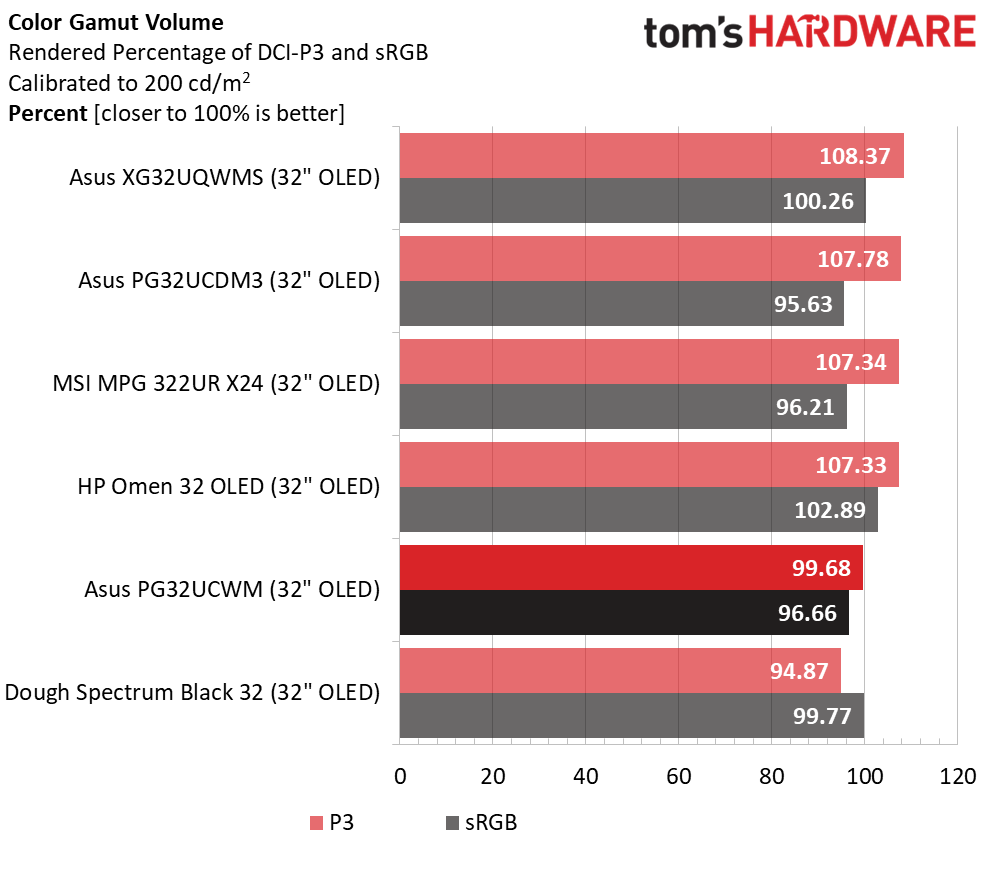
Another advantage of RGB Stripe is increased color volume. Most wide gamut screens employ Quantum Dots to increase volume up to 110% of DCI-P3 or more. RGB Stripe achieves most of that without the light-reducing effect of a QD layer. The PG32UCWM delivers an honest 100% of P3, which is a little less than the competition, but it's more than the 93-95% coverage of non-QD monitors. Asus promises and delivers accuracy out of the box as well with a calibration report stored in the panel's firmware.
It wouldn't be ROG without serious gaming performance, and on that, the PG32UCWM delivers in spades. 240 Hz at 4K is available for those with enough video card power to achieve it. If you want maximum fps, there's a 480 Hz mode with FHD 1920x1080 resolution. You can also employ ELMB at lower frame rates to reduce motion blur. Asus includes its exclusive OLED Anti-Flicker feature, which mitigates stutter during rapid frame rate transitions. Does this translate into a fast and smooth experience? Check out my test results on page two to find out.
The PG32UCWM supports HDR10 with multiple picture modes and an adjustable option. And it accepts Dolby Vision content, which is still a rarity among computer monitors. Its dynamic tone mapping creates a major improvement in picture depth, regardless of the level to which content is mastered. It will show you every nuance and render every detail present in the original material.
Like all ROG Swift screens, the PG32UCWM includes multiple LED arrays on the back and in the stand where a logo can be projected onto the desktop. There is a full list of GamePlus enhancements like aim points and sniper modes. And some of these can be automated with AI to better adapt to the gaming environment. You also get USBs and a full set of the latest video I/O ports: HDMI 2.1, DisplayPort 2.1 and USB-C.
Swift displays usually come with a price premium over their competition, but the PG32UCWM comes out of the gate at $1,299, which isn't a huge number when you consider its build quality and performance. It is a true flagship.
Assembly and AccessoriesA colorfully adorned box houses the PG32UCWM in molded pulp, which is completely recyclable. The stand, base, and panel assemble without tools. The ROG logo projector lens fits under the base with magnets and includes extra lenses. A zippered pouch disgorges a cable bundle consisting of IEC cords, two USBs, HDMI, and DisplayPort. You also get sheets of ROG decals and a microfiber cleaning cloth for that beautiful shiny screen. Speaking of shiny, there is a lot of bling on this monitor, all protected by bits of clear film. It almost becomes a game to find it all, but at least you can be sure your PG32UCWM won't arrive with scratches.
Product 360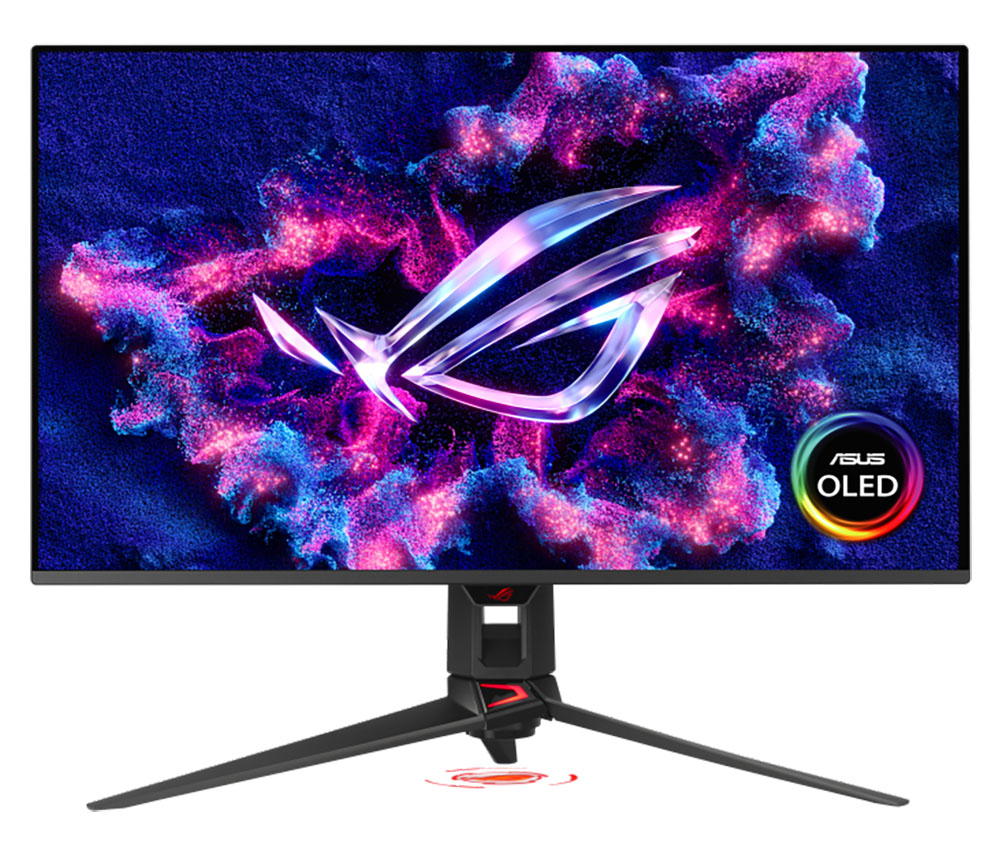 Asus
Asus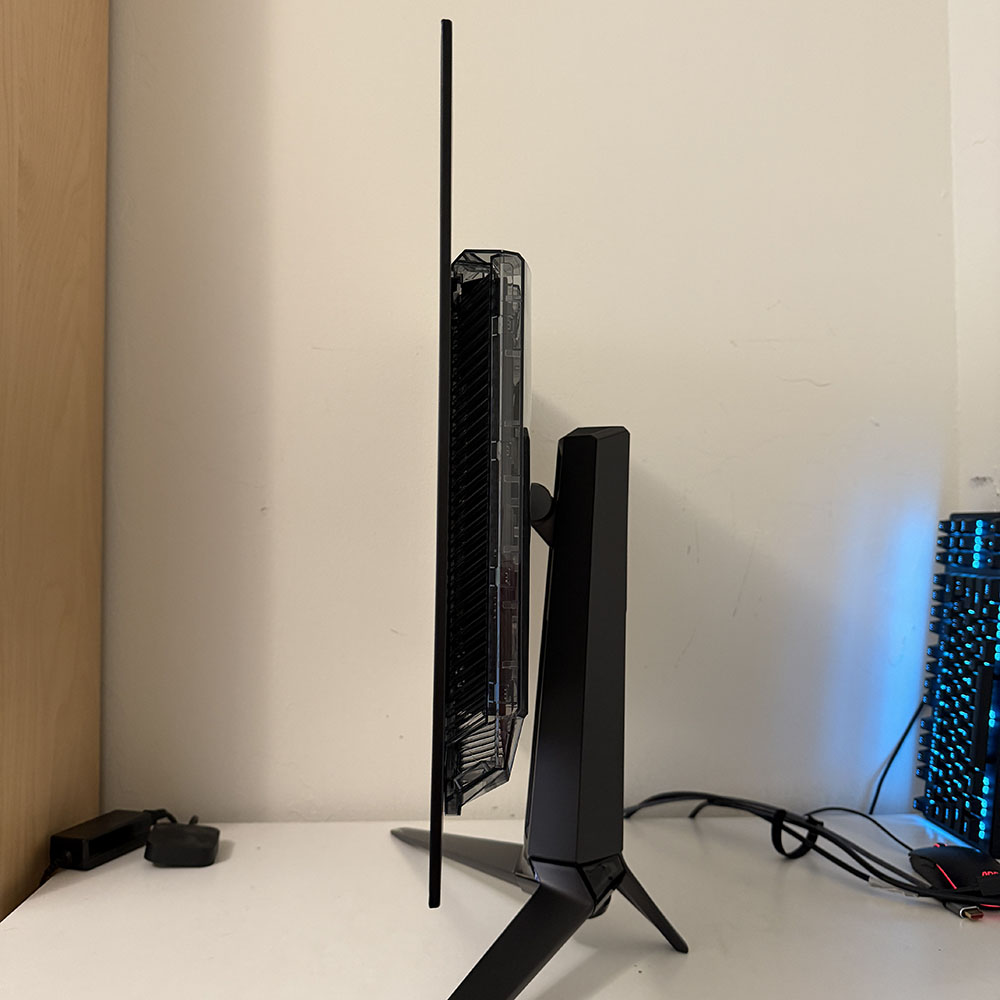 Tom's Hardware
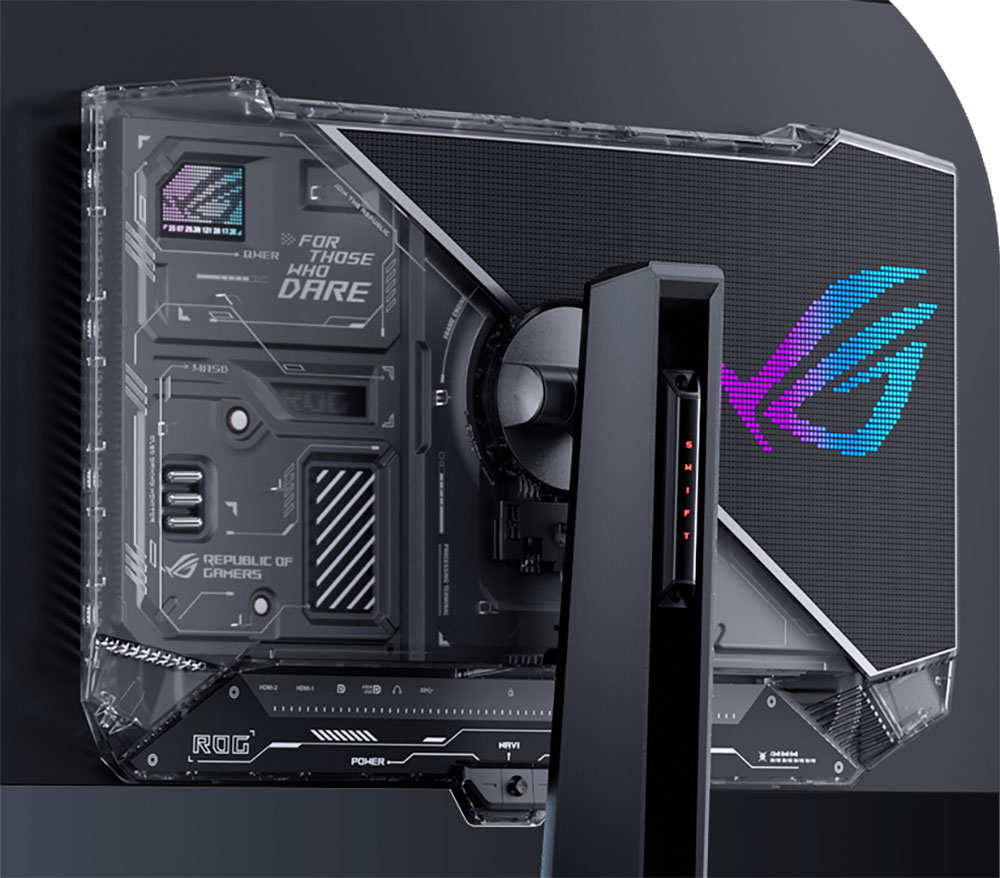 Asus
Asus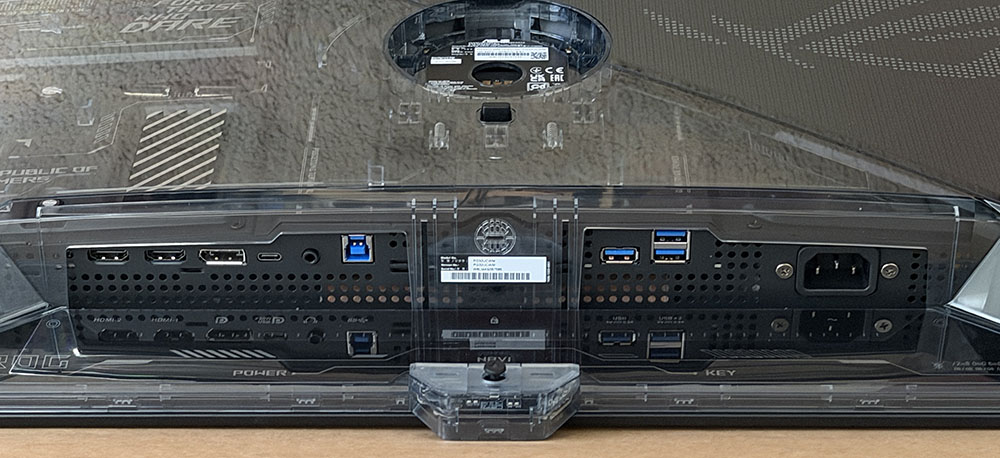 Tom's Hardware
The latest crop of Swift displays, like the PG32UCWM, set themselves apart with LEDs in the stand, a logo projector and clear plastic on the back that reveals the internal componentry. It's a great complement to a transparent PC case, which Asus can also sell you. The right half includes the Lite-Brite LED feature, which can play a vast array of colors and effects. You also get lighting in the stand where it says Swift", in the base, in the ROG logo up front, and in the projector under the stand.
The stand is super solid and includes a 3.1-inch height adjustment plus 5/20 degrees tilt and 15 degrees swivel. There is no portrait mode. If you want one, you'll need an aftermarket arm that interfaces with the included adapter bracket, which provides a 100mm VESA mount. It comes with beefy fasteners.
The styling is a two-piece configuration with the screen and its metal backing attached to a component bulge. This improves cooling along with a graphene layer and internal heat sinks. Several OLED care features enhance panel life, and Asus backs the PG32UCWM with a three-year warranty that includes burn-in. No internal fans are needed to keep running temps low.
The I/O panel includes one DisplayPort 2.1 (configurable to 1.4), two HDMI 2.1, and a USB-C (DP Alt). USB 3.2 is supported by one upstream and three downstream ports. Audio comes only through a 3.5mm headphone jack; there are no internal speakers.
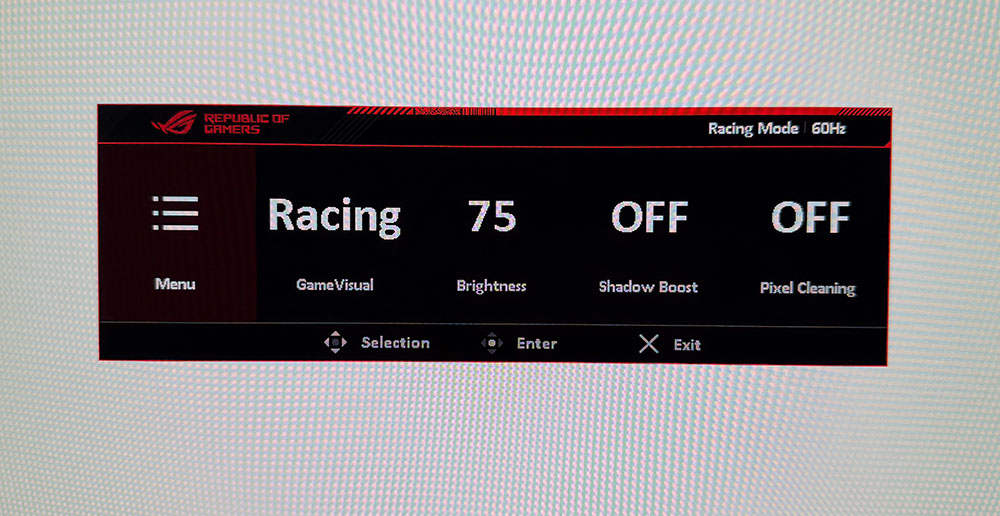
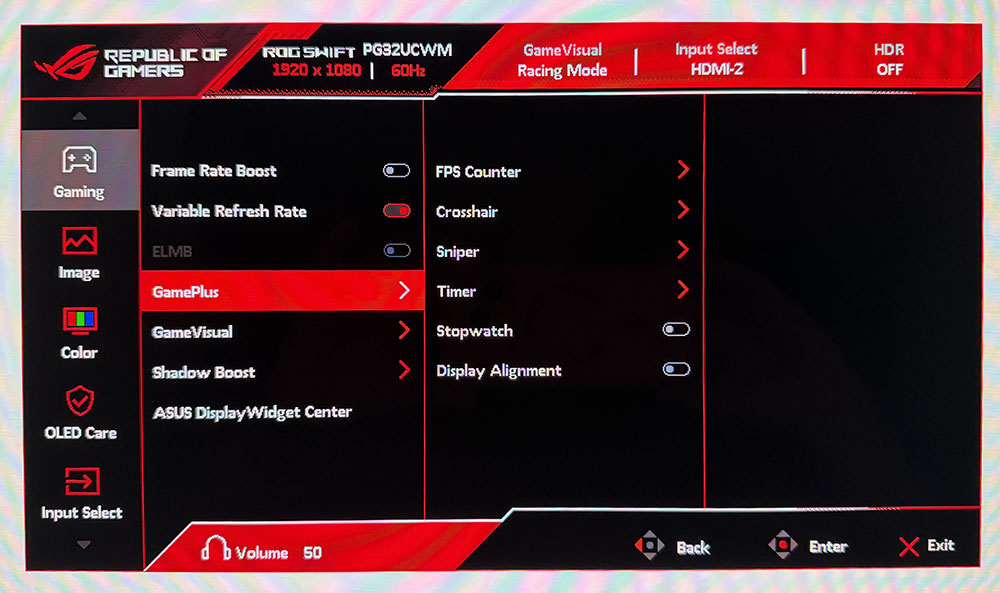
OSD FeaturesThe PG32UCWM's OSD has every feature one could want in a flagship gaming monitor, including video processing and extensive image controls. It's operated by a joystick behind the small protrusion in the front center. Two buttons flank it; one toggles power, and the user can program the other.
 Tom's Hardware
 Tom's Hardware
 Tom's Hardware
 Tom's Hardware
 Tom's Hardware
 Tom's Hardware
 Tom's Hardware
 Tom's Hardware
 Tom's Hardware
At the top of the Gaming menu is the Frame Rate Boost toggle. You can also switch modes with the left control button. Either way, it takes a few seconds for the picture to return. In GamePlus, you get frame counters, aiming points, sniper modes, timers, a stopwatch, and display alignment marks. Some of these have AI-controlled settings which change things like the reticle color or the gamma of the image's dark areas to increase visibility.
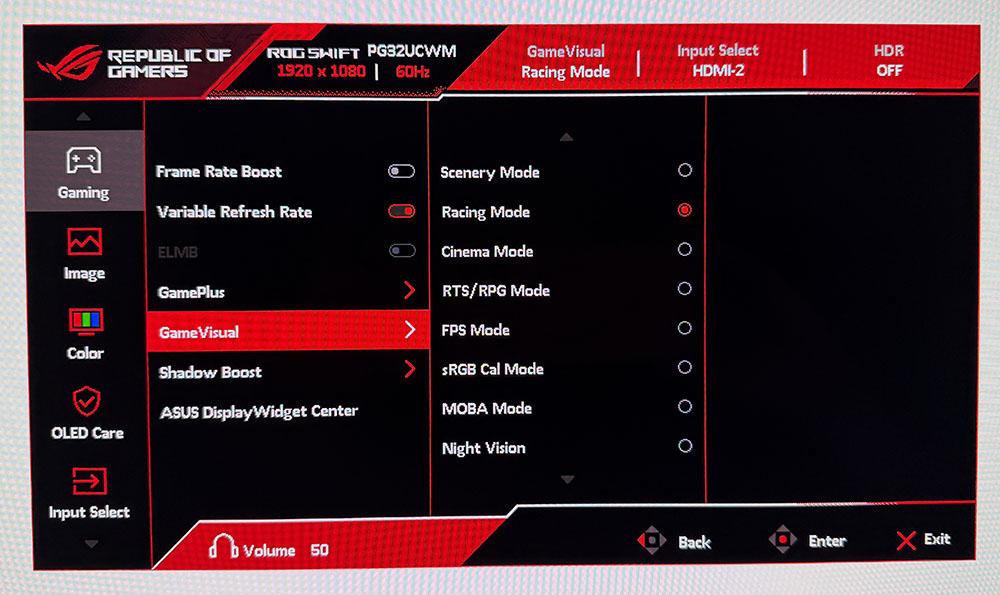
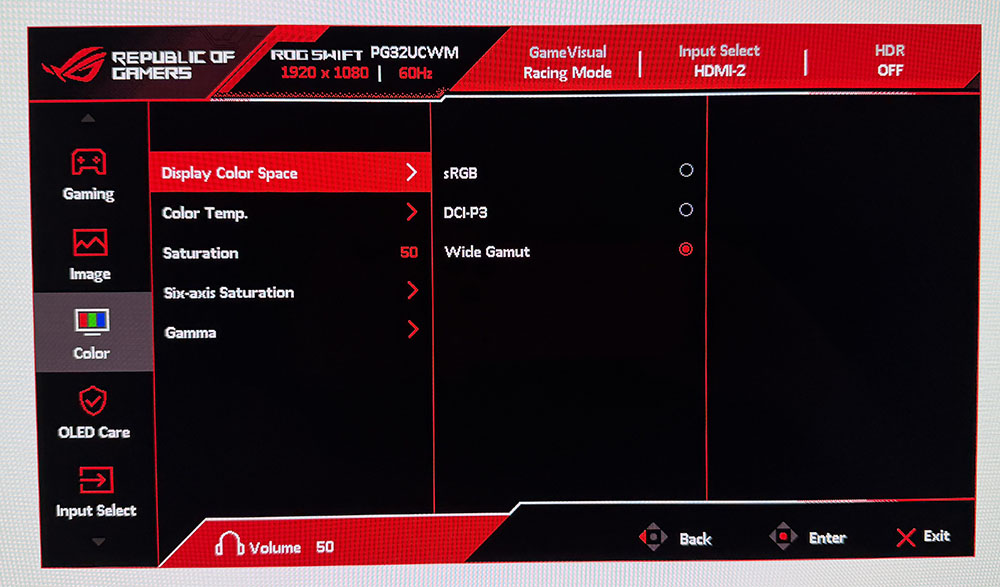
GameVisual has nine picture modes, of which Racing is the default and best choice. Like all Asus ROG monitors, there's an sRGB Cal mode which is accurate but also grays out the calibration controls. If you want sRGB, it's better to pick that option from Color Space in the Color menu. Then you can adjust grayscale and gamma if you wish.
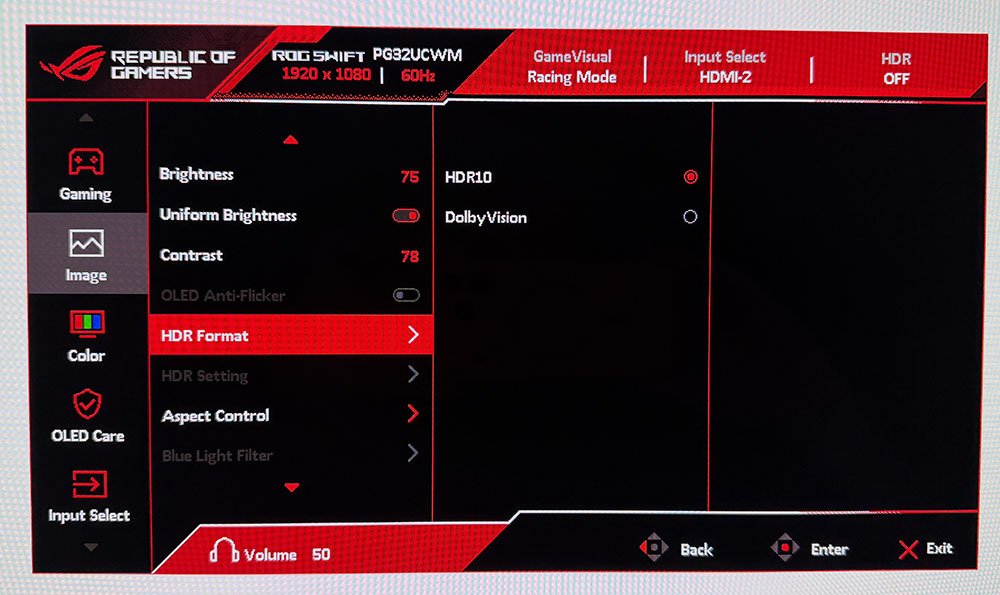
HDR is available in HDR10 and Dolby Vision formats. When the appropriate signal is present, you can pick between four different picture modes and turn on an adjustment toggle that enables the brightness and contrast sliders. Also included is Uniform Brightness for both SDR and HDR. If you turn this off, the peak output of small highlights can top 1,000 nits. I measured 532 nits from a 25% window pattern. This feature improves HDR impact and is handy for SDR gaming and video. Turn it on for productivity and static graphics where it will reduce eye fatigue during long work sessions.
The Color menu includes the aforementioned gamut options plus color temp and gamma presets. A set of RGB sliders can dial in grayscale to a very precise level. If you want to tweak color further, there are global and individual saturation controls.
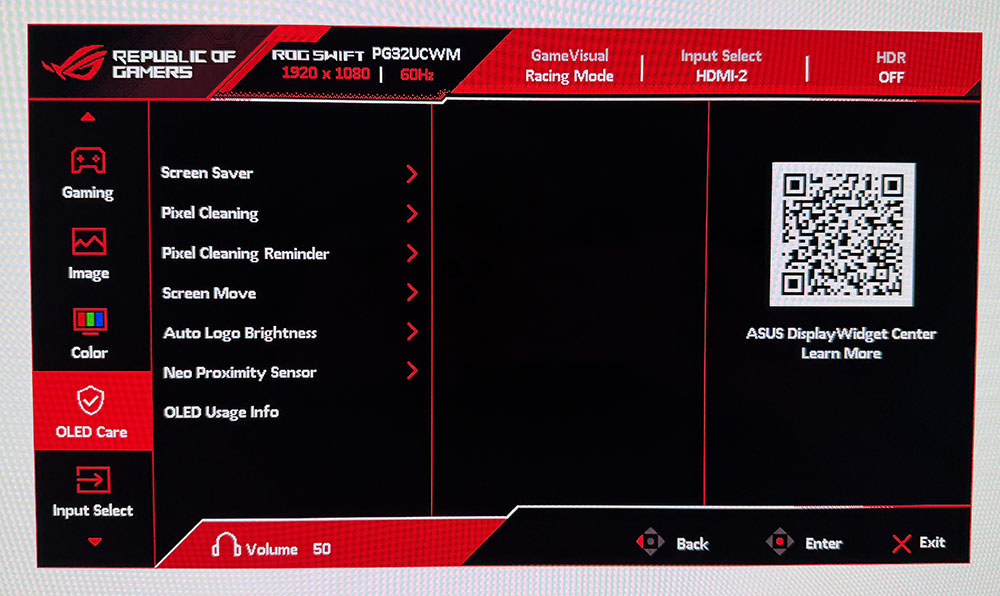
Asus takes OLED care very seriously with a host of options like pixel cleaning, screen saver, orbiter, and logo brightness. All of these can be toggled individually. When I first powered up my PG32UCWM sample, it recommended running the pixel clean straight away, so I did. This often improves screen uniformity for brand-new monitors, though I didn't see a difference in this case. You also get a proximity sensor that turns off the screen when you leave your desk.
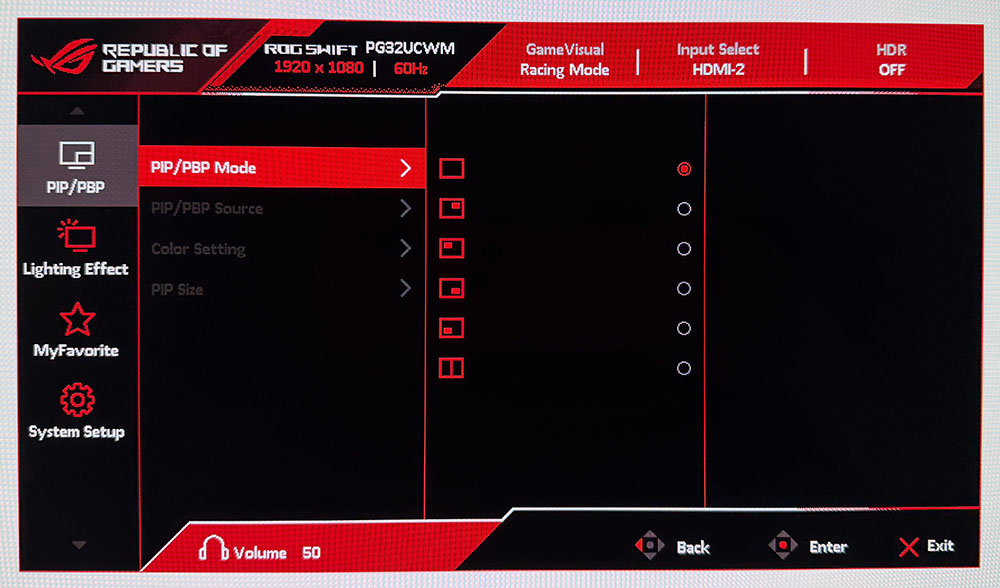
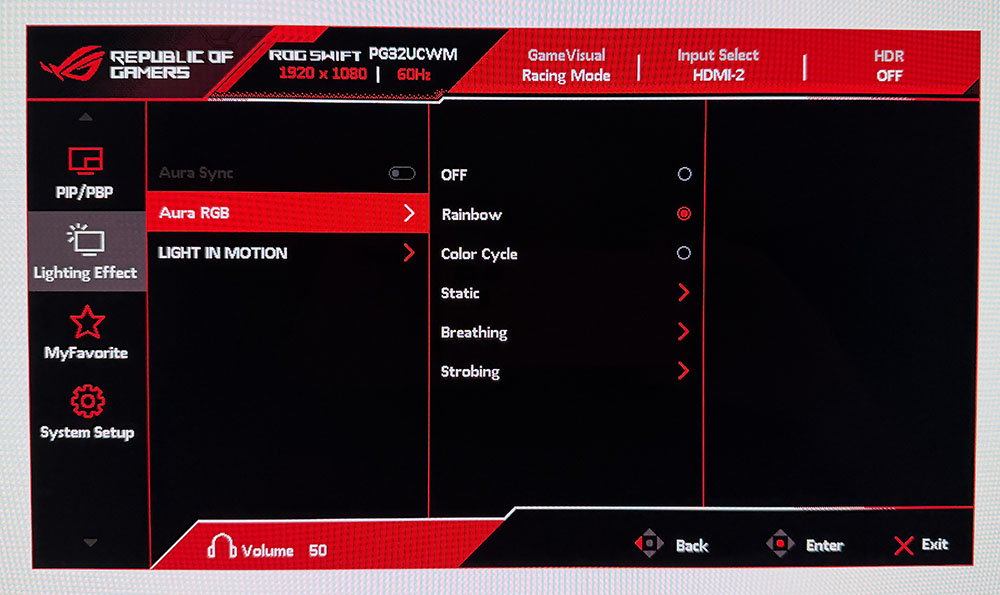
The PG32UCWM includes PIP and PBP options for viewing two video sources at once. You can have individual color settings for the two windows and position and size them how you like. The Lighting Effect menu controls the many effects possible with LEDs in the base and back of the monitor. With Aura Sync enabled through Asus' Display Widget Center app, you can coordinate the show with what's happening on screen.
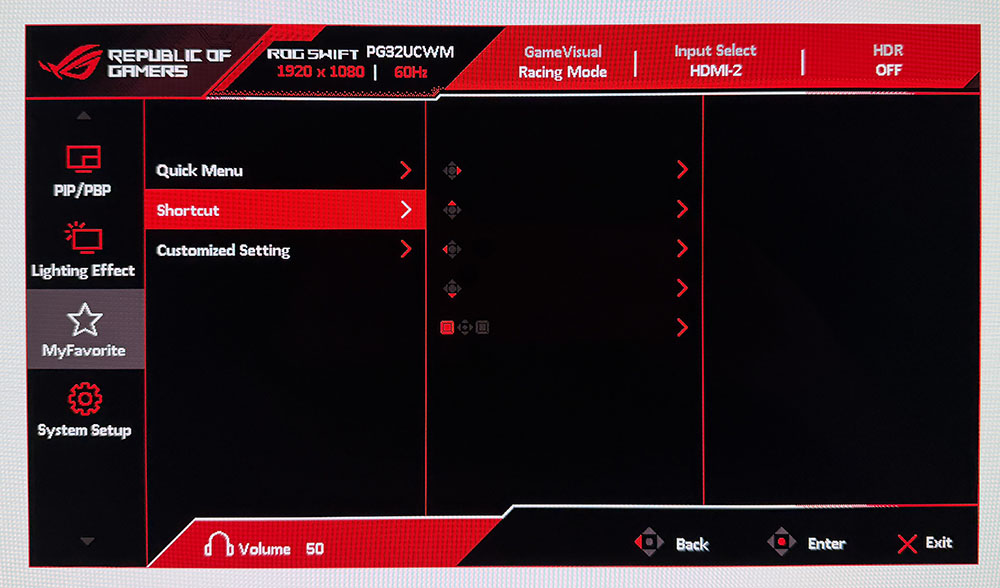
The quick menu has four user-programmable slots for one-click access to different functions. You can also program the four joystick directions and the left control button. There are two settings memories as well.
Asus ROG Swift PG32UCWM Calibration SettingsThe PG32UCWM doesn't need calibration in the Racing mode but I tweaked the RGB sliders for a nice gain, which took it into pro-monitor territory. Color is spot-on whether you choose wide gamut or sRGB. I found similar results in HDR mode when using either Gaming HDR or True Black modes, more about that on page five. Below are my suggested SDR settings including brightness values for Uniform Brightness on or off. You only need to set this value once for each mode, which is nice when switching back and forth.
Picture Mode | Racing |
Uniform Brightness | On / Off |
Brightness 200 nits | 69 / 55 |
Brightness 120 nits | 38 / 37 |
Brightness 100 nits | 30 / 29 |
Brightness 80 nits | 22 / 22 |
Brightness 50 nits | 10 / 10 (min. 25 /25 nits) |
Contrast | 78 |
Gamma | 2.2 |
Color Temp User | Red 100, Green 100, Blue 97 |
I've often said that it's nearly impossible to buy a bad OLED. All the displays I've reviewed over the past few years are super close in performance and image quality. That said, there have been several variations in technology that have subtle effects on the picture. Asus currently has the largest selection of different panel types covering Quantum Dot, Tandem, and RGB Stripe as the major categories. The PG32UCWM combines the latter two into a fourth variant, Tandem RGB Stripe. Looking at my sample, I could immediately see its sharper image. OLEDs are always razor-sharp, but this one is sharper, and I could see that in a side-by-side comparison with a typical Quantum Dot panel.
I could see it while gaming too. The detailed environments of Doom Eternal were even more textural and sharply resolved than usual. Little things like the reflections of light on a gun barrel, or the changing hues of the player's hand as I moved around had me almost entranced. I'll warn you now, if you audition a PG32UCWM, you will want to buy it. The sharpness and clarity of this monitor is addictive.
Video processing was exemplary, as it is with any Asus ROG Swift display. Movements and transitions happened with surgical precision as I ran through my usual sequence of run-and-gun maneuvers. Turn and shoot became second nature as I was able to stay apart from enemies and still put most of my ammo on target. Lobbing grenades became easier too. I love the sticky ones!
I always check out the HDR calibration screen in Doom's menu to look for the correct rendering of both highlight and shadow detail. Game HDR showed a little clipping of highlights, but shadow areas were perfect. True Black was the better mode, which showed everything clearly.
I also tried the dual mode switch. You don't want to do this in a game because it scrambles the image to where you can't see the menu. Always make the switch on the Windows desktop. The PG32UCWM lets you do this with a single button press. My GeForce RTX 4090 maintained 220-230fps at 4K and around 430fps in FHD. Though the image was softer, this monitor has smoother scaling than other dual-refresh screens I've reviewed. It is a good solution for those who can't run more than 200fps in 4K.
When the games were put away in favor of getting work done, the PG32UCWM continued to provide a picture that was hard to look away from. It is very colorful, though a few Quantum Dot displays will show you a tad more red and green. But the PG32UCWM covers 100% of DCI-P3 so it still overachieves for SDR in a good way. When editing graphics, I switched the Color Space option to sRGB and enjoyed similarly high accuracy.
The effect of Asus' True Black Glossy coating was also evident. Blacks seemed deeper because there was no reflected ambient light. The screen is shiny, but it rejects room light as if it were matte. This also makes color more vibrant. It was like having a light-blocking hood in place.
My user experience was completely positive. The PG32UCWM has a familiar and intuitive control and menu system. It's easy to create different settings memories and to set up the quick menus for easy access to things like picture modes and GamePlus options. I could plug input devices into the USB ports, which was handy. My only minor complaint was the lack of internal speakers. But playing with the extensive LED lighting was fun.
Takeaway: The PG32UCWM is a benchmark gaming display with a reference-quality image. It's incredibly sharp, and it looks great in brightly lit rooms thanks to its advanced screen coating and Tandem RGB Stripe technology. The refresh rate boost will be useful for those with less stout video cards, and its scaling down to FHD resolution is excellent. Paired with a well-endowed gaming PC, the PG32UCWM is about as good as it gets.
MORE: Best Gaming Monitors
MORE: How We Test PC Monitors
MORE: How to Buy a PC Monitor
To compare the PG32UCWM's performance, I've mined only 32-inch 240 Hz OLEDs from my test database. The more recent models are MSI's MPG 322UR X24 along with Asus' PG32UCDM3 and XG32UQWMS. Older screens include Dough's Spectrum Black 32 and HP's Omen 32 OLED.
Pixel Response and Input LagClick here to read up on our pixel response and input lag testing procedures.
 Tom's Hardware
 Tom's Hardware
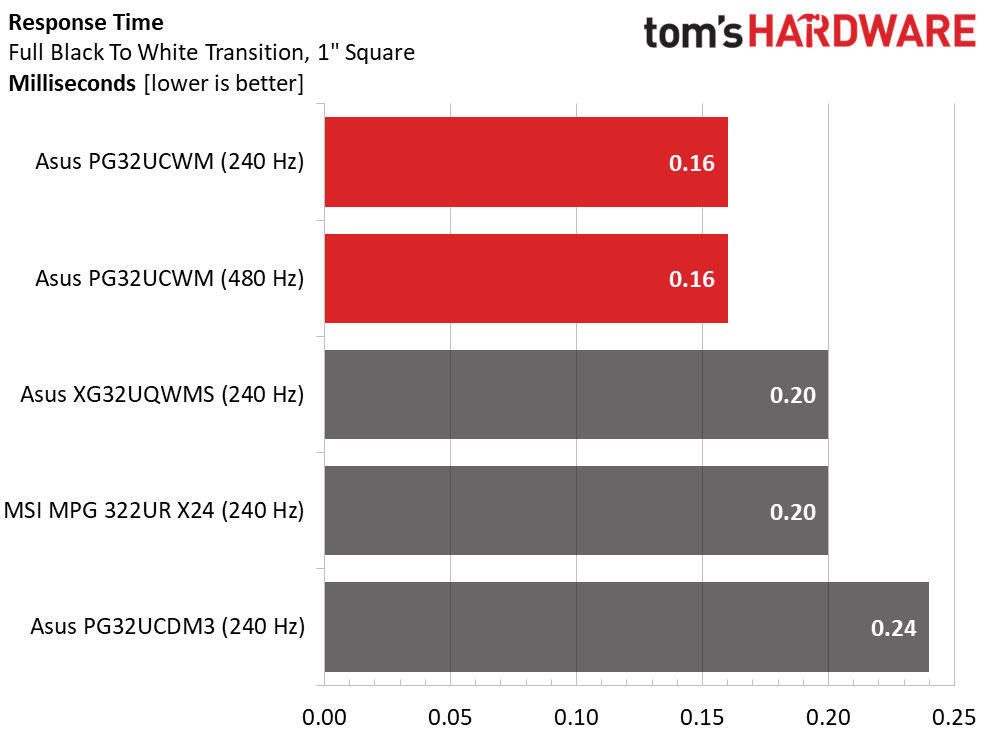
Since acquiring the Nvidia LDAT sensor, I've noted that OLED panel response times, black-to-white transition run in a super tight range from 0.12 to 0.24. The PG32UCWM manages this feat in 0.16 in both 240 and 480 Hz modes. Motion blur is non-existent when any of these screens run past 200fps.
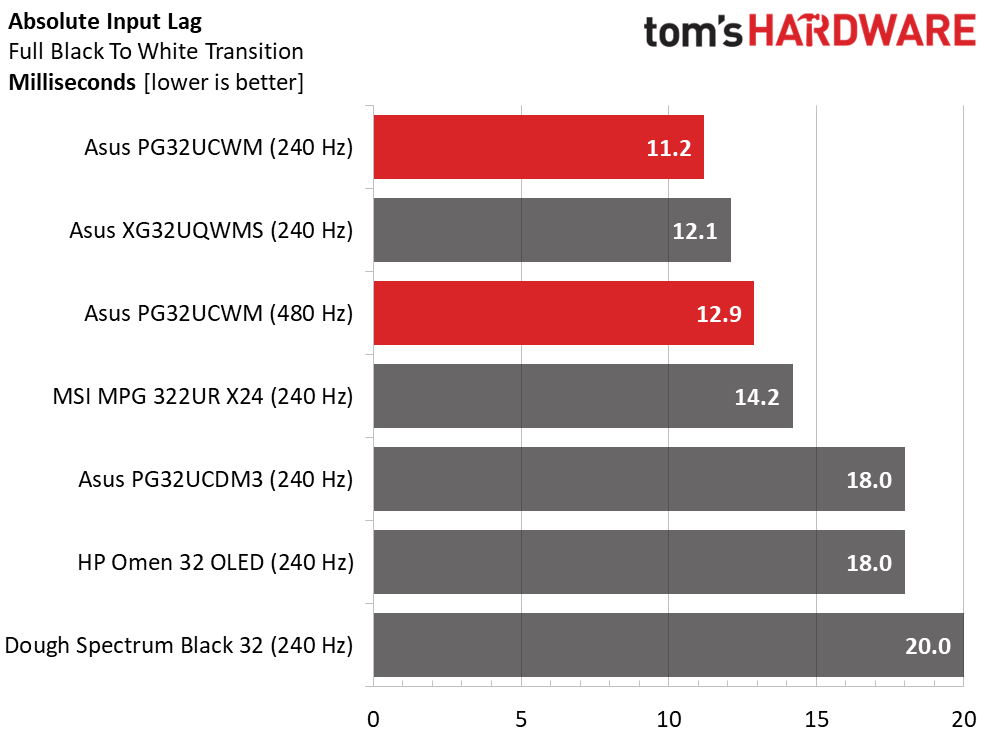
In the lag test, the PG32UCWM is the quickest of the 240 Hz screens at 11.2ms average lag over 25 mouse clicks. Only a couple of the 360 Hz panels I've tested are quicker, and only by 1.2ms, a microscopic amount. What's interesting is that 480 Hz is a tick slower at 12.9ms. This is still much lower than any human reaction time, so the difference is imperceptible. I'm confident that this is due to the processing lag involved in scaling the image down to Full HD from 4K.
Test Takeaway: The PG32UCWM is the quickest 32-inch 4K OLED you can buy at this time. Only a couple of 360 Hz QHD screens are a tad quicker, so if you have the video card necessary to run 4K over 200fps, this Asus is your best choice. There's no motion blur at that speed either. I noted that 480 Hz brought an increase in frame rate but not in motion resolution. And it did not reduce input lag.
Viewing Angles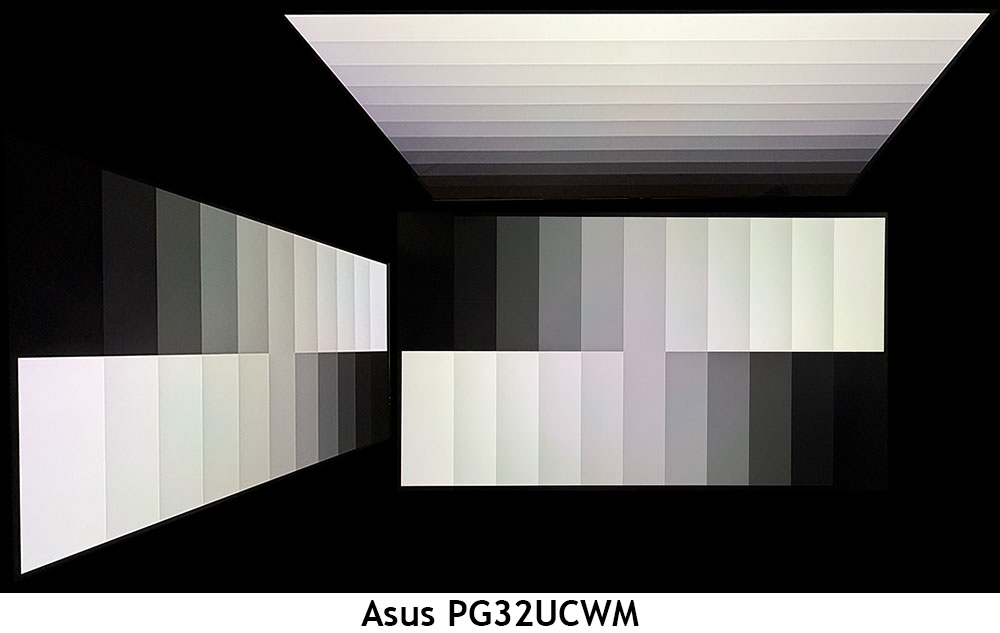
I've noticed slight differences in off-axis images from the different OLED variants I've reviewed. The PG32UCWM has two emissive layers, meaning that at any angle other than head-on, they are slightly out of phase with each other. This is the reason for the slight tints seen in a grayscale step pattern. In color patterns, or in actual content, you can't see this issue. In the side photo, there is no change to brightness or gamma, which is typical of OLED displays. The top view washes out a bit with reduced gamma.
Screen UniformityTo learn how we measure screen uniformity, click here.
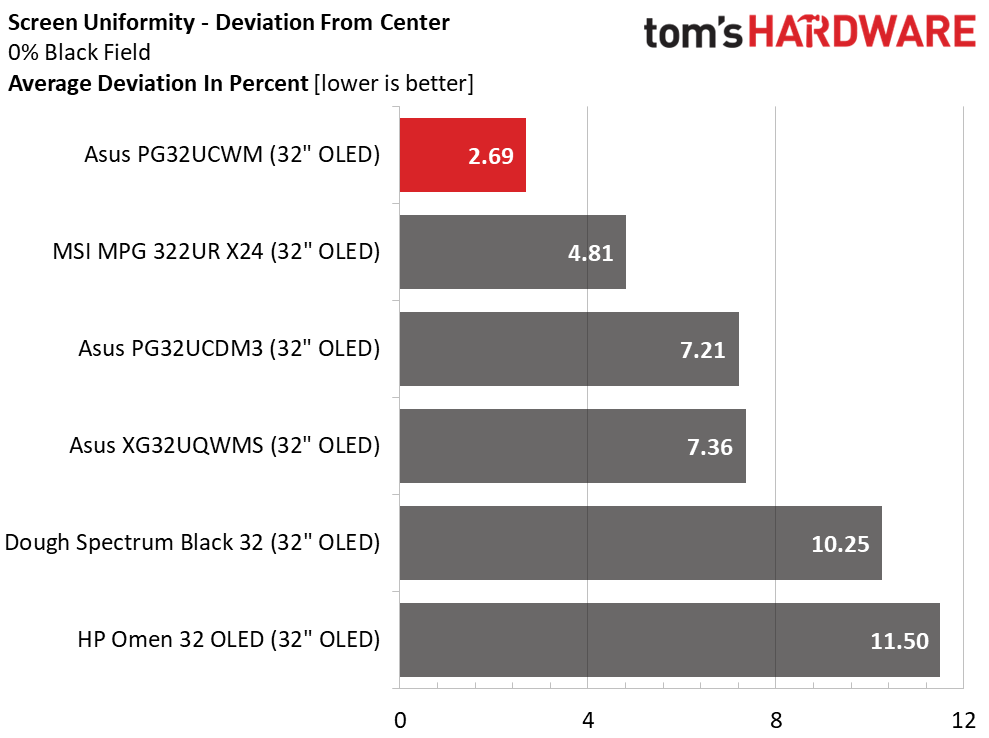
The PG32UCWM is the recipient of serious quality control as its low 2.69% uniformity score indicates. There is no hint of bleed or glow in any part of the image. It doesn't get much better than this.
MORE: Best Gaming Monitors
MORE: How We Test PC Monitors
MORE: How to Buy a PC Monitor
To read about our monitor tests in-depth, please check out Display Testing Explained: How We Test PC Monitors. We cover brightness and contrast testing on page two.
Uncalibrated - Maximum Backlight Level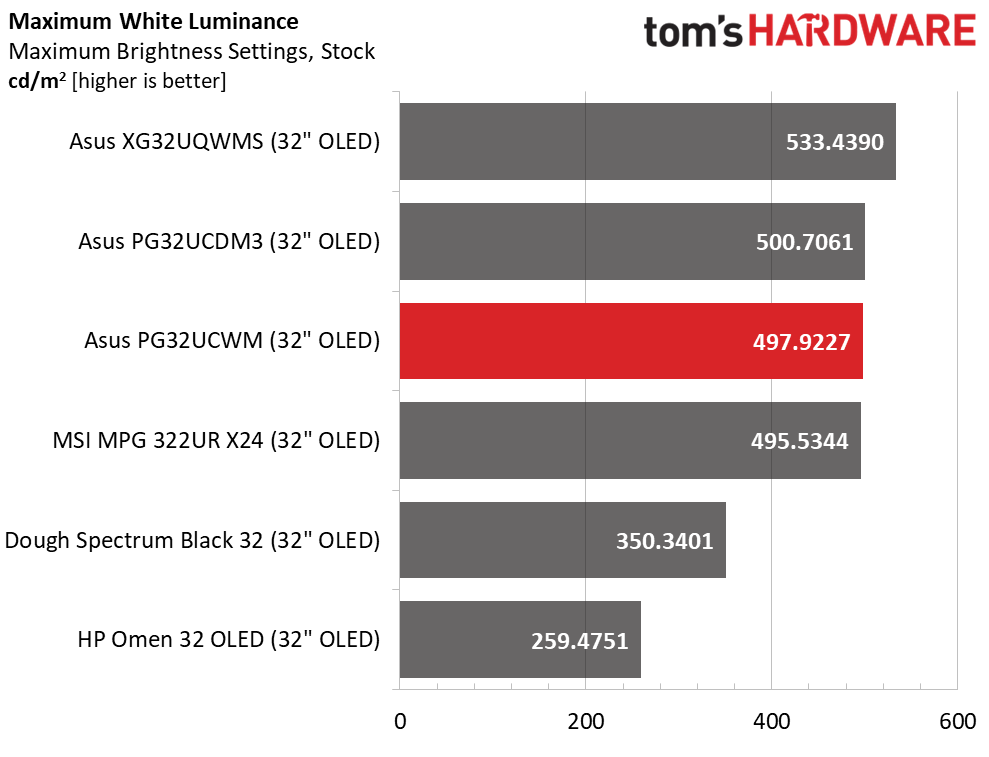 Tom's Hardware
 Tom's Hardware
 Tom's Hardware
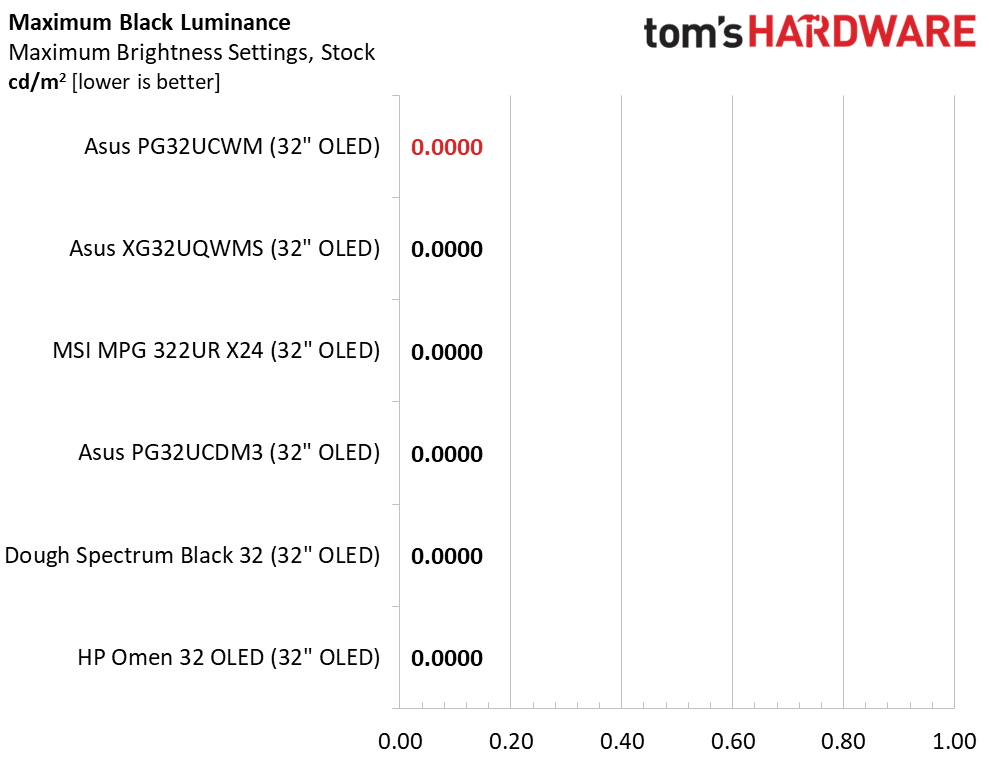
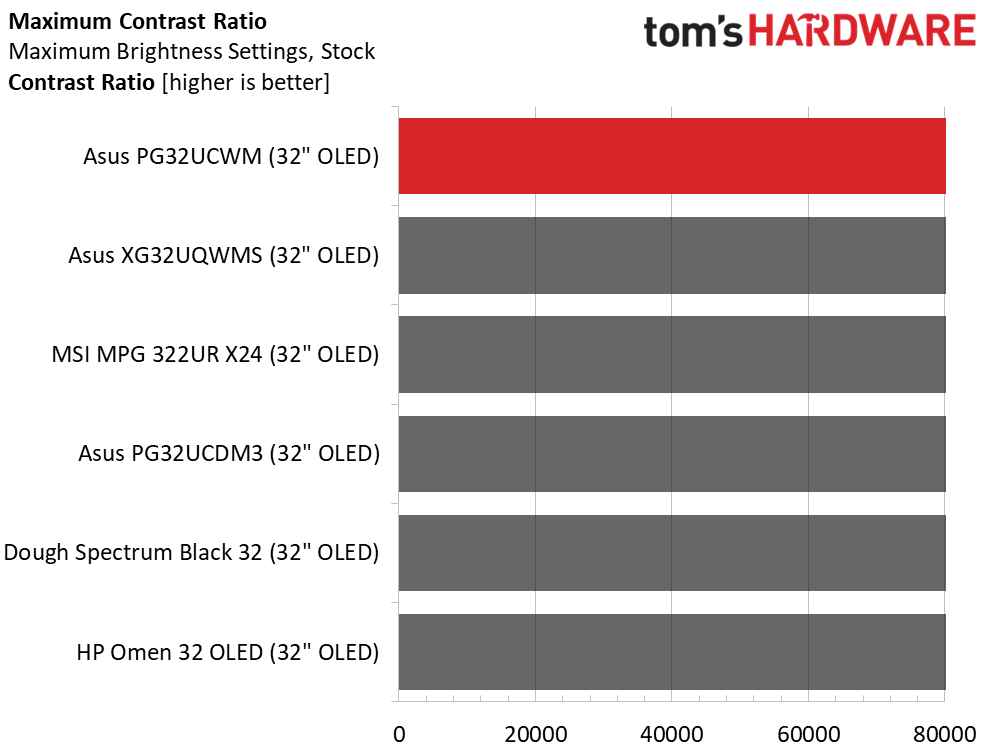
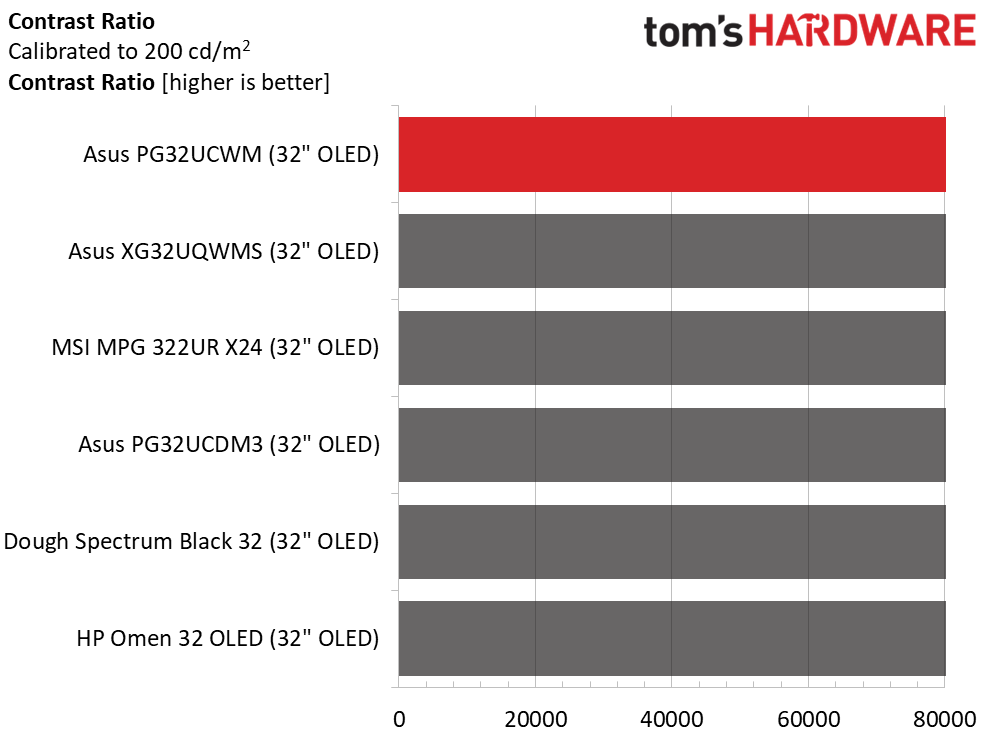
To find the PG32UCWM's maximum brightness value, I turned Uniform Brightness off and measured a 25% window pattern. It peaked just below 500 nits, which is typical for the category. The Dough and HP screens have only fixed brightness for SDR, so they measure the same for window or full white field patterns. The PG32UCWM's full-field value with Uniform Brightness on was 269 nits. Black levels and contrast could not be measured.
After Calibration to 200 nits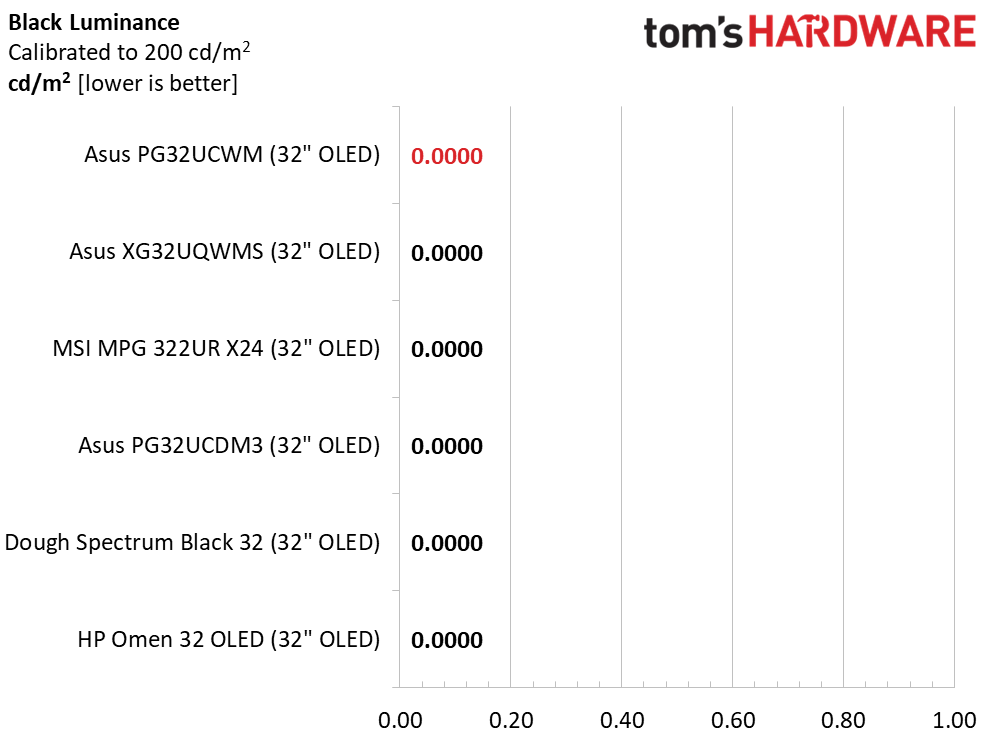 Tom's Hardware
 Tom's Hardware
 Tom's Hardware
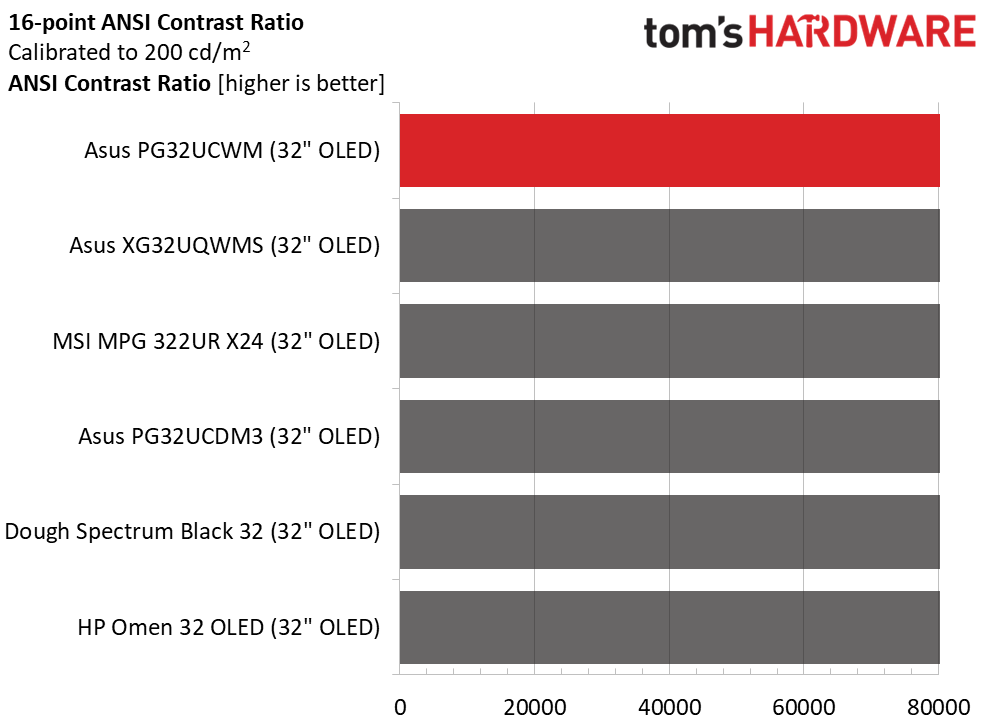
Calibration doesn't change anything but the peak white value. I recommend setting uniform brightness to 200 nits using a full field pattern and variable brightness to 200 nits using a 25% window pattern. This creates a visual balance between the two modes. Black levels, static contrast and ANSI intra-image contrast could not be measured.
Test Takeaway: The PG32UCWM offers the option of fixed or variable brightness which is something not all OLEDs offer. It's nice that the user can set individual brightness values for each mode just once. They are saved when switching back and forth which is another standout feature. The PG32UCWM can hit nearly 500 nits showing SDR content which makes it impactful for gaming and video content. Though contrast is theoretically infinite, the True Black Glossy screen coating makes this monitor's blacks perceptually deeper.
MORE: Best Gaming Monitors
MORE: How We Test PC Monitors
MORE: How to Buy a PC Monitor
The PG32UCWM offers accurate color out of the box and does not need to be calibrated. You can choose between DCI-P3 and sRGB gamuts and adjust grayscale tracking to a high standard.
Grayscale and Gamma TrackingOur grayscale and gamma tests use Calman calibration software from Portrait Displays. We describe our grayscale and gamma tests in detail here.
 Portrait Displays Calman
 Portrait Displays Calman
 Portrait Displays Calman
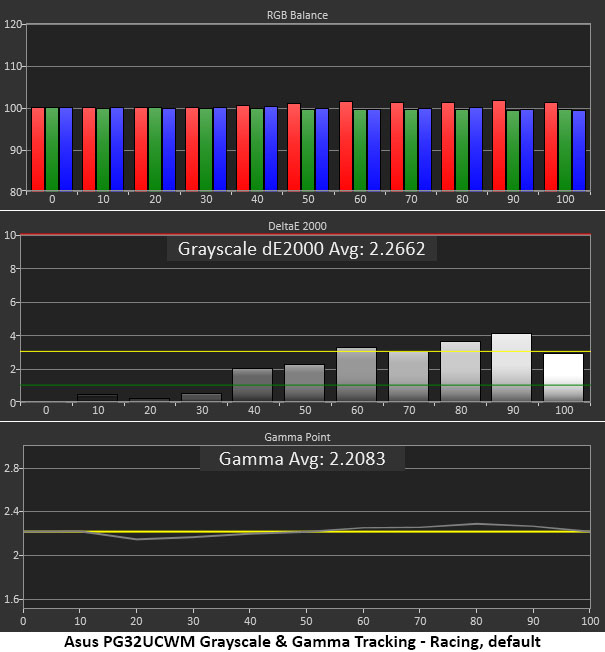
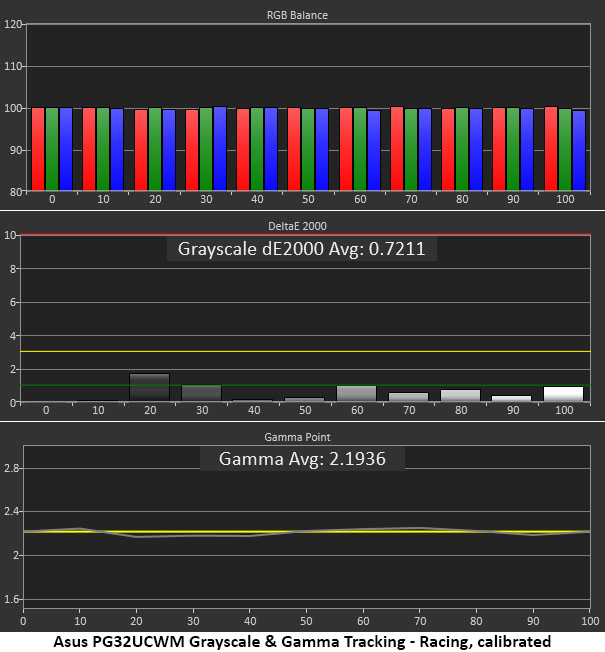
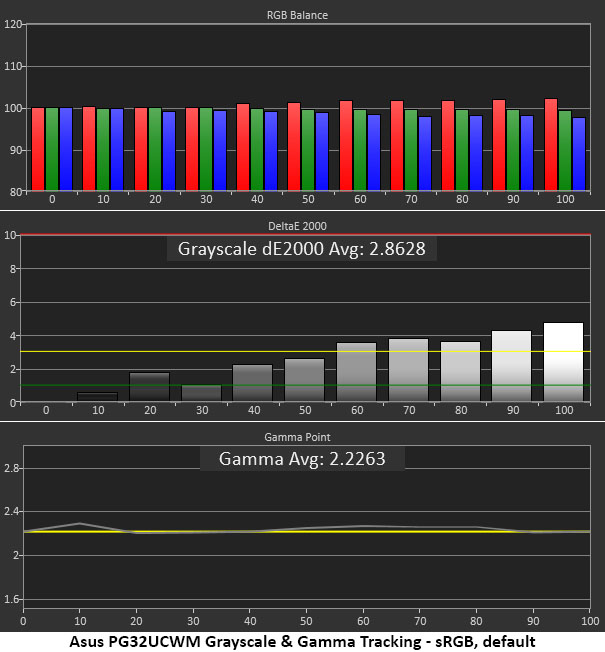
In the initial grayscale run, the PG32UCWM shows slight red errors in steps from 60 to 90% brightness. This error is barely visible, even in a test pattern. Gamma tracks very close to the 2.2 reference line. With calibration of the RGB sliders, all but one brightness step drops below 1dE. Gamma becomes a little tighter thanks to a change in the contrast slider.
For sRGB applications, I recommend using the sRGB gamut option rather than the sRGB Cal picture mode. Then, you can calibrate the grayscale if you wish. By default, it's a little warm in tone. Gamma is excellent with no visible errors.
Comparisons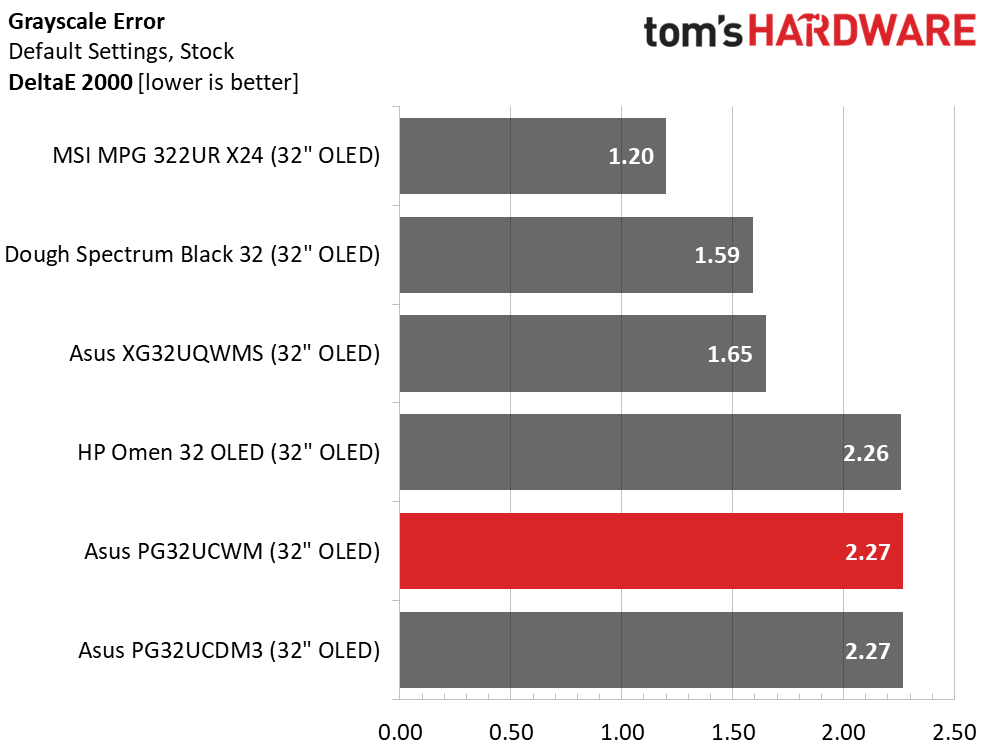 Tom's Hardware
 Tom's Hardware
 Tom's Hardware
 Tom's Hardware
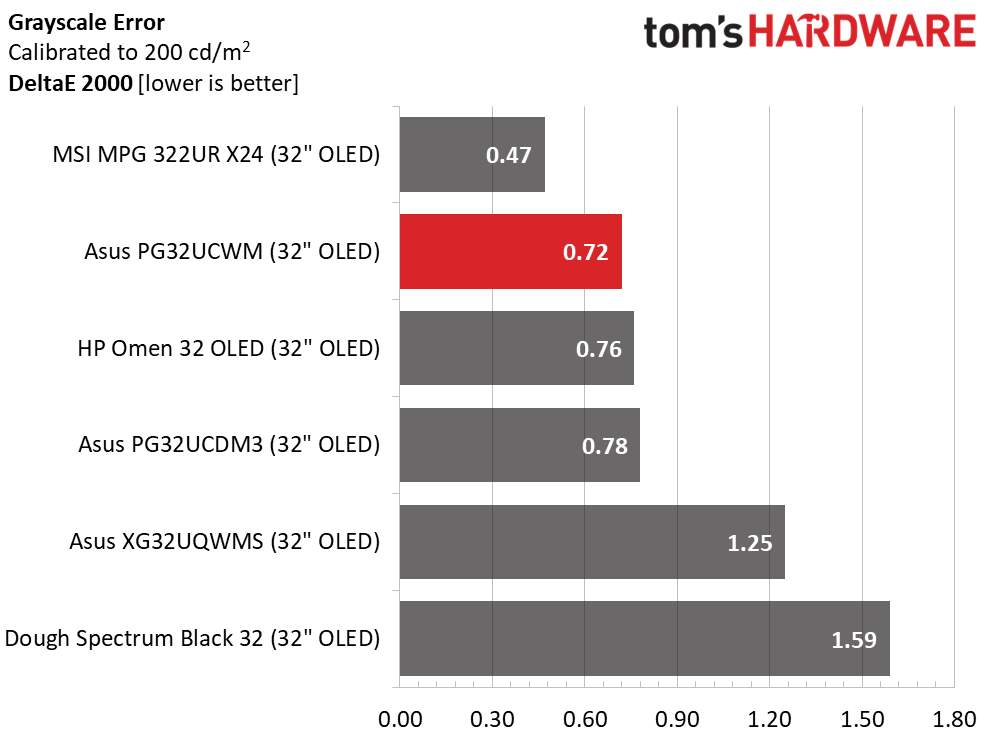
With a 2.27dE average value, the PG32UCWM has no visible grayscale issues. It can be used without calibration like all the screens here. One should expect this from a premium display. After changes to the RGB values (just blue actually), the error drops to 0.72dE, which is better than all but the MSI. Visually, there is no difference between any of the monitors.
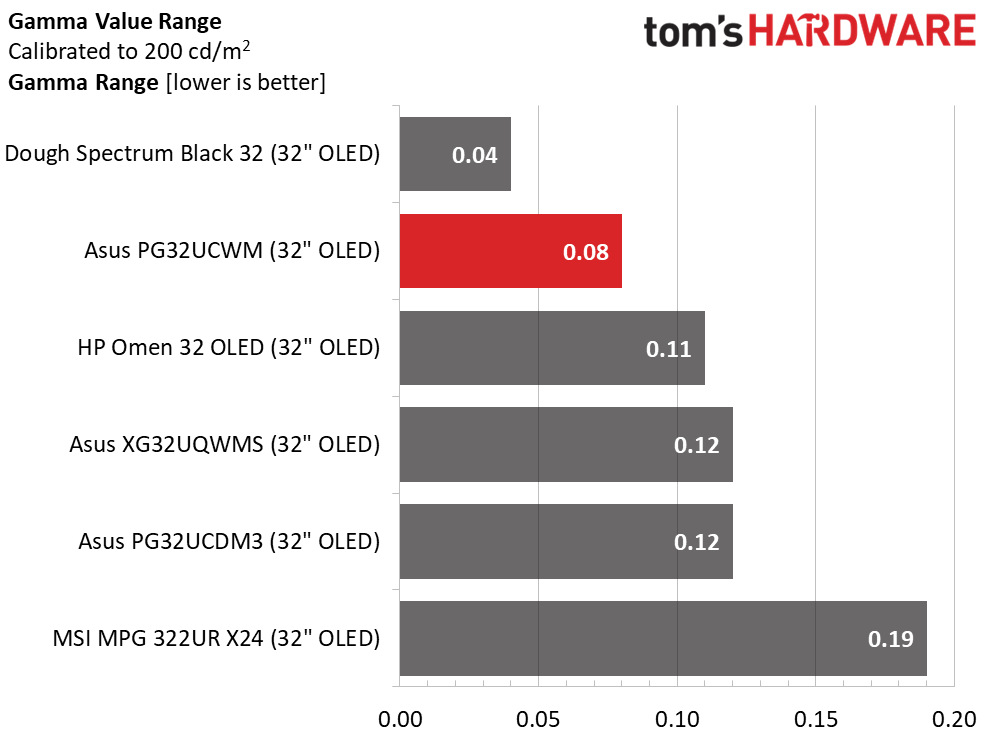
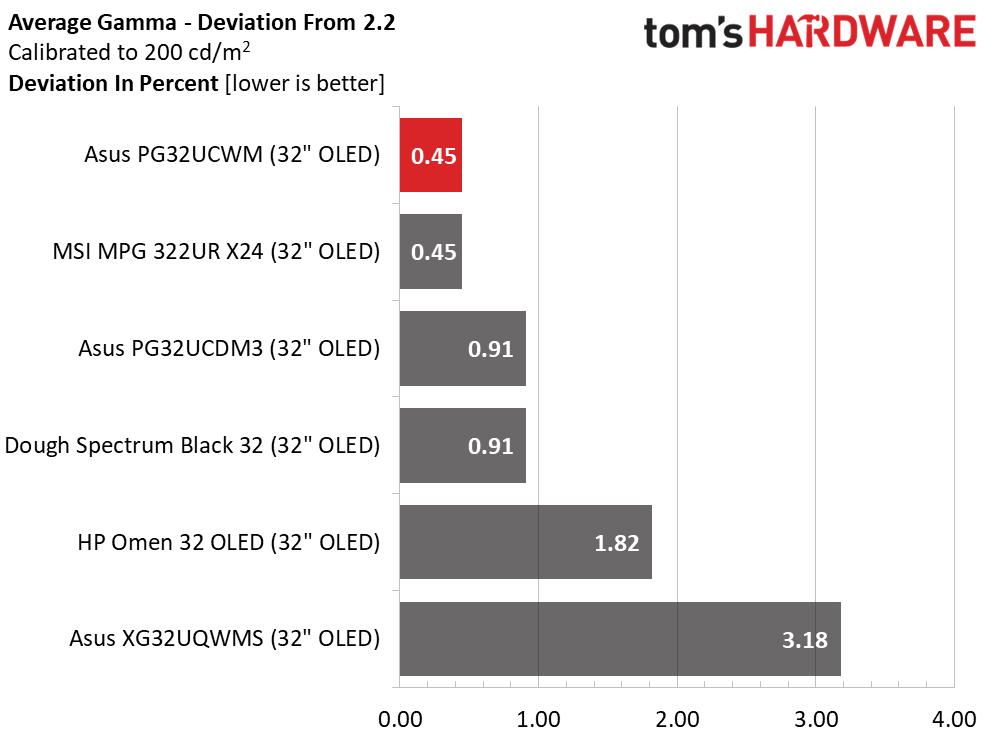
The PG32UCWM's gamma is very tight with a tiny 0.08 range of values and a 0.45% deviation from the 2.2. reference. The actual value is 2.19, which is nearly perfect and visually flawless.
Color Gamut AccuracyOur color gamut and volume testing use Portrait Displays' Calman software. For details on our color gamut testing and volume calculations, click here.
 Portrait Displays Calman
 Portrait Displays Calman
 Portrait Displays Calman
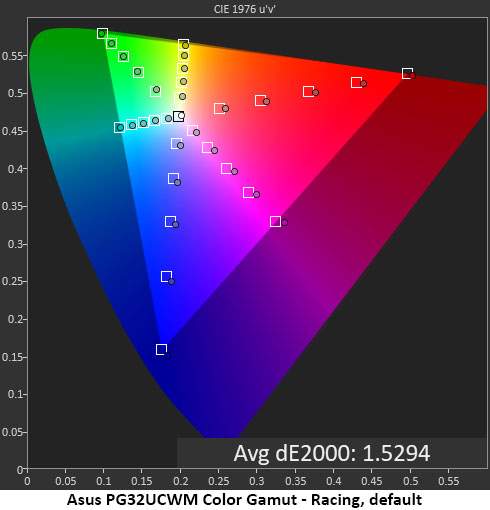
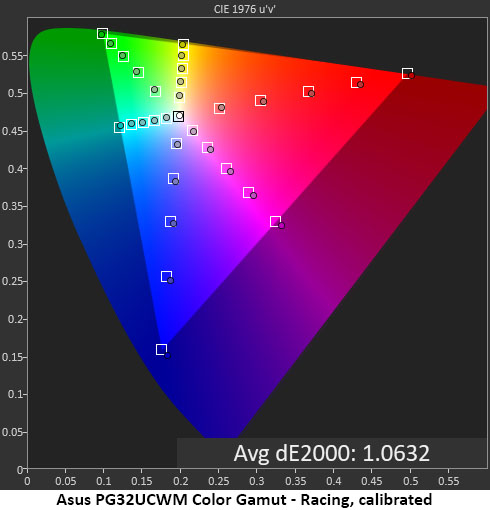
The PG32UCWM aces the default gamut test with a low value of 1.53dE, well below the visible threshold of 3dE. This is the average of 32 measurements. Though it covers right at 100% of DCI-P3, it is slightly oversaturated in the red, magenta, and blue areas of the triangle. Green is perfectly and fully rendered, putting the PG32UCWM ahead of any non-Quantum Dot screen. This is what Tandem OLED tech is supposed to do, and it is successful here. Calibration, shown in the second chart, tightens everything up even further, putting the monitor firmly in reference territory. This is excellent performance.
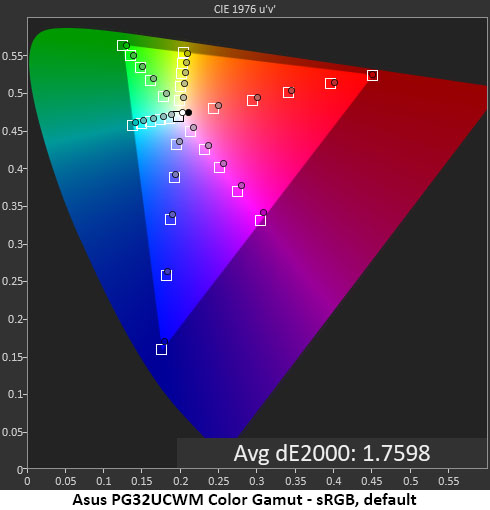
In the sRGB test, I'm showing a pre-calibration result so magenta is a tad off hue. The score is still quite low at 1.76dE so there's no cause for complaint. The PG32UCWM is fully qualified for color-critical applications.
Comparisons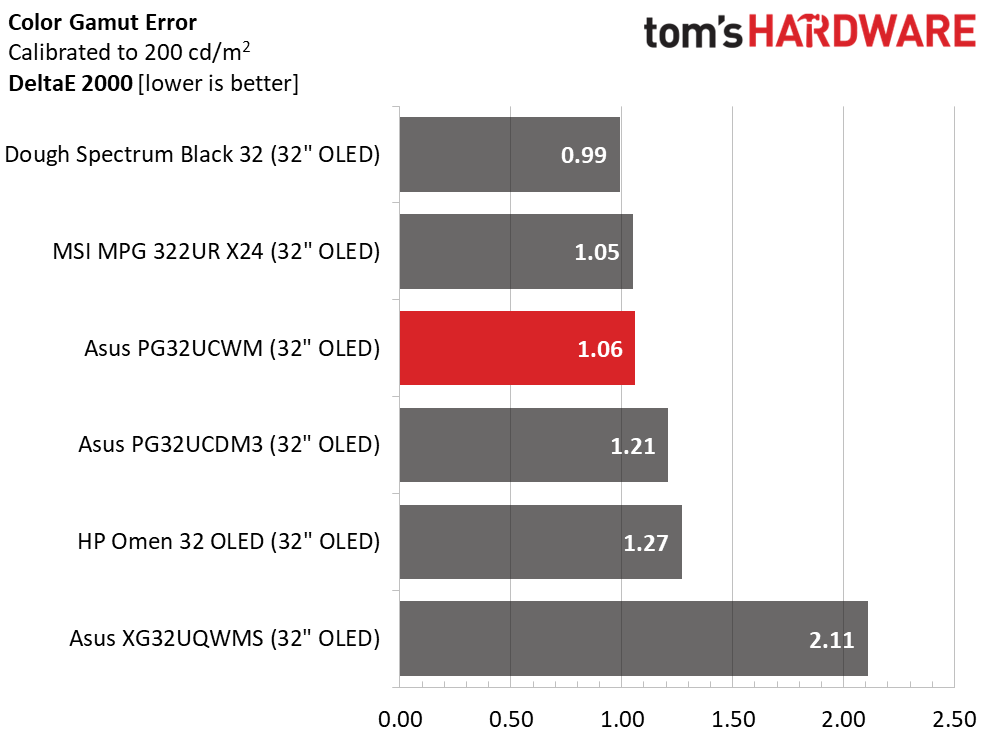 Tom's Hardware
 Tom's Hardware
As impressive as the PG32UCWM's color is, it isn't any better than the others save the XG32UQWMS. I am picking nits here since the naked eye cannot see these differences. But every hundredth of a point counts, and the PG32UCWM has fewer than most with a 1.06dE score. That's better than many pro monitors can boast, and it's only a tick behind the Dough and MSI displays. It doesn't really get better than this.
In the gamut volume test, the PG32UCWM is slightly behind the top four screens. But with almost exactly 100% coverage of DCI-P3, you'll see every shade and hue from the original content, and more if you run wide gamut mode for SDR. sRGB coverage is also nearly ideal at 96.66%. There is no cause for complaint here.
Test Takeaway: The PG32UCWM is very colorful and accurate with visual perfection out of the box and calibration to a high standard. It is fully qualified for critical applications in either DCI-P3 or sRGB modes. It has a little less color volume than some of the competition but more than the average non-Quantum Dot display. Gamma is tight and ruler straight in every case, which makes fine detail and texture more visible and impactful.
MORE: Best Gaming Monitors
MORE: How We Test PC Monitors
MORE: How to Buy a PC Monitor
Our HDR benchmarking uses Portrait Displays' Calman software. To learn about our HDR testing, see our breakdown of how we test PC monitors.
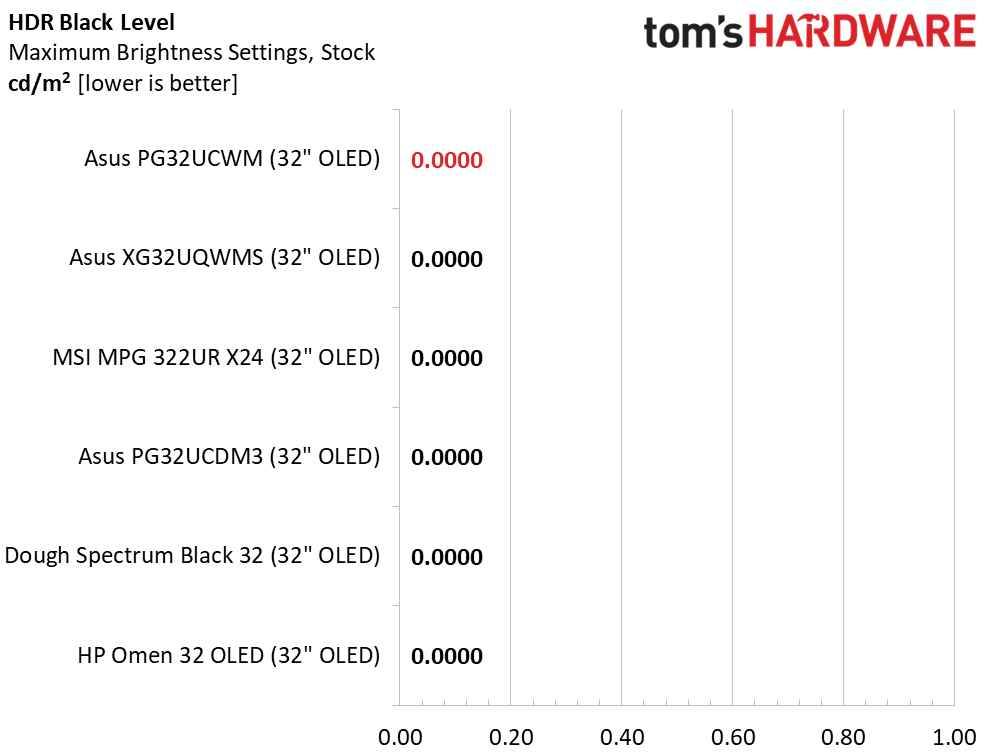
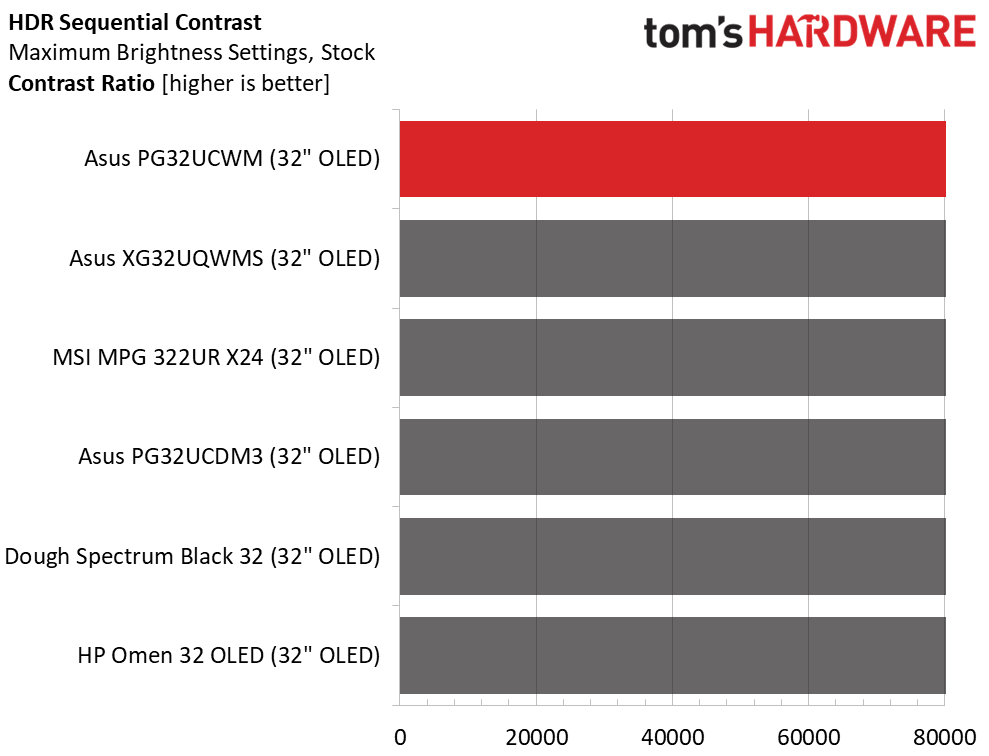
HDR is the PG32UCWM's forte with its bright highlights, deep blacks and vivid color. It supports HDR10 with four specific modes and offers adjustable brightness and contrast. It also plays Dolby Vision content which is a rarity in the computer monitor genre.
HDR Brightness and Contrast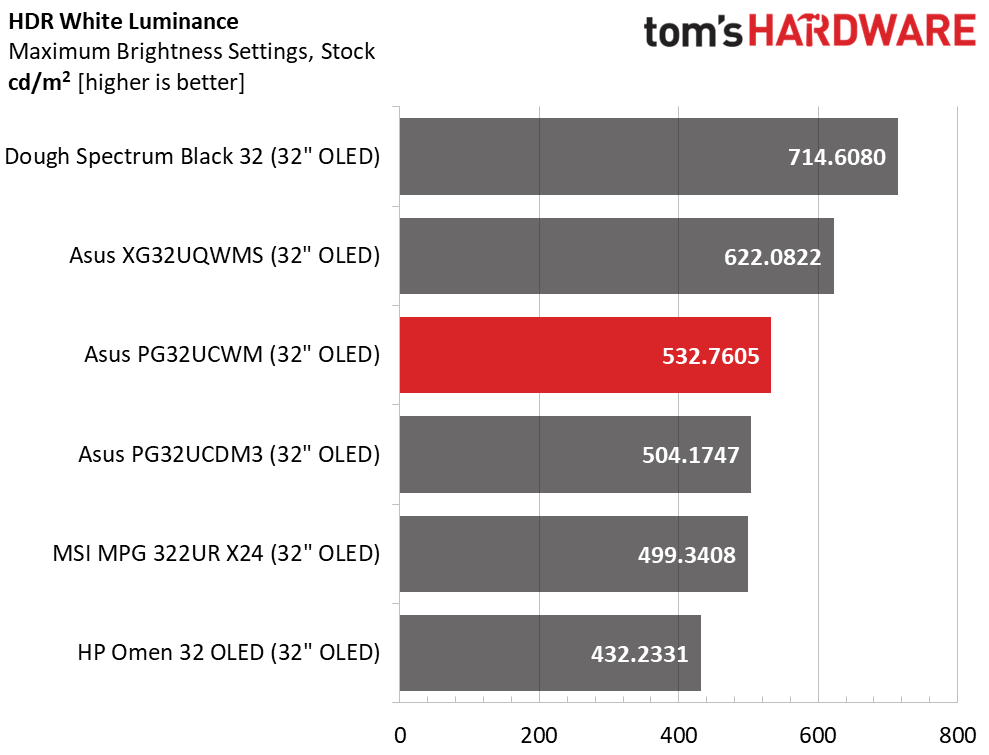 Tom's Hardware
 Tom's Hardware
 Tom's Hardware
All the screens offer variable brightness for HDR content, so their peak levels vary somewhat. The PG32UCWM is in the middle at a healthy 532 nits which is plenty of light from the 25% window pattern I measured. Asus' claim of 1,000 nits for a 3% window is completely valid. I measured this by engaging the Gaming HDR mode and turning on Adjustable HDR which upped the peak output a little. That changed the EOTF a little and I'll show you how below.
Grayscale, EOTF and Color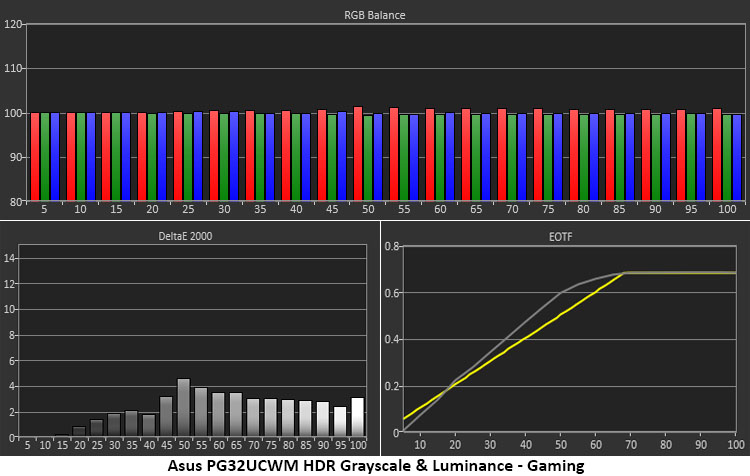 Portrait Displays Calman
 Portrait Displays Calman
 Portrait Displays Calman
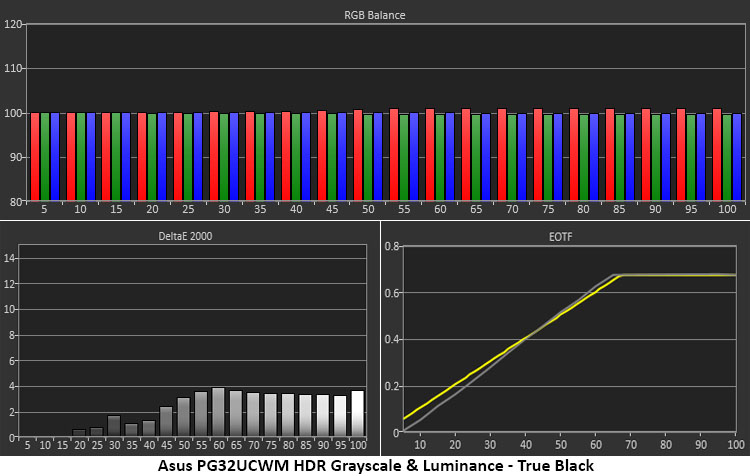
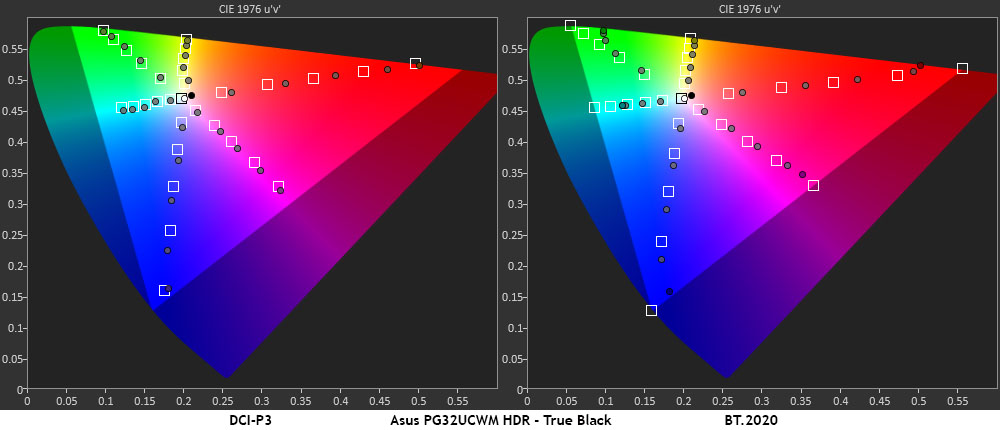
In the first two charts, you can see the difference between the Gaming and True Black HDR modes. They offer the same accurate grayscale tracking but vary in the EOTF luminance curve. True Black is closer to the reference with only tiny variations from black to white. Gaming offers a little more peak output, but it rises from black too quickly. This will make mid-tone regions a little less textural. These are subtle differences that will be perceived differently by different viewers. I would go for the True Black version, but the Gaming HDR picture will be a little blingier. It's like the brighter TV sells better" principle seen at big-box electronics stores. At least the PG32UCWM gives you a choice.
I measured color in both modes and got similar results. There is a slight and general oversaturation in the manner of nearly all the HDR OLEDs I've tested. This is typical performance. The picture is very impactful and colorful. In the BT.2020 test, the PG32UCWM runs out of color at 90% red, 75% green, and 95% blue. This is also typical of wide gamut screens with either Tandem or Quantum Dot enhancement.
Test Takeaway: The PG32UCWM delivers a superb HDR image with options to dial it into the user's liking. I recommend the True Black mode for its luminance accuracy, but some users may prefer the Gaming mode for its higher brightness. Either way, it's gorgeous to look at. Also of note is that the PG32UCWM is one of the rare computer monitors that supports Dolby Vision.
MORE: Best Gaming Monitors
MORE: How We Test PC Monitors
MORE: How to Buy a PC Monitor
There's always something special about flagship products. So, if a company makes a line of displays that are all flagship, are any of them special? In the case of Asus' ROG Swift PG32UCWM, I'm going to say yes. Thanks to Asus' willingness to seed its stable with multiple OLED panel technologies, we have a large array of choices, all of them good.
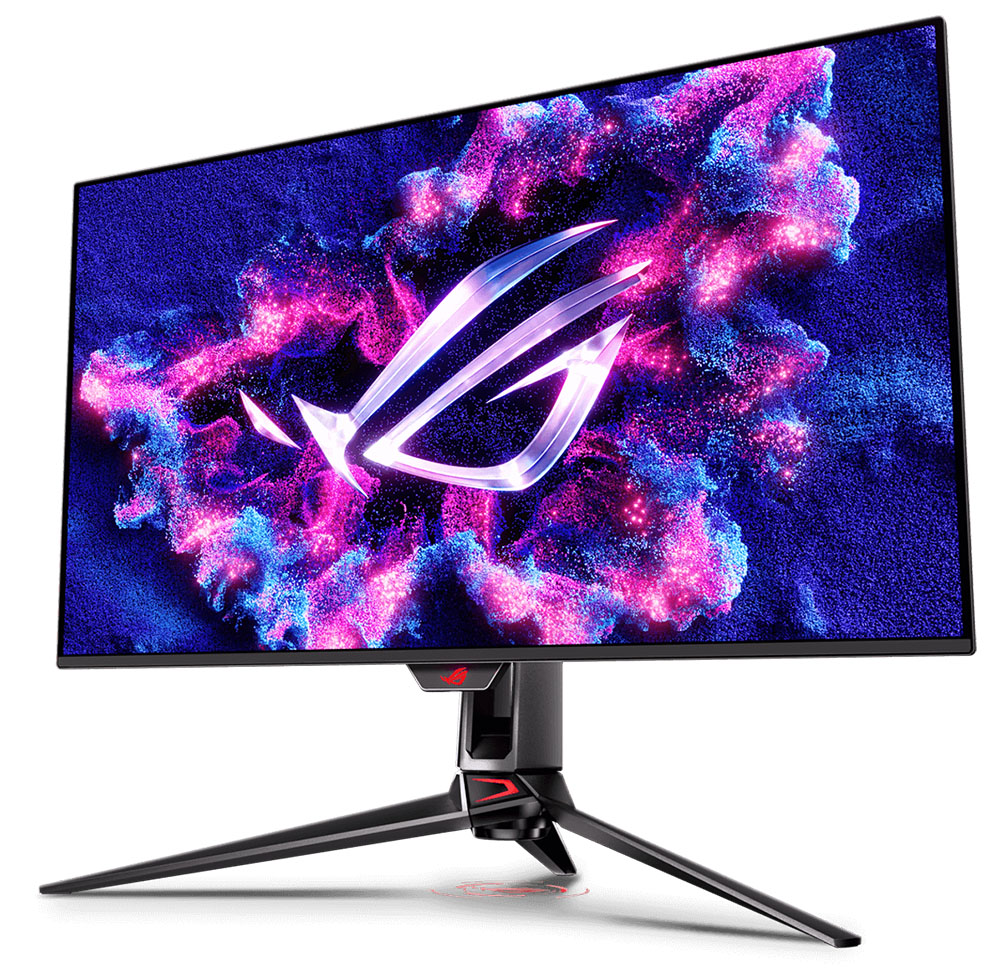
The PG32UCWM and its Tandem RGB Stripe panel stand out for being incredibly sharp. In other areas like color, video processing and build quality, it is the same as other Swift displays, but image clarity raises the bar. You can expect accurate color out of the box with reference-level performance after a few adjustments. Video processing is super smooth with perfect motion resolution and the lowest input lag in the category. There's flexibility in the frame rate boost feature that lets the PG32UCWM work with less powerful video cards. And its extra features like GamePlus and Aura RGB elevate it beyond most premium monitors.
(Image credit: Tom's Hardware)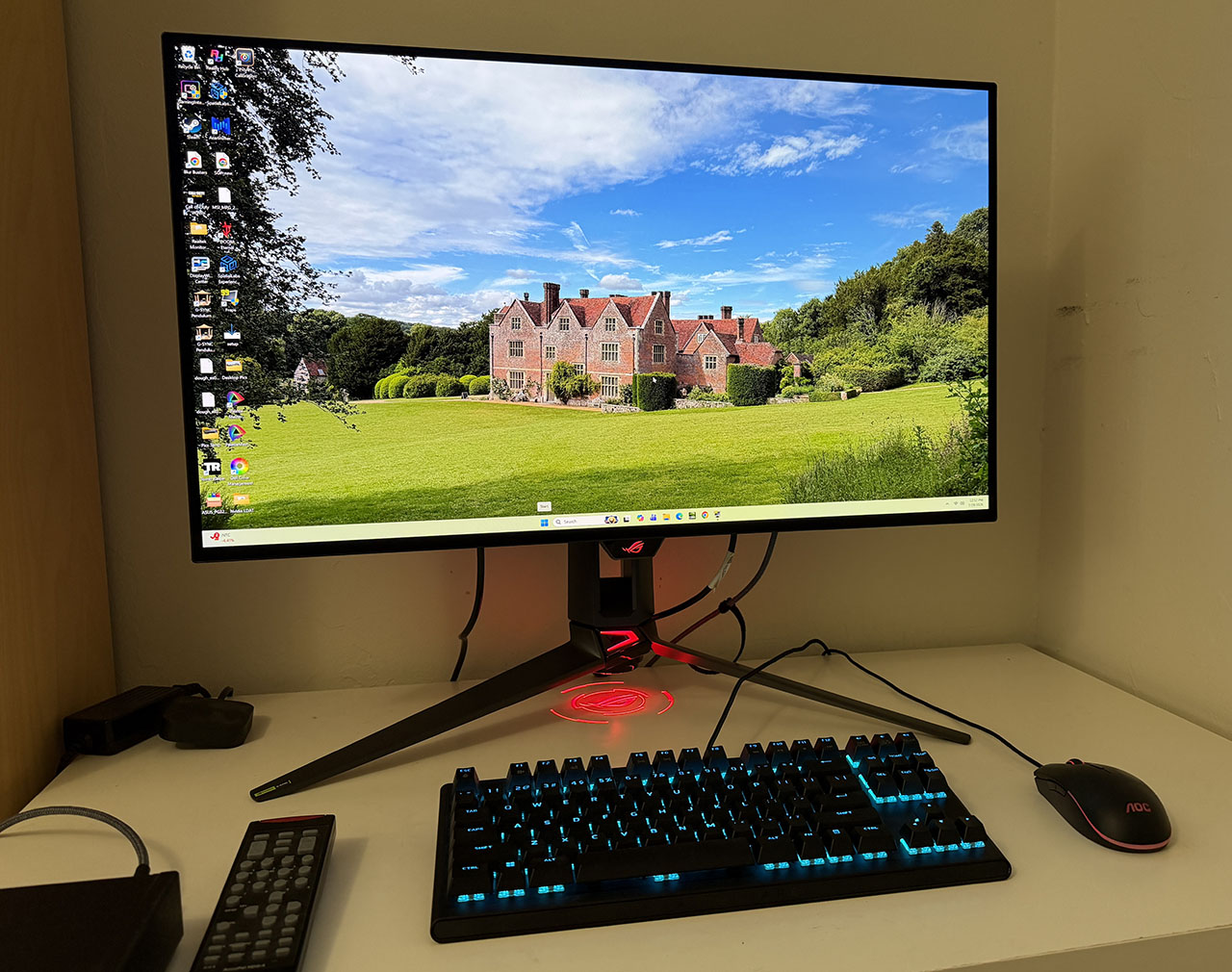
At $1,299, it is an investment, but consider that its performance and build quality mean you'll be using it for many years through multiple system upgrades. If you desire a flagship monitor and have the budget, the Asus ROG Swift PG32UCWM is well worth checking out.
MORE: Best Gaming Monitors
MORE: How We Test PC Monitors
MORE: How to Buy a PC Monitor