Adata Urban Tapsafe 2TB review: Solid-state storage you unlock with your phone
Perhaps as a result of AI hyperscaler demand soaking up all the cutting-edge flash, external storage makers in recent months have seemed to focus less on speed and more on adding unique and helpful features. We saw this with Sharge's Disk Pro and its built-in hub, Orico's Book Drive P10 Plus and its 100W passthrough charging and MagSafe-compatible back. Adata seems to be playing a similar game with its latest drive, the Urban Tapsafe.
The Urban Tapsafe external SSD is quite compact, about the size of a lighter at 2.70 x 1.42 x 0.76 inches, while making space for a built-in clip, NFC support for automatic locking and unlocking of your data with your phone (if you install the requisite app), and even magnetic swappable front plates. Under the hood, it's a fairly typical 20 Gbps drive with performance that's generally fine. But if you need something small and prefer a clip to a magnet for keeping the drive where you need it, it's worth considering. It also ships with a long five-year warranty, compared to the 2-3 years offered by many other drives in this class.
SpecificationsProduct | 1TB | 2TB | |
Pricing | $219 | $391 | |
Interface / Protocol | USB 3.2 Gen2 2x2 (20 Gbps) | USB 3.2 Gen2 2x2 (20 Gbps) | |
Sequential Read | Up to 1,900 MB/s | Up to 1,900 MB/s | |
Sequential Write | Up to 1,900 MB/s | Up to 1,900 MB/s | |
Dimensions | 2.70 x 1.42 x 0.76 inches / 68.68 x 36.18 x 19.18 mm | 2.70 x 1.42 x 0.76 inches / 68.68 x 36.18 x 19.18 mm | |
Weight | 72.61 grams | 72.61 grams | |
Warranty | 5 years | 5 years | |
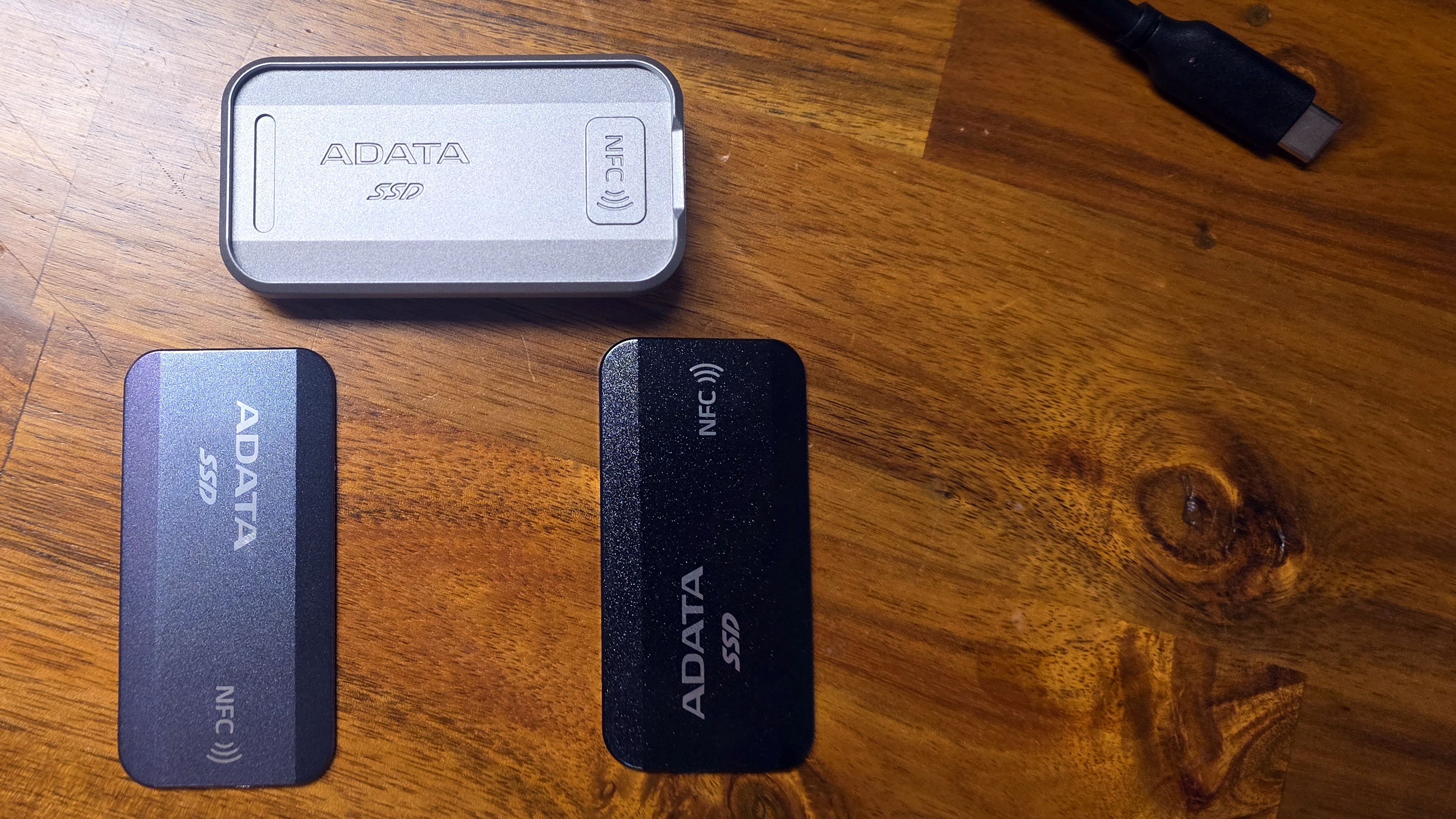
The Urban Tapsafe stands out in terms of design, in part due to its magnetic face plates that snap onto the frame. The company includes both a black plate and one with a color-shifting surface that looks silver, gray, or a light metallic purple, depending on lighting and the angle you look at it from.
And it's not just about the pretty faceplates. The silver metal chassis feels extremely solid and sports a clip with a strong grip, aided by ridged silicone pads on both sides of the opening. This makes the drive easy to clip onto a pocket, your bag, or video rigs. The limiting factor here is that the clip only opens about half an inch, so it won't clip on to anything bulky.
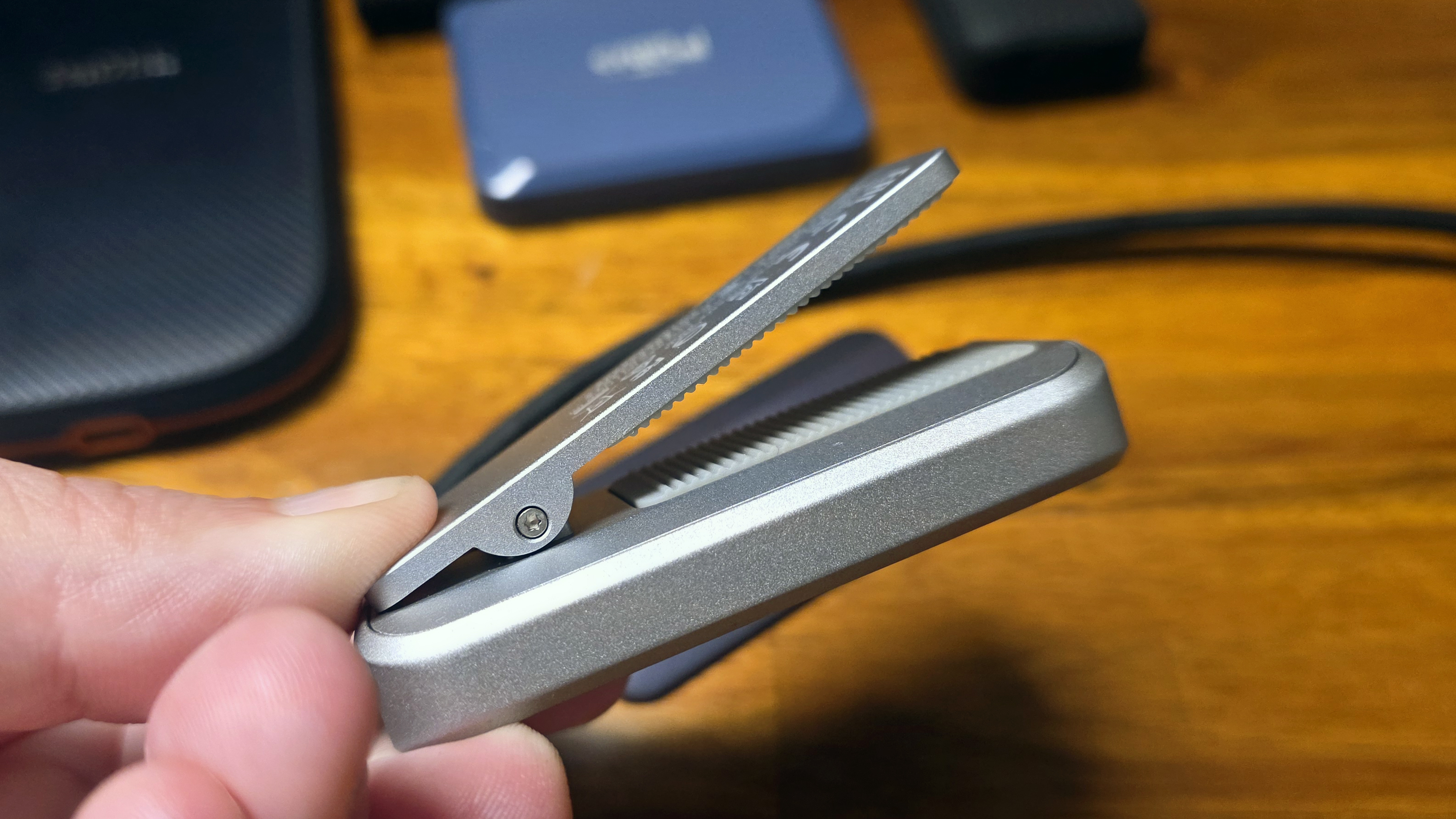
Despite its plethora of design flourishes and features, the Tapsafe is also pretty small, at 2.3 inches long and 0.72 inches thick. Its metal frame means it's not the lightest drive, at 2.56 ounces, but it's obviously not going to weigh you down.
Putting the tap in Tapsafe, with an appOf course, the Tapsafe drive's main selling point is the ability to unlock the drive via NFC. This is done via the Urban Tapsafe app, which Adata offers for both Android and iOS. And far from just having simple unlock capabilities, it also lets you give access to multiple users, as well as stipulate whether they are limited to read-only or read-and-write access. The app is fairly simple, but everything worked more or less as expected during my time testing the drive.
After installing and launching the app, you'll first need to use your fingerprint or whatever authentication you use to unlock your phone to get access. Once the app is unlocked, you'll need to hit Add Drive, then you'll be asked to name the drive and create and confirm a password. After hitting Submit, you're asked to make sure the drive is plugged in, then tap the back of your phone to the drive.
This didn't work the first time I tried it with the drive plugged into my Samsung S25 Ultra; I got an error saying the drive didn't have power. But when I plugged the drive into my PC and tapped with my phone, the drive registered, and I was able to use my phone to unlock the SSD. Once the drive and app were configured, I went back and tried unlocking the drive when it was plugged into my phone, and it worked as expected. My phone's USB port is a bit fiddly with power connections, so my initial unlocking issue was likely an a problem with my phone, not the drive.
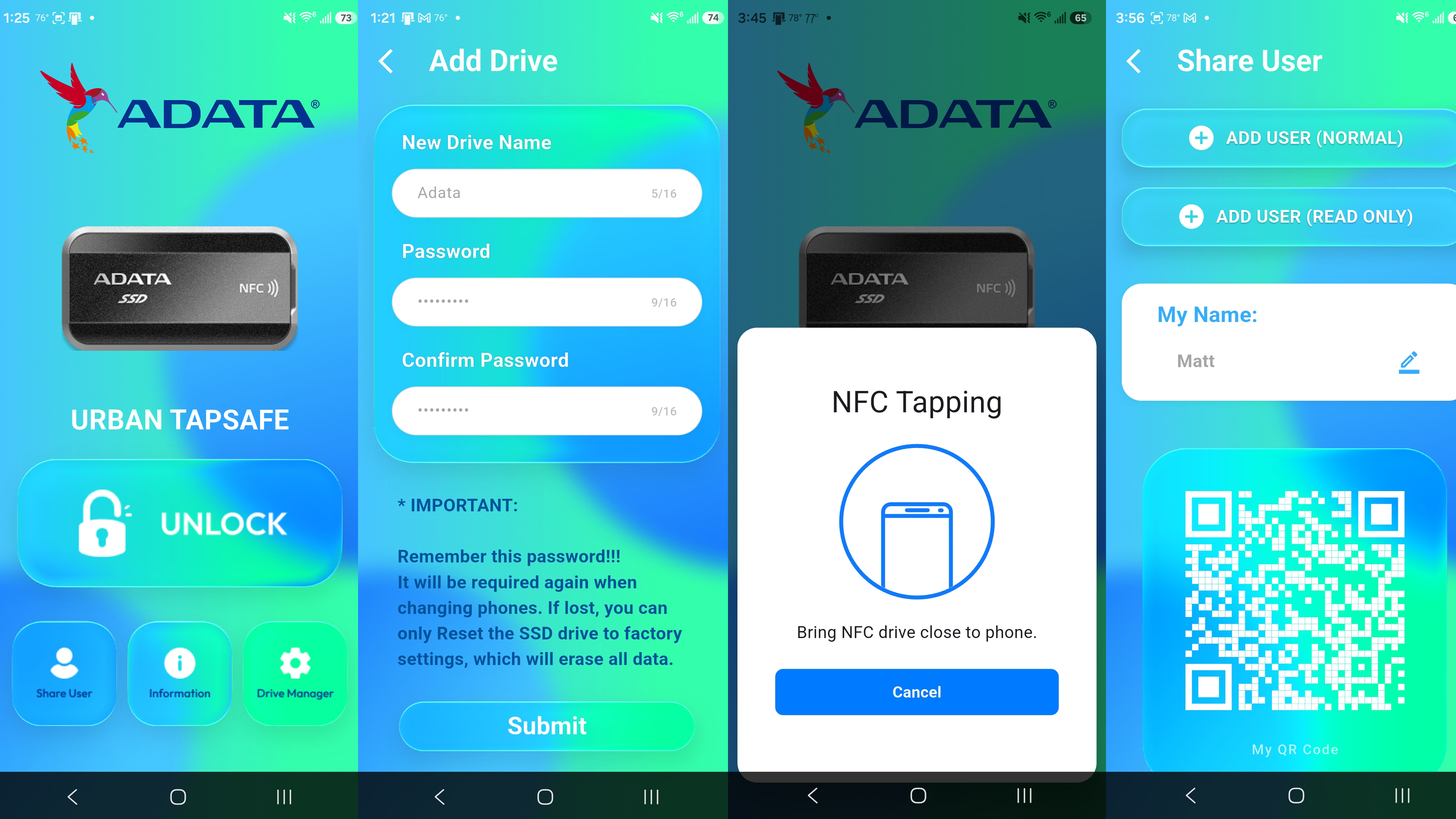
With the drive set up to use the app and password, it will lock whenever the drive is unplugged. Plug it back in, and the drive won't be recognized by your system. The small drive activity light will glow a steady red until you again open the app on your phone, tap Unlock, and move your phone to the drive. Then the drive should unlock, the activity light will turn blue, and, in Windows, the drive and its content will pop up in an Explorer window.
The app also lets you share access to the drive with up to nine other users, and stipulate whether they will have read and write access to the drive, or just read access. They'll also need to have the app installed, and physical access to the drive, then they scan the QR code supplied by your app to grant access. After this, tapping their phone to the SSD will grant the requisite drive access.
Note that the drive isn't being encrypted or decrypted during this process, and Adata makes no specific claims about hardware security. The drive simply will not function or be recognized over USB without using the app to unlock it (if the NFC/password function is enabled, of course). It's possible that if someone had access to the drive and was able to disassemble it, they could get access to the drive's data without app access or the password. So this drive isn't a good fit for situations that call for hardware encryption or high-level data security.
But for those who just want to keep their files private on a basic level, and / or want a drive that lets them selectively share access with other users, there's a lot to like here. The app is pretty well designed and easy to use. The only issue I had was that my phone would occasionally fail to unlock the drive on my first attempt. But once you get used to where your NFC chip is located on the back of your phone (it's in different places, depending on the make and model), the process quickly becomes easier and fairly intuitive.
Comparison products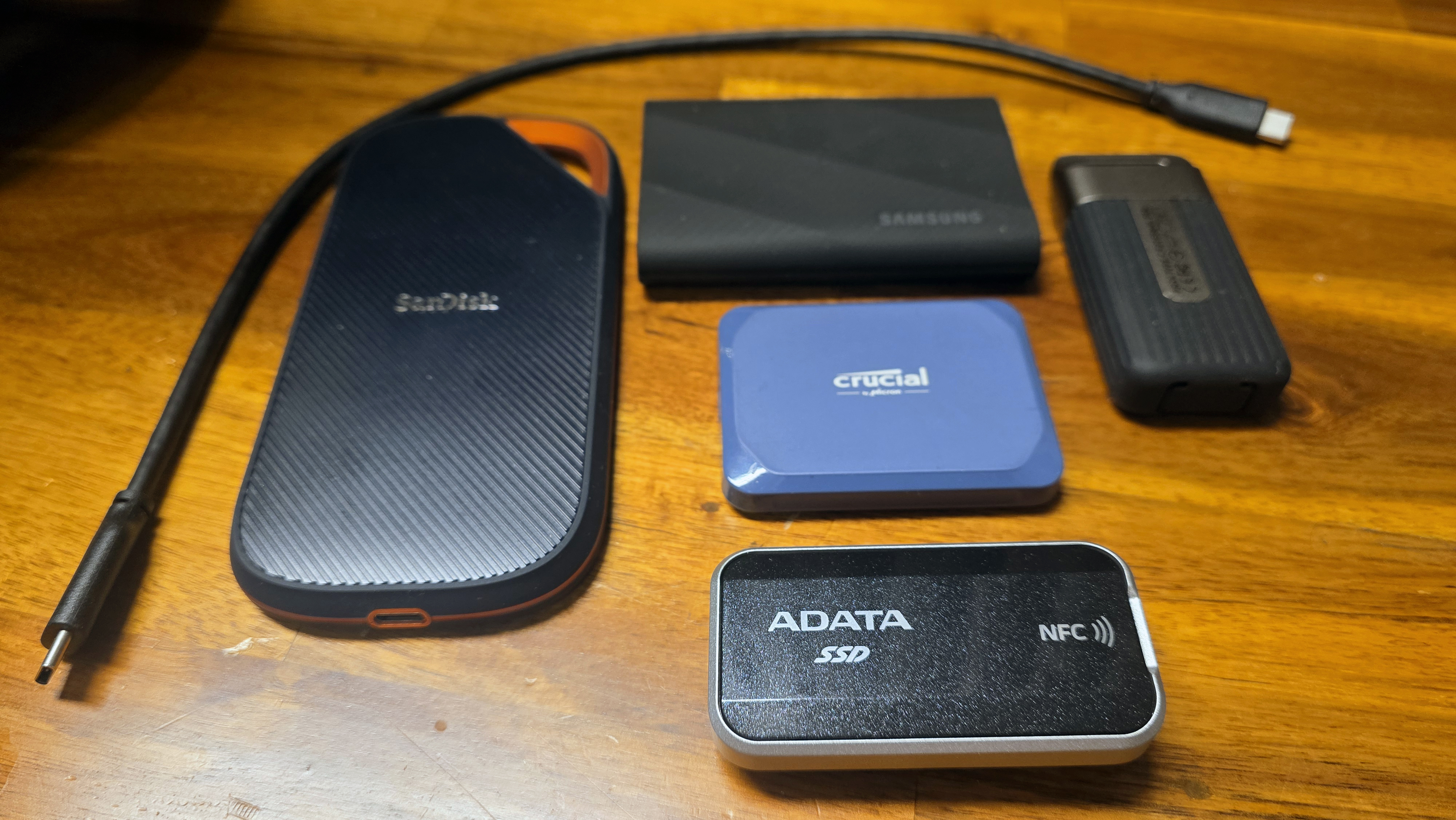
With AI demand gobbling up all the good flash and hiking prices on anything new at the same time, it's a tough climate for drives like the Urban Tapsafe. While the Tapsafe drive sells for slightly less directly from Adata, it's $228 for the 1TB model and $411 for the 2TB option we tested at Amazon, as of this writing. Meanwhile, one of the better 20 Gbps drives we've tested, Crucial's X10 (which launched last year, months before parent company Micron killed the consumer Crucial brand), is still available for $238 (1TB) and $368 (2TB). Even tougher if you mostly care about price in the same drive class, Team Group's also 20 GBps PD20 drive sells for just $235 for the 2TB model at Amazon - so you could get double the capacity with Team Group for $7 more.
To be fair to Adata, those two competitors don't have an NFC chip for access, or a clip for attaching it to other things. But as we'll see, at least one of the above drives performs better than the Tapsafe, too.
Storage Testbed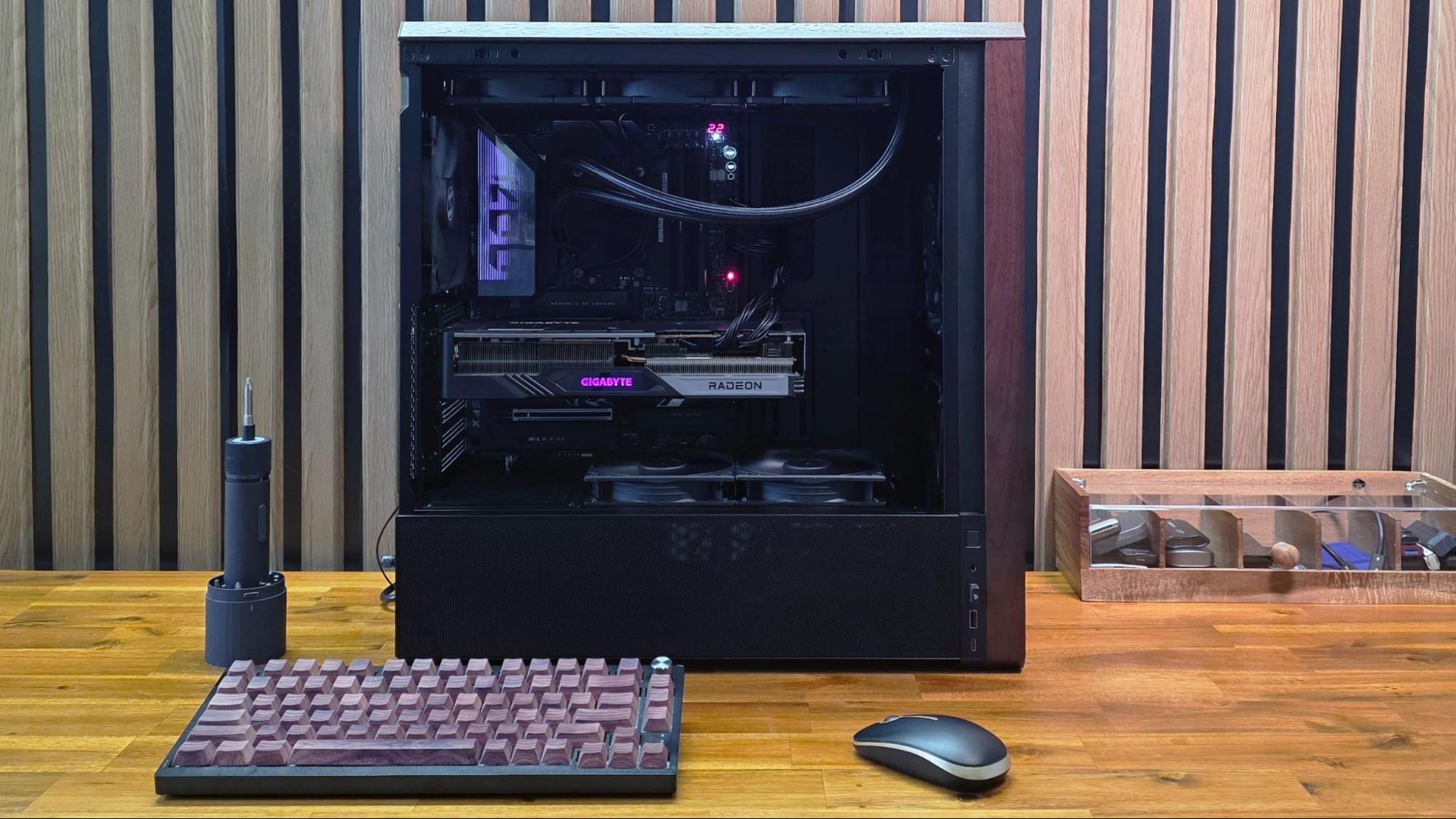
In 2025, we updated our external storage testbed to an AMD Ryzen 7600X-based PC with an Asus ROG Crosshair X870E Hero motherboard, installed in Lian Li's Lancool 217 case. This was done in part because we needed a system with native USB4 support for upcoming drives (like this one).
All the drives in the charts below have been re-tested on the new X870E system, with the exception of the final Iometer sustained sequential test. That benchmark is less about top speed and more about how long a drive can write before depleting any fast cache onboard. We also updated to CrystalDiskMark 8, rather than the older (and non-comparable) version 7 we used on the previous testbed.
A note on testing, before we jump into the benchmarks: Out of the box, our Adata Urban Tapsafe review unit was oddly inconsistent in benchmarks. Most of the time, its read speed topped out below 1,000 Mb/s, while its write speed was nearly double that. At first I thought there might be an issue with our storage testbed, or the cable. I tried changing both and sometimes the drive would read faster, closer to its expected performance. Then it wouldn't, even when plugged into the same machine with the same cable.
After lots of on-and-off testing, getting inconsistent results that usually didn't match Adata's listed read specs by a long shot, I eventually performed a secure erase on the drive via DiskPart, formatted it, and tried again. Surprisingly, that sorted out the issue, and the drive was finally consistent in both its read and write speeds, matching the drive's sequential ratings. Our testing below reflects the drive's capabilities after that secure erase and reformatting cycle.
Trace Testing - PCMark 10 Storage BenchmarkPCMark 10 is a trace-based benchmark that uses a wide-ranging set of real-world traces from popular applications and everyday tasks to measure the performance of storage devices.
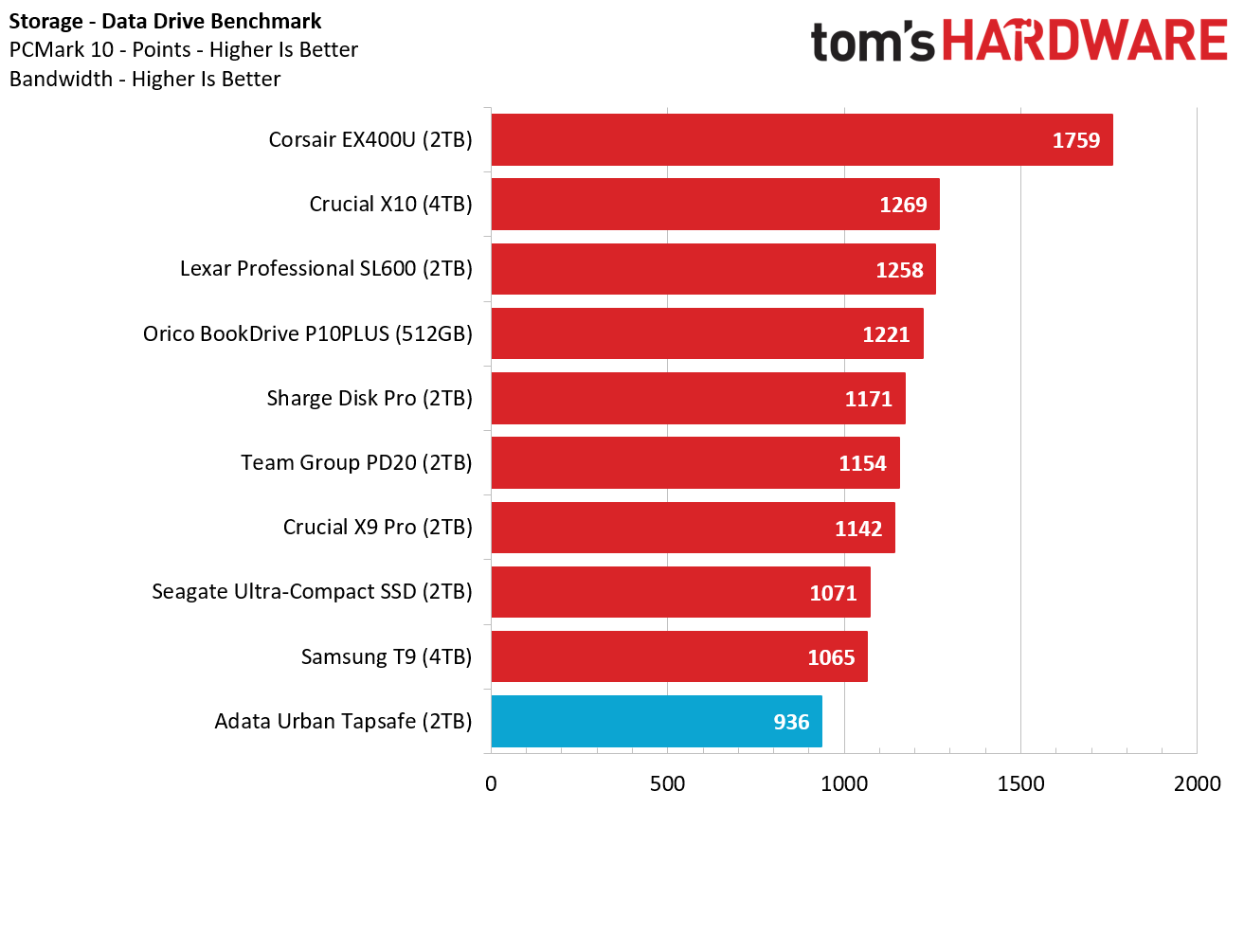
The Adata drive doesn't start out our benchmark run looking its best - in fact, it landed dead last here, bested even by 10 Gbps drives like the Crucial X9 Pro and the Sharge Disk Pro, as well as Samsung's T9. Its performance isn't massively behind the competition, but it's an early indication that this isn't the snappiest of performers.
Transfer Rates - DiskBench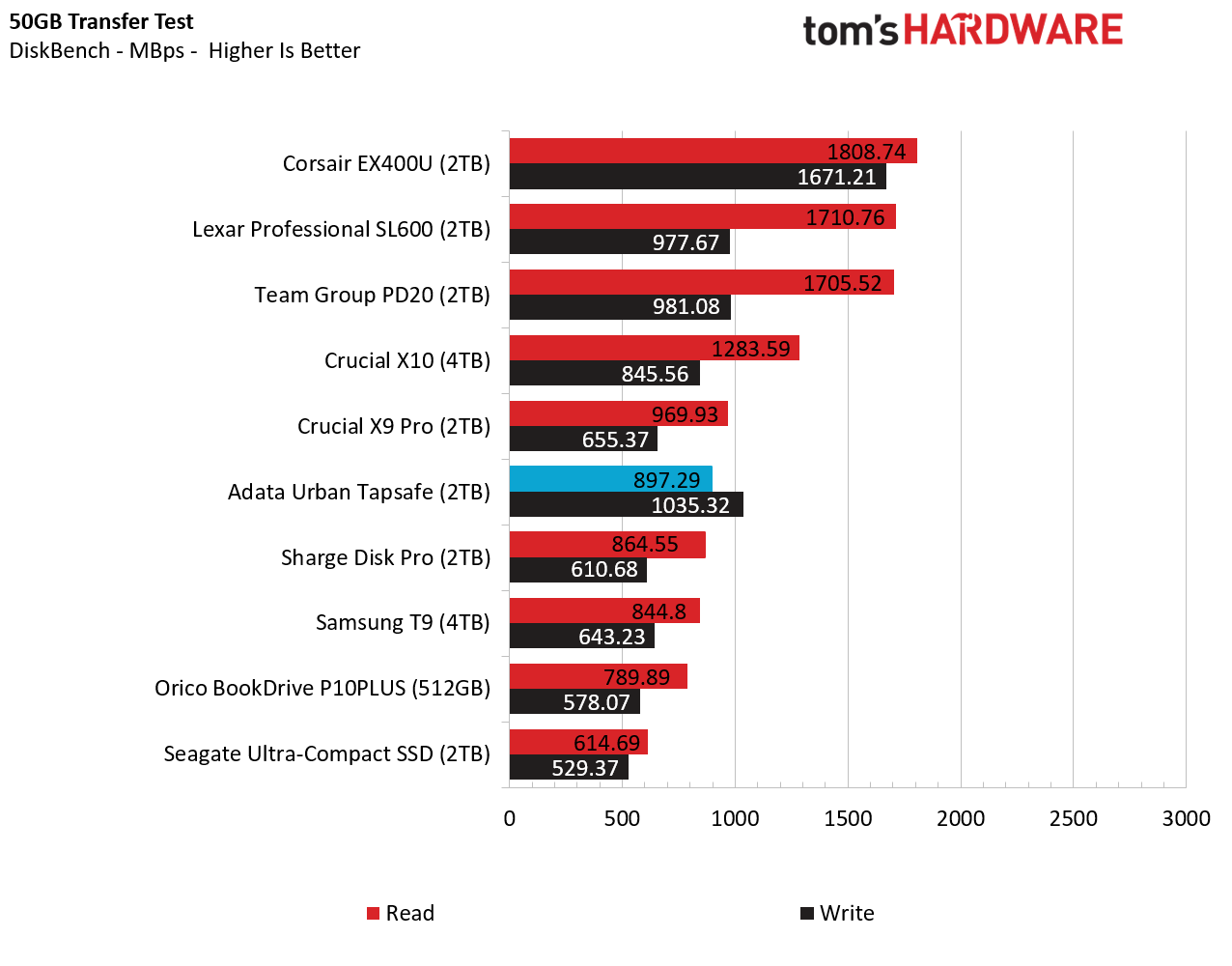
In this real-world file transfer test, the Adata drive fares significantly better, landing in the middle of our charts in terms of read speeds, at 897 MB/s. And its writes were even more impressive, beating everything in our charts save for the 40 Gbps Corsair external SSD.
Synthetic Testing CrystalDiskMarkCrystalDiskMark (CDM) is a free and easy-to-run storage benchmarking tool that SSD companies commonly use to assign product performance specifications. It gives us insight into how each device handles different file sizes. We run this test at its default settings.
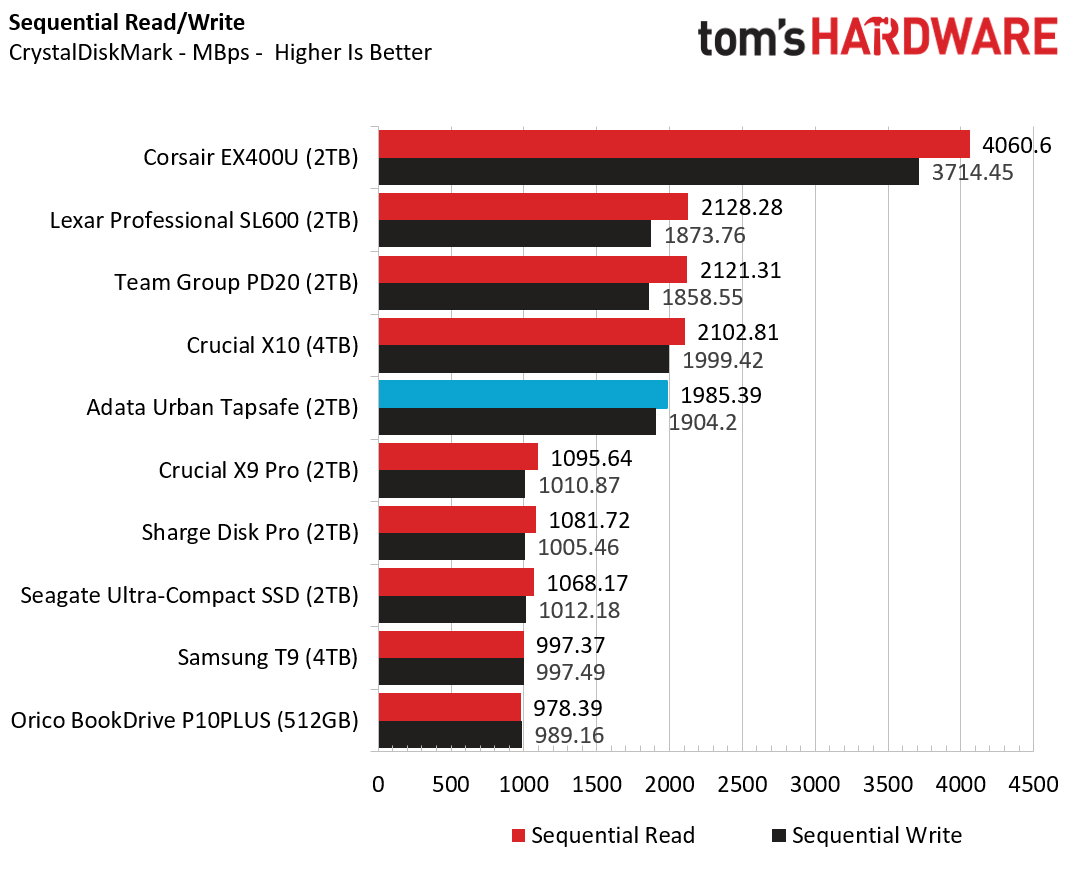
Moving back to synthetic tests and this sequential benchmark, the competing 20 Gbps Crucial and Team Group drives did better on reads again. But on writes, only the Crucial and Corsair drives did better here.
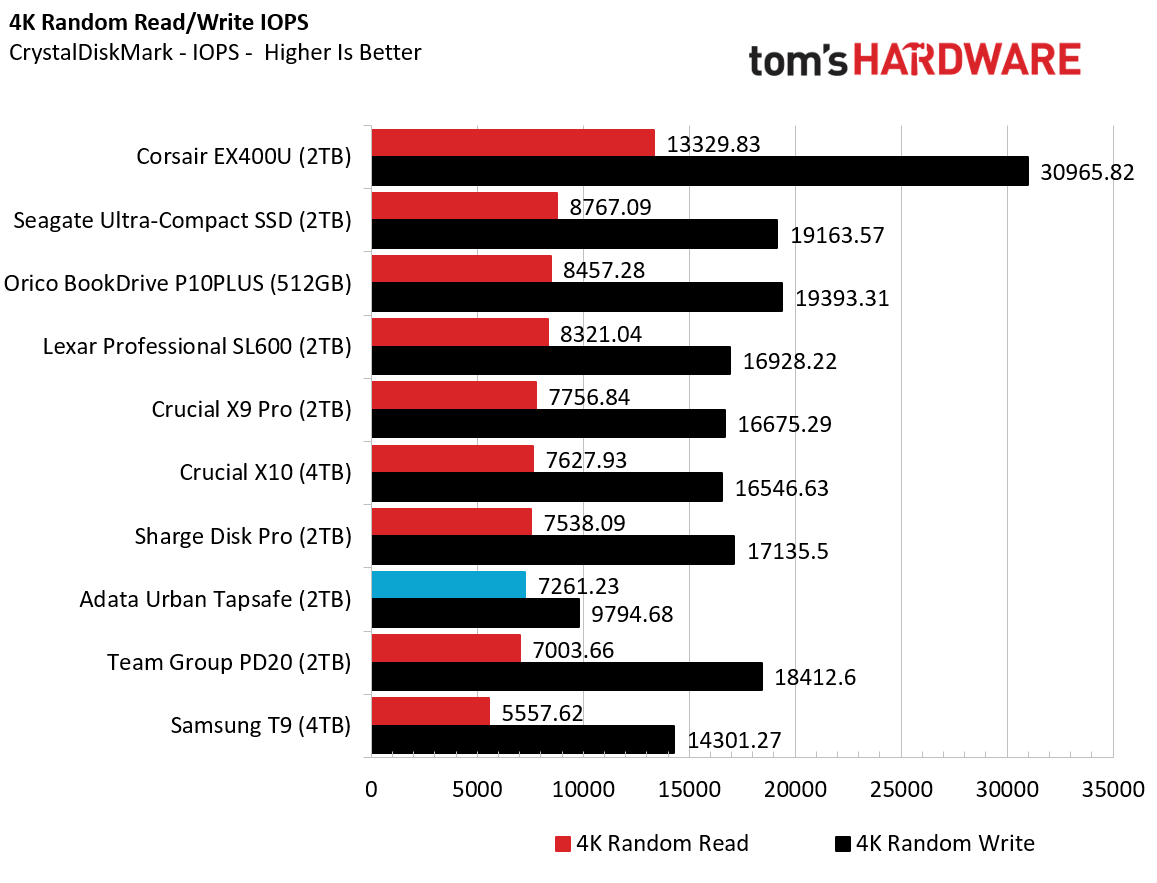
In small file performance, we see perhaps an explanation why the drive also didn't do well on PCMark. Its small-file read performance was third-from-last place, while write IOPS trailed everything else by a significant margin. This performance isn't quite damning, but it does mean the Tapsafe isn't the best option if you want to run programs directly from your drive, or use it as a boot drive.
Sustained Write PerformanceA drive's rated write specifications are only a piece of the performance picture. Most external SSDs (just like their internal counterparts) implement a write cache, or a fast area of flash, programmed to perform like faster SLC, that absorbs incoming data.
Sustained write speeds often suffer tremendously when the workload saturates the cache and slips into the "native" TLC or QLC flash. We use Iometer to hammer the SSD with sequential writes for 15 minutes to measure the size of the write cache and performance after the cache is saturated.
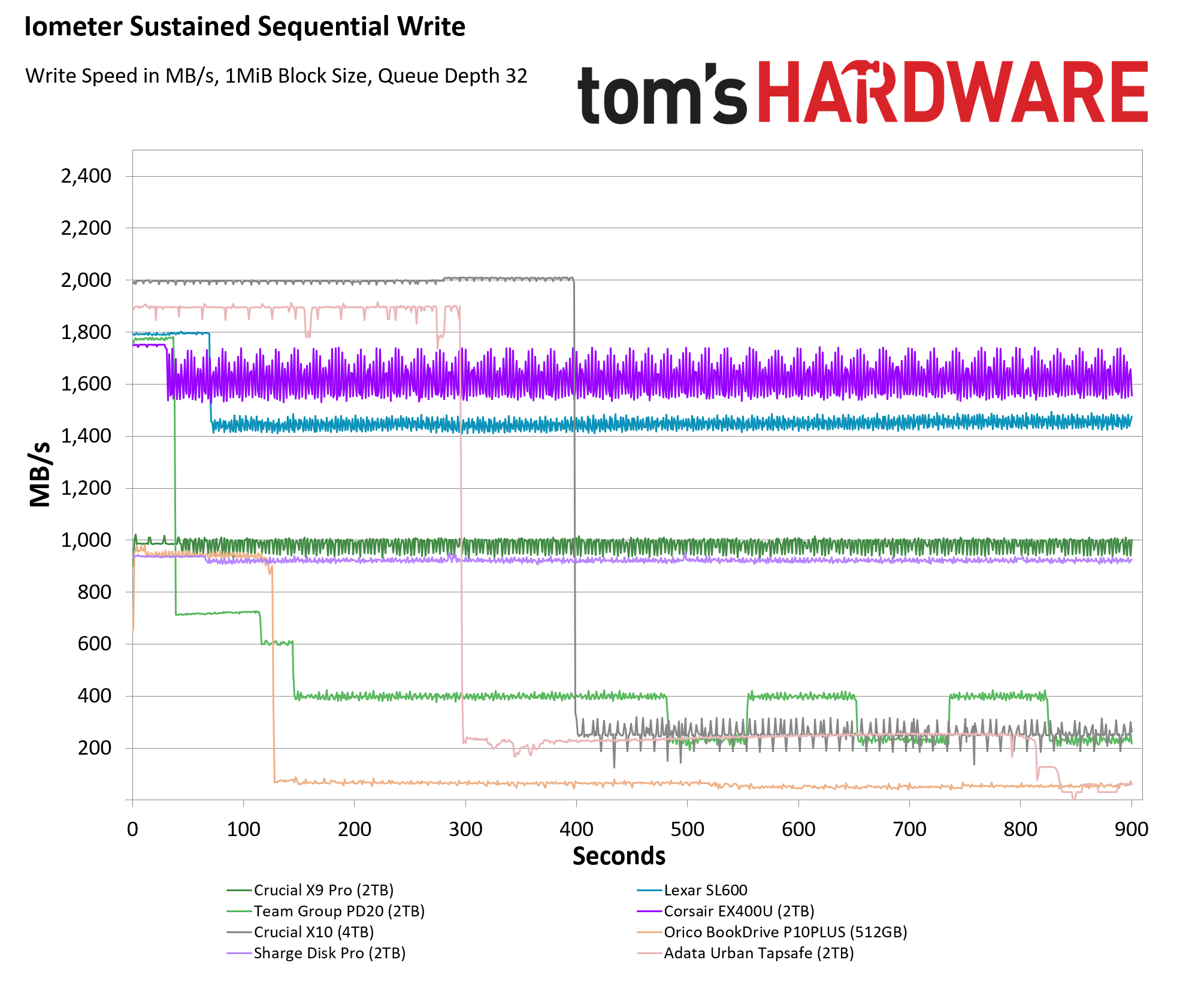
On this grueling sustained write test, the Adata Urban Tapsafe managed to deliver between 1,800 and 1,900 MB/s for a solid five minutes, before dropping to about 250 MB/s, and then dropping again near the end of our 15-minute test to below 70 MB/s. While its speed past about the 14-minute mark is abysmally slow (less than a laptop hard drive), the Tapsafe's showing here is easily better than the competing Team Group drive, which started slower and fell faster. Crucial's X10 is a better option on this sustained test, as is Corsair's USB4 drive (which is of course significantly more expensive). But so long as you aren't expecting a 20 Gbps drive with pro-level write performance, the Tapsafe is speedy and consistent enough to keep most users happy.
Bottom Line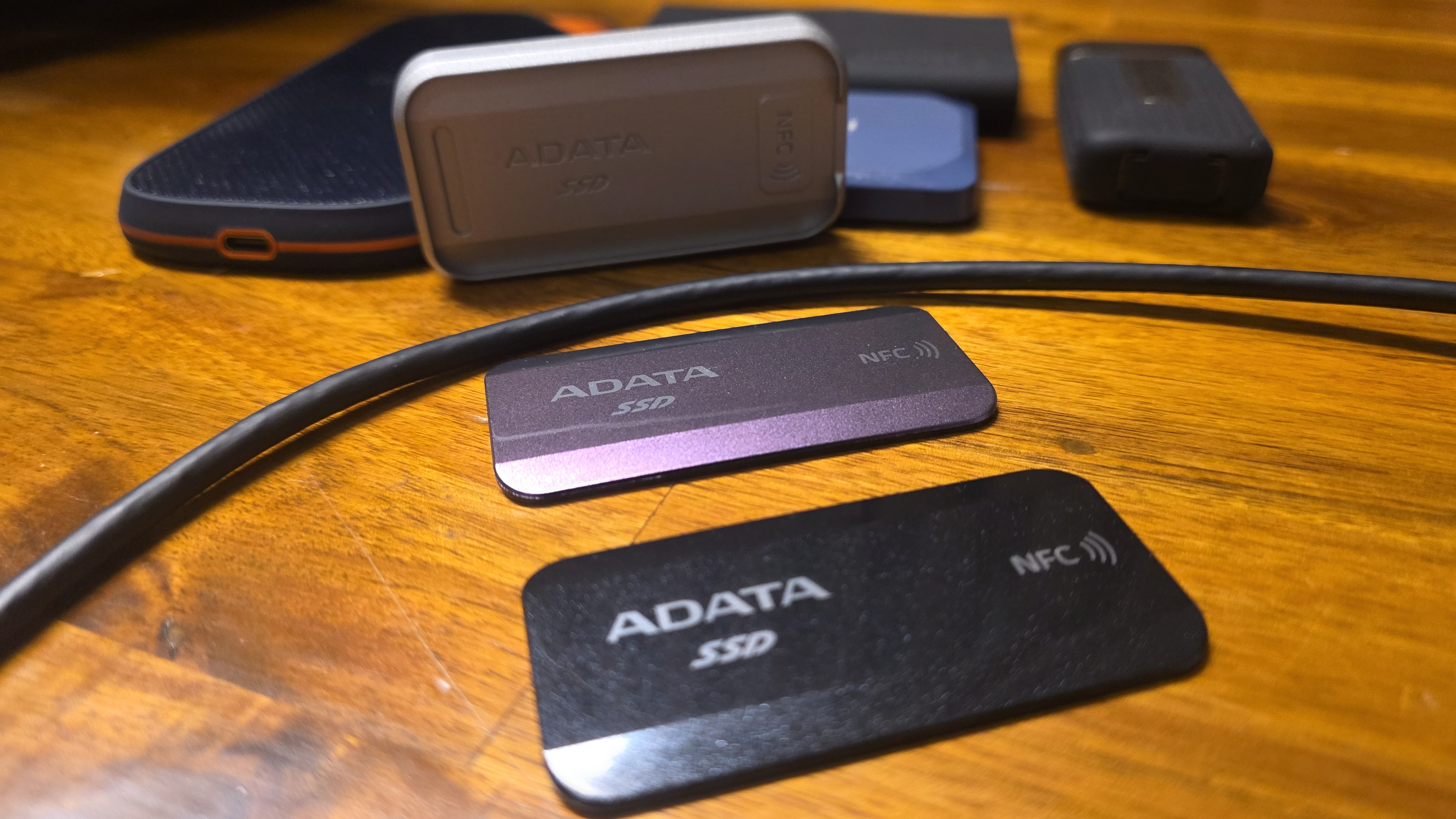
Adata's Urban Tapsafe is a unique drive that's well-suited to those who want basic, convenient control over who has access to the data on their drive, and who want to share that access with a handful of other users who also have physical access to the drive. Its tap-to-unlock, NFC-based access might not be technically as secure as more traditional AES-based encryption, but it worked well during our testing. And the ability to selectively give read or read / write access to up to nine other people via their own phones and apps could make this drive a good fit for collaborative projects or family file storage.
In terms of performance, it's not the fastest 20 Gbps drive, but it's also far from the slowest. For mainstream tasks like video recording or moving large files quickly, its performance is more than speedy enough - just make sure your devices have a 20 Gbps port if you want the fastest possible speeds.
As a niche device for those cases where you need the drive's NFC unlocking and multi-user sharing, the Urban Tapsafe is easy to recommend. But its high price means it's likely to remain a niche, because Team Group's PD20 performs nearly as well (barring sustained writes) while costing much less. And Crucial's X10 drive is a significantly faster 20 Gbps alternative that sells for a little more at the 1TB capacity, and is about $30 cheaper than the Tapsafe at its top 2TB tier.
MORE: Best SSDs
MORE: Best External SSDs