This keyboard app brings Pixel 11's best feature to all Android phones
- SwiftKey beta is rolling out a new AI voice typing mode similar to Google's Rambler feature on the Pixel 11 series.
- The feature cleans up and formats your speech automatically, although it doesn't show a live transcription while you speak.
- SwiftKey's AI voice typing works completely offline after downloading an AI model that's around 163MB on Android.
- Unlike Google's Rambler, SwiftKey's AI voice typing isn't Pixel-exclusive and can work across other Android smartphones.
SwiftKey, the popular keyboard app acquired by Microsoft more than a decade ago, has started rolling out a new AI-powered voice typing feature in beta.
With the launch of the Pixel 11 series, Google introduced a feature that improved on the Pixel's already excellent voice typing. Called Rambler, the feature lets you speak more naturally while automatically removing filler words like "um" and "ah," cleaning up corrections, and properly formatting the final text.
Now, SwiftKey is bringing a similar feature to its keyboard app, and unlike Rambler, it can work on pretty much any Android phone.
The latest SwiftKey beta for Android, version 9.13.16.4, introduces a new "AI voice" typing mode. When you tap the microphone icon, SwiftKey now shows the new AI voice option alongside a quick explanation of how it works.
Similar to Rambler on the Pixel 11 series, you can simply start speaking naturally while SwiftKey listens to you and displays a waveform on the screen. Once you're done, the AI processes what you've said and turns it into properly formatted text.
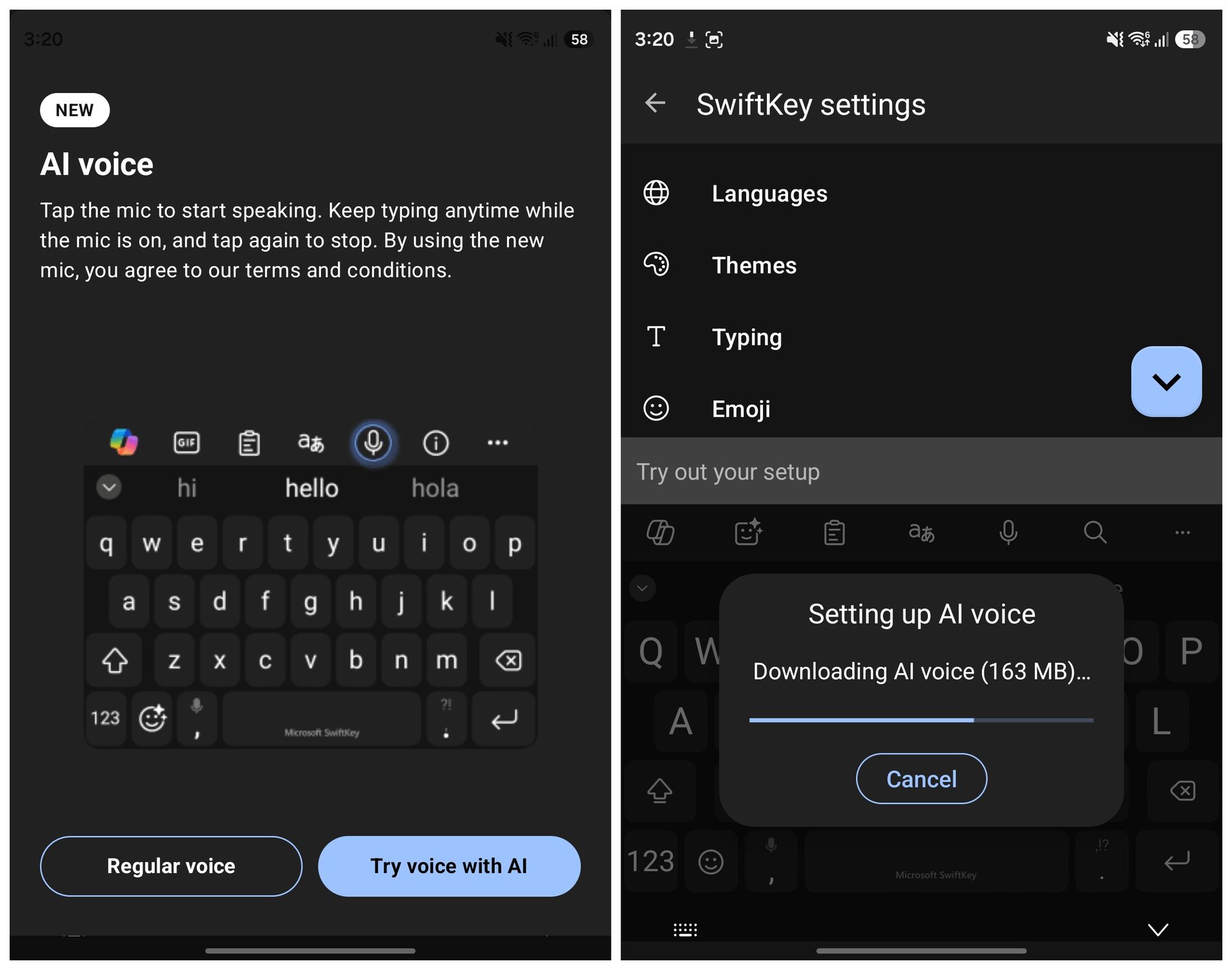
Before you can use the feature, though, SwiftKey asks you to download an AI voice model. On my Galaxy Z Fold 8, the download was around 163MB. Similar to Rambler, you also don't get a live preview of the transcription while you're speaking. Instead, the finished text appears once the AI has processed everything. The best part, however, is that the feature works completely offline.
I tested AI voice typing on my Galaxy Z Fold 8 with both Wi-Fi and mobile data switched off, and SwiftKey was still able to process and transcribe my speech without any issues. This isn't possible right now with Gboard's Rambler, which does require an internet connection to work.
There are some limitations compared to Google's Rambler, though. SwiftKey's implementation currently doesn't let you do things like change the tone, format the text further, or automatically insert emojis through voice commands.
That said, the SwiftKey Beta app can be installed on any Android phone, unlike the Rambler feature, which is exclusive to the Pixel 11 series, for now. So if you've been wanting to try Pixel 11-like AI voice typing without buying Google's latest phone, this might be one of the easiest ways to get something similar.
If you want to try it yourself, you can download the latest SwiftKey beta from the Google Play Store.