Acer Nitro XV273U F5 gaming monitor review: One of the fastest LCDs on the planet
The number 1,000 is a benchmark goal in many disciplines. You know a car is special when it has 1,000 horsepower. An amplifier reaches a different level when it can output 1,000 watts. In computer monitor parlance, 1,000 Hz or 1 kHz is also a plateau. Remember that TVs and most displays max out at 60 Hz. But the best gaming monitors, in pursuit of higher frame rates and smoother motion, have been getting faster with each new generation.
I've reviewed several 500 Hz monitors, mostly LCDs, with a few OLEDs sprinkled in. But currently on my desk is Acer's Nitro XV273U F5, which has a 1,000 Hz mode. And before I get to the caveat, know that it can refresh its screen at 540 Hz in QHD 2560x1440 resolution, so even without trickery, it's one of the fastest flat panels you can buy. This 27-inch IPS display also features Adaptive-Sync, HDR 600, and wide gamut color. Let's take a look.
Acer Nitro XV273U F5 SpecsPanel Type / Backlight | IPS / W-LED, edge array |
Screen Size / Aspect Ratio | 27 inches / 16:9 |
Max Resolution and Refresh Rate | 2560x1440 @ 540 Hz |
1280x720 @ 1,000 Hz | |
FreeSync and G-Sync Compatible | |
Native Color Depth and Gamut | 10-bit (8-bit+FRC) / DCI-P3 |
Response Time (GTG) | 1ms |
Brightness (mfr) | 400 nits, 600 nits peak HDR |
Contrast (mfr) | 1,000:1 |
Speakers | 2x 2w |
Video Inputs | 2x DisplayPort 1.4 |
2x HDMI 2.1 | |
Audio | 3.5mm headphone output |
USB | None |
Power Consumption | 36.5w, brightness @ 200 nits |
Panel Dimensions WxHxD w/base | 24.3 x 15.6-21.5 x 8.3 inches (617 x 396-546 x 211mm) |
Panel Thickness | 2.36 inches (60mm) |
Bezel Width | Top/sides: 0.39 inch (10mm) |
Bottom: 0.55 inch (14mm) | |
Weight | 13.57 pounds (6.17kg) |
Warranty | 3 years |
So, let's get the caveat out of the way first. The XV273U F5's 1,000 Hz mode happens at 1280x720 resolution. That's HD, not Full HD, which is 1920x1080. The good part is that this is a multiple of QHD's 2560x1440. The picture becomes softer but not by as much as you'd expect. Additional video processing features include backlight strobe-based blur reduction and very precise overdrive.
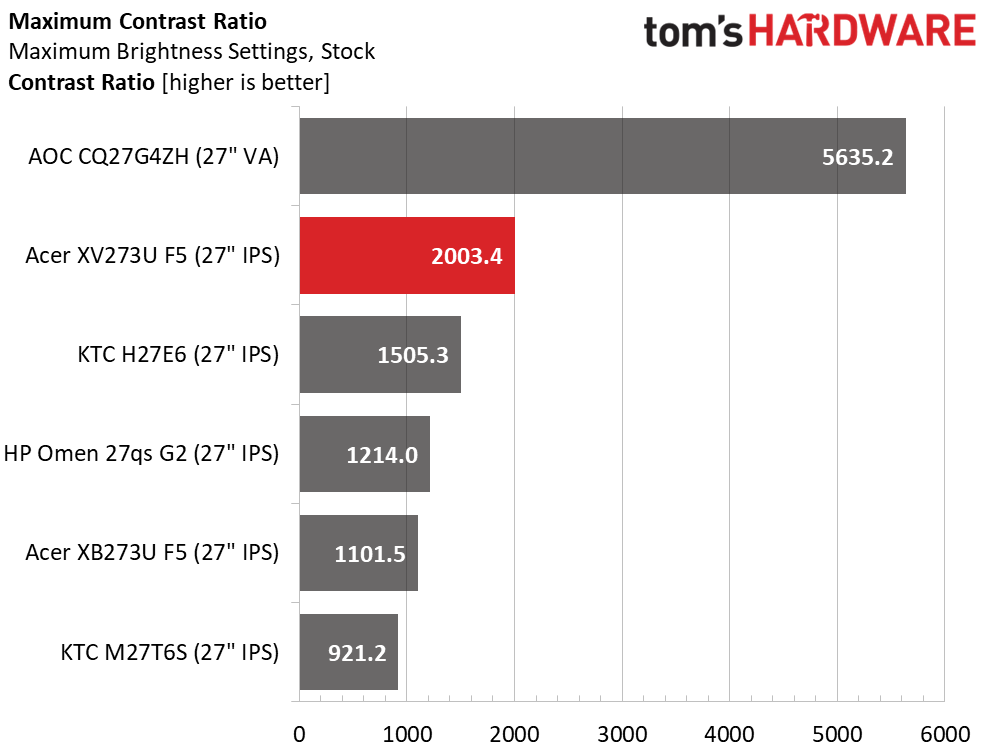
The XV273U F5 also provides excellent image quality from an IPS panel, which has far higher contrast than its claimed 1,000:1 ratio. I measured just over 2,000:1 in testing, which blows away most other IPS panels for dynamic range. The black levels are almost in VA territory, resulting in a very deep, textural image. Acer gets color and gamma right as well, and with a few tweaks that I'll show you on page four, you can enjoy reference-level accuracy. Gamut coverage is generous, with around 90% coverage of DCI-P3.
The XV273U F5 is fully ready for gaming on PC or console and has all the features to enhance gameplay at any skill level. You get plenty of aiming points and sniper modes, along with a set of timers. The overdrive and backlight strobe are enabled when your system can't push the frame rates to 540 or 1,000, and they work extremely well, with significant blur reduction and no ghosting or phasing artifacts.
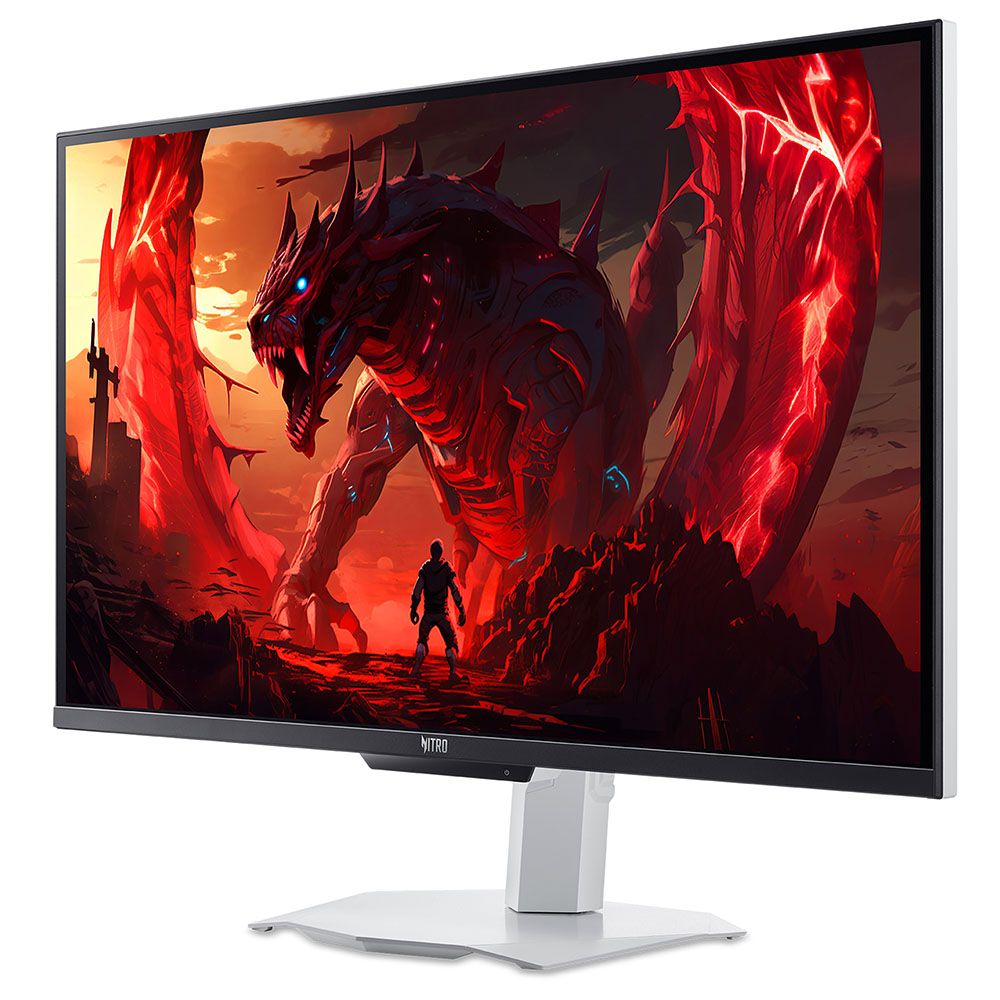
Style is not forgotten here, with a rare white aesthetic. Everything is white, including the base and the included cables. Only the thin screen bezel is black. A handy joystick controls most functions, and there are three control keys, one of which switches the refresh modes.
Connectivity includes two DisplayPorts and two HDMIs. There are no USB ports. You also get internal speakers and a headphone jack. And the ports all face backward for easy access.
The XV273U F5 isn't a trifling purchase at $700, but if you want a 1,000 Hz monitor, they aren't exactly common. I'm anxious to pop the hood, then take it for a spin.
Assembly and AccessoriesThe XV273U F5 comes simply packaged in recyclable pulp forms. A clamshell box opens to reveal four parts: the panel, upright, base, and a snap-on fulcrum. You would omit that if you wanted to use the 100mm VESA mount with an aftermarket arm or wall bracket. The cable bundle includes a white external power brick and an HDMI cable, no DisplayPort though.
Product 360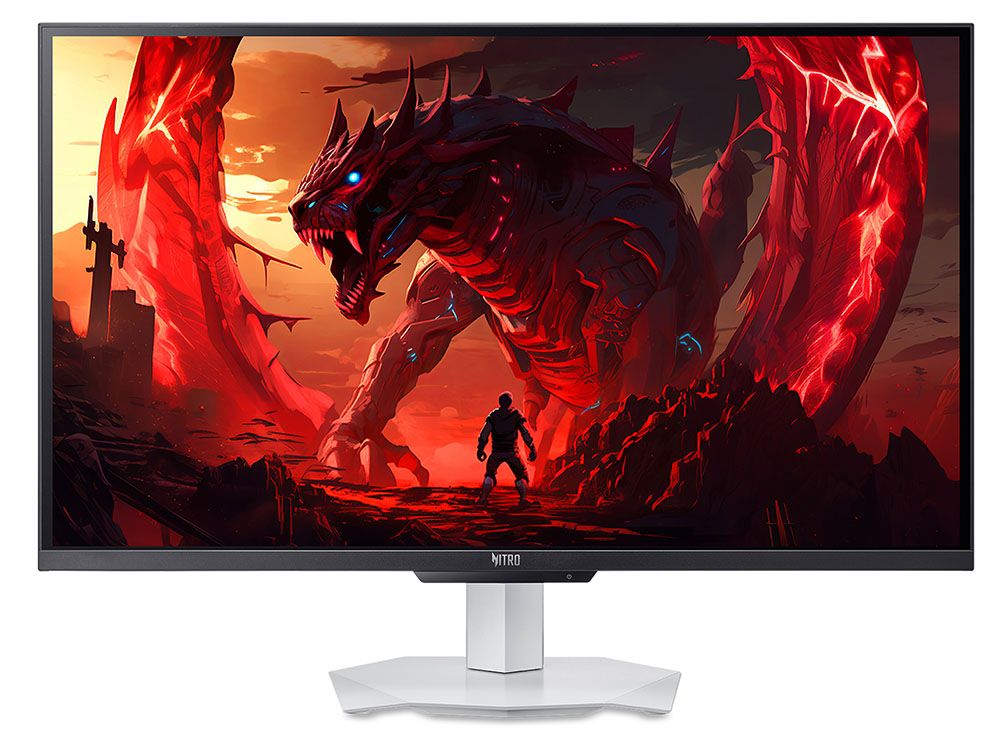 Acer
Acer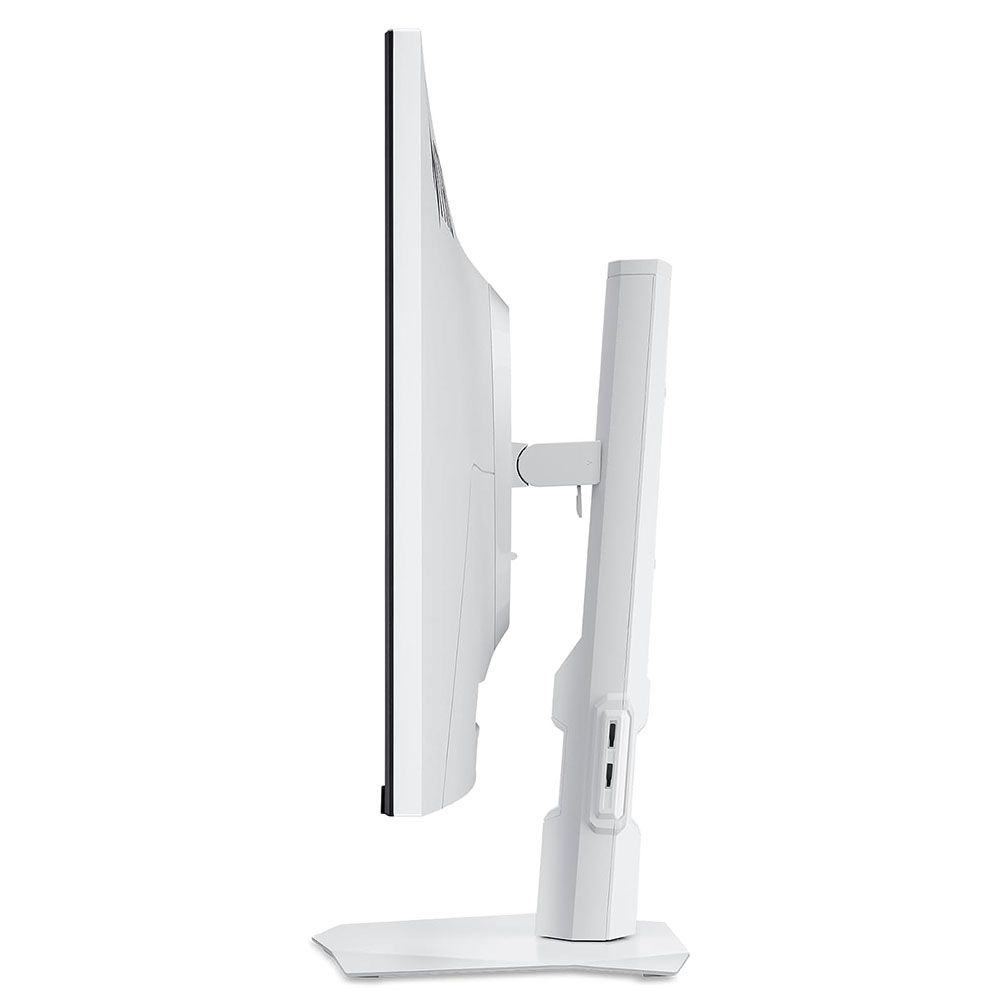 Acer
Acer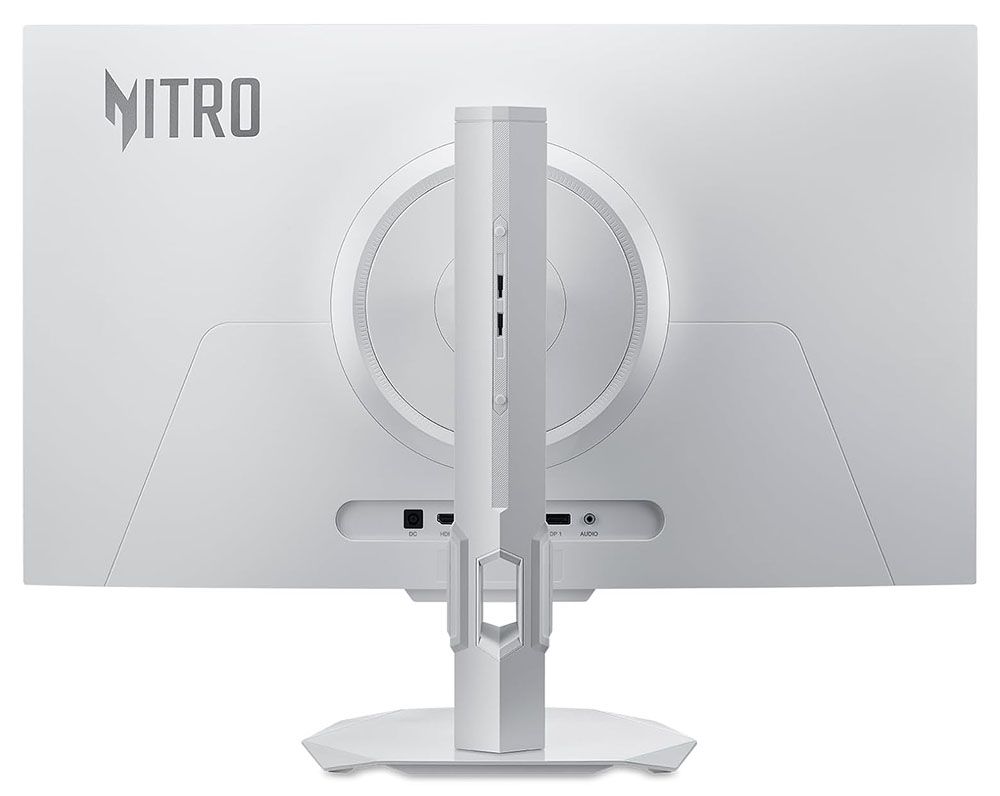 Acer
AcerThere's something cool about white monitors, mostly because they are few and far between. The XV273U F5 has a nice aesthetic that balances purpose between gaming and productivity. The angular bits are reserved for the stand. The base is a metal plate with downturned corners, finished in a white powder coat. The upright has a cable hole and a few small trim pieces, with a tripod socket at the top. It features full ergonomics with a 5.9-inch height adjustment, 5/25 degree tilt, 20-degree swivel, and a 90-degree portrait mode. Movements are firm, but there's a little play at the fulcrum point. Getting the panel level takes a bit more effort.
In the back is a large gray Nitro logo and a smooth panel shape with no angles or extra curves. The inputs face backward, making them easy to see and access. You get two DisplayPort 1.4, two HDMI 2.1, and a 3.5mm headphone jack. There are no USB ports, but there is a pair of two-watt internal speakers that play clean and politely in the upper midrange frequencies.
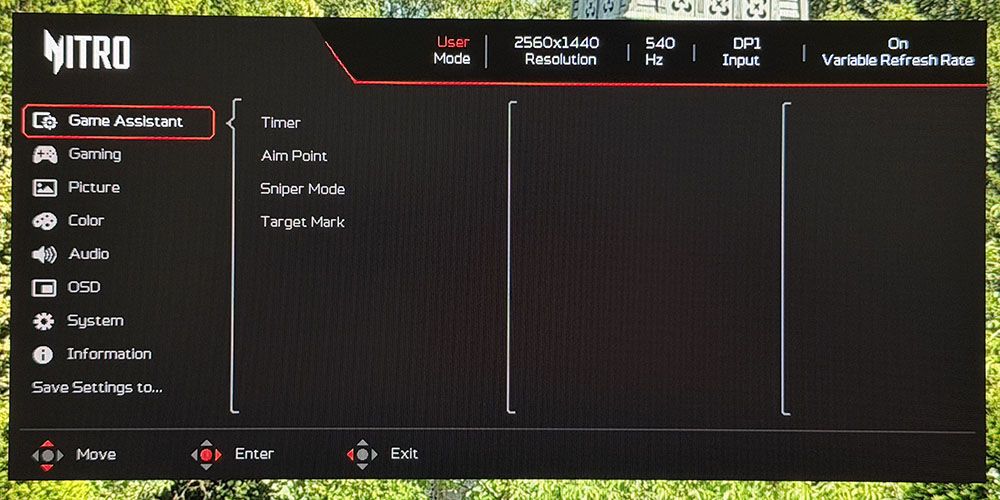
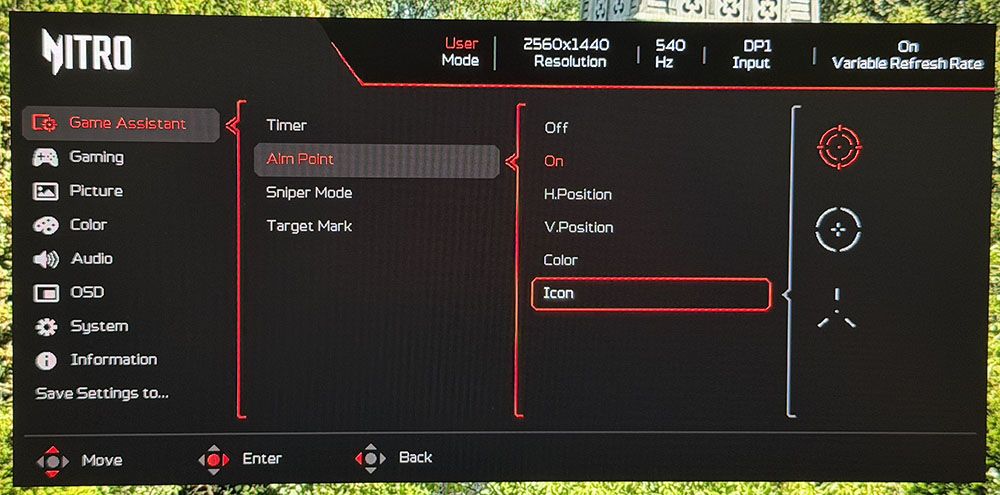
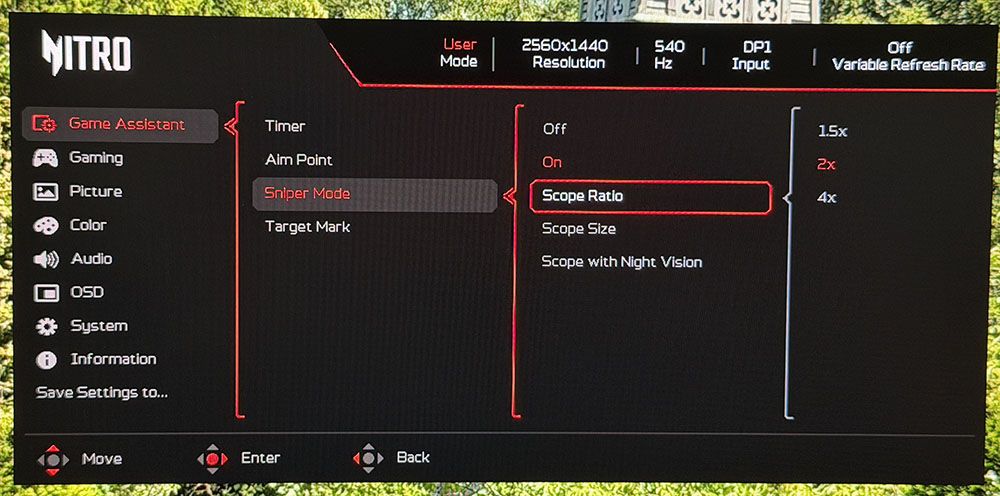
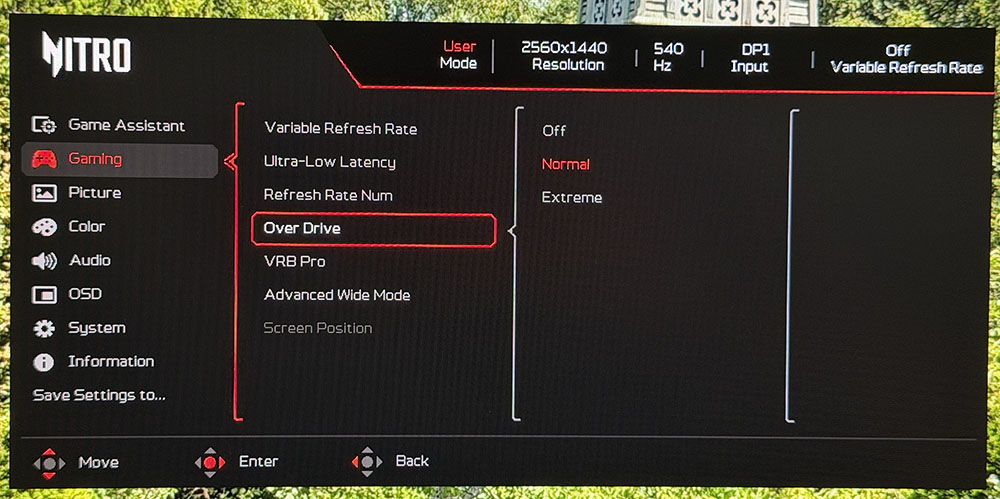
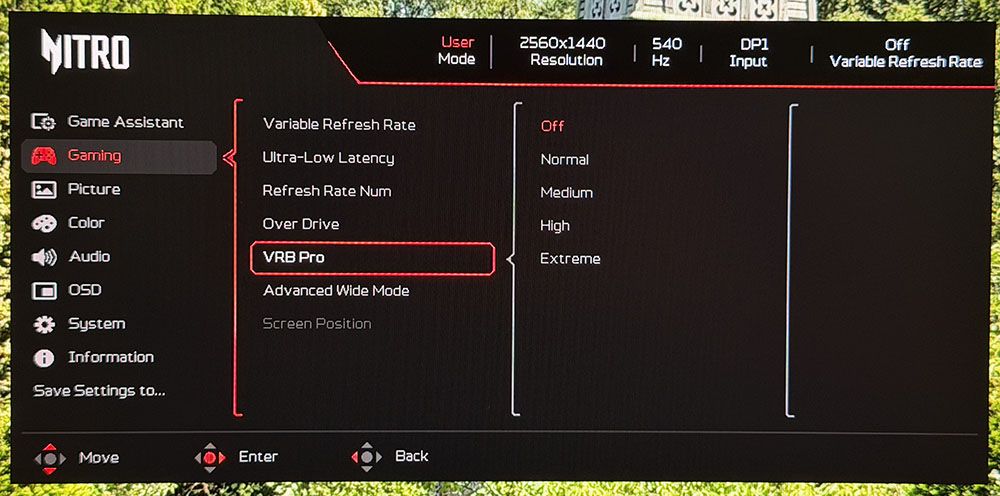
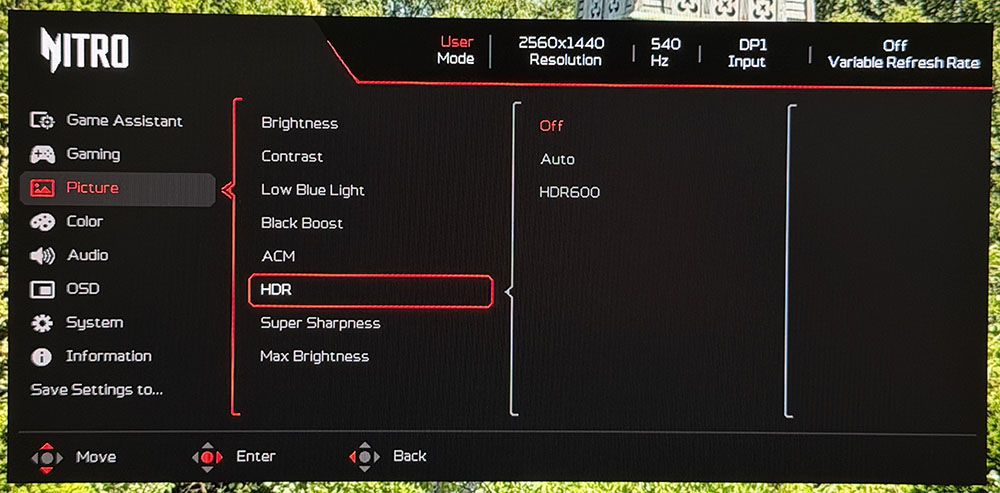
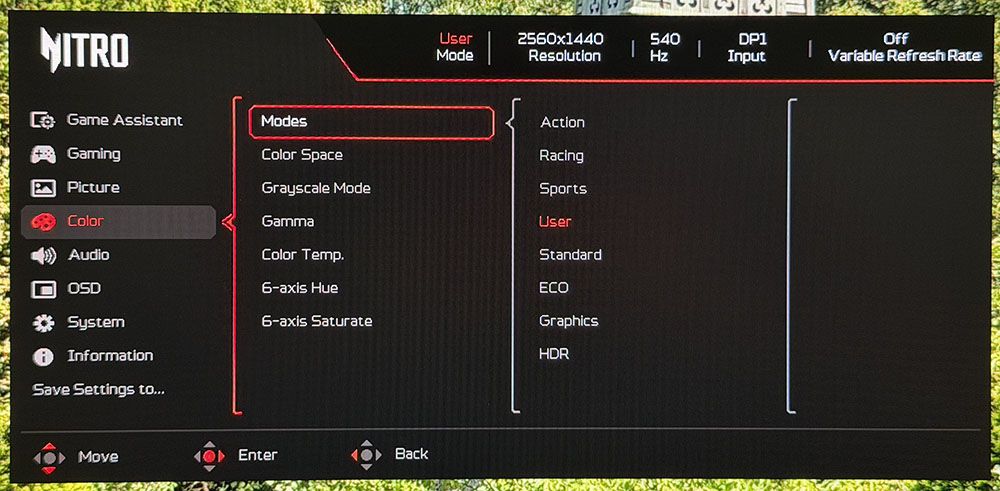
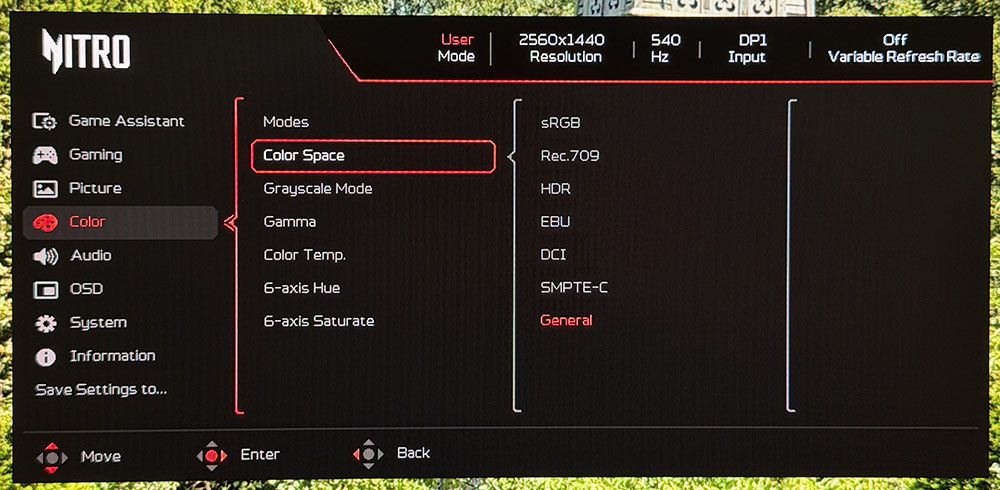
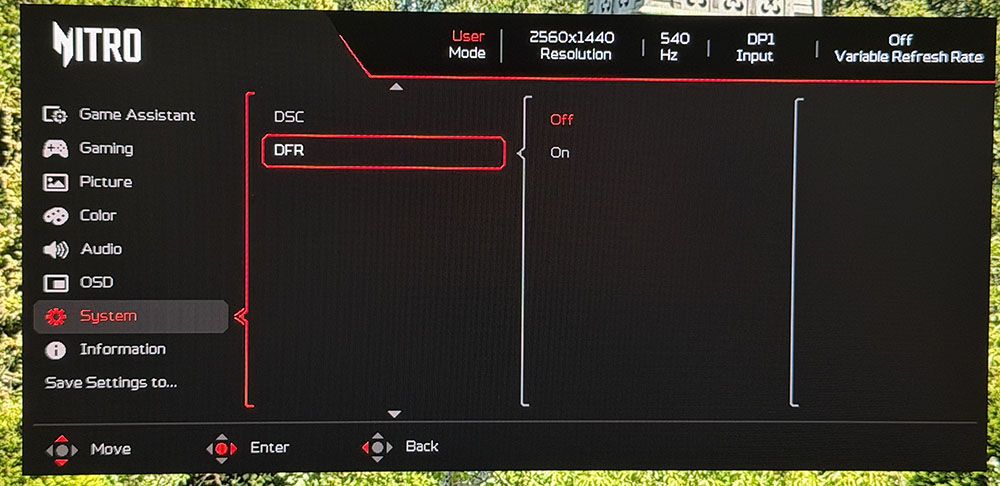
OSD FeaturesThe XV273U F5's OSD will be familiar to users of Acer monitors. It's divided into four fields forming a logical tree and has eight sub-sections. To summon it, press the joystick twice.
 Tom's Hardware
 Tom's Hardware
 Tom's Hardware
 Tom's Hardware
 Tom's Hardware
 Tom's Hardware
 Tom's Hardware
 Tom's Hardware
 Tom's Hardware
The first two menus are the gaming aids and video processing options. Enhancements include timers, aiming points in multiple shapes and colors, and a sniper mode. The reticle can be moved around the screen if you wish. The sniper scope has three magnifications and night vision. Video processing includes a frame counter, blur reduction with four backlight strobe pulse width levels, and a two-level overdrive. Both are very effective at reducing blur and operate artifact-free. The strobe is one of the very best I've seen. At its most extreme setting, it reduces light output by around 40%, but you can increase the brightness slider to compensate.
The picture menu includes the HDR modes. You get two: Auto and HDR 600. You would think they are different, but in my tests they measured the same. I noted that the XV273U F5 does not switch to HDR mode automatically; you must select one of these options after applying the signal. Also important in the menu is Max Brightness. Turn it on to get, you know...
In the Color menu are the eight picture modes arranged by game type or task. Standard is the default, but if you change any setting, the XV273U F5 switches to User. Calibration controls include seven color space options; Native is the most colorful, plus gamma and color temp presets. The RGB sliders include gain and bias adjustments for very precise grayscale tracking.
If you're looking for the frame rate switch, it's in the System menu, which is counterintuitive. It should be in the Gaming menu. You can also do it with the far-left control key to switch refresh rates without going into the OSD. Like most dual-mode monitors, you must initially set up each resolution in the Nvidia or AMD control panel. Then, you can make the switch on the fly. When you've made your settings, you can save them to the two memory locations under Save Settings to...
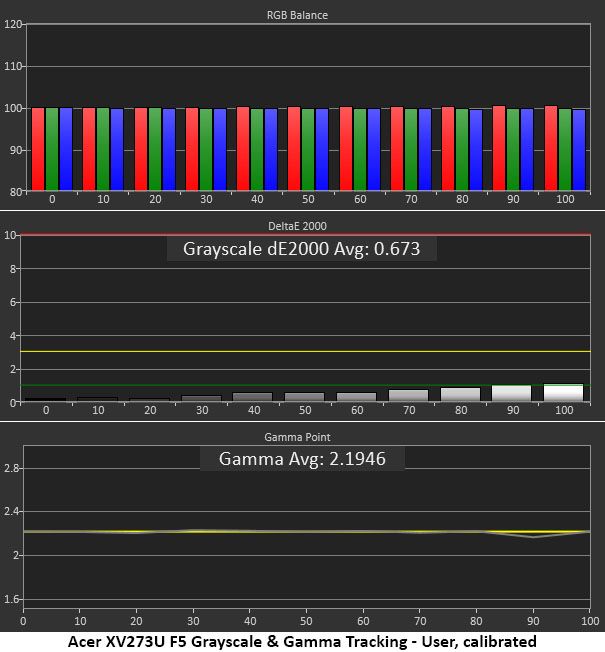
Acer Nitro XV273U F5 Calibration SettingsThe XV273U F5 comes out of the box looking a little cool. It could probably satisfy most users, but a grayscale calibration takes it to reference level. The Native color gamut covers about 90% of DCI-P3, and an sRGB option is available. In all cases, gamma was spot-on, so I left that preset on 2.2. I had to reduce contrast by two clicks to solve a clipping issue. My suggested settings are below. For HDR, apply the signal first, then choose either Auto or HDR 600 from the Picture menu. And don't forget to turn on Max Brightness for the XV273U F5's max brightness.
Picture Mode | User |
Brightness 200 nits | 55 |
Brightness 120 nits | 31 |
Brightness 100 nits | 23 |
Brightness 80 nits | 18 |
Brightness 50 nits | 8 (min. 23 nits) |
Contrast | 48 |
Gamma | 2.2 |
Color Temp User | Gain - Red 49, Green 51, Blue 49 |
Bias - Red 50, Green 50, Blue 50 |
If you are a gamer looking for maximum smoothness and next-to-no input lag, and you don't want to buy an OLED, the XV273U F5 is easily the next best thing. My perspective comes from the fact that the most prolific OLED category right now is 27-inch QHD 240 Hz. The XV273U F5 has the same size and pixel density, as well as excellent contrast and color. And it's as smooth as a QHD 240 Hz OLED, albeit running at 540 Hz. I could do this without any problem using a GeForce RTX 4090, though given the fan noise I heard, it was working for it. But this monitor is the first LCD I would compare to an OLED for gaming feel and addictive play.
Motion blur simply did not exist at 540 Hz, and perceptually, neither did input lag. Turn-and-fire and circle strafe maneuvers were super easy and precise. I experienced very little wasted ammo. Competitive gamers will be right at home playing on an XV273U F5.
At 1,000 Hz, the story is different, but not that different. Yes, the picture is soft. It's a bit like watching old TV shows on YouTube. You don't enjoy them less, but by modern FHD and UHD standards, 480p is so 10 years ago. However, 1,000 fps is really something. The RTX 4090 worked even harder than before, but it managed to keep the frame rate locked at 1K. Again, there is no input lag, nor is there any blur. And even though the picture was soft, gameplay was just as addictive. It's just so quick that some scenarios become too easy. For gamers of all skill levels, the XV273U F5 is a weapon.
I'm spoiled by OLEDs, so I won't pretend that the XV273U F5 looks as good as them. But it's closer to that standard than many other LCDs. It has one of the highest-contrast IPS panels I've seen, with a native contrast ratio around 2,000:1. That's almost VA territory, but with better viewing angles and more saturated color. You'll see in my test results on page four that this is a very accurate display, and it shows in practice. I noted that HDR content looked very good but had no more contrast than SDR. But with excellent luminance tracking and rich color, it provided decent impact.
For daily use, you can save a little power and run it at 120 Hz for productivity. That will get you smooth scrolling for webpages and documents. 109ppi pixel density gave me clear fonts, sharp graphics, and solid detail in small objects like icons and toolbars. Color accuracy and a useful sRGB mode provided good functionality in Photoshop.
I enjoyed the styling very much too, especially the white part. I'm a fan of white monitors, and the XV273U F5 is one of the nicer ones I've experienced. The rear-facing ports are super handy because they're easy to see and reach. I'd have liked some USB ports, though. But I was glad to hear decent sound from the internal speakers. They aren't Wilson Sashas, but they play clean and loud enough for one user.
Takeaway: The XV273U F5 is a superb gaming monitor with a gaming feel and response time on par with any OLED display. It has plenty of contrast and color too, which gives the picture impact and texture. I really enjoyed the styling and the white aesthetic. Though premium-priced, it can refresh at 1,000 Hz, and that is something rare indeed.
MORE: Best Gaming Monitors
MORE: How We Test PC Monitors
MORE: How to Buy a PC Monitor
(Image credit: Tom's Hardware)(Image credit: Tom's Hardware)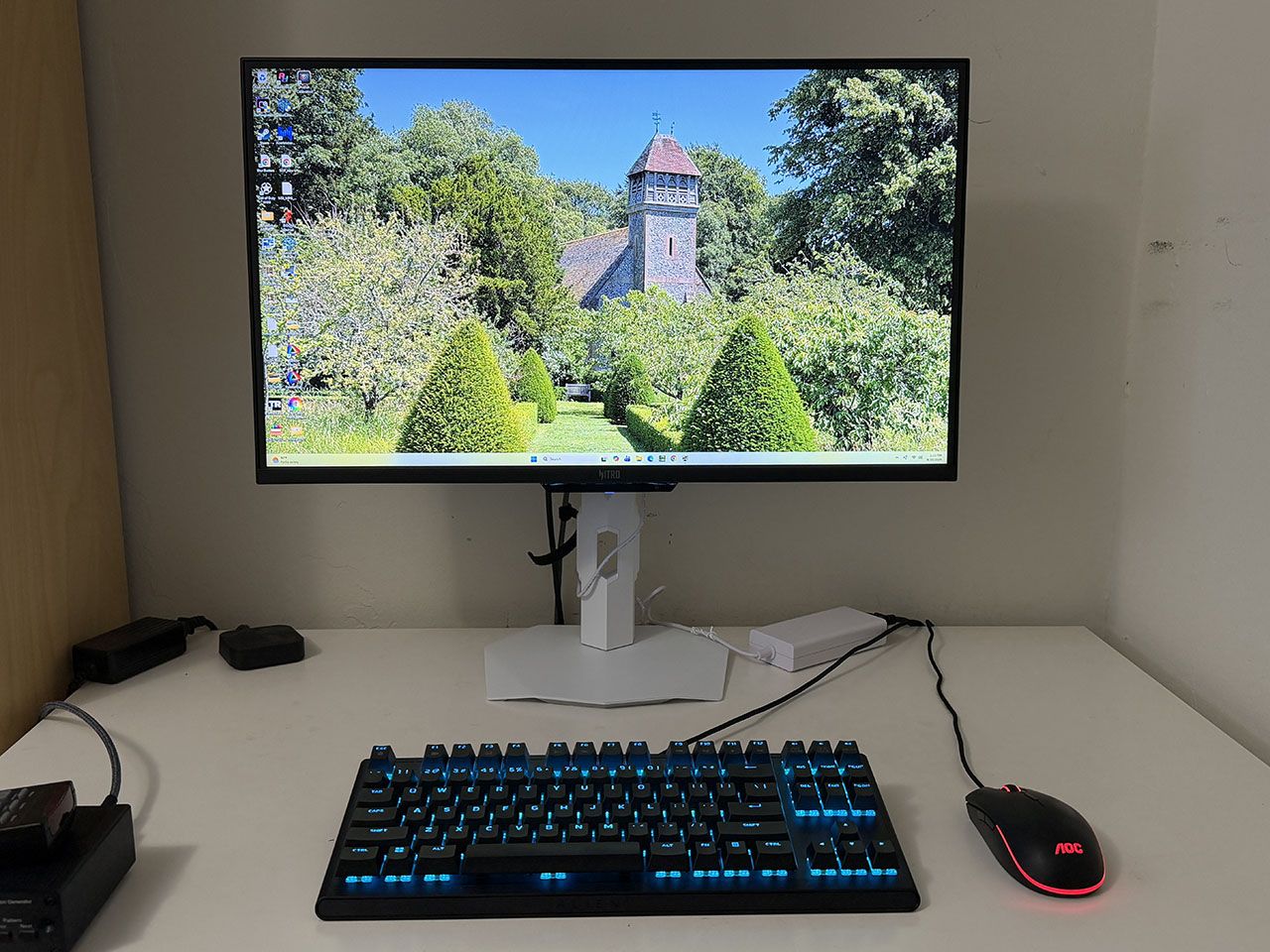
To compare the XV273U F5's performance, I've rounded up a group of speedy LCDs that refresh between 210 and 360 Hz. Obviously, the response and lag tests give the Acer an unfair advantage, but I haven't reviewed a 500 Hz LCD monitor in quite a while. They are Acer's XB273U F5, KTC's M27T6S and H27E6, AOC's CQ27G4ZH, and HP's Omen 27qs.
Pixel Response and Input LagClick here to read up on our pixel response and input lag testing procedures.
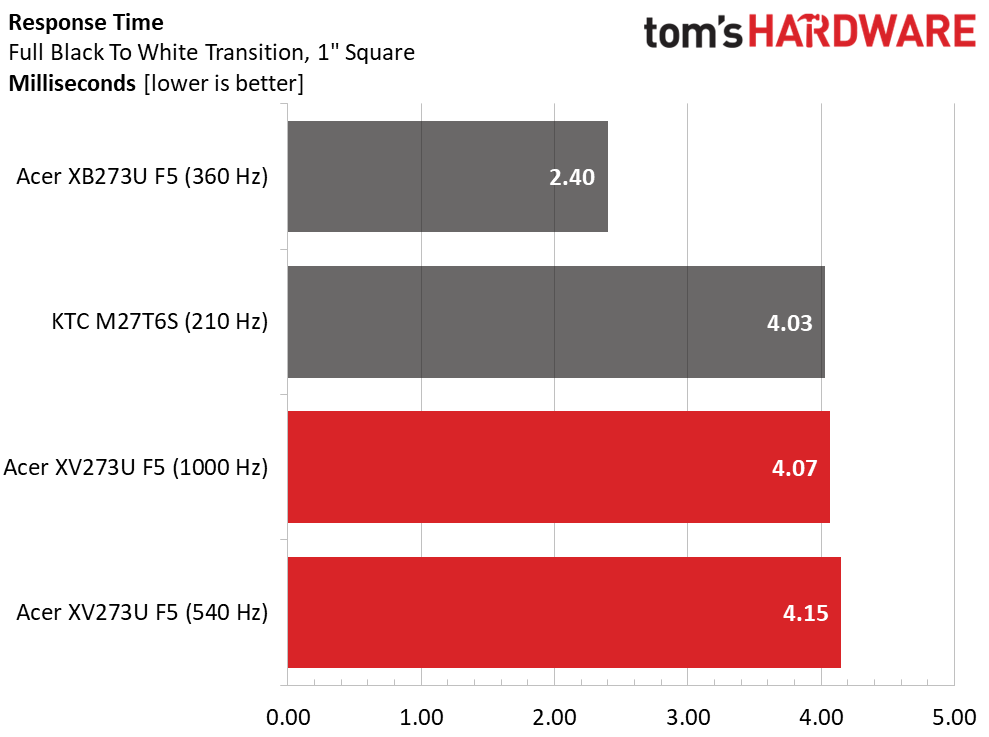 Tom's Hardware
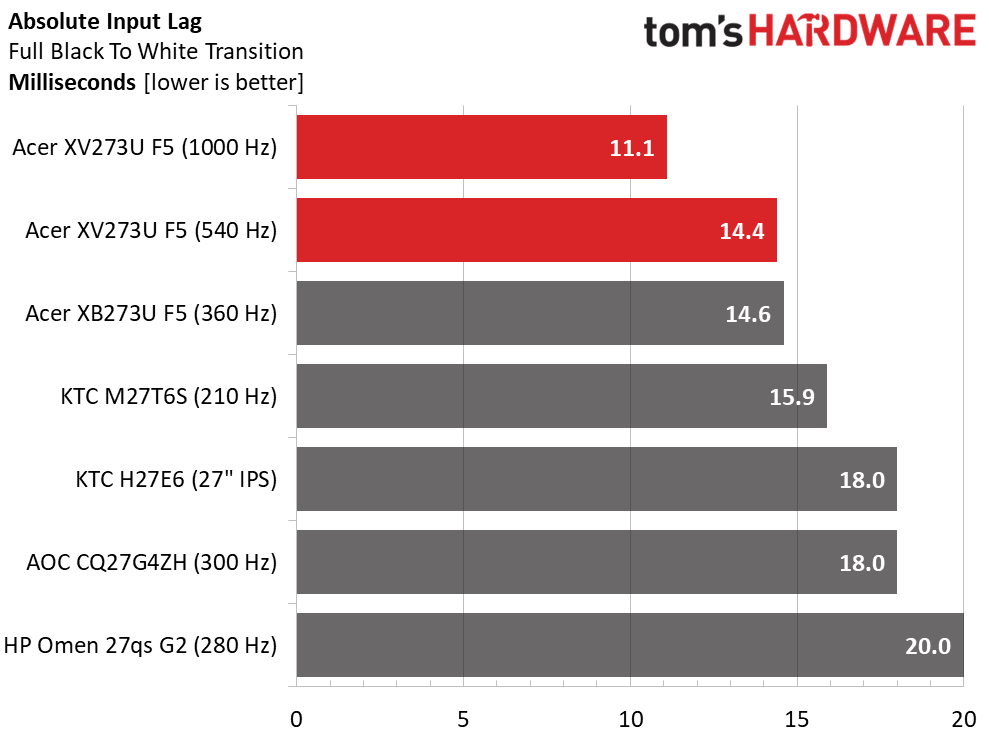 Tom's Hardware
For the response test, only the XB273U F5 and M27T6S have been measured by my new LDAT sensor from Nvidia. Interestingly, the 360 Hz screen is the quickest at 2.4ms. The XV273U F5 seems a tad slow by comparison, and there's only a slight difference at 1,000 Hz. But this doesn't account for the quality of the overdrive. The XV273U F5 has one of the best I've seen, and it removes almost all motion blur at 540 and 1,000 Hz. It's effective at lower frame rates too. You can run down to about 300fps before blur becomes noticeable.
The lag test is where the XV273U F5 really shines. It's one of the quickest LCDs I've tested at just 14.4ms for 540 Hz and 11.1ms for 1,000 Hz. In practice, any of these monitors will satisfy twitchy gameplay, but the XV273U F5 is firmly on top. Only the XB273U F5 and M27T6S come close.
Test Takeaway: The XV273U F5 is one of the fastest LCDs you can buy. At 540 Hz, it equals many OLEDs in smoothness. The overdrive and backlight strobe are among the best available, with effective blur reduction and no ghosting or phasing artifacts. At 1,000 Hz, motion is uncannily smooth, and though resolution is reduced, it isn't as soft as you might expect. And it has very low input lag in that mode.
Viewing Angles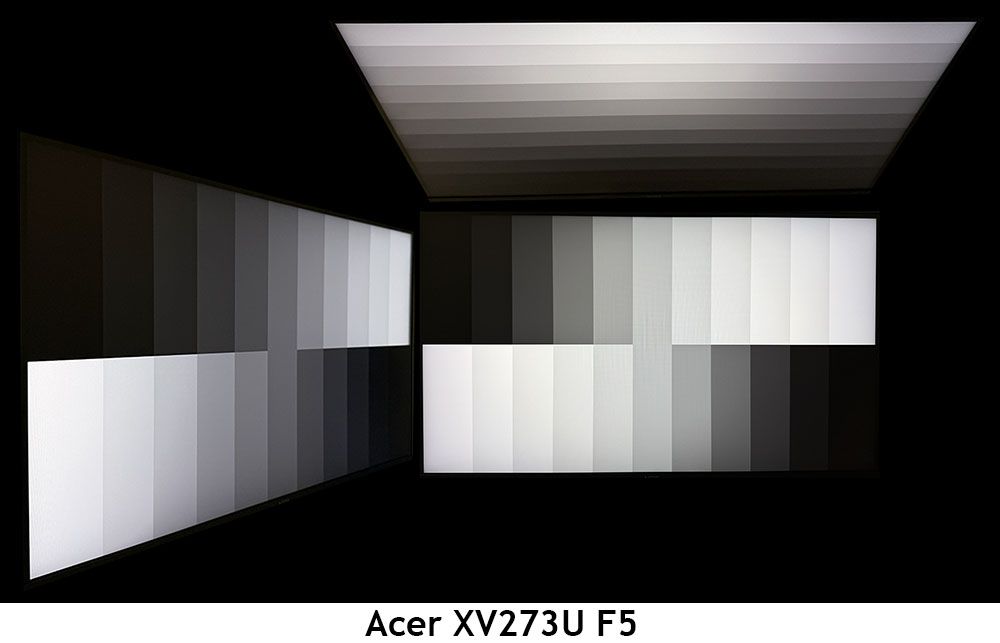
The XV273U F5 is one of the better IPS screens I've photographed. In the side view, there is a slight blue tint but no change to gamma or brightness. The top view darkens by around 50% and has a red tint, but its gamma is better than most. This is one of the most shareable LCDs I've seen.
Screen UniformityTo learn how we measure screen uniformity, click here.
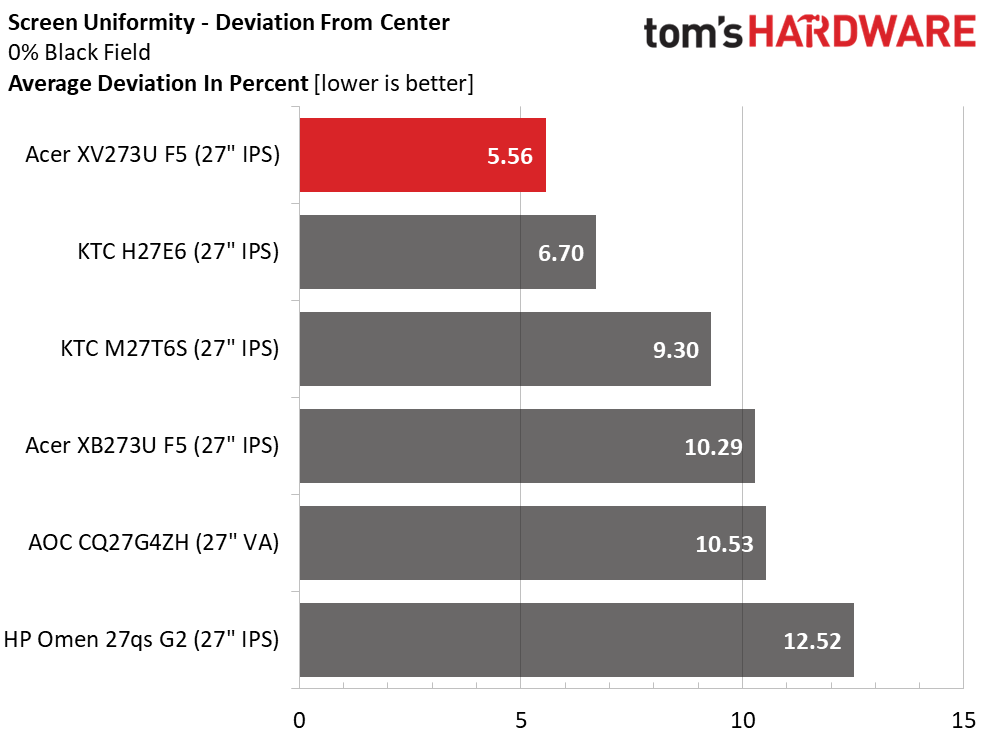
The XV273U F5's screen uniformity is also on par with many OLEDs. 5.56% is well below the point where you would see any glow or bleed. Color fields were perfectly uniform in my tests as well. This is excellent performance.
MORE: Best Gaming Monitors
MORE: How We Test PC Monitors
MORE: How to Buy a PC Monitor
To read about our monitor tests in-depth, please check out Display Testing Explained: How We Test PC Monitors. We cover brightness and contrast testing on page two.
Uncalibrated - Maximum Backlight Level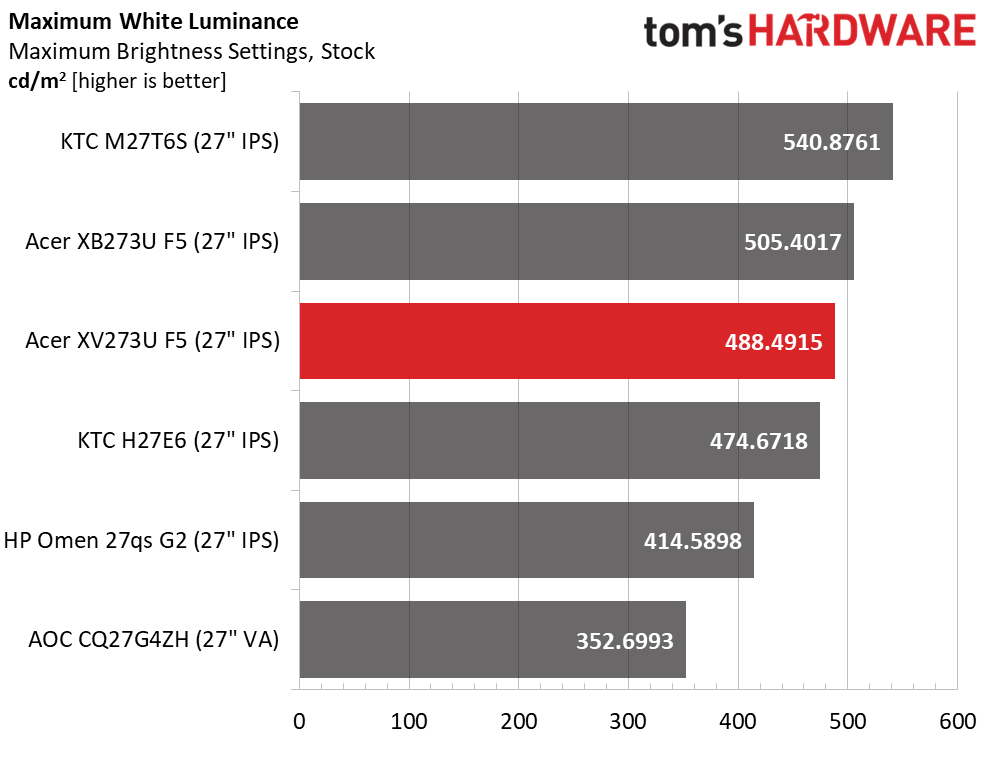 Tom's Hardware
 Tom's Hardware
 Tom's Hardware
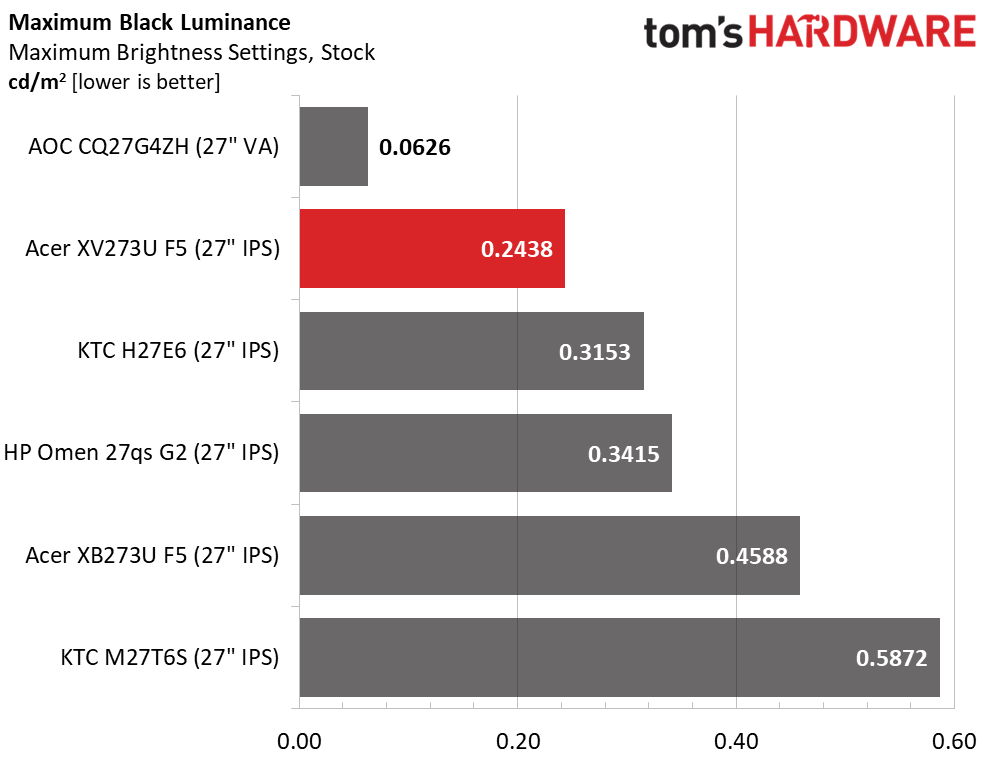
The XV273U F5 has more than enough light output for any indoor space. You could use it in an outdoor location, too, with almost 500 nits available. What's truly amazing though, is the black level. I was almost fooled into thinking it was a VA panel with a contrast ratio of 2,003:1. This is twice the IPS average of 1,000:1. Only the AOC, which actually is VA, can do better.
After Calibration to 200 nits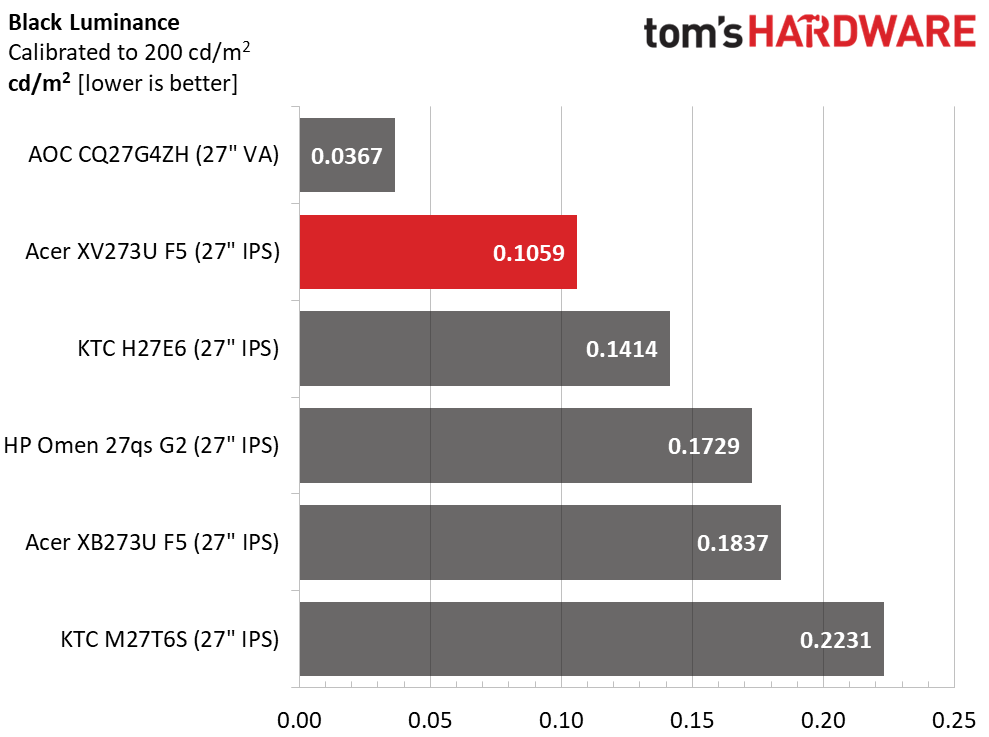 Tom's Hardware
 Tom's Hardware
 Tom's Hardware
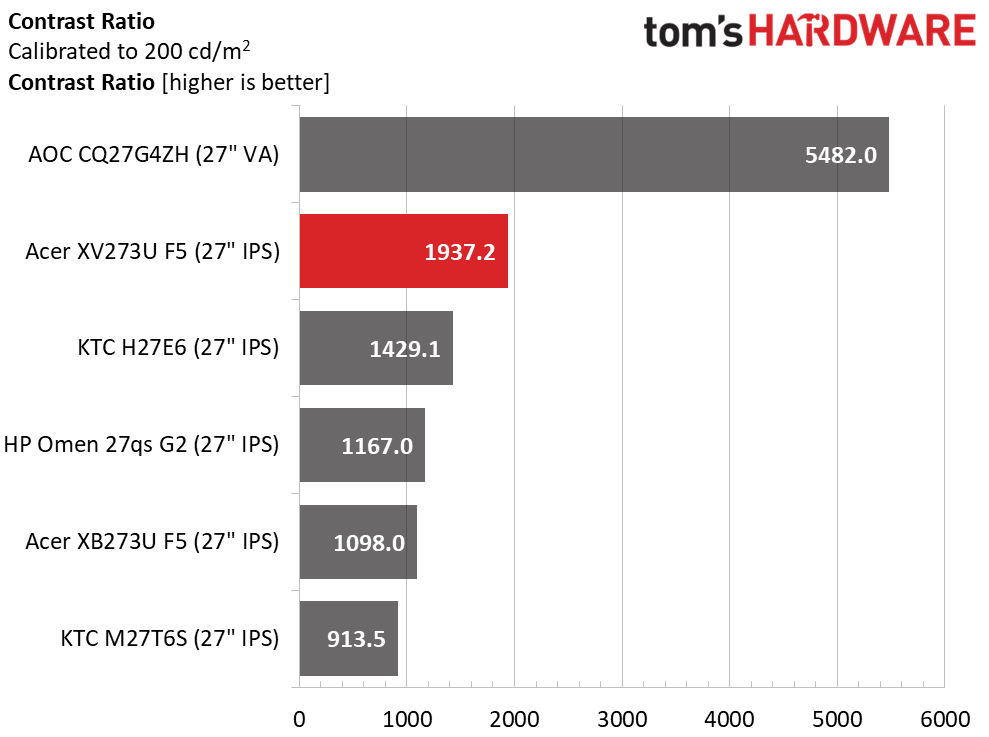
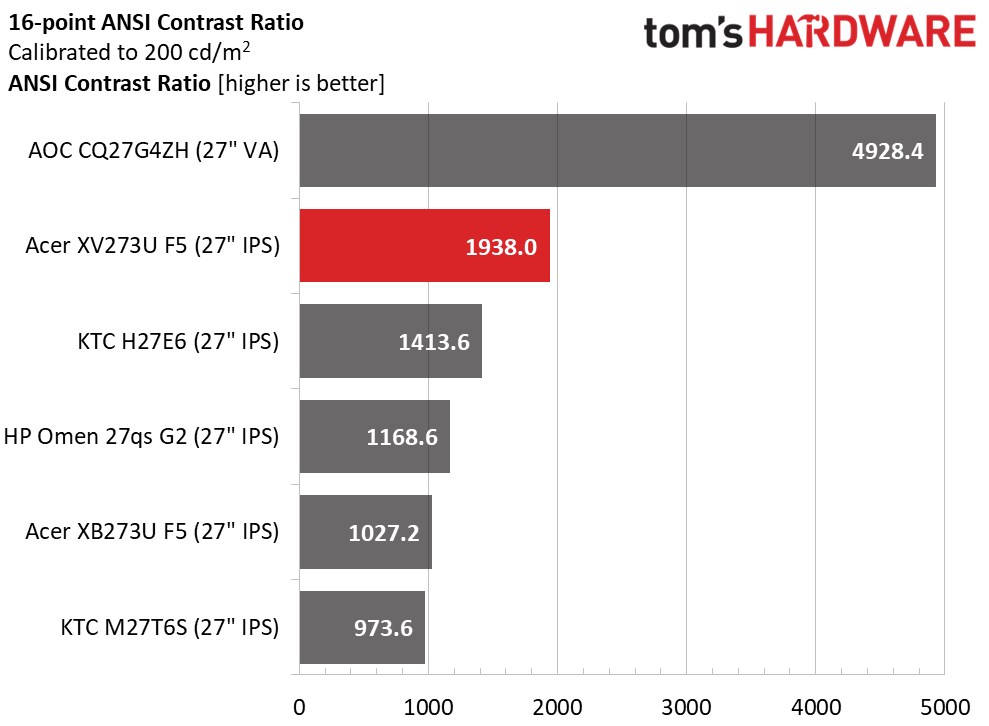
During calibration, I had to lower the contrast slider a bit to solve a clipping issue, but that didn't make much difference in dynamic range. It's still an excellent 1,937.2:1, well ahead of the next best KTC. The ANSI score is even more impressive at 1,938:1. It's rare that any monitor matches its static and intra-image results in my tests. This is excellent performance.
Test Takeaway: The XV273U F5 tries hard to be an OLED with its superb contrast and deep black levels. It's bright when needed as well, with nearly 500 nits of peak output for SDR content. It also shows excellent quality control with near-identical static and ANSI contrast numbers.
MORE: Best Gaming Monitors
MORE: How We Test PC Monitors
MORE: How to Buy a PC Monitor
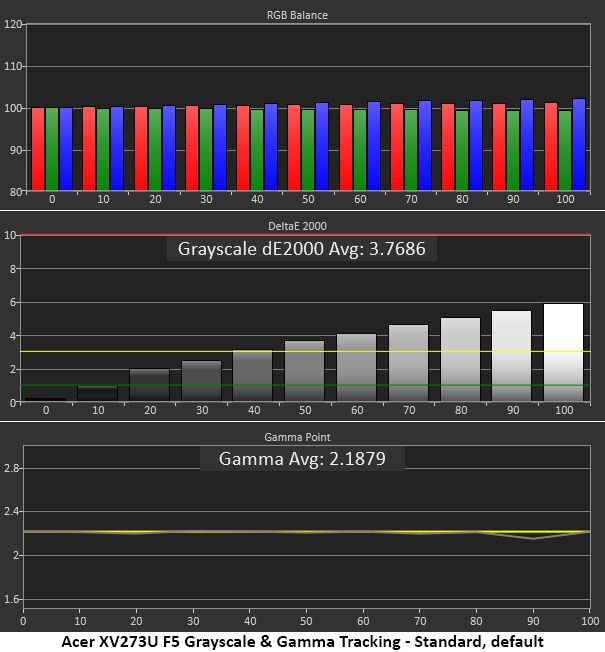
The XV273U F5 ships in its Standard picture mode and includes plenty of picture options like gamma presets, color temps, RGB sliders with two-point control and a gamut selector.
Grayscale and Gamma TrackingOur grayscale and gamma tests use Calman calibration software from Portrait Displays. We describe our grayscale and gamma tests in detail here.
 Portrait Displays Calman
 Portrait Displays Calman
 Portrait Displays Calman
The initial grayscale run shows visible errors starting at the 50% brightness step. The pattern looks a little cool in tone though it's not too far off the mark. I would definitely calibrate, but many users will be satisfied with the image. And that's largely because gamma is within a hair of perfect. Only the tiniest dip happens at 90%, and that is well below the visible threshold. Gamma this good makes the image more textural and realistic. It also increases perceived color saturation.
Calibration takes the XV273U F5 to reference level. All errors are under 1dE except 100%, which just cracks the line. It doesn't get much better than this. Gamma improves a tad as well, with that 90% dip almost gone. This is excellent performance.
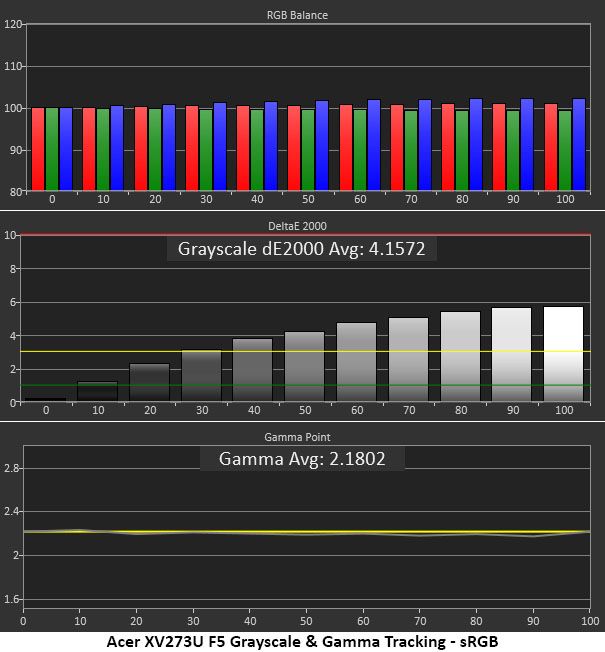
Picking the sRGB color space grays out all other calibration controls, so you get great gamma, but that cool grayscale returns. It's not a big deal, but I'd like the RGB sliders available. This is decent performance.
Comparisons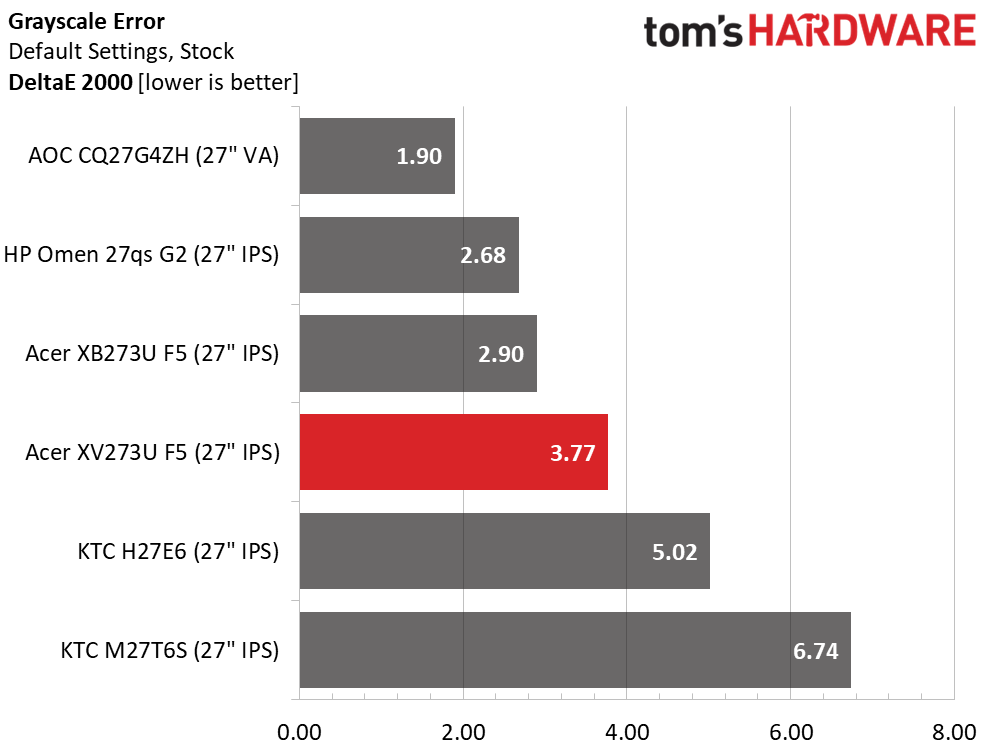 Tom's Hardware
 Tom's Hardware
 Tom's Hardware
 Tom's Hardware
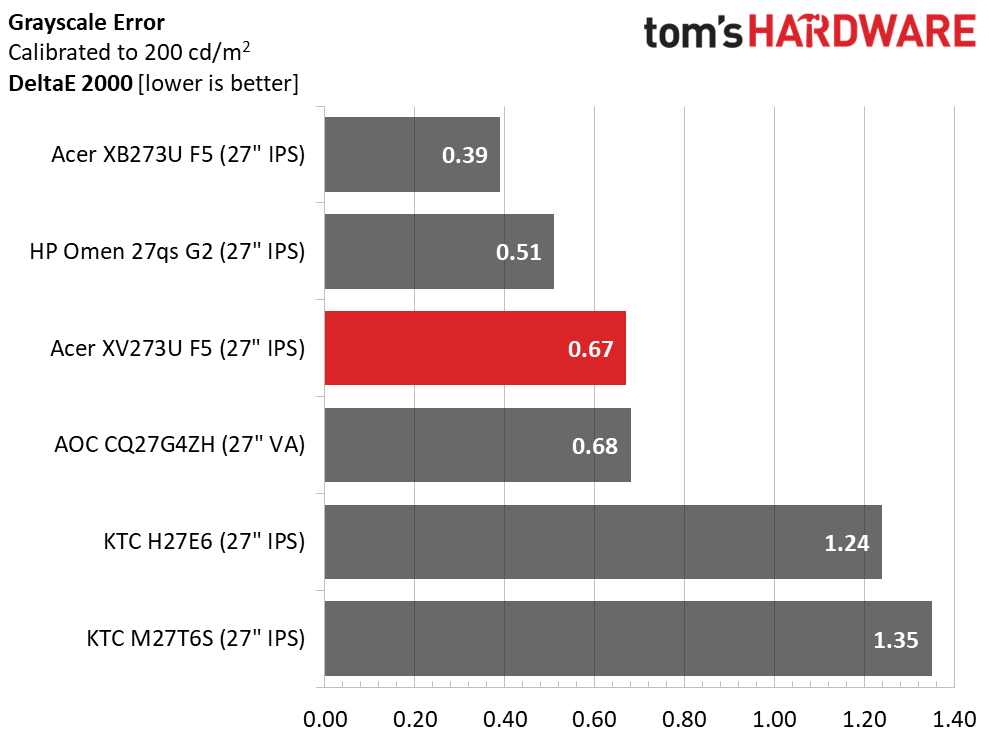
The XV273U F5 finishes fourth in the comparison and just cracks the should calibrate" line. Most users will be satisfied with the picture, but since a few adjustments can produce reference-quality results, it's worth a little effort. That takes the average error down to 0.67dE, which is awesome but not quite as good as its predecessor, the XB273U F5, or the HP.
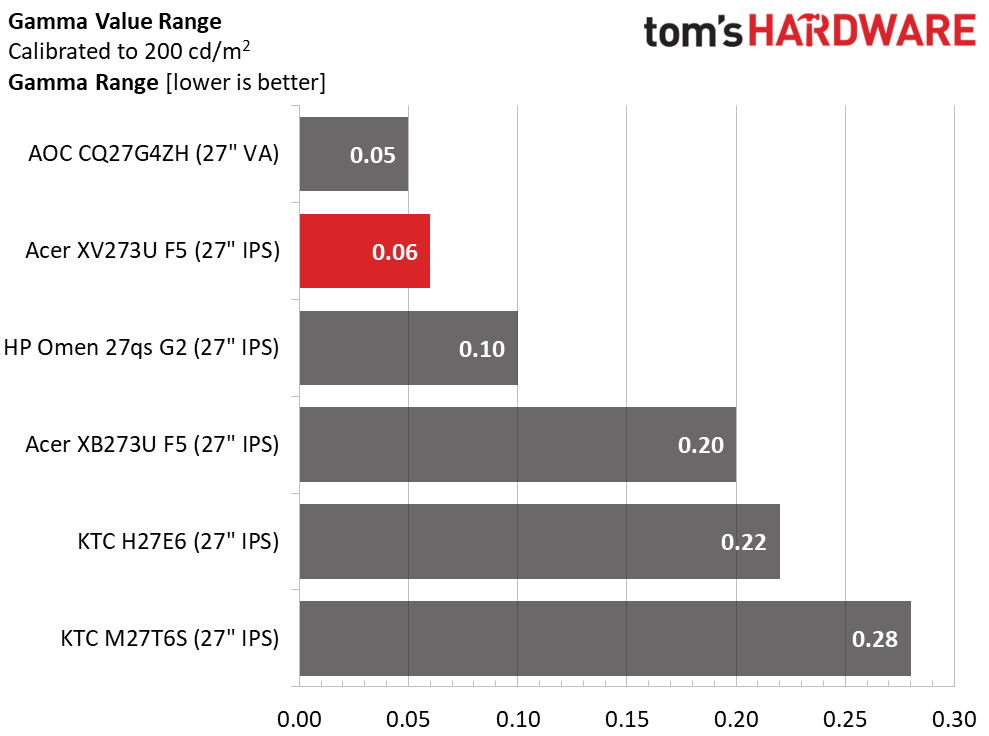
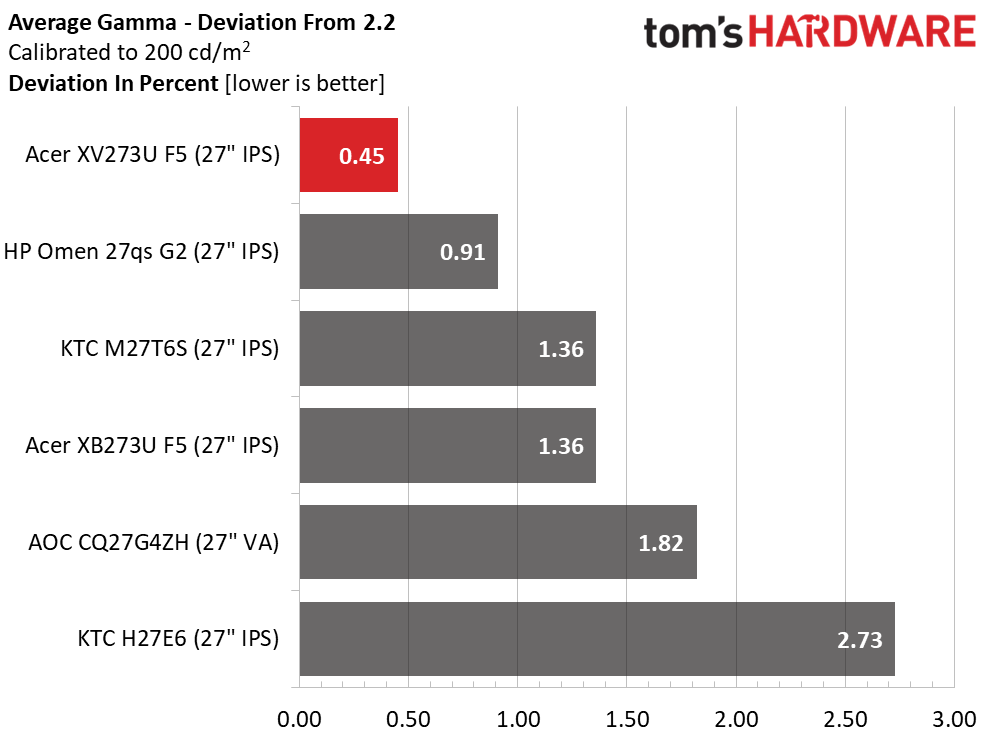
The gamma value range is about as tight as it gets, though the AOC is 0.01 better. But when compared to the 2.2 reference, the XV273U F5 comes out on top with just a 0.45% deviation. The actual value is 2.19. The XV273U F5 has gamma on par with the most accurate pro monitors I've reviewed.
Color Gamut AccuracyOur color gamut and volume testing use Portrait Displays' Calman software. For details on our color gamut testing and volume calculations, click here.
 Portrait Displays Calman
 Portrait Displays Calman
 Portrait Displays Calman
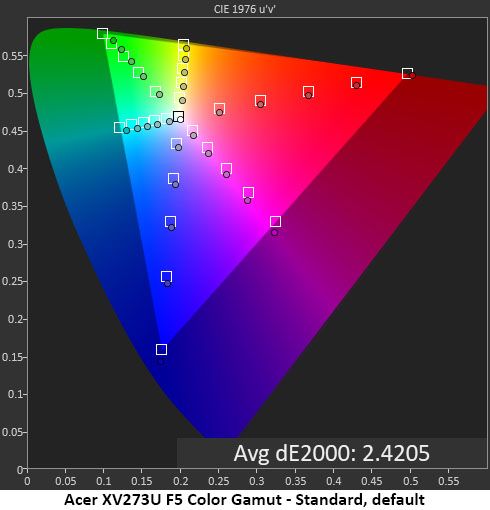
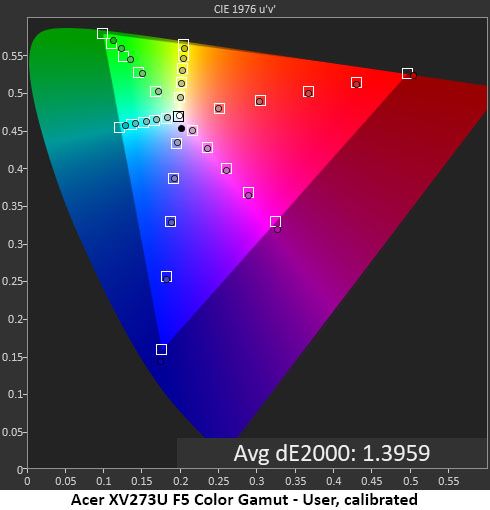
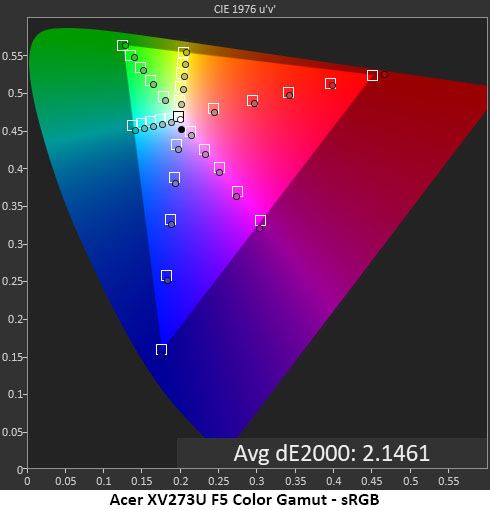
The XV273U F5's initial color measurement is good, but there is room for improvement. Saturation levels are spot-on thanks to the near-perfect gamma, but hues are slightly off due to grayscale errors. You can see what I mean in the next chart where my grayscale calibration has been done. Now, every point is either inside or in contact with its target box. It doesn't get much better than that.
The sRGB mode is quite close to the mark, with a slightly warm grayscale but perfect gamma. There are slight hue errors in cyan and magenta, but other colors are spot-on. If the RGB sliders were available in sRGB mode, this chart could be improved, though it is already good enough for color-important applications.
Comparisons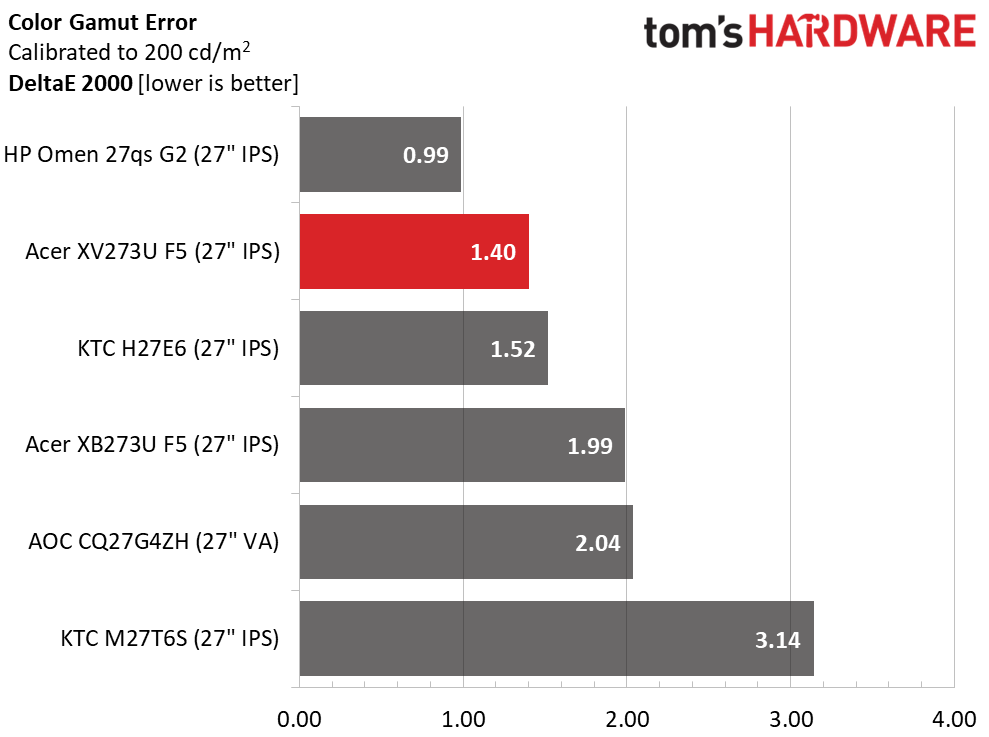 Tom's Hardware
 Tom's Hardware
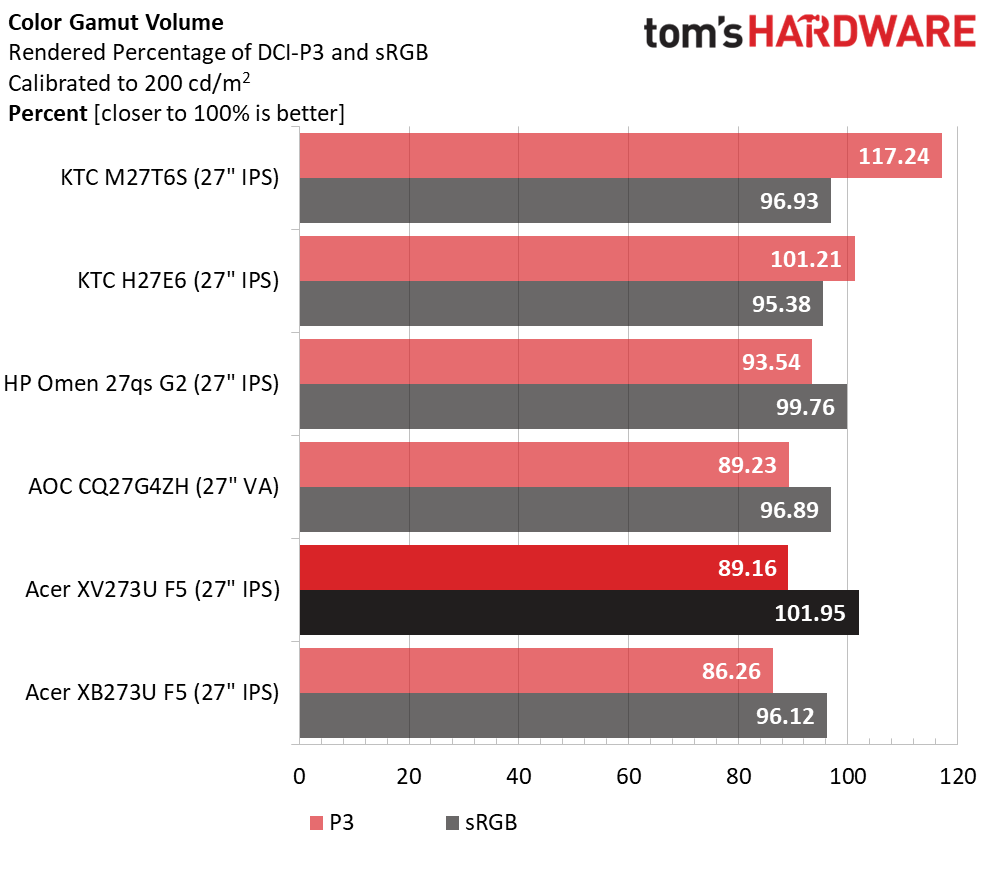
The XV273U F5 has superb color accuracy and gamut coverage, with only minor errors that won't diminish the picture. A 1.40dE final color score is among the best I've recorded. In the gamut volume test, it achieves 89.16% DCI-P3 coverage, which is about average for non-Quantum Dot LCD panels. It only comes up a tad short in the green primary. sRGB coverage comes close to 102% thanks to a little bonus red.
Test Takeaway: The XV273U F5 has excellent color accuracy once calibrated. Out of the box, it's still solid. In either case, it has gamma tracking on par with the best professional monitors. Color coverage is about average for non-Quantum Dot screens with around 90% of DCI-P3. That suits it well for HDR material.
MORE: Best Gaming Monitors
MORE: How We Test PC Monitors
MORE: How to Buy a PC Monitor
Our HDR benchmarking uses Portrait Displays' Calman software. To learn about our HDR testing, see our breakdown of how we test PC monitors.
The XV273U F5 accepts HDR10 signals with a manual switch. You must apply the signal first, then choose one of the two HDR picture modes, Auto or HDR 600.
HDR Brightness and Contrast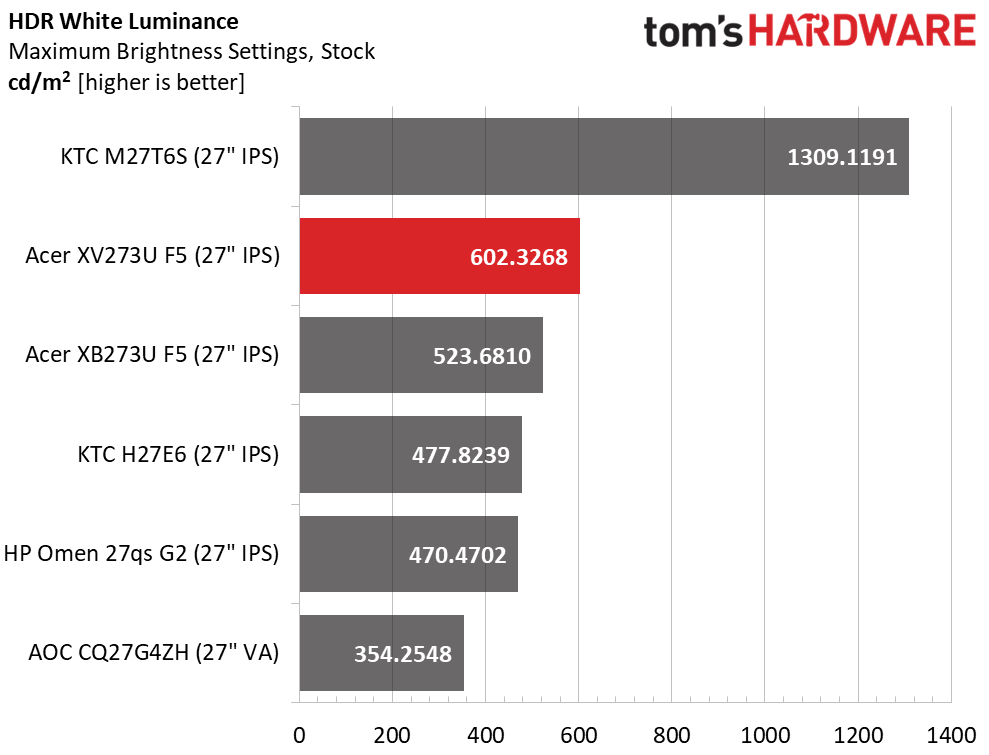 Tom's Hardware
 Tom's Hardware
 Tom's Hardware
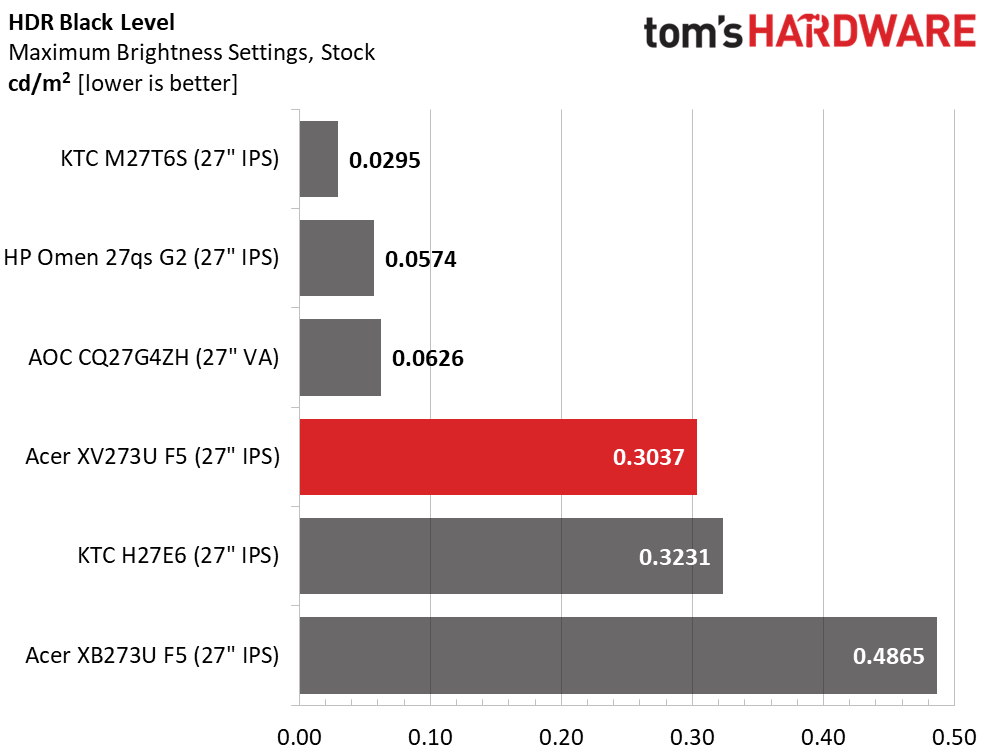
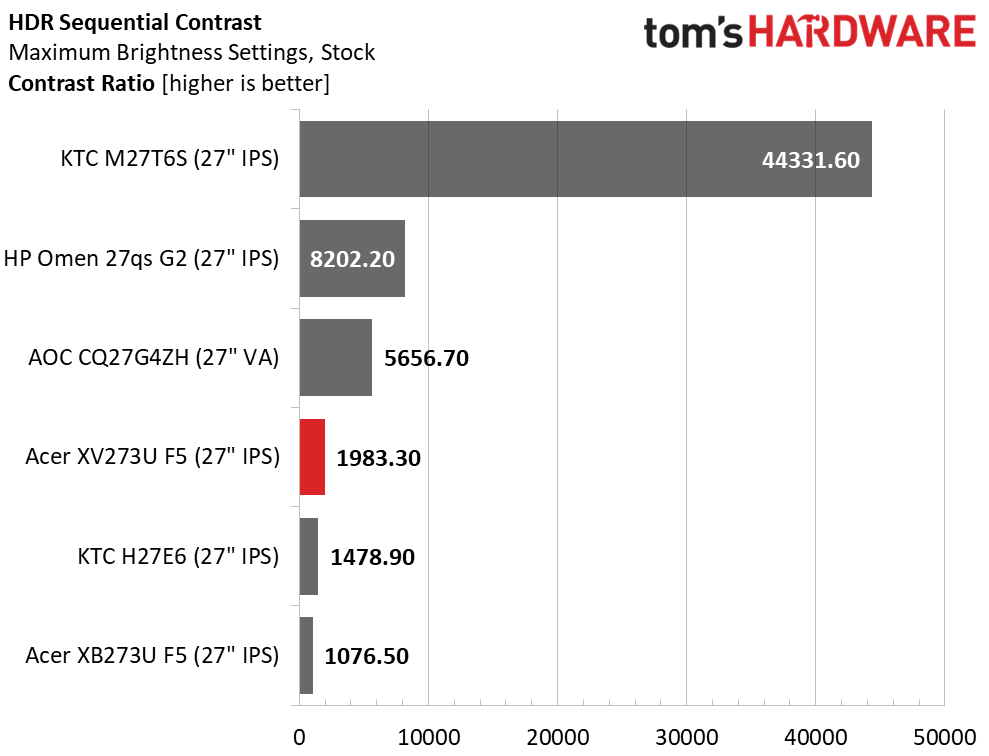
I measured the same peak output in both HDR modes, Auto and HDR 600. The XV273U F5 just cracks the 600-nit mark, earning its VESA Display HDR 600 certification. There is no dimming, either field or zone, to reduce the black level, so contrast is the same as SDR, 1,983:1. This is solid performance, but the HP, KTC, and AOC use dimming to lower their black levels and increase dynamic range, which ultimately provides more impact.
Grayscale, EOTF and Color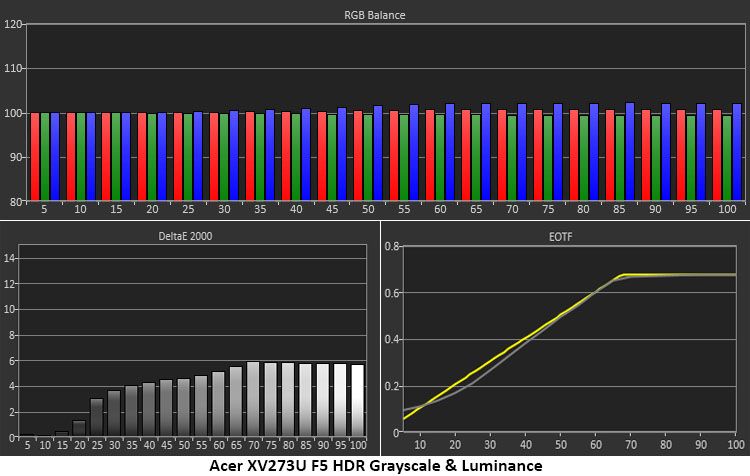 Portrait Displays Calman
 Portrait Displays Calman
The XV273U F5 has a slightly cool grayscale in HDR mode, with errors visible from the 25% step and brighter. This flattens the image a little, but that is mitigated by excellent EOTF tracking. Aside from a light 0% reading, the measurements stick close to the reference line and hit the correct tone map transition point at 65%. This is where it should be for the measured black and white thresholds.
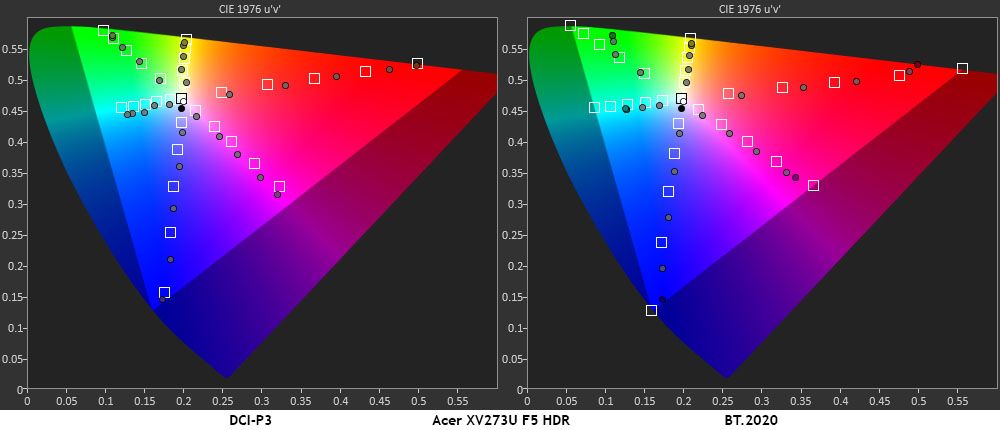
In the color test, you can see some oversaturation in red and blue while green is close to its targets. That primary comes up a tad short at 100%, which was also the case in my SDR tests. You'll need Quantum Dots or a Tandem OLED to get more green than this. Hues are true for all colors except magenta and cyan, which are pulled off target by the cool grayscale. In the BT.2020 test, color runs out at 85% red, 70% green, and 95% blue.
Test Takeaway: The XV273U F5 has solid HDR contrast but gives away some performance to other monitors that have zone or field dimming. It mitigates this somewhat with very accurate EOTF tracking. Color is also close to the mark and there's plenty of saturation there to provide decent impact for HDR content.
MORE: Best Gaming Monitors
MORE: How We Test PC Monitors
MORE: How to Buy a PC Monitor
There's no question that OLED gaming monitors have raised the bar for motion quality, gaming feel and quick response. But LCD isn't done yet. With a high refresh rate and good video processing, an IPS panel can provide the same experience. Acer has clearly raised the bar with its Nitro XV273U F5.
At 540 Hz, the XV273U F5 has no visible motion blur. At lower refresh rates, the overdrive keeps motion smooth and if you want a backlight strobe, it's available and is one of the best implementations out there. You can run this monitor with any gaming PC or console. It isn't limited to just expensive video cards. And it's super cool to see 1000" displayed on the screen's frame counter.
The XV273U F5 panel also provides superb contrast. Though it isn't going to displace OLED or VA in the black level contest, I measured a 2,000:1 ratio, which puts it well ahead of the IPS average. I also measured perfect gamma, which resulted in a highly textured image with vivid color saturation and 90% DCI-P3 coverage. It can be enjoyed without calibration, but a few tweaks of the RGB sliders put it in pro-monitor territory.
(Image credit: Tom's Hardware)I also enjoyed the white aesthetic, mainly because it's something different. It stands out from the sea of black monitors in a good way. The only misses for me were the lack of USB ports and the lack of dimming to increase HDR contrast. But neither of these things diminishes its gaming prowess. It's addictive in every respect.
If you want the smoothest motion and the quickest response from your next gaming monitor, and you don't want an OLED, the Acer Nitro XV273U F5 deserves serious consideration. Definitely check it out.
MORE: Best Gaming Monitors
MORE: How We Test PC Monitors
MORE: How to Buy a PC Monitor