Sony INZONE M10S II 27-inch 540 Hz QHD OLED gaming monitor review: A major player in a crowded field
When I look at my collection of computer monitor reviews from the past 13 years, I see a tremendous number of displays from manufacturers that begin with the letter A. But there are lesser-represented companies with the same level of engineering expertise and high quality as mainstream brands when it comes to the best gaming monitors.
If you're old enough to remember CRTs, then you've heard of the Sony Trinitron tube. This was an evolved display with a cylindrical shape rather than the bubble screens that fronted other CRTs. It wasn't completely flat, but it curved only along one axis. And it was coveted by users for its sharp and undistorted image.
Today, you can still buy a premium gaming monitor from Sony, and here is its latest: the INZONE M10S II. It's a 27-inch OLED with QHD resolution and 540 Hz refresh rate. It runs at 720 Hz in HD and supports Adaptive-Sync, HDR, and wide-gamut color. Let's take a look.
Sony INZONE M10S II SpecsPanel Type / Backlight | Organic Light Emitting Diode (OLED) |
Screen Size / Aspect Ratio | 27 inches / 16:9 |
Max Resolution and Refresh Rate | 2560x1440 @ 540 Hz |
1280x720 @ 720 Hz | |
FreeSync and G-Sync Compatible | |
Native Color Depth and Gamut | 10-bit / DCI-P3+ |
Response Time (GTG) | 0.02ms |
Brightness | 283 nits full field |
543 nits 25% window | |
Contrast | Unmeasurable |
Speakers | None |
Video Inputs | 1x DisplayPort 2.1 |
2x HDMI 2.1 | |
Audio | 3.5mm headphone output |
USB 3.2 | 1x up, 2x down |
Power Consumption | 43.5w, brightness @ 200 nits |
Panel Dimensions WxHxD w/base | 23.8 x 14.9-19.7 x 7.8 inches (604 x 378-500 x 197mm) |
Panel Thickness | 2.28 inches (58mm) |
Bezel Width | Top: 0.28 inch (7mm) |
Top/sides: 0.3 inch (8mm) | |
Bottom: 0.47 inch (12mm) | |
Weight | 13.64 pounds (6.2kg) |
Warranty | 3 years |
The M10S II starts with an OLED panel that runs natively at 2560x1440 QHD resolution and 540 Hz. A dual-refresh mode bumps that up to 720 Hz at HD, 1280x720 pixels. Adaptive-Sync runs on both AMD and Nvidia platforms, and you get HDR support with the ability to calibrate for HDR10 content. The screen coating is unusual in that it's matte, while nearly every OLED that crosses my desk is shiny. That finish is extremely effective at rejecting image-spoiling ambient light. It literally swallows up reflections and displays the image without any visible grain.
The M10S II delivers a huge color gamut that, in my tests, covered nearly 110% of DCI-P3. I found that calibration was necessary, but the reward was a beautifully saturated image. There's an sRGB mode available if you need that smaller gamut for photography or graphics work. You also get variable brightness to stretch dynamic range. It has two settings that had a positive impact in both practice and testing. I'll tell you more about that on page four. Peak output is around 475 nits in SDR mode and 543 nits in HDR mode when measuring a 25% window pattern.
For gaming, you get plenty of goodness in the form of static and dynamic aiming points, OLED anti-flicker, black frame insertion for blur reduction at low frame rates, an FPS indicator, and a set of timers. Missing are internal speakers and LED lighting, but you do get USB ports for peripherals. There's panel protection in the form of advanced heat management and OLED care options, such as panel refresh and pixel orbiting. The latest I/O ports also include one DisplayPort 2.1 and two HDMI 2.1 ports. A pair of headphones can be plugged into the provided 3.5mm jack. There's a comprehensive OSD for control, or you can use Sony's INZONE Hub app, which is free to download.
The M10S II sells for $1,100 at this writing, so it's primed to compete with other speedy competition displays. While it isn't quite as loaded as an Asus ROG Swift screen, it delivers equal performance and image quality.
Assembly and AccessoriesThe M10S II's carton gets the full cardboard treatment with no crumbly foam in sight. The panel, upright, and base assemble without tools. If you plan to use an arm, there's a 100mm VESA mount with fasteners included. Also in the box are a DisplayPort cable, an external power brick, and a sheet of INZONE stickers, in case you want to decorate your Trapper Keeper.
Product 360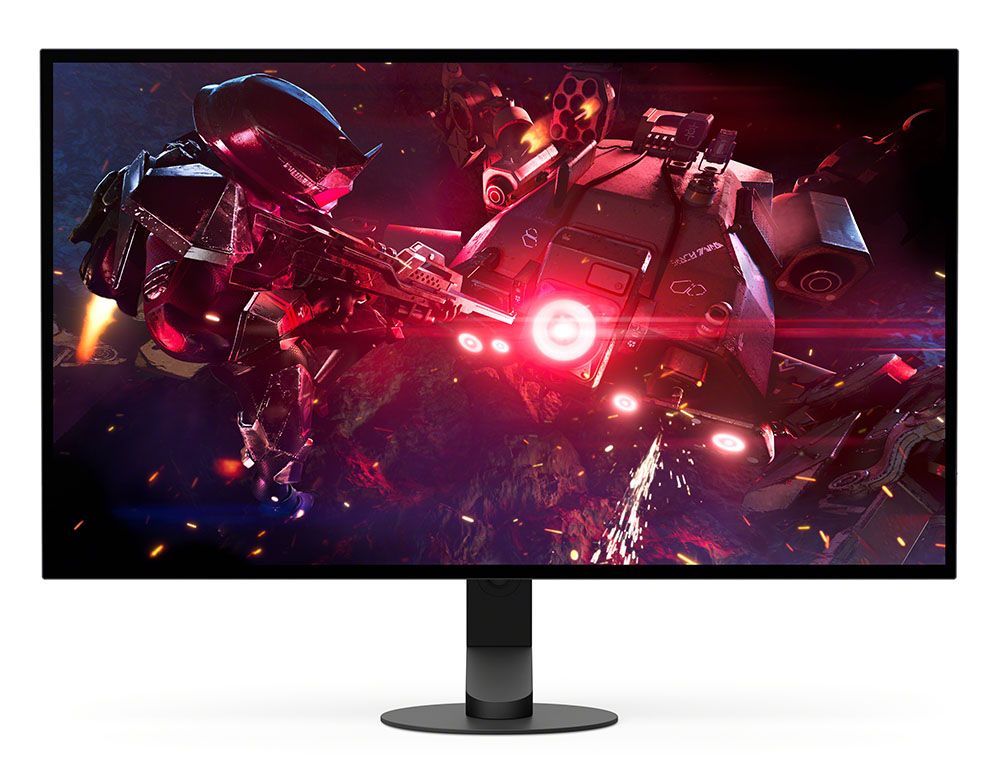 Sony
Sony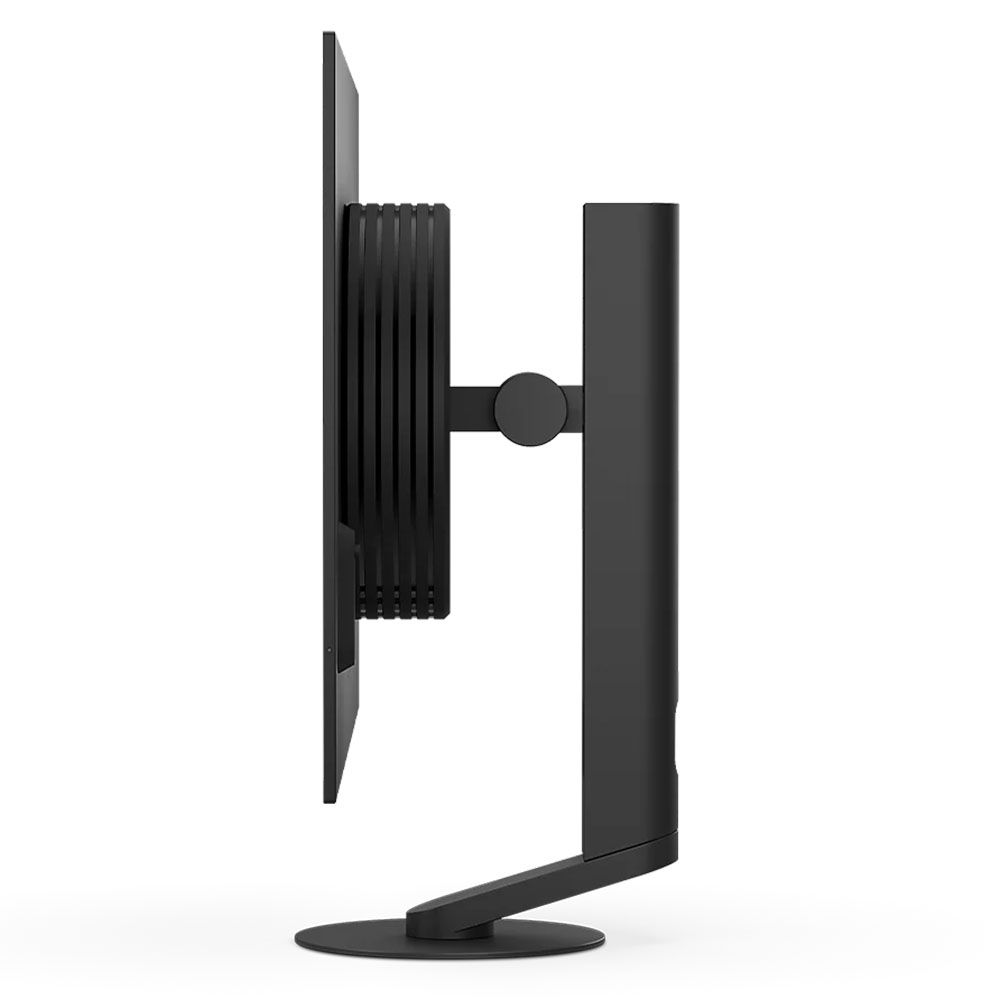 Sony
Sony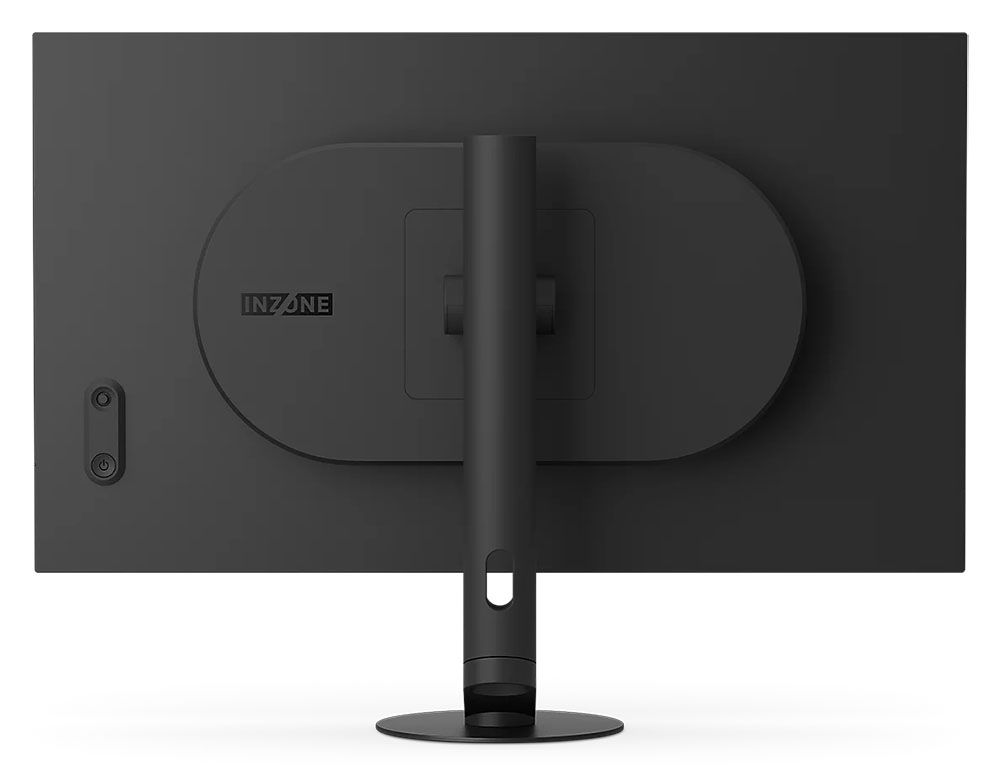 Sony
SonyThe M10S II's most visible feature is its small-footprint base. Honestly, when I took it out of the box, I was dubious about its stability. It's a heavy metal disc just six inches across. The upright bolts to its center with an offset that extends the depth to almost eight inches. It looks like it would fall over easily, but I gave it a few shakes, and it remained stable. This is geometry at work. The swivel point is where the upright and base meet, allowing you to swing the screen 360 degrees. You also get a 5/35-degree tilt and a 4.8-inch height range, no portrait mode, though. Movements are firm and smooth with no wobble or play.
Reach around the back right, and you'll find a small protrusion with a power button and a joystick for the OSD. Uniquely, the power LED is positioned on the side, just the right spot to light up your hand when you press the button. It isn't visible from the front, but you can turn it off if you wish.
The side view shows a thick component bulge attached to a thin screen backed by a metal plate. It's just 5mm thick, and the bezel is narrow too: 7mm on top, 8mm on the sides, and 12mm at the bottom. It's flush, so you can't see it when the power's off.
The I/O panel is up and under and includes two HDMI 2.1 ports, one DisplayPort 2.1, and USB, one upstream and two downstream ports. There are no internal speakers, so you can plug headphones into the 3.5mm jack. An additional USB port is there for service and firmware updates.
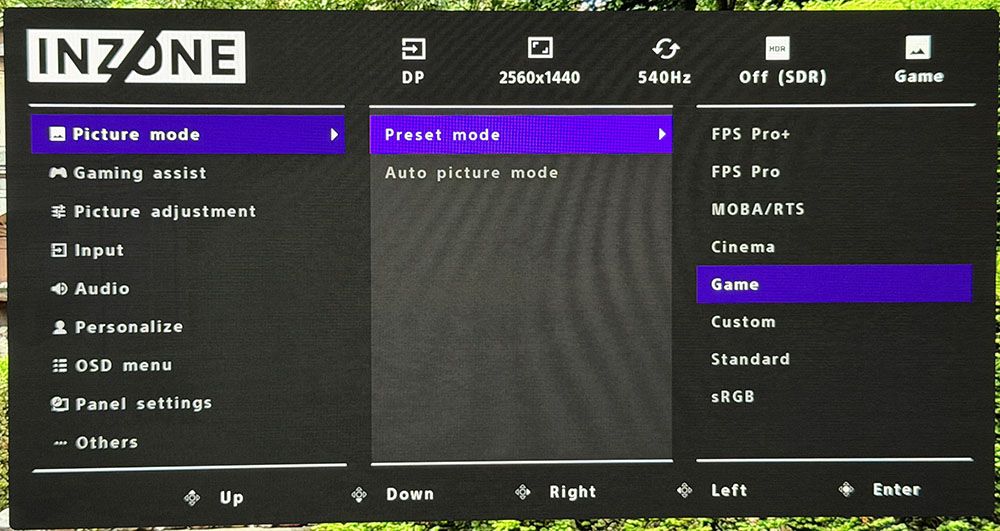
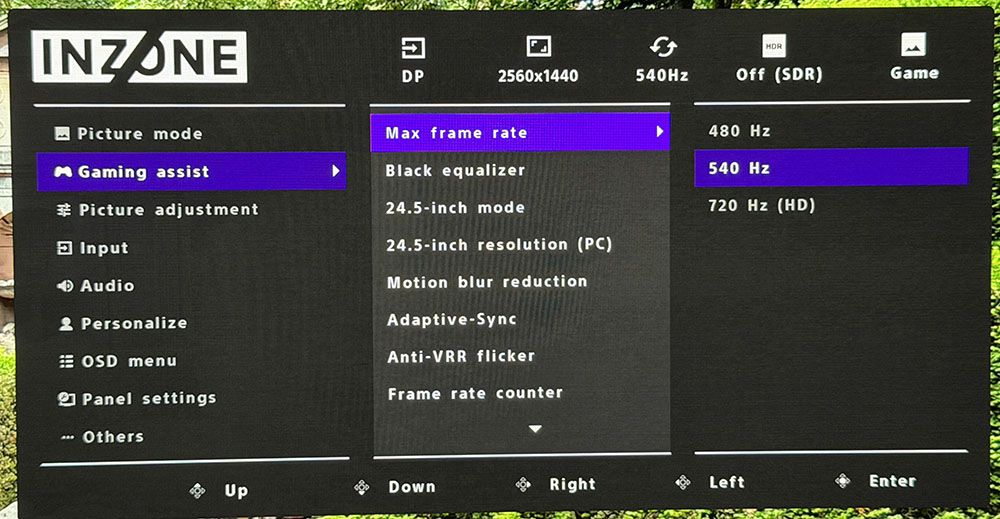
OSD FeaturesPressing the M10S II's joystick brings up an efficiently organized OSD. It's divided into nine sections and has plenty of calibration and convenience options.
 Tom's hardware
 Tom's hardware
 Tom's hardware
 Tom's hardware
 Tom's hardware
The OSD begins with picture modes, eight in total. The default is Game, and it looks good but needs a bit of tweaking to align it with broadcast standards. The other modes are aimed at specific game types or tasks, and there's an accurate sRGB mode. I found the best results using Standard with a grayscale calibration, which you can read about below and on page four.
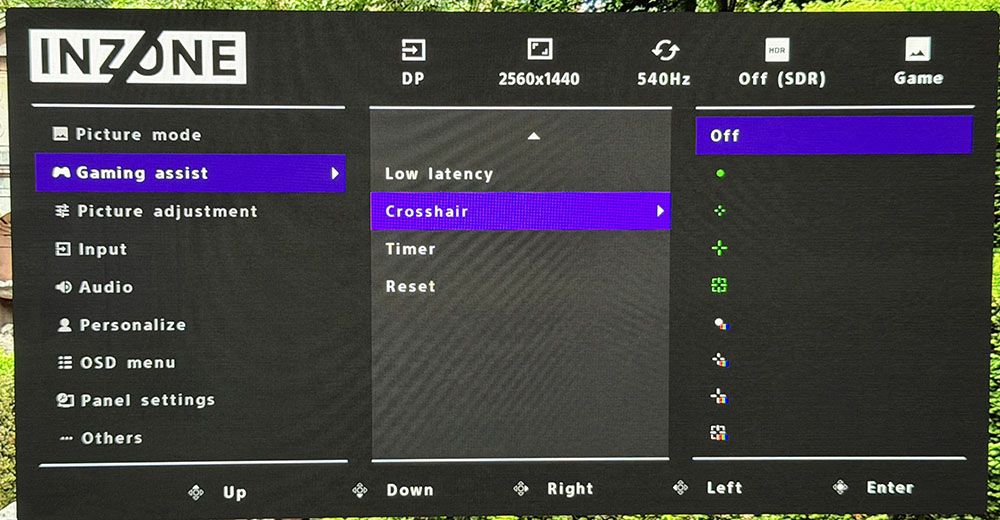
Gaming Assist includes the refresh rate switches and 24.5-inch modes which deliver 1080 vertical pixels while maintaining a 1:1 mapping. That way, there's no scaling to soften the image. You also get motion blur reduction via a backlight strobe, which works well at low frame rates. It cuts brightness by around 30%. Anti-VRR flicker is unique to OLED monitors and prevents flickering during rapid frame-rate transitions. Hint: if your video card is fast enough to keep the action above 300 Hz, you won't get flicker. Also in this menu are an FPS counter and aiming points, both static and dynamic.
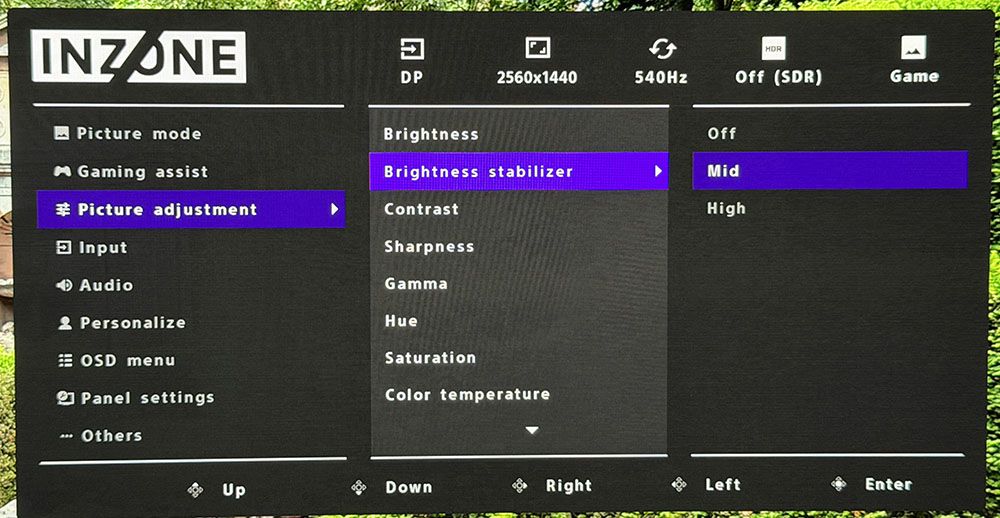
In the Picture adjustment menu, you'll find the variable brightness options, which Sony calls Brightness stabilizer. It's counter to other monitors I've encountered, in that off means variable brightness is fully engaged. I experimented with all three settings and found the best gamma, and therefore quality, on the Mid setting. Also, here are gamma presets and color temps with a set of RGB sliders. There is no color gamut selector, but you can opt for sRGB in the sRGB picture mode.
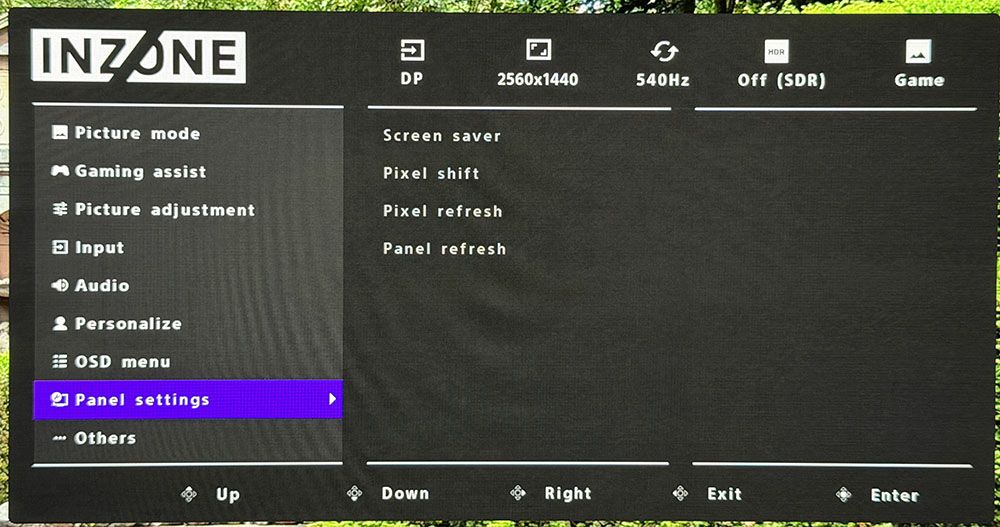
For panel care, the M10S II includes pixel shift, a screen saver, and refresh routines. Sony differentiates between pixel and panel refresh. I ran the pixel refresh when I first powered up my sample. Selecting panel refresh prompted a message that it should only be run once a year, so I concluded it was a very aggressive refresh routine.
Sony INZONE M10S II Calibration SettingsThe M10S II arrived set to its Game mode, which had a cool grayscale and light gamma. I could fix the grayscale but not the gamma, so I turned to Standard mode, which was much better. After a few clicks of the RGB sliders, I had much improved grayscale, gamma, and color tracking. The gamut volume is just under 110% of DCI-P3, which is too large for the SDR standard but looks great, nonetheless. If you want sRGB, it's there in the preset mode list. It has good gamut accuracy and supports grayscale calibration but not gamma adjustment. My recommended settings are below.
For HDR content, the M10S II switches over automatically and provides four specific picture modes. Game works the best, and I noted that it allowed grayscale calibration and brightness adjustment. You can see those test results on page five.
Picture Mode | Standard |
Brightness 200 nits | 51 |
Brightness 120 nits | 28 |
Brightness 100 nits | 23 |
Brightness 80 nits | 17 |
Brightness 50 nits | 8 (min. 22 nits) |
Contrast | 75 |
Gamma | 2.2 |
Color Temp User | Red 100, Green 100, Blue 98 |
Sony's marketing for the M10S II clearly targets competition and hardcore gamers, and for those users, it delivers. Whether you need 540 Hz or not, it is super quick. Motion resolution is perfect, which means moving objects and backgrounds have the same clarity as stationary elements. Camera pans are free from blur or smearing. Adaptive-Sync worked perfectly for me when using a GeForce RTX 4090 video card. Frame rates in Doom Eternal set to max detail ranged from 350 to 540fps.
The M10S II has a couple of features designed to reduce motion blur and smooth out the image, but I didn't find any need for them. Anti-flicker, which I've seen from Asus as well, is there to remove any flickering during frame rate transitions. I saw plenty of those with rates rapidly shifting 80-100fps by the second. There was no flicker. You also get blur reduction via backlight strobe. It only works below 270 Hz, and since my speeds never went below that, it wasn't needed. To engage it, turn off Adaptive-Sync first. The M10S II will automatically reduce the refresh rate. It works well and shows no evidence of phasing or ghosting.
Input lag is low enough that I perceived instant response to control inputs during the most frenetic battle maneuvers. My skills are average, but I see this monitor's benefit to a competitive gamer. The 720 Hz mode felt super quick even though its input lag is only a tad lower. Full-screen resolution is limited to 1280x720, but you can achieve dizzying frame rates in the process. Also available are 24.5-inch modes in which the picture occupies a portion of the screen. You can do 1920x1080 at 720 Hz this way or opt for 2368x1332 pixels in a 1:1 mapping.
In all scenarios, color and clarity are as good as it gets for the OLED genre. The M10S II has a huge color gamut, almost 110% of DCI-P3, and that shows in both SDR and HDR content. HDR has the additional capability of calibration, something most HDR monitors cannot do. I also liked the variable brightness options. The terminology is a little counterintuitive in that when Brightness stabilizer is off, variable brightness is engaged at maximum. The other settings, Mid and High, are less aggressive at modulating light output. I found the best gamma, and therefore picture quality, came from the Mid option.
As a 27-inch QHD flat panel, the M10S II is well suited for productivity and delivers a clean and colorful picture for general use. Small text is sharp and free of color fringing. Graphics and photos are deeply textured, and video looks great as well. The monitor makes a great personal TV. The only things I noted missing were internal speakers and LED lighting. But everything you need for gaming, entertainment, and work is there.
Takeaway: The M10S II is a competitor's dream with its speedy response, smooth motion resolution, and multitude of refresh and resolution options. It delivers a clean and colorful picture for both SDR and HDR content. The anti-glare layer is among the best I've seen, with no effects seen from ambient light reflections. It's a premium purchase for sure, but there is nothing it cannot do well.
MORE: Best Gaming Monitors
MORE: How We Test PC Monitors
MORE: How to Buy a PC Monitor
540 Hz OLEDs aren't common, and I could only find one other in my database to compare to the M10S II: Asus' PG27AQWP. Also in the mix are Alienware's AW2726DM, Gigabyte's MO27Q28G, ViewSonic's VX2738-2K, and Asus XG27AQWMG.
Pixel Response and Input LagClick here to read up on our pixel response and input lag testing procedures.
 Tom's Hardware
 Tom's Hardware
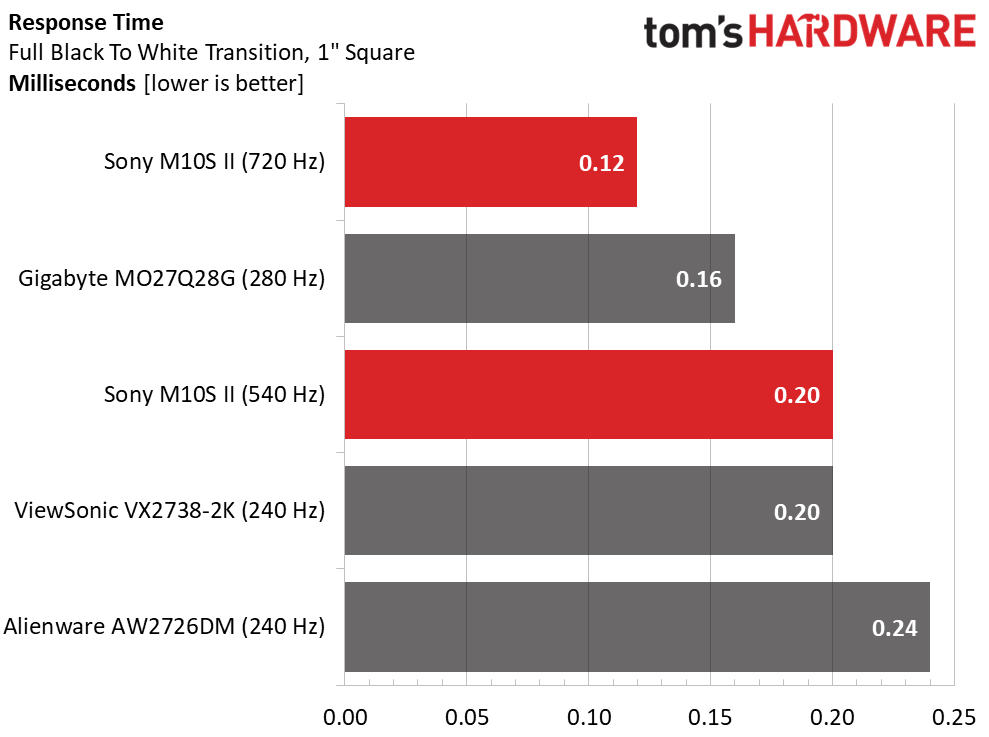
I can only include monitors tested with the Nvidia LDAT for a fair comparison, so I had to exclude the Asus screens from the response test results. The M10S II shows a difference between 540 and 720 Hz of 0.20 ms and 0.12 ms, respectively. You can't see this difference as it is well below the human eye's capabilities. Notice that the 240 Hz ViewSonic draws the one-inch white box in the same amount of time, and the Alienware is just behind at 0.24ms. Do you need a 540 Hz OLED? 240 Hz is enough for perfect motion resolution.
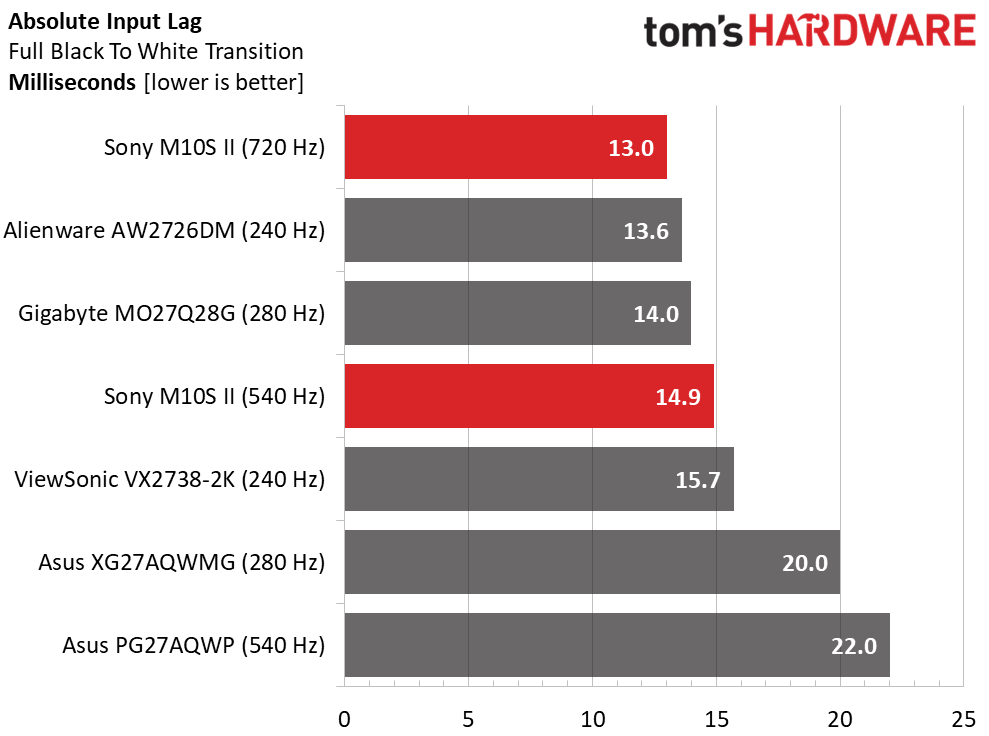
Faster refresh rates typically mean lower input lag, though not universally. The M10S II is quick at 14.9 ms, but again, it's pipped by a 240 and a 280 Hz screen. At 720 Hz, it sits on top. Note the 540 Hz PG27AQWP can only muster 22ms. Is that a problem? Not if you consider that human reaction time is typically around 200ms.
Test Takeaway: The M10S II is certainly a fast monitor and among the quickest 27-inch QHD OLEDs currently available. It gains a slight advantage in test results at 720 Hz, but not enough to make a visible difference. If you can drive it at 540 Hz in QHD resolution, you'll be rewarded with a superb feel and perfect motion resolution, with moving objects rendered as clearly as static ones.
Viewing Angles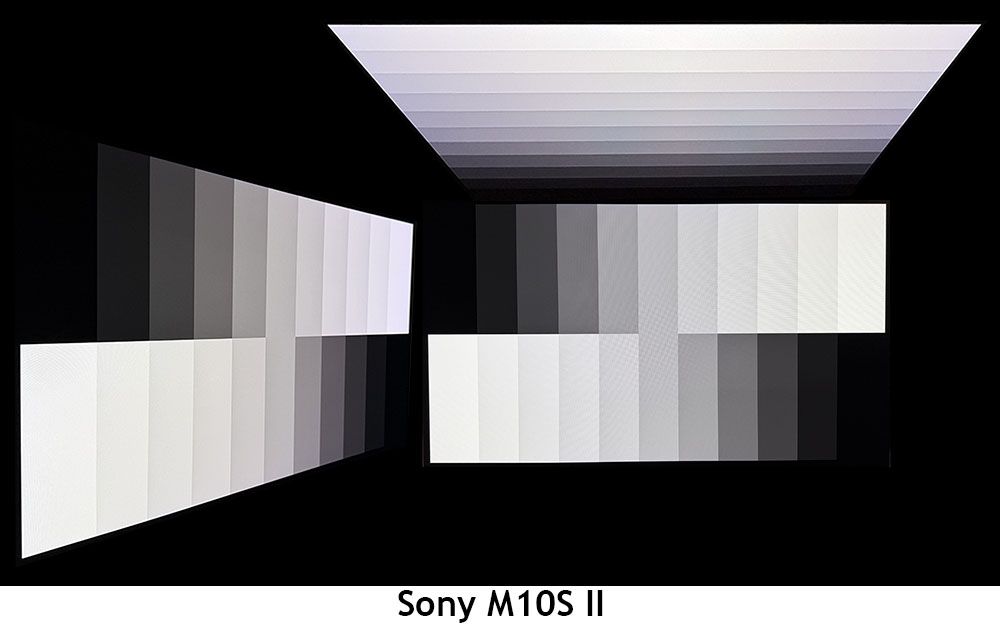
The M10S II shows a barely visible red tint at 45 degrees from the center, in both horizontal and vertical orientations. This is likely due to the anti-glare coating, which makes it the least shiny screen I've encountered. There's no reduction in light output or gamma, and even the top view has good detail rendering. This is excellent performance.
Screen UniformityTo learn how we measure screen uniformity, click here.
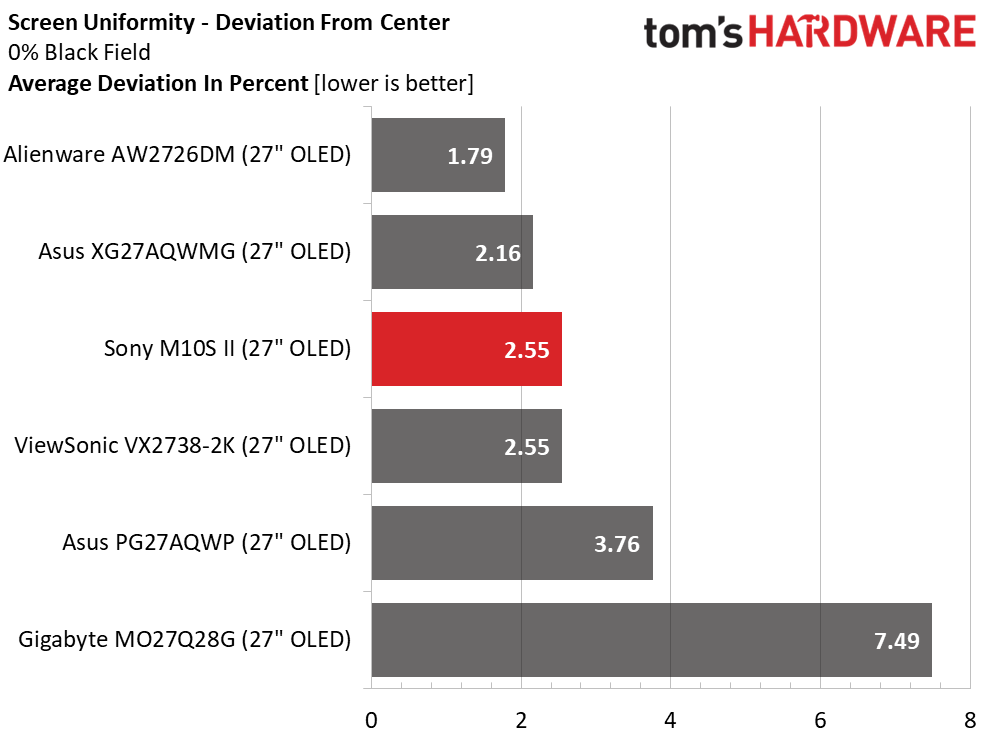
The M10S II has screen uniformity on par with the best monitors I've measured, OLED and LCD alike. 2.55% is about as good as it gets. I used the pixel refresh routine right after unpacking, which took five minutes, then ran moving patterns on the panel for a few hours before starting my tests. This is excellent performance.
MORE: Best Gaming Monitors
MORE: How We Test PC Monitors
MORE: How to Buy a PC Monitor
To read about our monitor tests in-depth, please check out Display Testing Explained: How We Test PC Monitors. We cover brightness and contrast testing on page two.
Uncalibrated - Maximum Backlight Level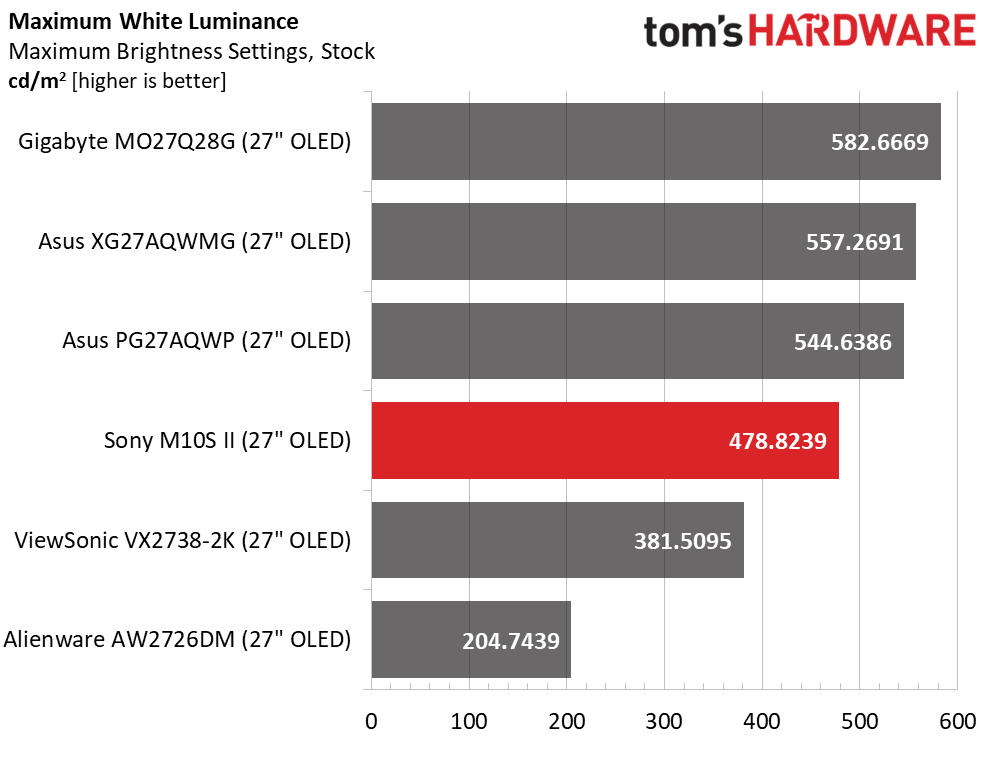 Tom's Hardware
 Tom's Hardware
 Tom's Hardware
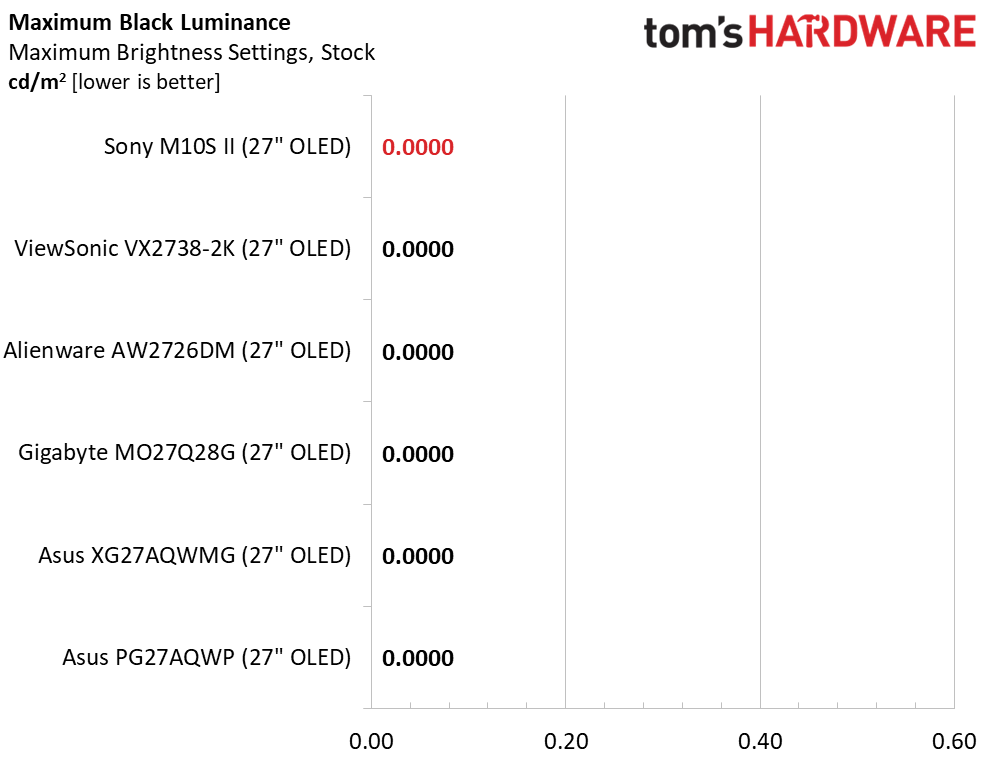
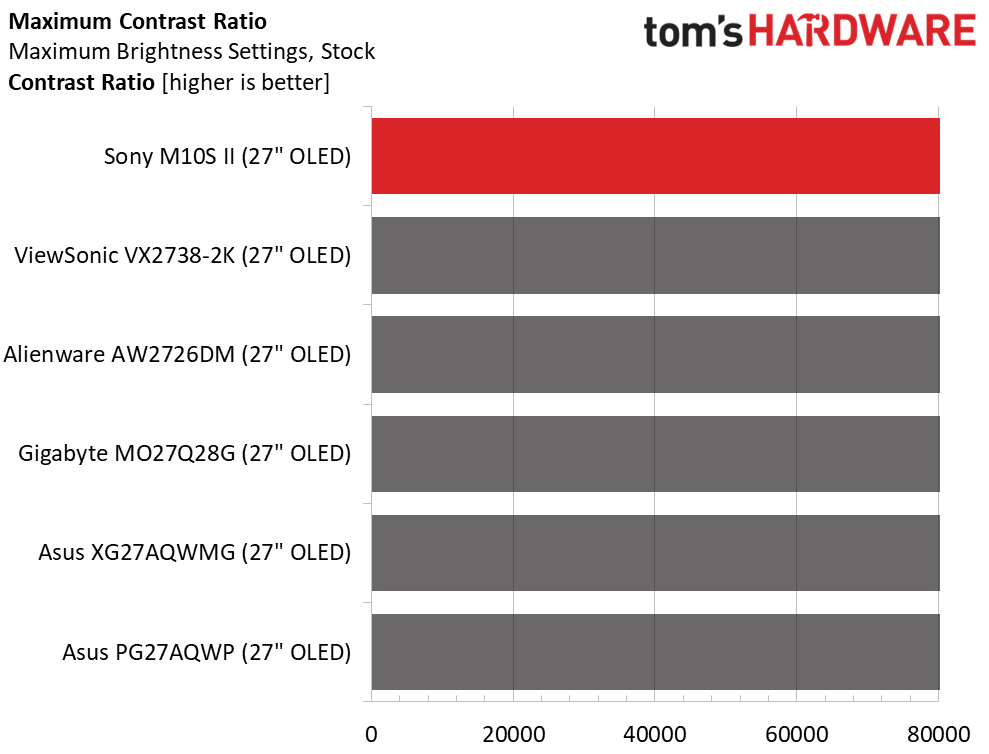
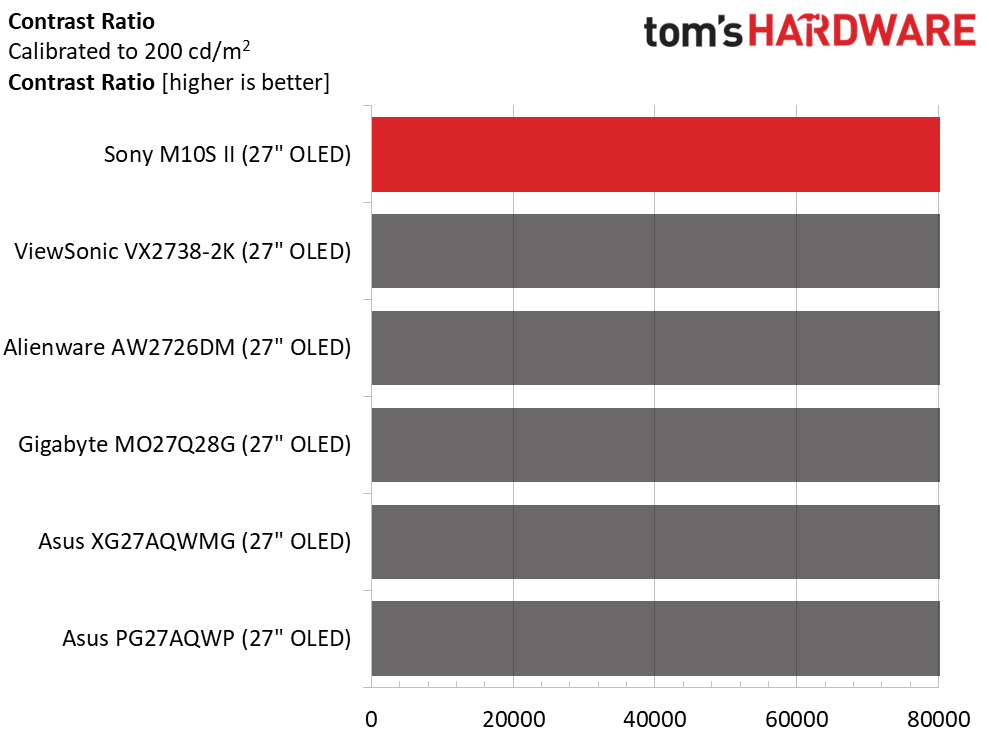
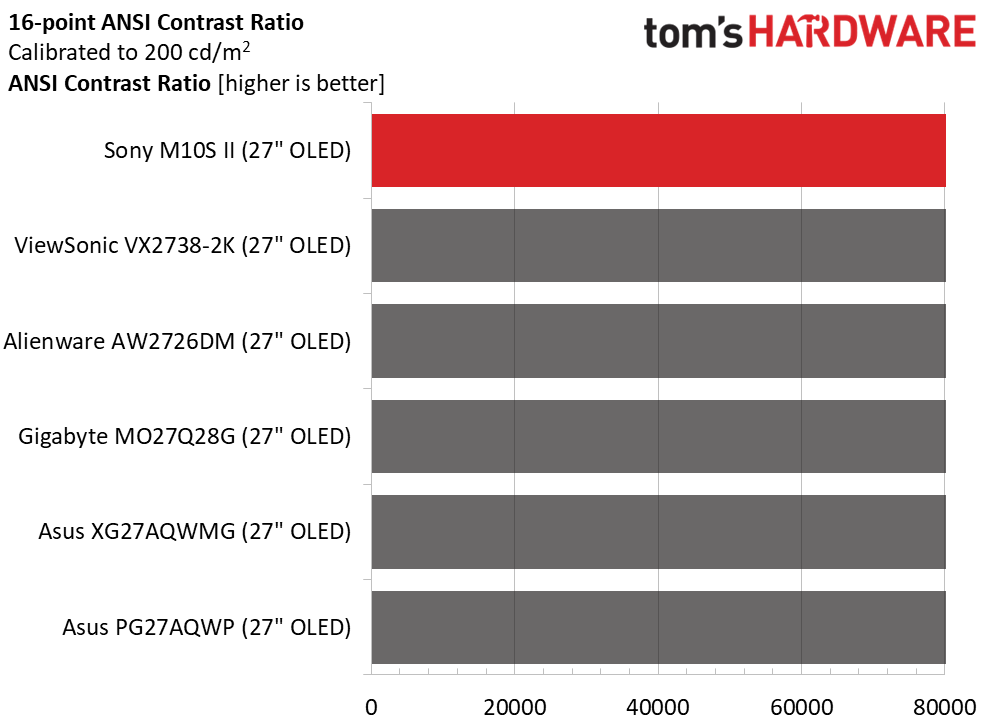
The M10S II includes both constant and variable brightness options. To find the peak luminance, I tested all three Brightness stabilizer settings. Off means variable brightness is fully engaged, measuring 478 nits with a 25% window pattern. A full field was 283 nits. Mid is 426 nits, and Off is the same 283 nits for any size window pattern or a full field. As you'll see on the next page, Mid delivers the best gamma and is the setting I used for my hands-on tests. Black levels and contrast could not be measured.
After Calibration to 200 nits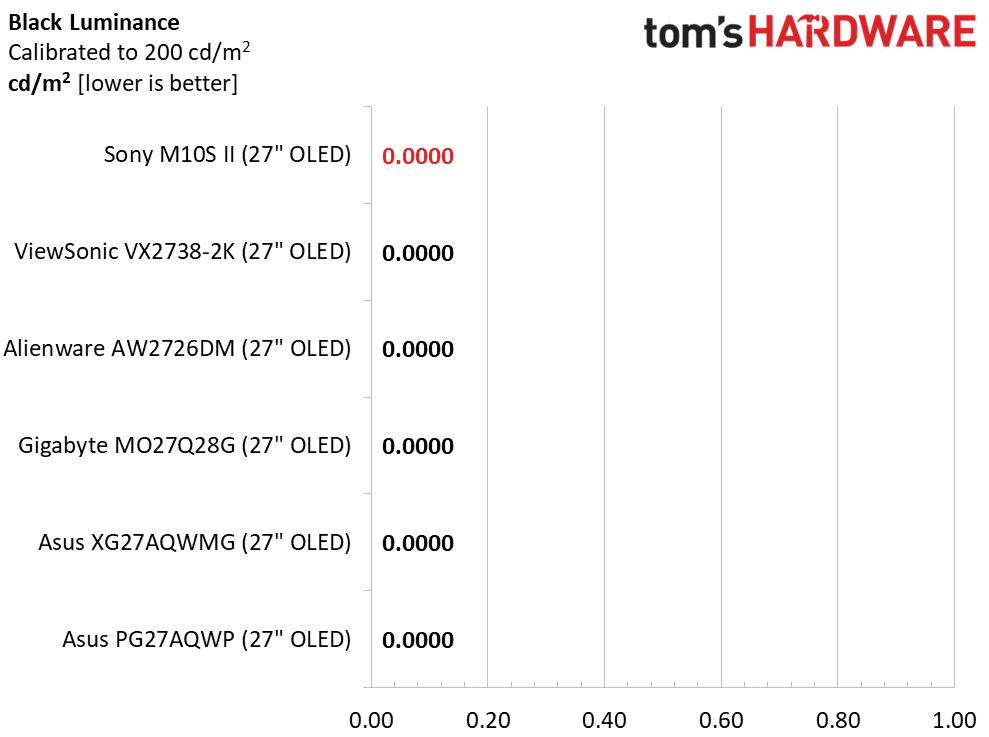 Tom's Hardware
 Tom's Hardware
 Tom's Hardware
Calibration doesn't change black levels or contrast. I found the best gamma on the Mid setting of the Brightness stabilizer, so I used a 25% window to set the slider to 200 nits. This is typical OLED performance.
Test Takeaway: The M10S II has typical brightness and contrast compared to other OLED displays with a variable-brightness option. It stands out by having three options instead of two. It also performs best in gamma tests and looks the best when the Mid setting of the Brightness stabilizer is used.
MORE: Best Gaming Monitors
MORE: How We Test PC Monitors
MORE: How to Buy a PC Monitor
The M10S II includes a variety of picture modes tailored to different game types and tasks. They offer different levels of control for users who want to calibrate.
Grayscale and Gamma TrackingOur grayscale and gamma tests use Calman calibration software from Portrait Displays. We describe our grayscale and gamma tests in detail here.
 Portrait Displays Calman
 Portrait Displays Calman
 Portrait Displays Calman
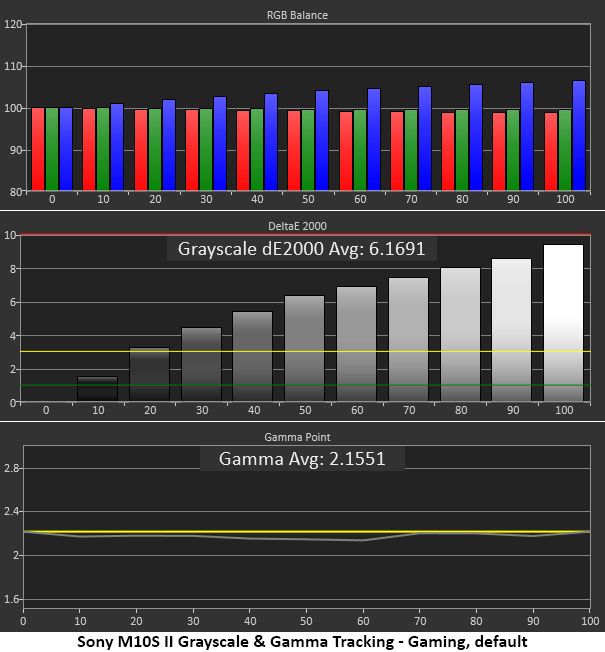
The M10S II's Game mode is visibly cool in tone. No surprise, as its default color temp setting is neutral. You can find some relief from the Warm preset, but calibration is the best way to go. Gamma is a tad light as well. Adjustments also affect color tracking, which you'll see just below.
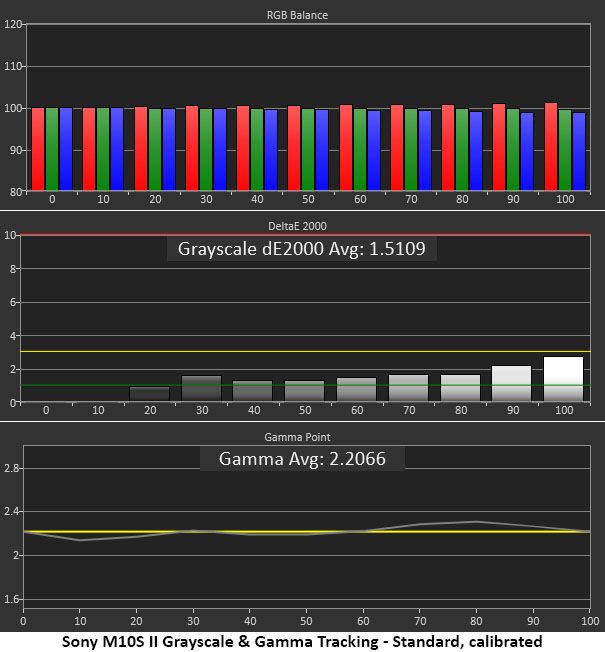
The RGB sliders are a bit coarse in operation, so I couldn't quite get all the errors below 1dE. But aside from 90 and 100% brightness, they are all under 2dE, not too bad. I switched to Standard mode as well, which has better gamma. Though it's a little skewed, more of it sticks close to 2.2, so the picture gains some texture and depth. This is solid performance.
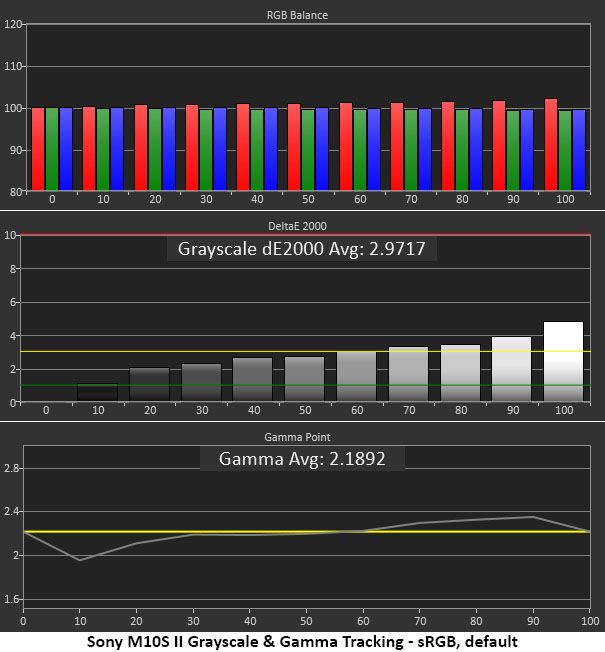
I measured the sRGB mode at its default settings. You can't change brightness or gamma, but you can adjust the color temperature. The above result shows the default state. Gamma is too light in the darker parts of the image, while highlights are a tad dark.
Comparisons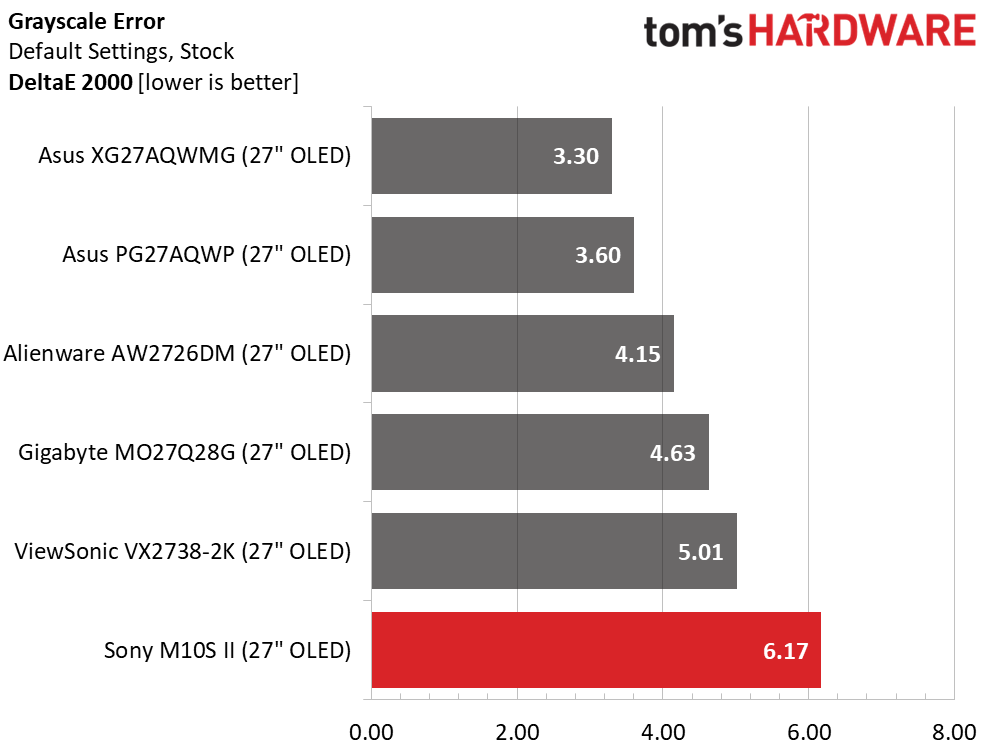 Tom's Hardware
 Tom's Hardware
 Tom's Hardware
 Tom's Hardware
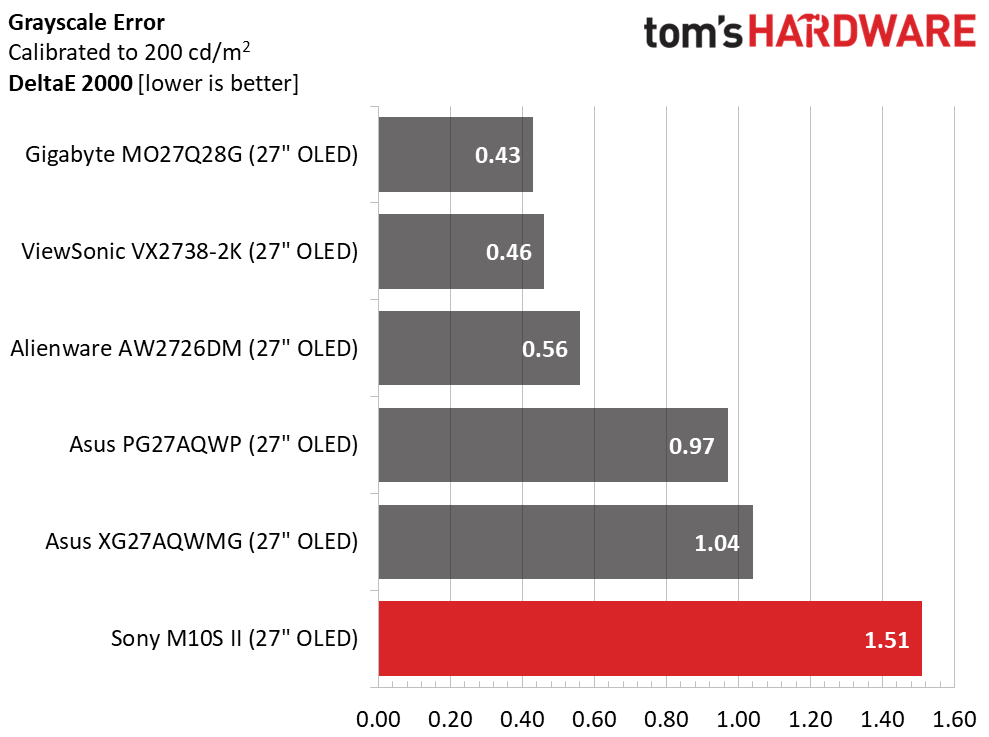
The M10S II's out-of-box grayscale is clearly blue in tone. A 6.17dE error is visible to the naked eye. Changing the color temp to warm improves it; it measures around 3dE. The best option is to calibrate, which brings the error down to 1.51dE. Then, there is no visible issue.
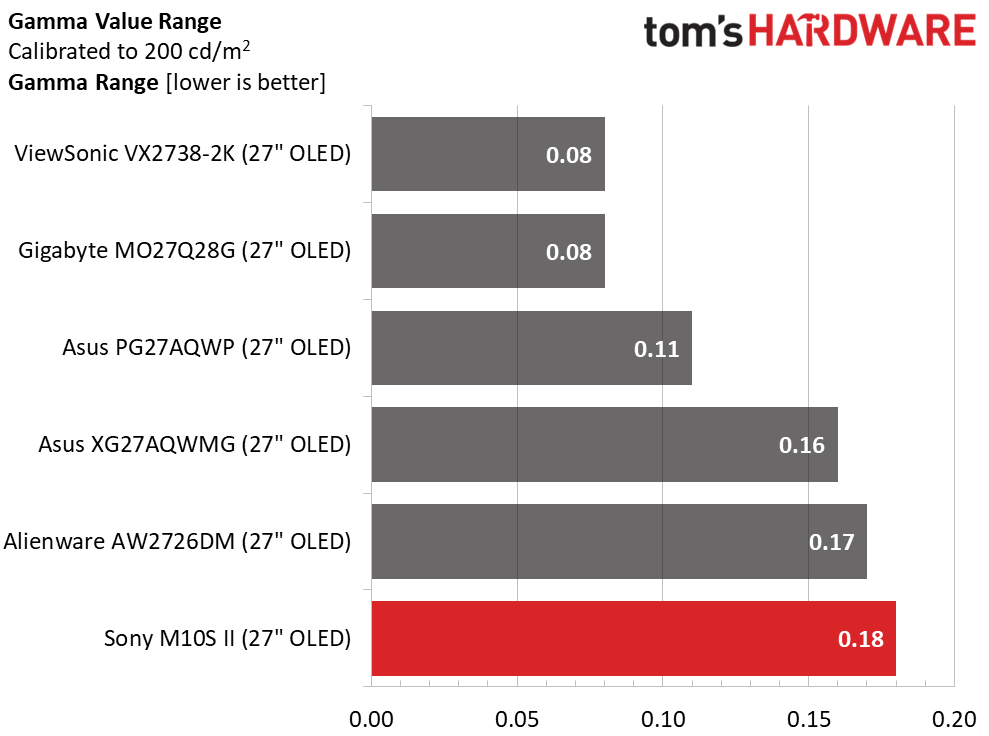
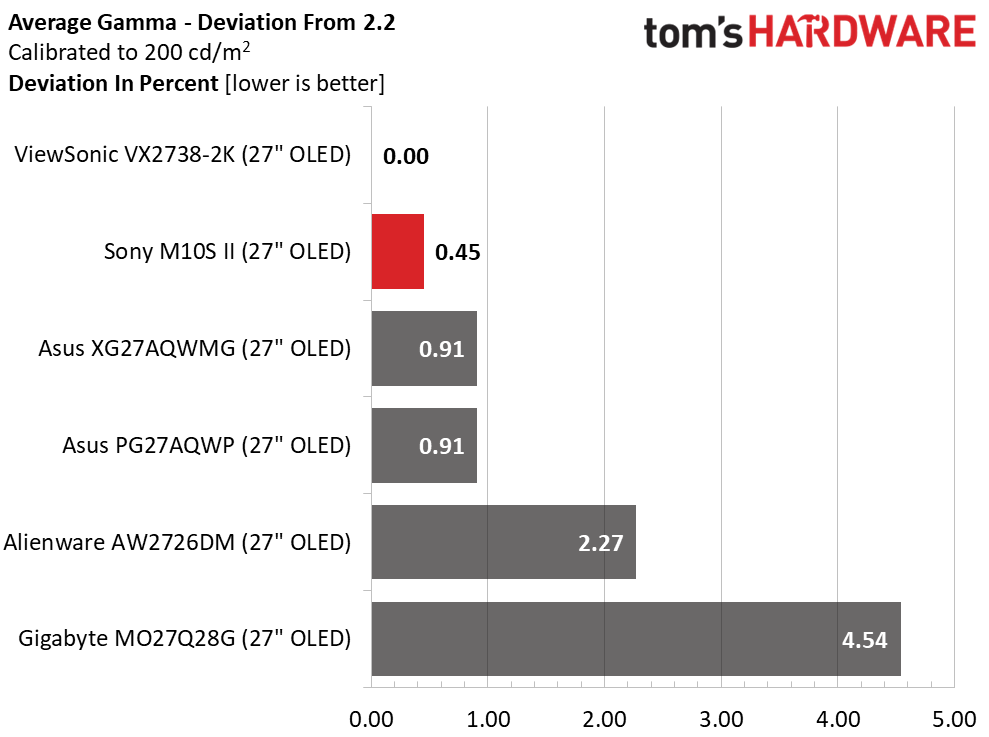
In the gamma test, the range of values is a bit wider than the other monitors, at 0.18 (low to high). But the numbers stay close to 2.2, so the deviation is only 0.45%; the actual value is 2.21. This is mainly because I changed the picture mode from Game to Standard.
Color Gamut AccuracyOur color gamut and volume testing use Portrait Displays' Calman software. For details on our color gamut testing and volume calculations, click here.
 Portrait Displays Calman
 Portrait Displays Calman
 Portrait Displays Calman
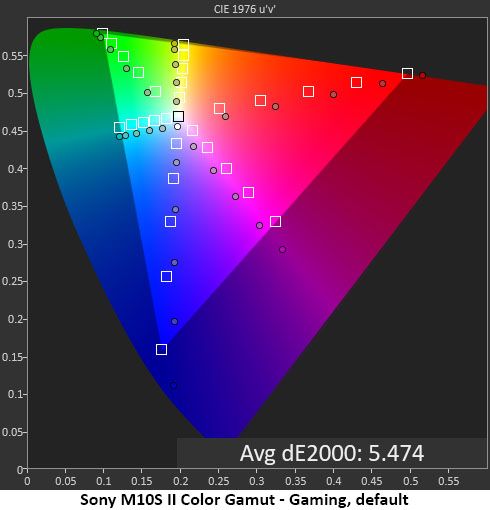
The first chart is the main reason why the Game mode isn't the best choice. The blue grayscale pulls the gamut tracking off target, resulting in visible hue errors across every color. Yellow is too green; magenta is too blue, and so on. The good part is that there is linear oversaturation, which delivers richer color without going over the top to a cartoonish look.
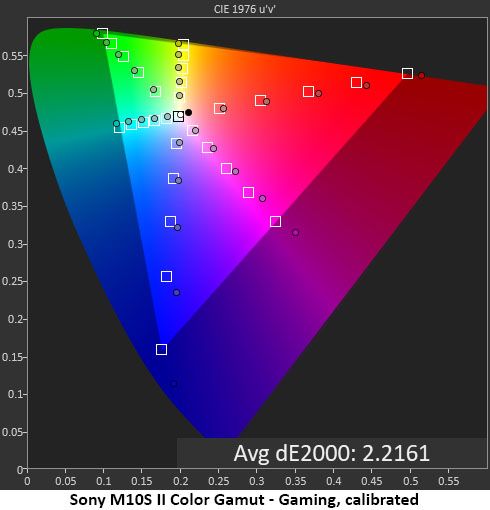
You can see what a difference calibration makes. Hue errors are now almost gone, and saturation points are at or near target. This makes a visible improvement in picture quality, making it look more natural.
Comparisons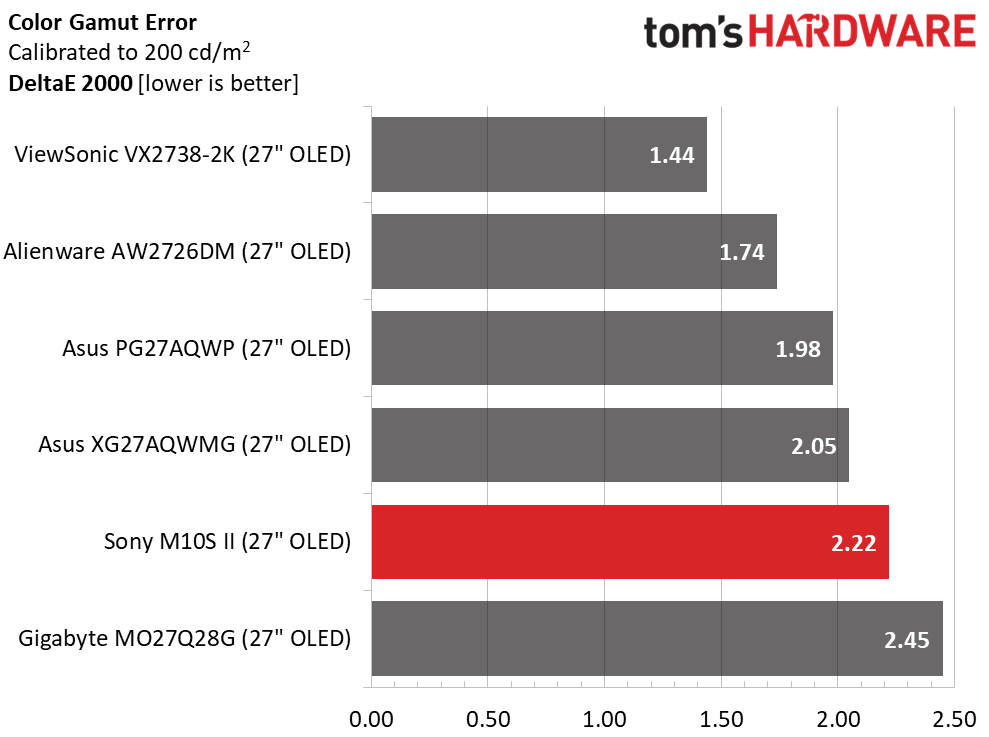 Tom's Hardware
 Tom's Hardware
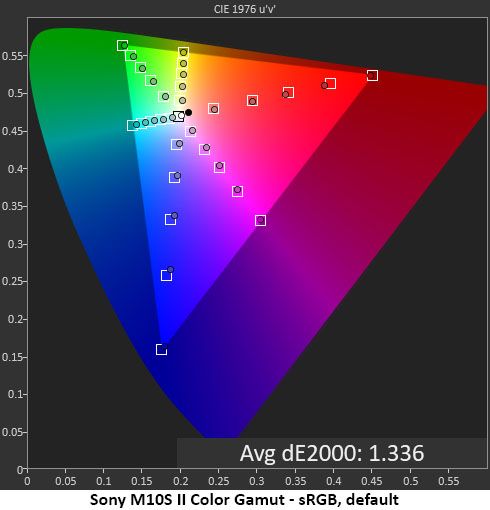
It's nigh impossible to find a bad OLED when it comes to color. Though the M10S II isn't at the top of this group, it has no visible errors once calibrated. 2.22dE is still in the realm of excellent performance. I noted that the sRGB average error was 1.34 dE.
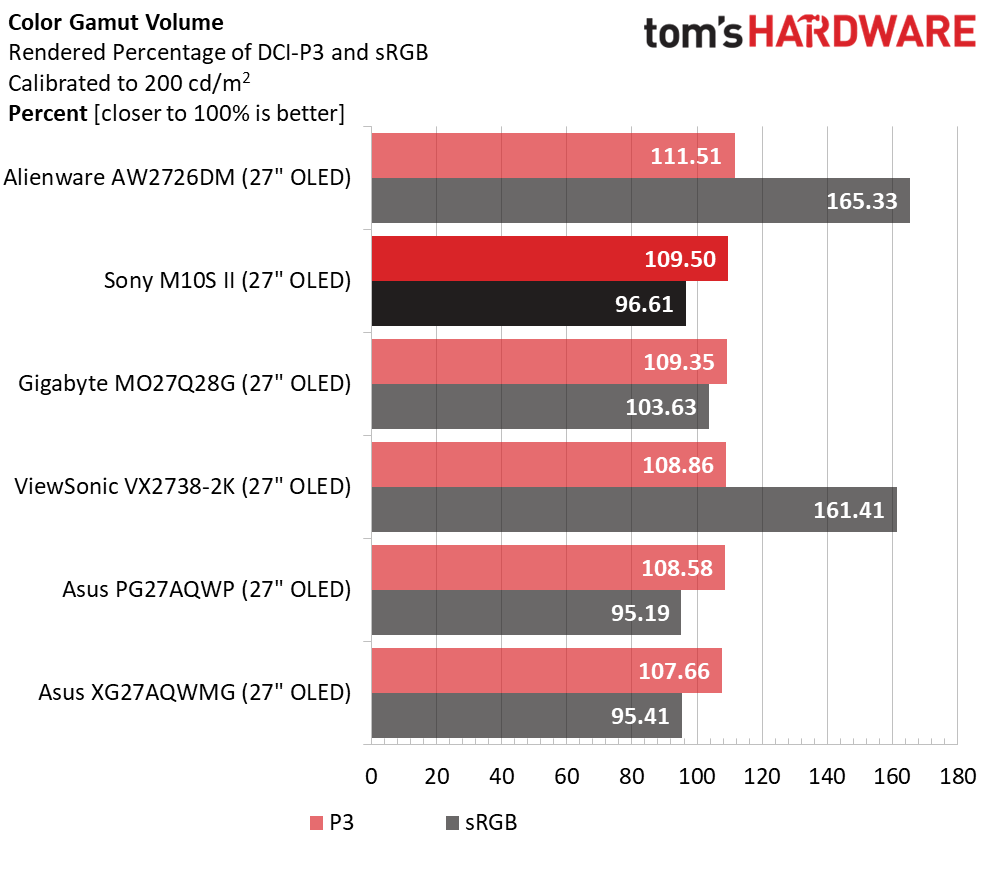
In the volume test, the M10S II proved itself to be one of the most colorful monitors you can buy in this category. OLED gamuts don't get much bigger than 109.5% of DCI-P3. The 96.61% sRGB coverage is nearly ideal. The M10S II is suitable for color-critical work once calibrated.
Test Takeaway: The M10S II doesn't come out of the box in its most accurate picture mode, but a few tweaks in the OSD take performance to a higher level. You can simply select the Standard picture mode with Warm color temp or calibrate for the best possible result. The sRGB mode is also accurate, and unlike most monitors, it can be calibrated for grayscale tracking. The M10S II's overall color performance is on par with other premium OLED displays.
MORE: Best Gaming Monitors
MORE: How We Test PC Monitors
MORE: How to Buy a PC Monitor
Our HDR benchmarking uses Portrait Displays' Calman software. To learn about our HDR testing, see our breakdown of how we test PC monitors.
The M10S II accepts HDR10 signals and switches automatically to reveal four new picture modes. I noted that some adjustments were possible, which is unusual in a good way. Most monitors have no HDR picture options.
HDR Brightness and Contrast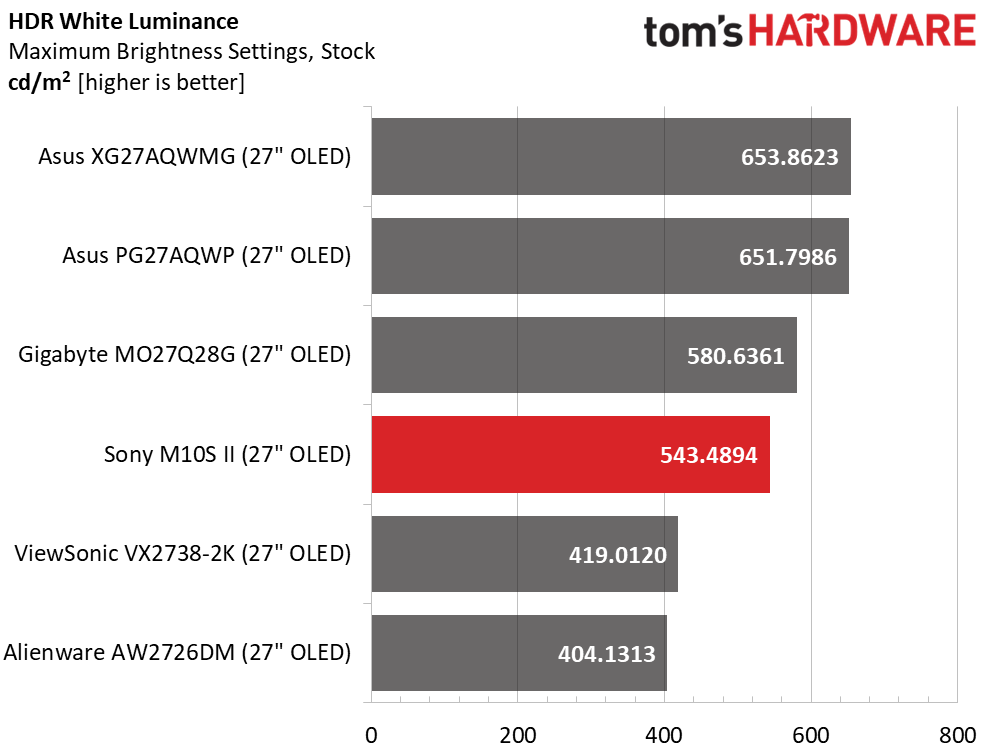 Tom's Hardware
 Tom's Hardware
 Tom's Hardware
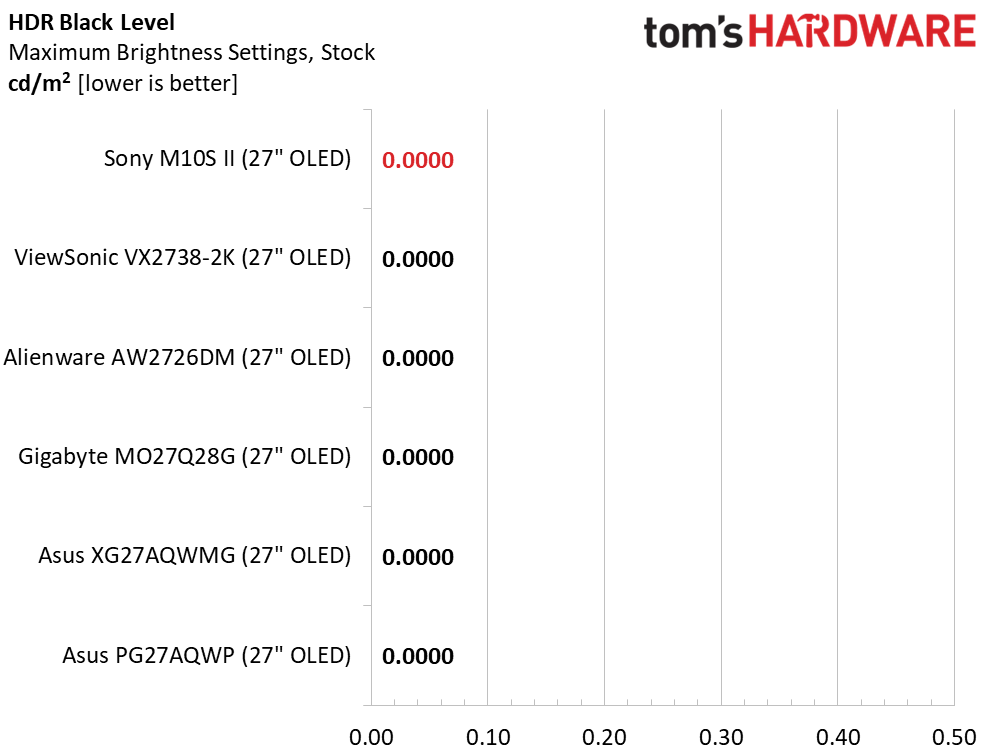
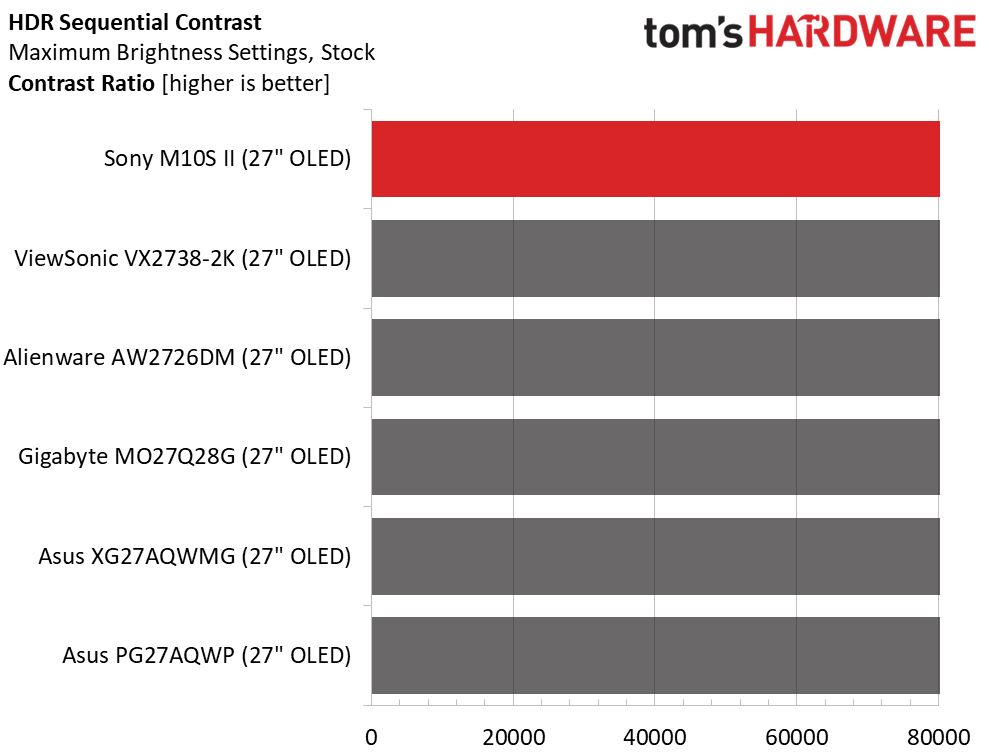
The M10S II's brightest HDR picture mode is also the default, Game. A 25% window pattern measures over 543 nits, which puts it mid-pack in this comparison. In practice, and with its infinite black levels, it delivers punchy images with deep shadows and bright highlights with sharp detail throughout.
Grayscale, EOTF and Color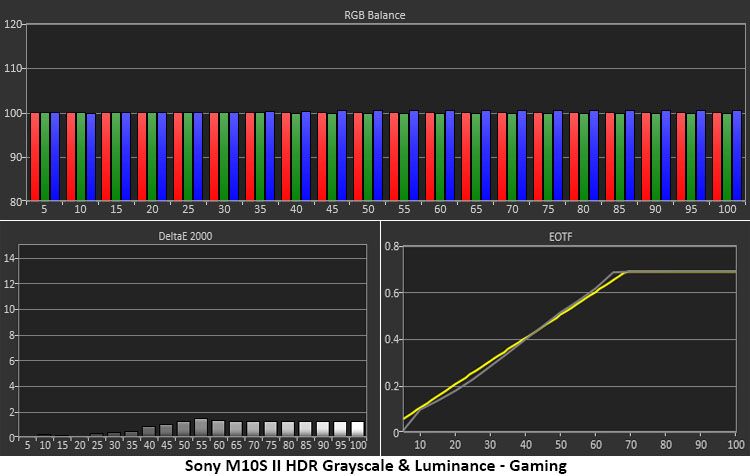 Portrait Displays Calman
 Portrait Displays Calman
In the grayscale and EOTF test, the M10S II in Game mode proved to be one of the most accurate HDR monitors I've reviewed. The first chart above shows grayscale after a couple of tweaks to the RGB sliders. It's one of the few HDR monitors that allow color adjustments. The EOTF tracks very closely to the reference with a correct tone-map transition at 68% brightness. This is where it should be given the measured white and black points.
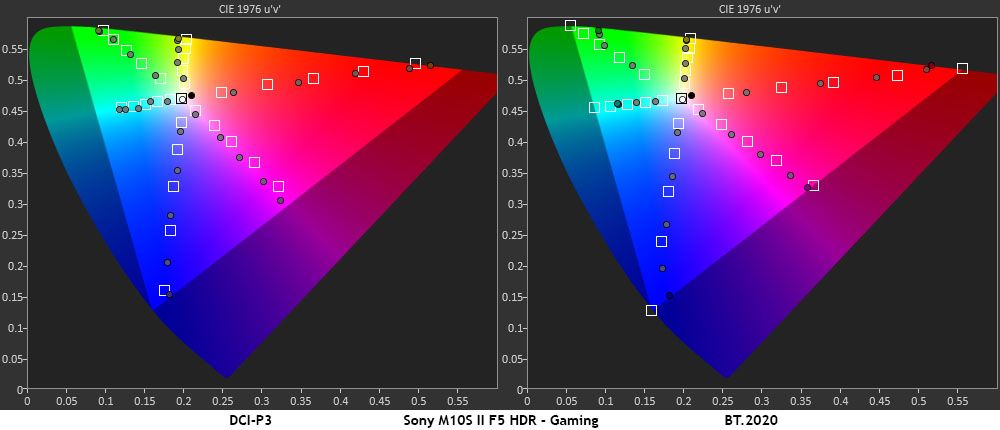
In the color test, there is significant oversaturation in red and just typical oversaturation in blue and green. This isn't all that different from other HDR displays, but some red-dominant images I viewed showed clipping. Most HDR monitors are engineered this way, but Sony goes a bit further than others. Hue tracking is good, though with only slight deviations in yellow and magenta. In the BT.2020 test, the M10S II runs out of color at 90% red, 80% green, and 98% blue.
Test Takeaway: The M10S II has superb HDR luminance and grayscale tracking. Color is a little oversaturated, but most users will not complain about a monitor this colorful. It fills more of the BT.2020 color space than nearly every monitor I've reviewed, including professional models. Brightness is on the high side of average with punchy highlights and deep shadows, all well detailed.
MORE: Best Gaming Monitors
MORE: How We Test PC Monitors
MORE: How to Buy a PC Monitor
Based on the number of gaming monitors on offer, Sony might not be the first brand one thinks of, but that doesn't mean it isn't among the best. Its model line may be small, but it is no less mighty. Competitors looking for the fastest and most flexible OLED display should take a closer look at the INZONE M10S II.
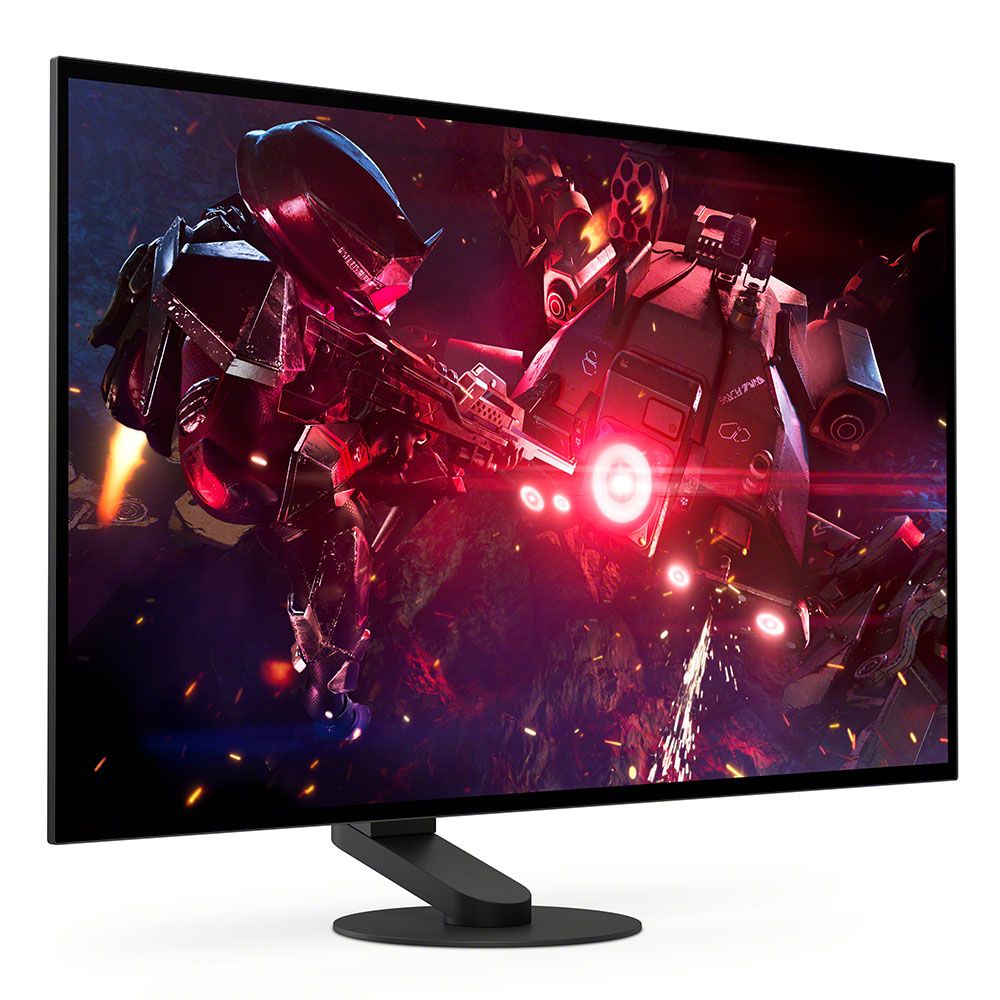
With a 540 Hz refresh rate at QHD resolution, the M10S II delivers speed right out of the gate. Then it adds performance options like 720 Hz at HD and two 24.5-inch modes that sport 1920x1080 and 2368x1332 resolutions with 1:1 pixel mapping. Add in blur reduction and anti-flicker, and you have a monitor that delivers smooth, responsive gaming on any PC or console.
(Image credit: Tom's Hardware)
Image quality is given equal attention. The OLED panel used here covers almost 110% of DCI-P3 and, with a few tweaks, delivers a color-accurate picture with the deep contrast and true blacks OLEDs are known for. The M10S II also includes variable brightness and HDR calibration, features not found in many OLED displays. I also noted the matte screen coating, which rejected ambient light better than any other OLED I've reviewed.
The Sony INZONE M10S II is a premium purchase for sure, and though it doesn't include internal speakers or LED lighting, it performs on par with the very best. If you have the budget and you want a competition weapon for your gaming PC or console, you should definitely check it out.
MORE: Best Gaming Monitors
MORE: How We Test PC Monitors
MORE: How to Buy a PC Monitor