Modder turns NES into a Windows-like desktop with original hardware
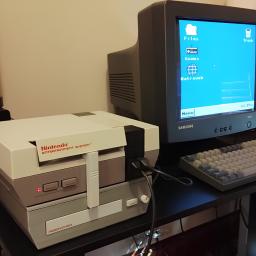
YouTube retro gaming experiment channel Throaty Mumbo created a Windows-like desktop environment on the NES. The project took advantage of the EverDrive N8 Pro, an FPGA-powered NES cartridge that handles the heavy x86 emulation. Throaty Mumbo has made the NESPC project available on GitHub and included firmware for an RP2350 he used to make a USB interface for keyboard, mouse, and MIDI functionality.
Throaty Mumbo started out with ROMs he found on the internet, trying out a Chinese Windows 98 ROM that didn't really do much. It had Paint, Windows Explorer, and plenty of things that looked like Windows 98 programs, but none of them were actually functional; only images of what the programs approximately look like. He also tried out a ROM of Linux, a project named NES86 by decrazyo, but it was incredibly slow and unusable, leading him to create his own ROM.
Since the NES' 6502 8-bit microprocessor was too slow to emulate x86, Throaty Mumbo used the EverDrive N8 Pro, which has a much more powerful ARM-based Cyclone IV FPGA. It simply goes into the cartridge slot and takes advantage of the NES' cartridge-side processing, basically making it act similarly to an external graphics card by outsourcing tasks to another processing unit. To run x86, Throaty Mumbo used Next186, an open-source FPGA soft processor core that can make the FPGA execute Intel 80186-compatible instructions as if it were an x86 CPU.
Throaty Mumbo first showed his NESPC project with a command-line interface, demonstrating how fast you can navigate the environment and run command-line programs like tty-tetris, which didn't work well at such a low resolution, but he did show a command-line train animation running quite smoothly. He finally showed that he built a whole desktop environment that looked like a very stripped-down version of the Windows 98 ROM earlier. His UI, however, was more functional, serving as a menu replacement for the EverDrive N8 Pro menu ROM, even having a fully playable Minesweeper in the Start menu. The UI also had program icons that served as ways to start game ROMs and access files inside the EverDrive N8 Pro cartridge's storage.
Throaty Mumbo wasn't satisfied, however, as moving a mouse cursor and typing with an NES controller isn't the best desktop experience, so he tried adapting a Family BASIC keyboard for the Famicom to it using the NES expansion slot and a breakout board to connect jumper wires to specific pins. It didn't work very well, with each keystroke outputting multiple letters and symbols; the bulk on the bottom also didn't allow the NES to sit flat on the desk.
Throaty Mumbo then thought of using an RP2350 microcontroller with custom firmware so he could connect a USB device into the NES controller ports. This worked much better, even allowing smooth mouse inputs, but it only had one USB port, so it could only take either a keyboard or a mouse. His solution to this was to use a keyboard with a USB hub built into it, which worked great. Throaty Mumbo further experimented with this USB input as a MIDI device, plugging in a USB piano keyboard and playing with a very basic digital audio workstation (DAW), even playing some Mario soundtracks from NSF (Nintendo Sound Format) files.
To get even more of a retro PC experience, he added his previous 3D-printed NES CD drive project, the NESCD, which plugs into a port on the EverDrive N8 Pro cartridge and the expansion slot, allowing him to play music in the background while playing an NES game at the same time without losing any performance. He then upgraded the NESCD with a Seeed Studio XIAO ESP32 to add WiFi capability, allowing for 4 MB/s download and 90 KB/s upload speeds. Since the internet capabilities are very limited, the NES uses Throaty Mumbo's laptop as a proxy to fetch the NES' requests from the internet and simplify them to be more easily displayed on the limited resolution. However, Throaty Mumbo also added an option to connect directly to the internet, which would be a miserable experience.