Minisforum Elite Mini M2 Air-304 review: A quiet and compact Wildcat
Minisforum's Intel-based M2 line includes mini PCs with powerful processors such as the Core Ultra X7 Processor 358H (with 16C/16T CPU and B390 graphics), and the Core Ultra 7 356H (16C/16T). But there are more modest systems, too. The M2 Air-304 here is the most affordable option, based around the Intel Core 3 processor 304 with its 5C/5T CPU (1x Cougar Cove P-core and 4x Darkmont LP E-cores) and an iGPU with just a single Xe3 core.
No surprise, the little brother in the pack, both in terms of physical size and computing resources, is the most affordable. It currently starts at $263 for a barebones version. However, our test sample with 16GB DDR5-5600, a 500GB SSD, and Windows 11 Pro is listed at $559 - direct. That's an introductory price, and Minisforum's small text threatens that our configuration will bump up to $699 at some point in the future. Such a rise would put this product offering on very shaky ground, and we see B&H Photo has already raised the price at $729.
Overall, this Mini PC was pleasant to use, though. It ran quietly and only strained in gaming and productivity benchmarks which put it under loads that casual users aren't going to be running on such a machine.
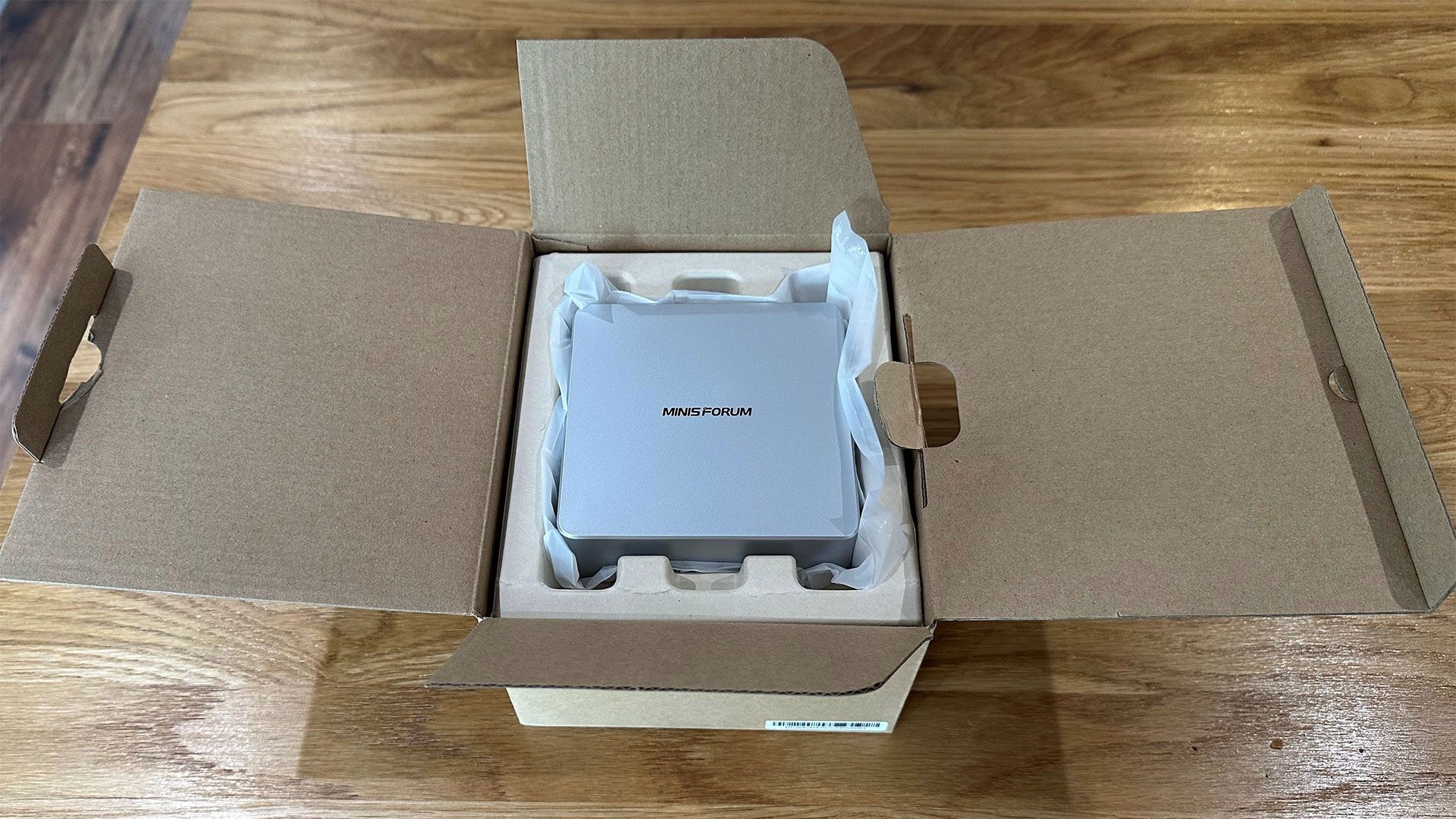
Design of the Minisforum Elite Mini M2 Air-304 Mini PC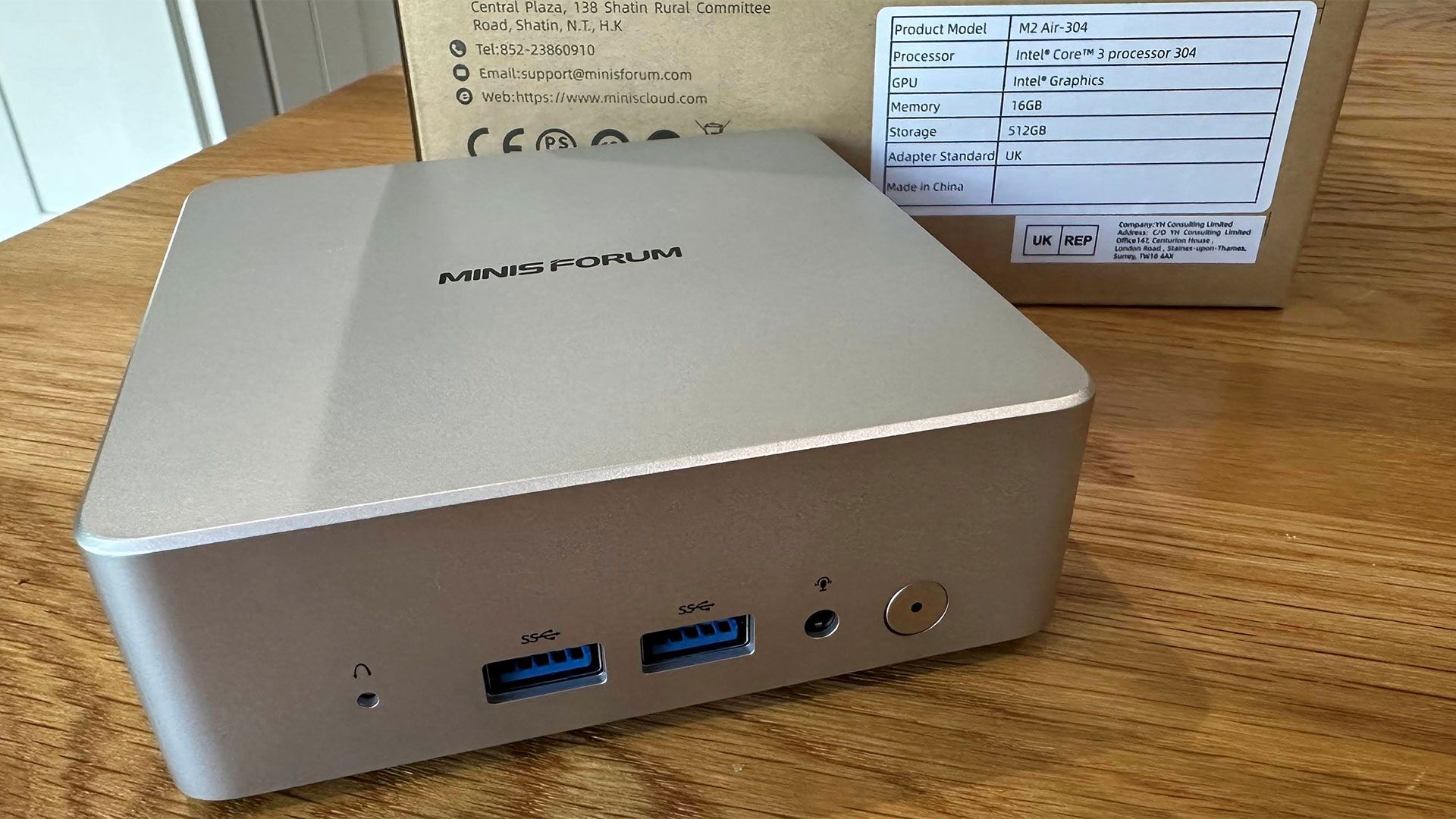 Tom's Hardware
 Tom's Hardware
 Tom's Hardware
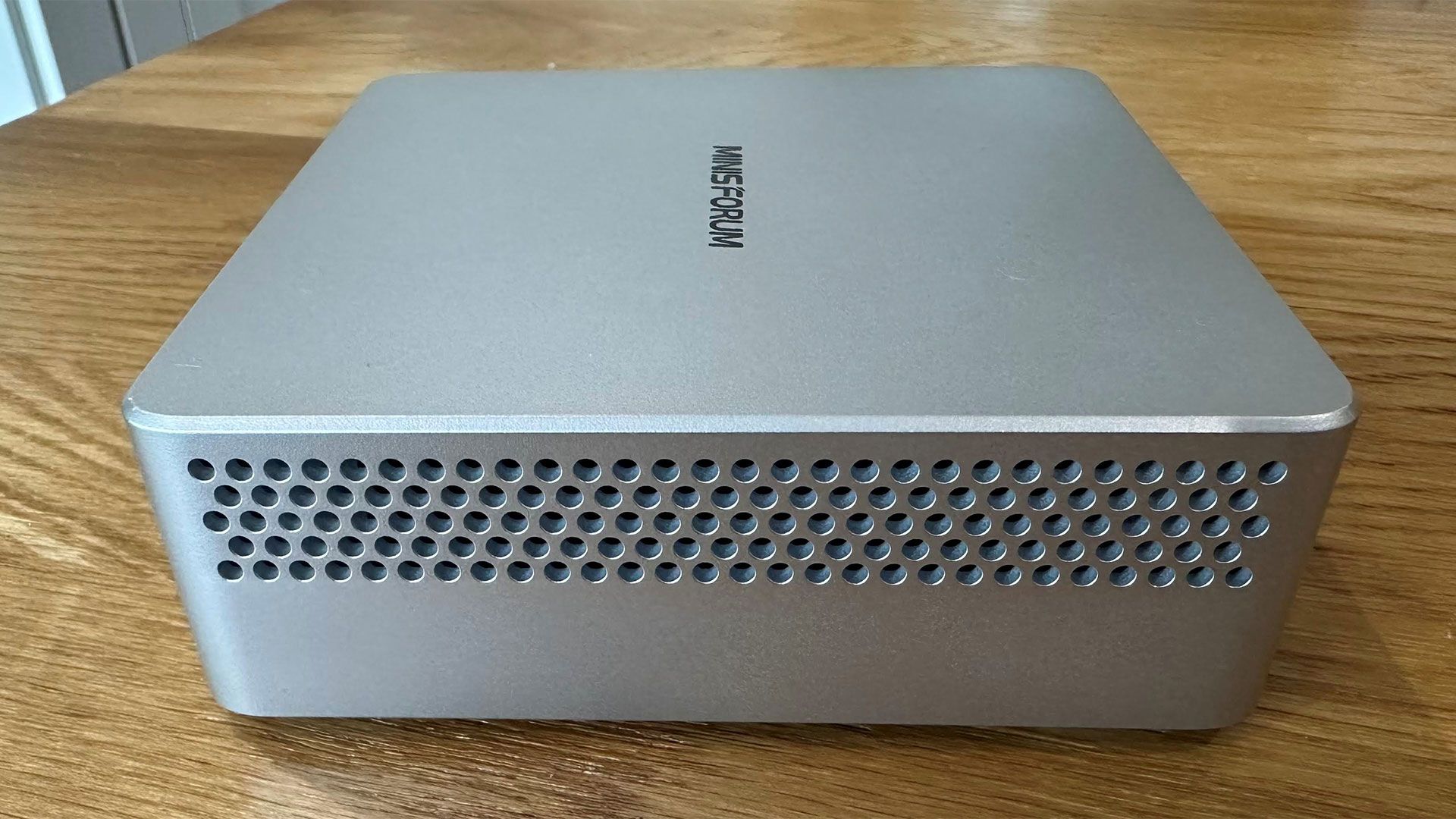
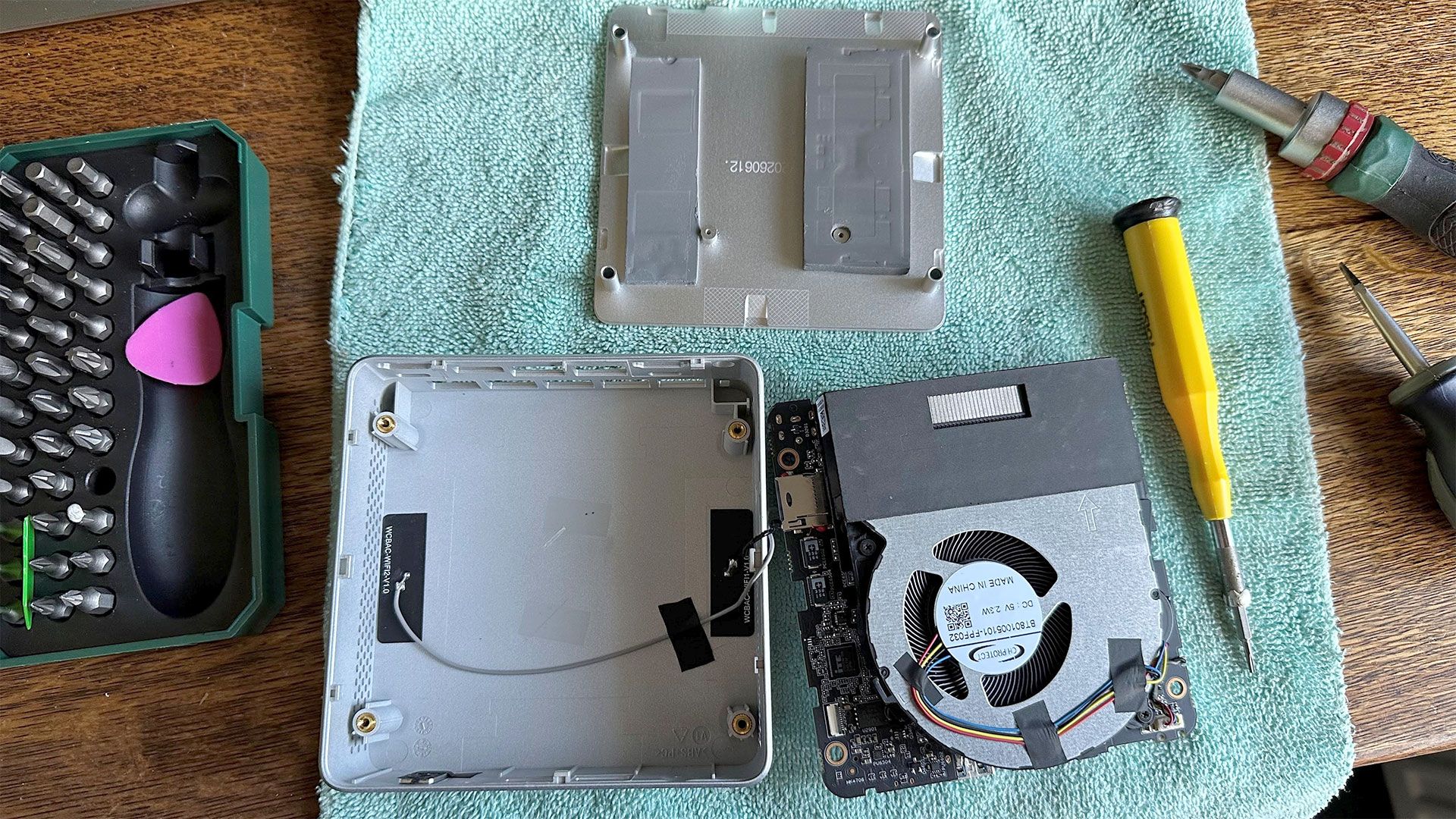
The Mini M2 Air looks stylish enough, and feels solid. Looks can be deceiving, though, and the top shell is a silver colored plastic, not a metallic alloy. Sometimes a metal shell can be used to help conduct away heat, but that seems less important with this actively cooled machine with a 15W processor. We note that there are thermal pads connecting the installed RAM and SSD to the bottom of this mini PC, which is metal.
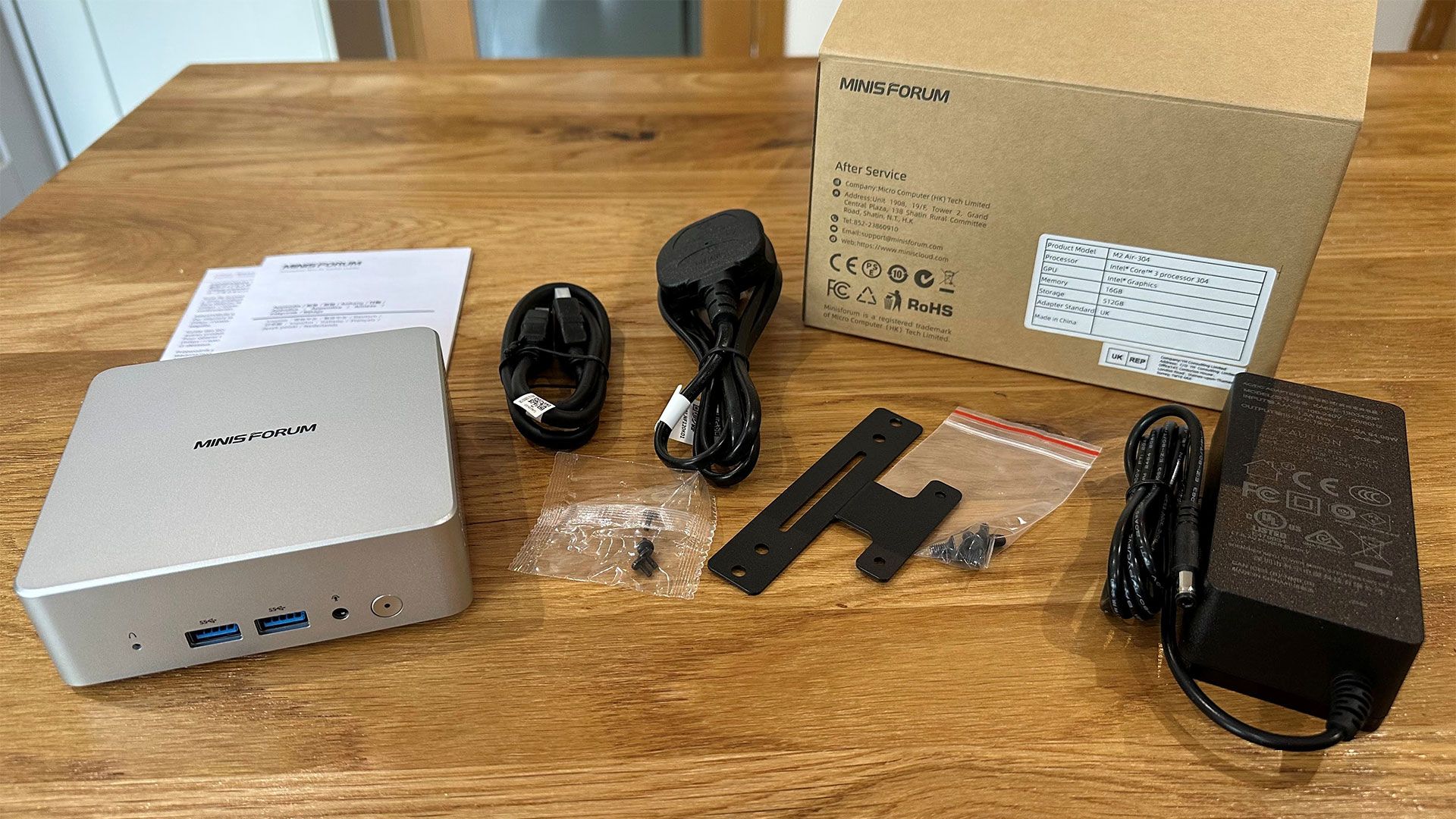
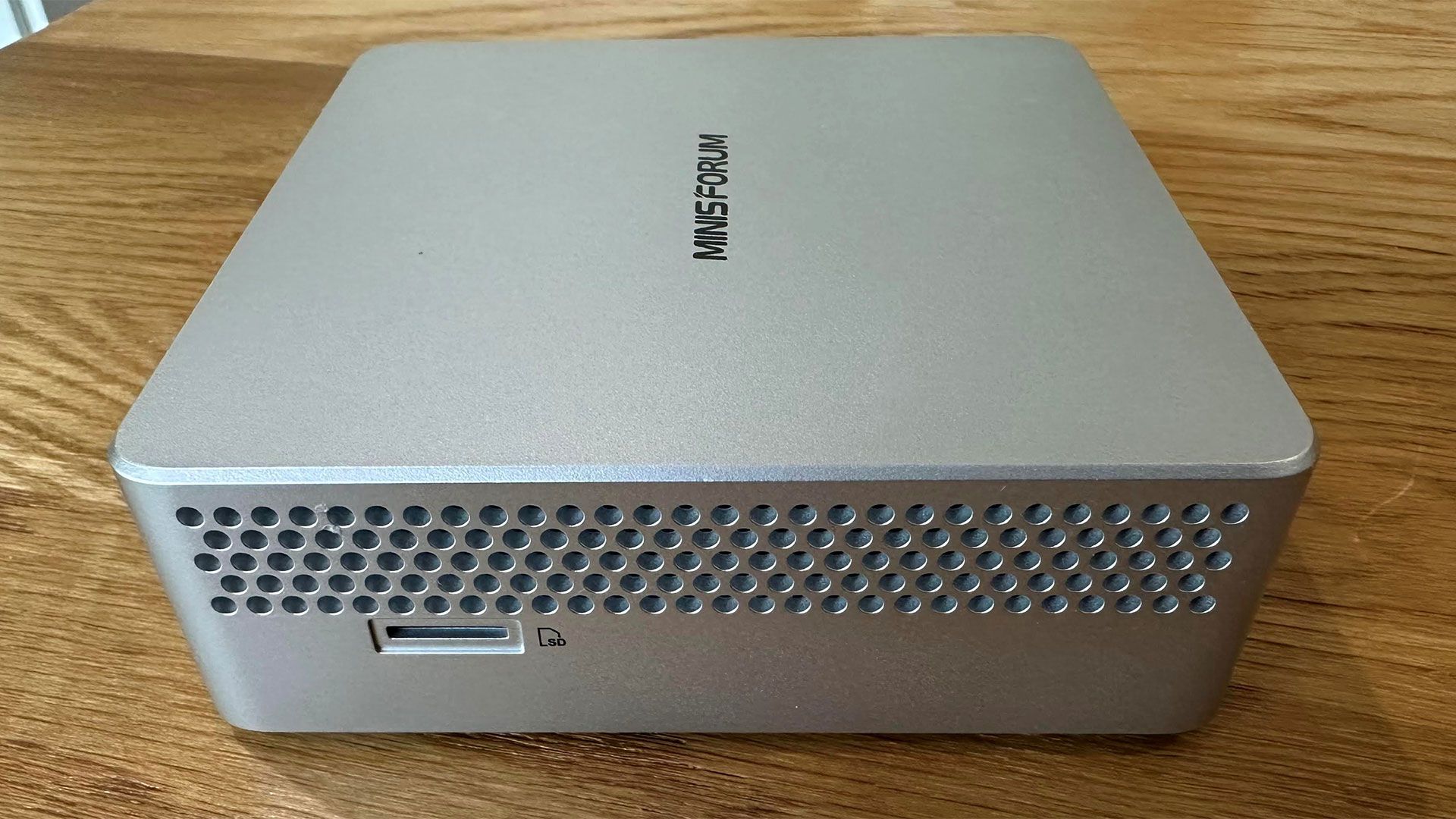
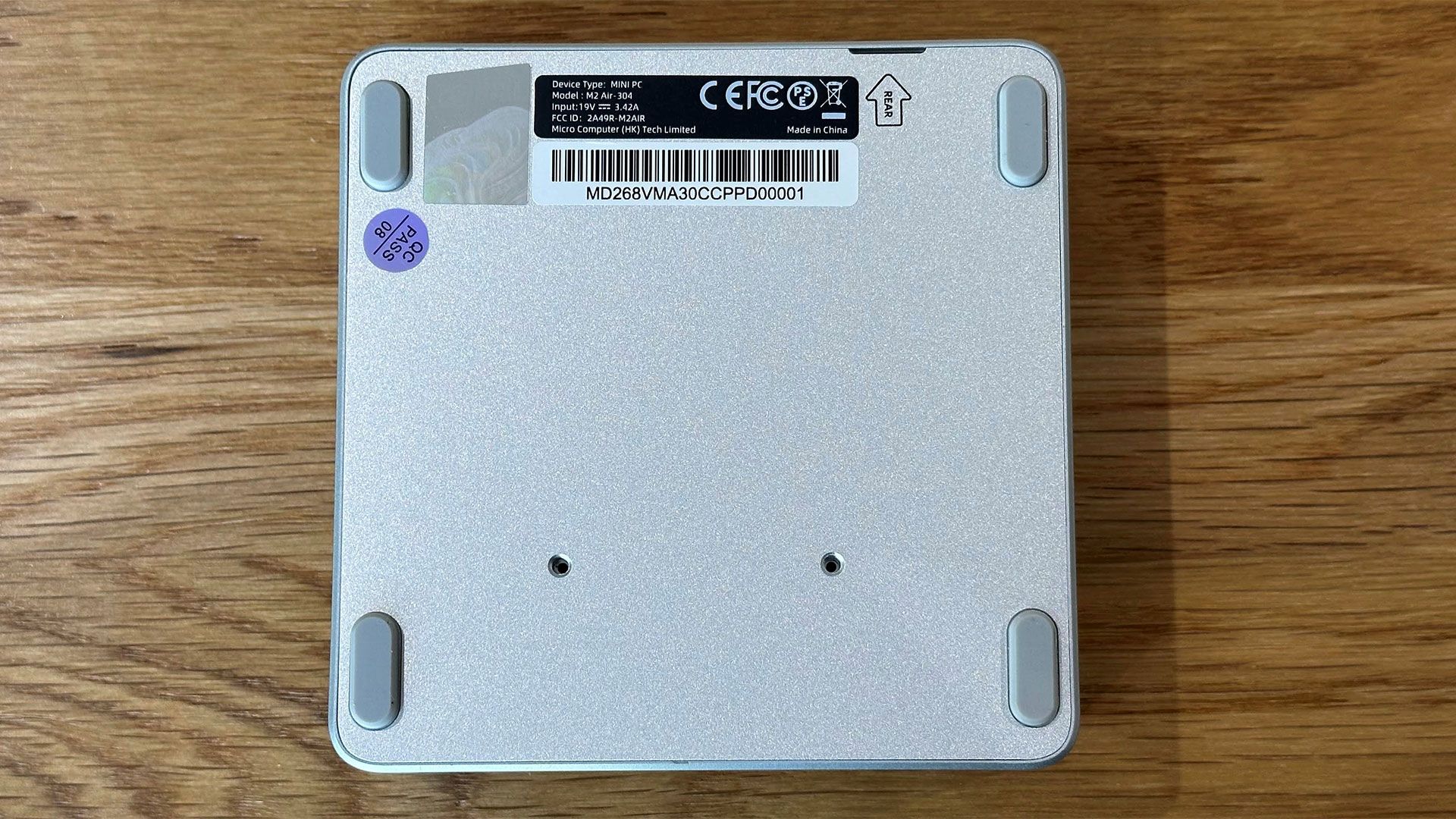
A VESA mounting bracket is provided in the box if you prefer to hide the tiny device out of sight. It doesn't have a remote power switch like the MSI Cubi NUC AI+ 3MG we reviewed earlier in the year, though, so you'll have to consider reachability. A simple LED-lit power button is on the front of the device, alongside a couple of handy ports (more on the ports later). It also has a reset / clear CMOS hole on the front, and a Kensington lock slot on the rear.
Minisforum's component choices mean this is a particularly small and light mini PC. The official M2 Mini specs state it is 112 x 112 x 37.15mm, which is roughly 4.4 x 4.4 x 1.5-inches. That's a volume of 0.47 liters. It weighs in at just 440 grams, which is 0.97 pounds.
The power supply isn't built-in. There's a surprisingly bulky 65W power brick in the box, which connects to using a detachable figure-eight cable. However, this mini PC can be powered by USB-C, too, so you could pack a far more compact multipurpose power brick if portability is important.
Specifications of the Minisforum Elite Mini M2 Air-304 Mini PCProcessor | Intel Core 3 304 (5C/5T) Wildcat Lake,' up to 4.3 GHz, 15W |
Graphics | Intel integrated graphics, 1x Xe3 core runs at up to 2.3 GHz, supports up to 3x displays |
RAM | 16GB in single SODIMM slot which can fit up to a 64GB DDR5-6400 module |
Storage | 1x M.2 2280 PCIe 4.0 x4 NVMe SSD slot (up to 2TB), microSD card expansion |
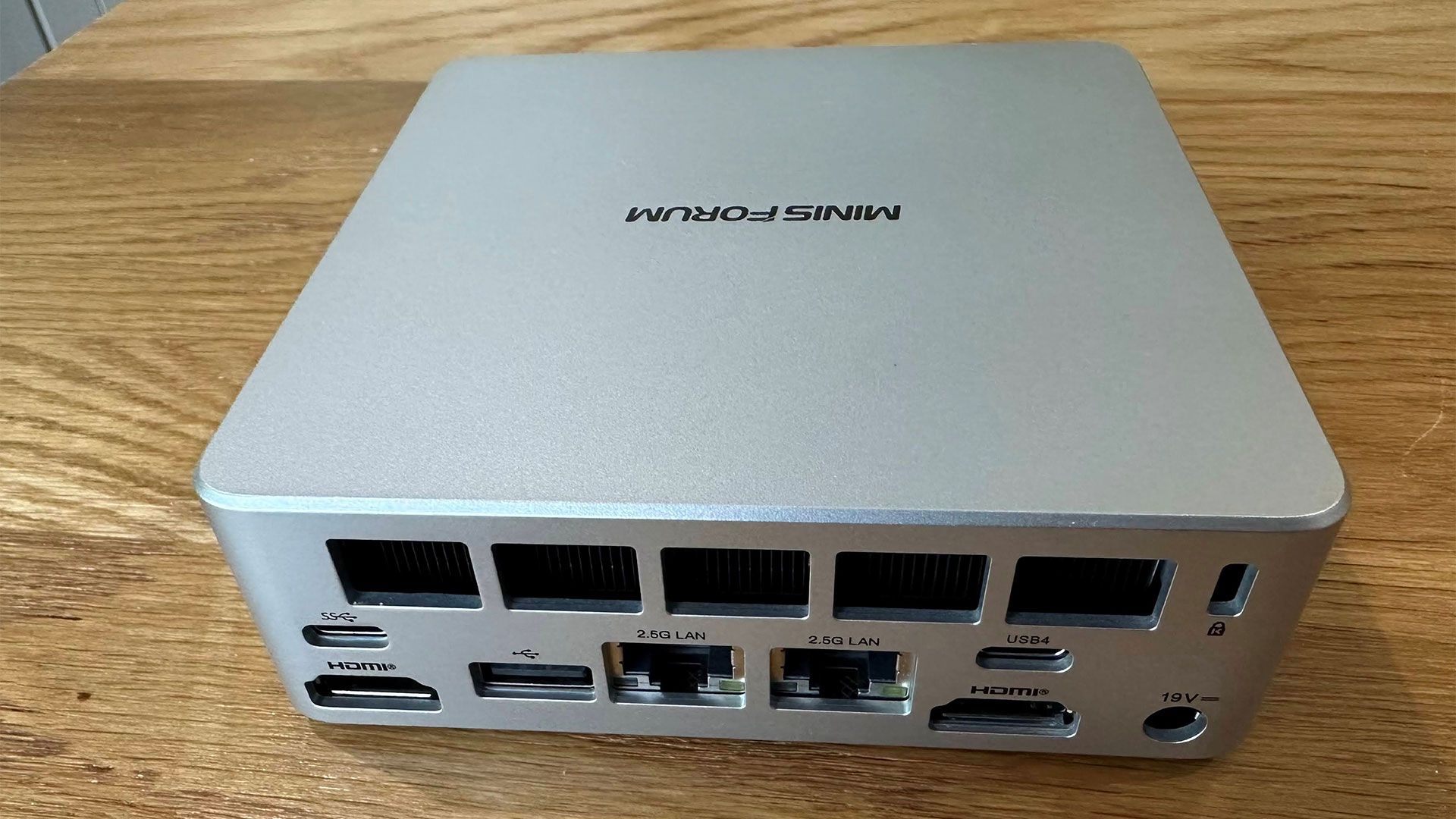
Physical Ports | Front: 2x USB-A 3.2 Gen 2, 3.5mm audio. Rear: 1x USB4 (40Gbps, DP Alt Mode, PD), 1x USB-C 10Gbps, 1x USB 2.0, 2x HDMI 2.0, 2x RJ-45 2.5GbE LAN, DC-IN. Side: microSD card slot. |
Wireless | Wi-Fi 6E, Bluetooth 5.4 |
Dimensions | 112 * 112 * 37.15 mm (0.47 L chassis) |
Operating System | Windows 11; barebone model available without OS |
Price (as configured) | $559.00 limited-time price(16GB RAM, 500GB SSD, Windows 11 Pro) |
 Tom's Hardware
 Tom's Hardware
 Tom's Hardware
 Tom's Hardware
 Tom's Hardware
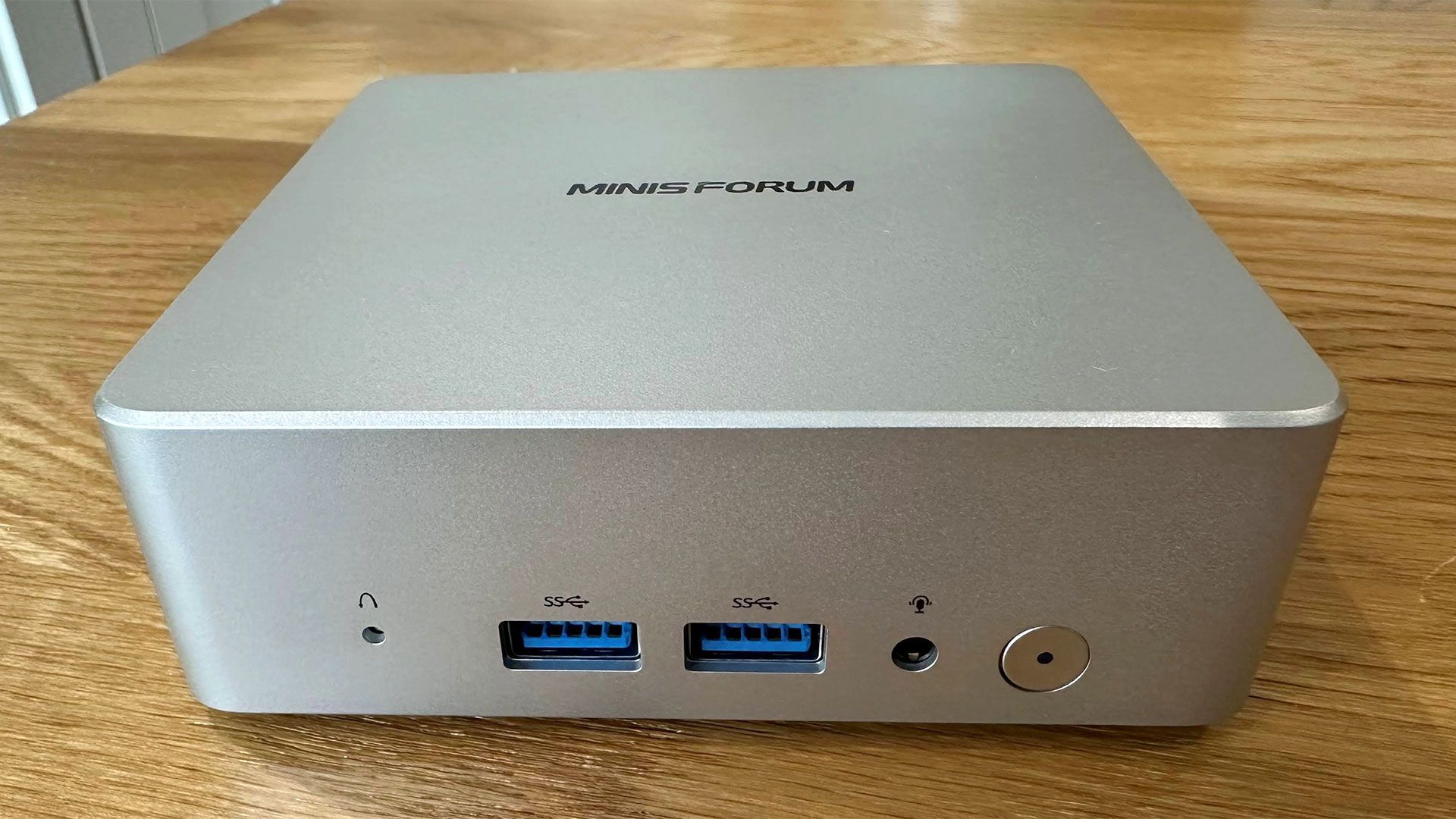
On the front of the Minisforum Elite Mini M2 Air-304 there are 2x USB-A 3.2 Gen 2 ports and a 3.5mm audio jack. Turn it to the side and you'll see the microSD card slot. Then, around the back you have access to 1x USB4 (40Gbps, DP Alt Mode, PD), 1x USB-C 10Gbps, 1x USB 2.0, 2x HDMI 2.0, 2x RJ-45 2.5GbE LAN, and a DC-IN barrel jack.
Some might like to have at least one of the Type-C ports on the front, instead of two Type-As. But for its size the Mini M2 Air packs quite a few ports, including the very capable USB4, two HDMI ports, and two Ethernet ports. Realistically, a machine like this won't be connected to oodles of wired peripherals, but if you found the port count lacking, USB4 allows for a capable and fast dock.
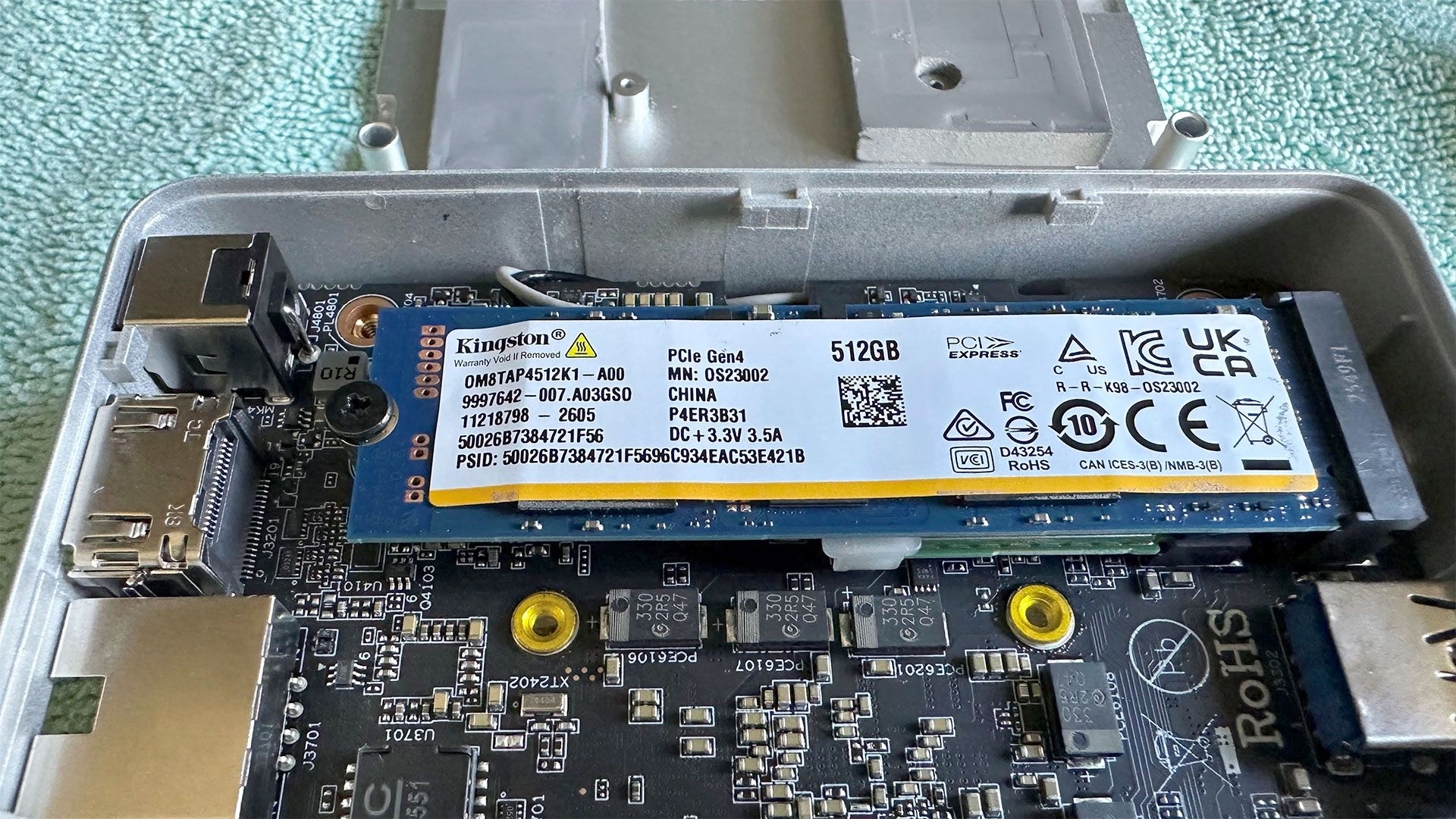
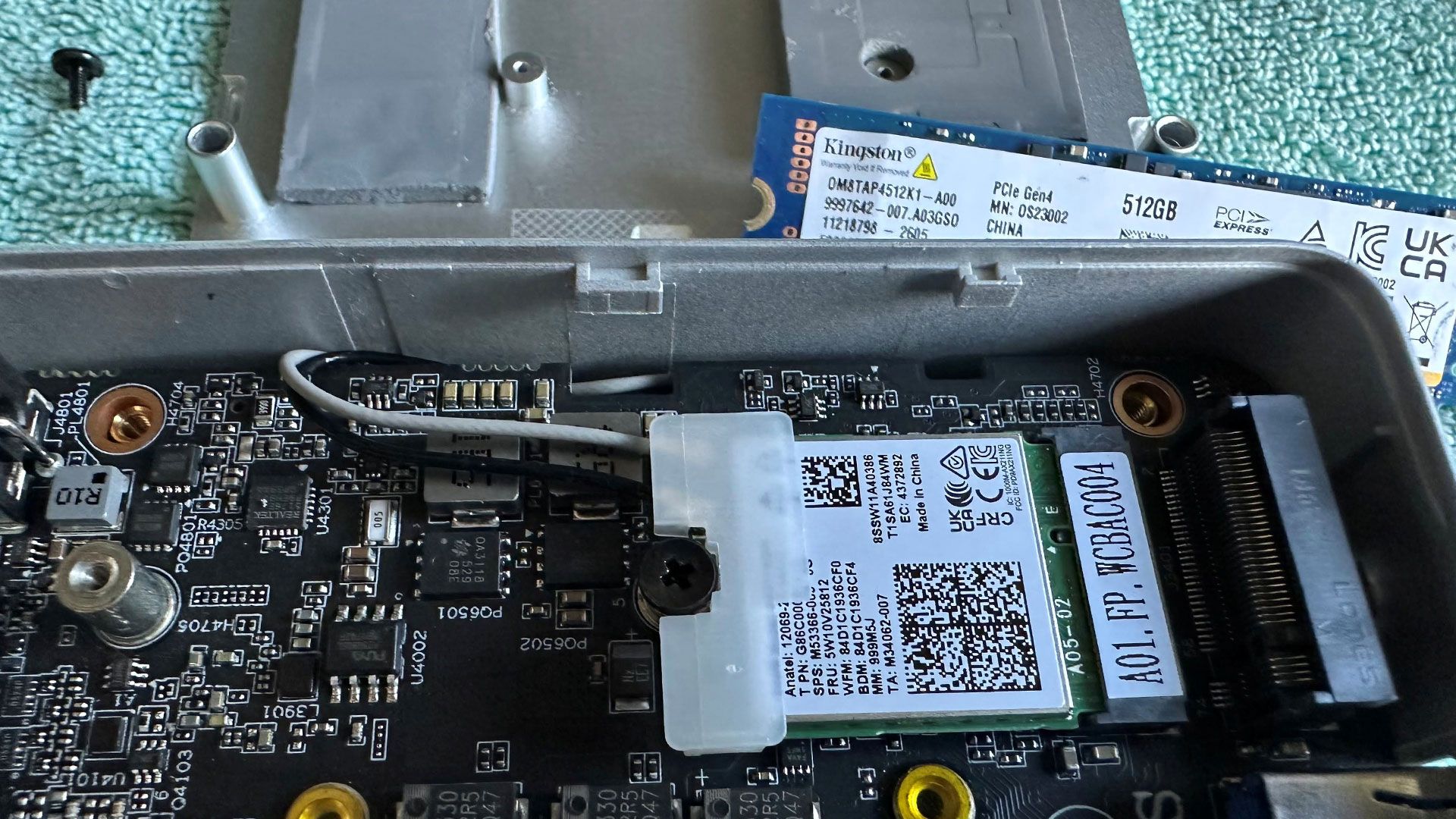
Wireless connectivity seems adequate, with an M.2 2230 card inside providing Wi-Fi 6E and Bluetooth 5.4. I had no problems with either during the test period. The wireless card is socketed. It's located under the SSD, making it easy to repair or upgrade down the line.
 Tom's Hardware
 Tom's Hardware
 Tom's Hardware
 Tom's Hardware
 Tom's Hardware
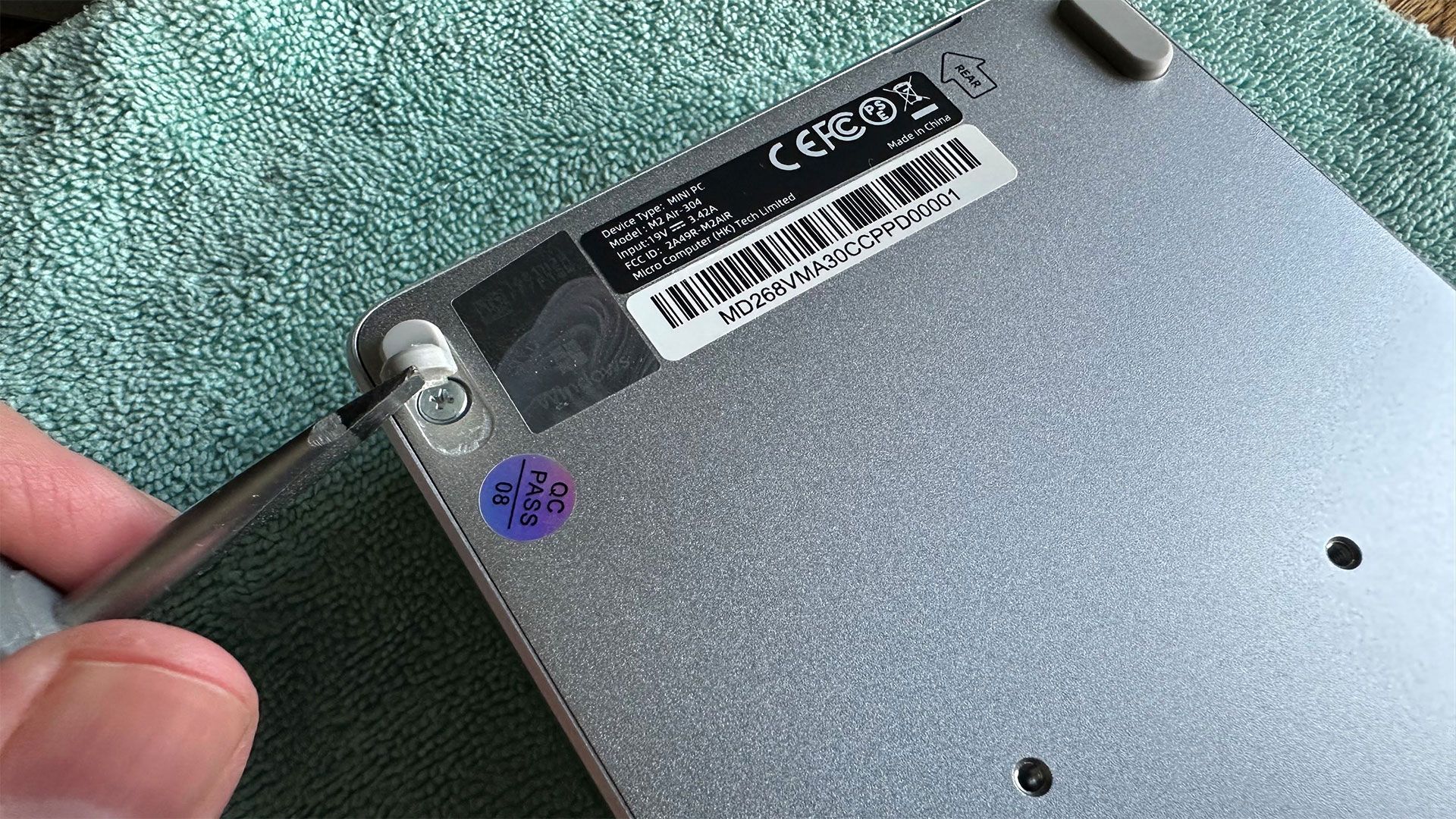
Accessing the components inside the Minisforum Mini M2 Air is straightforward, but you need to peel off all the four rubber feet to get to four long fastening screws. When they're removed, just flip off the metal bottom to access the M.2 slots and SODIMM. Be aware there's some adhesive force holding this metal plate in place, due to the sticky thermal pads on the RAM and storage.
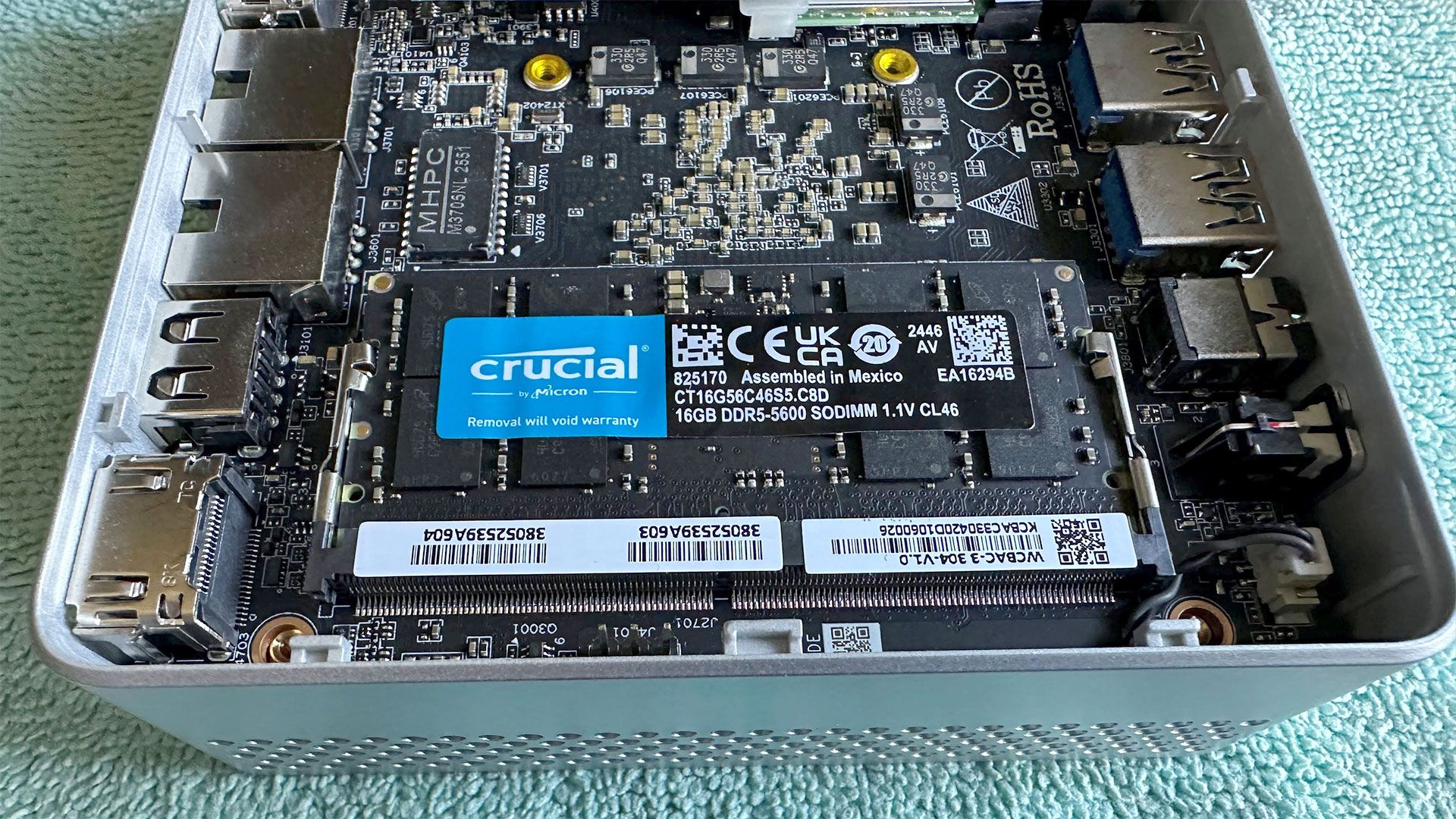
There's just a single M.2 2280 storage slot and one SODIMM slot, both populated. That means, there's no way to upgrade the RAM than swapping the module you already have in place. Our sample came with a 16GB DDR5-5600 SODIMM, but the system supports up to DDR5-6400. This only non-barebones configuration also came with a 500GB SSD in the M.2 slot.
System | CPU | (i)GPU | Memory | Chassis |
GMKtec Evo-T2 | IntelCoreUltraX7358H(16C/16T: 4P + 8E + 4 LPE),upto4.8GHz | Intel Arc B390 (Xe3, 12 cores, up to 2.5 GHz) | 2x 32GBLPDDR5X-8533soldered | Dual-fan,1.72 liters |
MSI Cubi NUC AI+ 3MG | Intel Core Ultra 9 386H (16C/16T: 6P + 8E + 2LPE), up to 4.9GHz | Intel Graphics (Xe3, 4 Cores, up to 2.5 GHz) | 2x 16GB DDR5-5600 Sodimm | Single fan, 0.52 liters |
Geekom A9 Max 2026 | AMDRyzenAI9HX470(12C/24T: 4x Zen 5 , 8x Zen 5c),upto5.2GHz | Radeon890M(RDNA3.5,16CUs,upto3.1GHz) | 1x 32GB DDR5-5600 Sodimm | Single fan, 0.82 liters |
Arctic Senza AI 370 | AMD Ryzen AI 9 HX 370 (12C/24T: 4x Zen 5 , 8x Zen 5c), upto5.1GHz | Radeon890M(RDNA3.5,16CUs,upto2.9GHz) | 2x 16GB LPDDR5X8000 soldered | Passive, 4.82 liters |
Beelink SER10 MAX | AMDRyzenAI9HX470(12C/24T: 4x Zen 5 , 8x Zen 5c),upto5.2GHz | Radeon890M(RDNA3.5,16CUs,upto3.1GHz) | 2x 32GB DDR5-5600 Sodimm | Single fan, 0.81 liters |
Geekom IT13 Max 2026 | Intel Core Ultra 9 185H(16C/22T: 6P + 8E + 2LPE), up to 5.1 GHz | Intel Arc graphics (Xe-LPG, 8 cores, up to 2.35 GHz) | 2x 16GB DDR5-5600 Soldered | Single fan, 0.97 liters |
GMKtec Evo-X3 | AMD Ryzen AI Max+ 395 (16C/32T: 16x Zen 5), up to 5.1 GHz | Radeon 8060S (RDNA 3.5, 40 CUs, up to 2.9 GHz) | 2x 64GB LPDDR5X-8000 Soldered | Triple-fan, 2.69 liters |
Minisforum Elite Mini M2 Air | Intel Core 3 processor 304 (5C/5TL 1P + 4LPE), up to 4.3 GHz | Intel Graphics (Xe3, 1 Cores, up to 2.3 GHz) | 1x 16GB DDR5-5600 SODIMM | Single fan, 0.47 liters |
We have Intel's latest 18A silicon inside this tiny PC, but not that much of it. Our review unit came with an Intel Core 3 304 "Wildcat Lake" chip that runs up to 4.3 GHz. Previous mini PCs based on Intel 300 series mobile silicon like the previously MSI and the GMKtec Evo-T2 came with a 16C/16T CPU. However, here we have just 5C/5T, and that's just one performance core supported by four low power efficiency (LPE) cores.
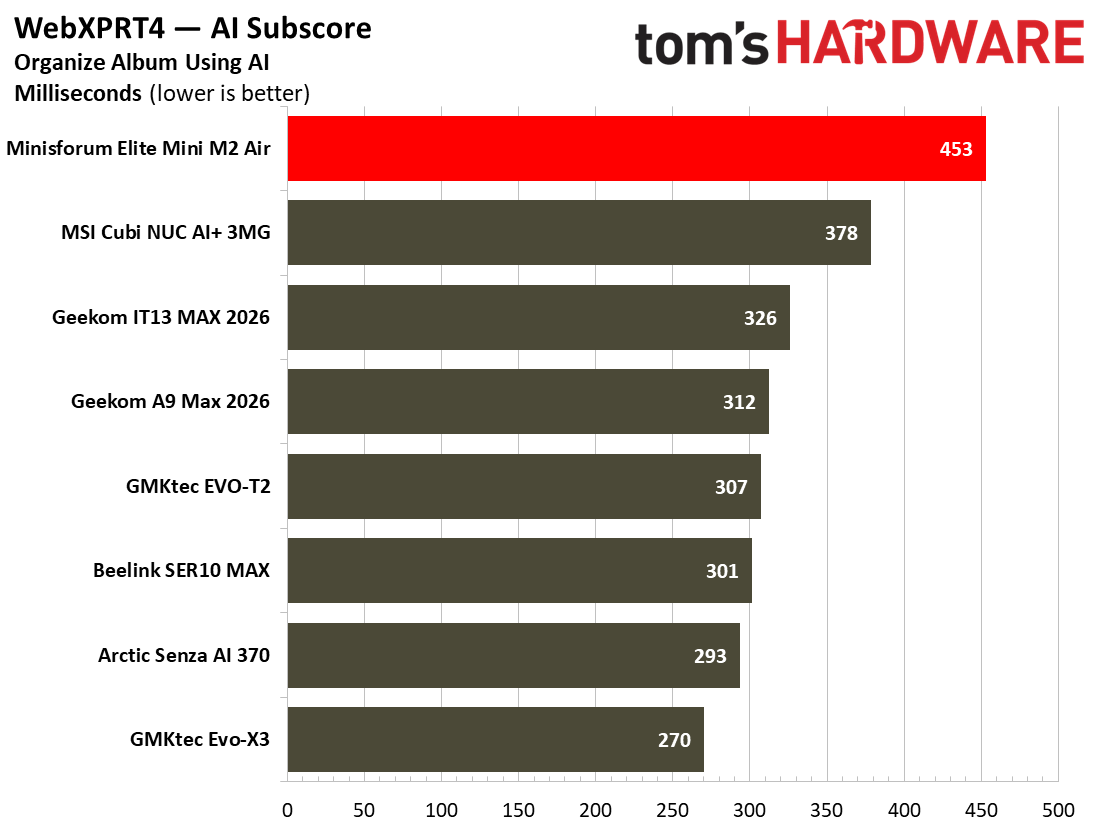
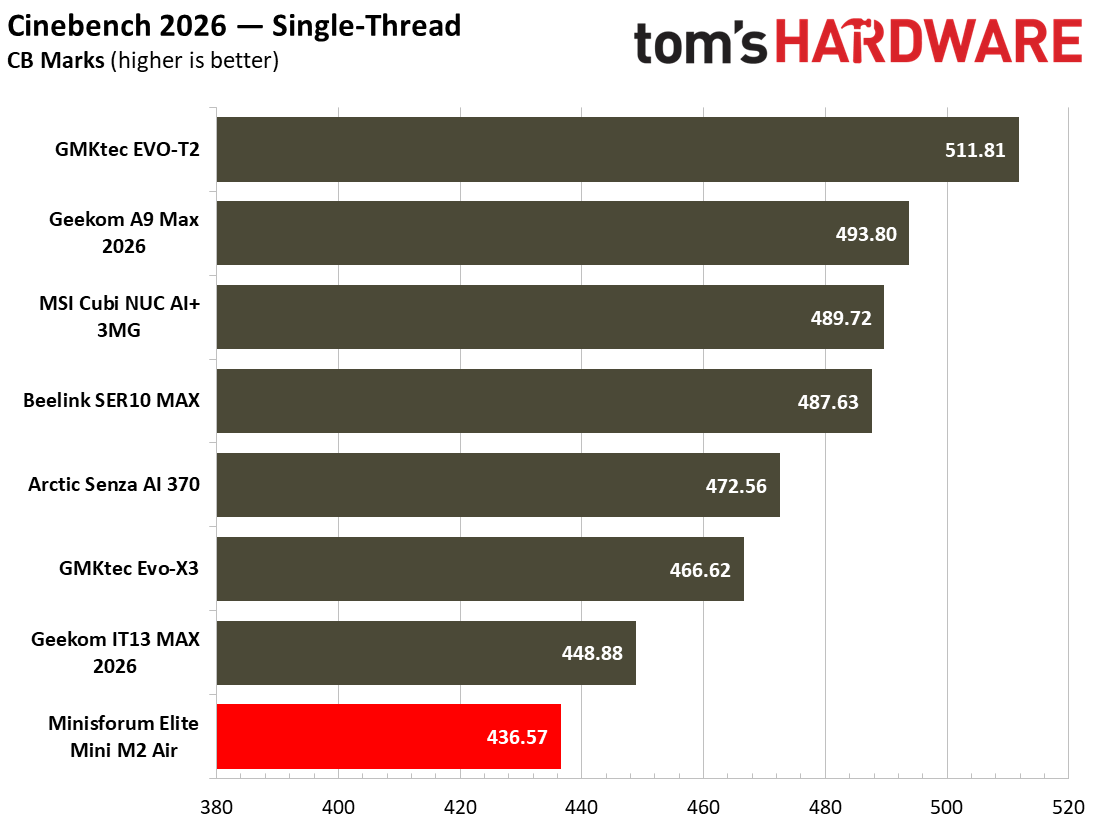
Still, single core performance continues to be important for system and app responsiveness. The proof of the pudding is in the testing, though. And while this system felt perfectly usable in Windows 11, internet browsers, and word processing - preparing and writing this review, for example - the benchmarks are somewhat tougher.
Single-Threaded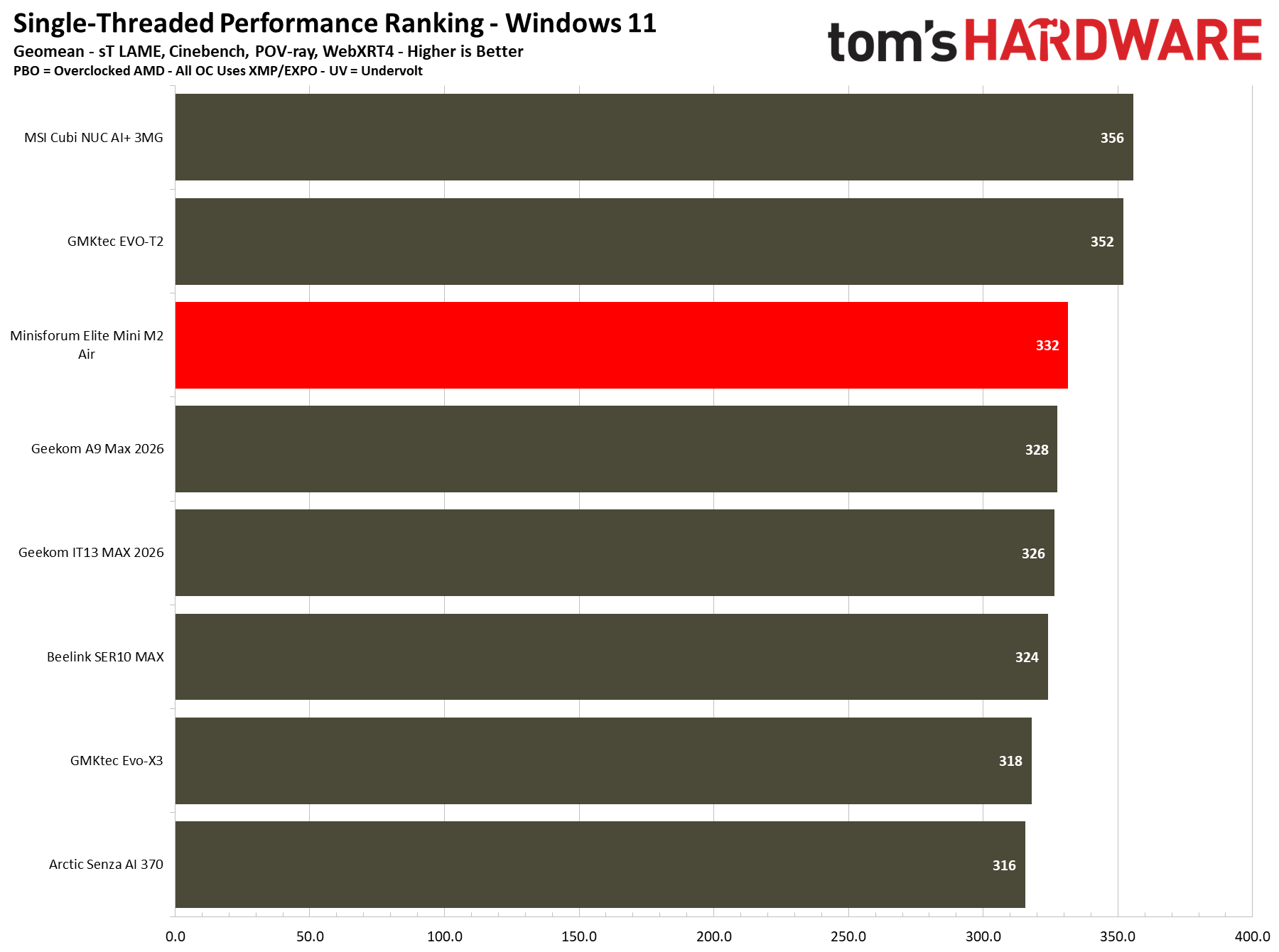 Tom's Hardware
 Tom's Hardware
 Tom's Hardware
 Tom's Hardware
 Tom's Hardware
 Tom's Hardware
 Tom's Hardware
 Tom's HardwareMulti-Threaded
 Tom's Hardware
 Tom's Hardware
 Tom's Hardware
 Tom's Hardware
 Tom's Hardware
 Tom's Hardware
 Tom's Hardware
 Tom's Hardware
 Tom's Hardware
 Tom's Hardware
 Tom's Hardware
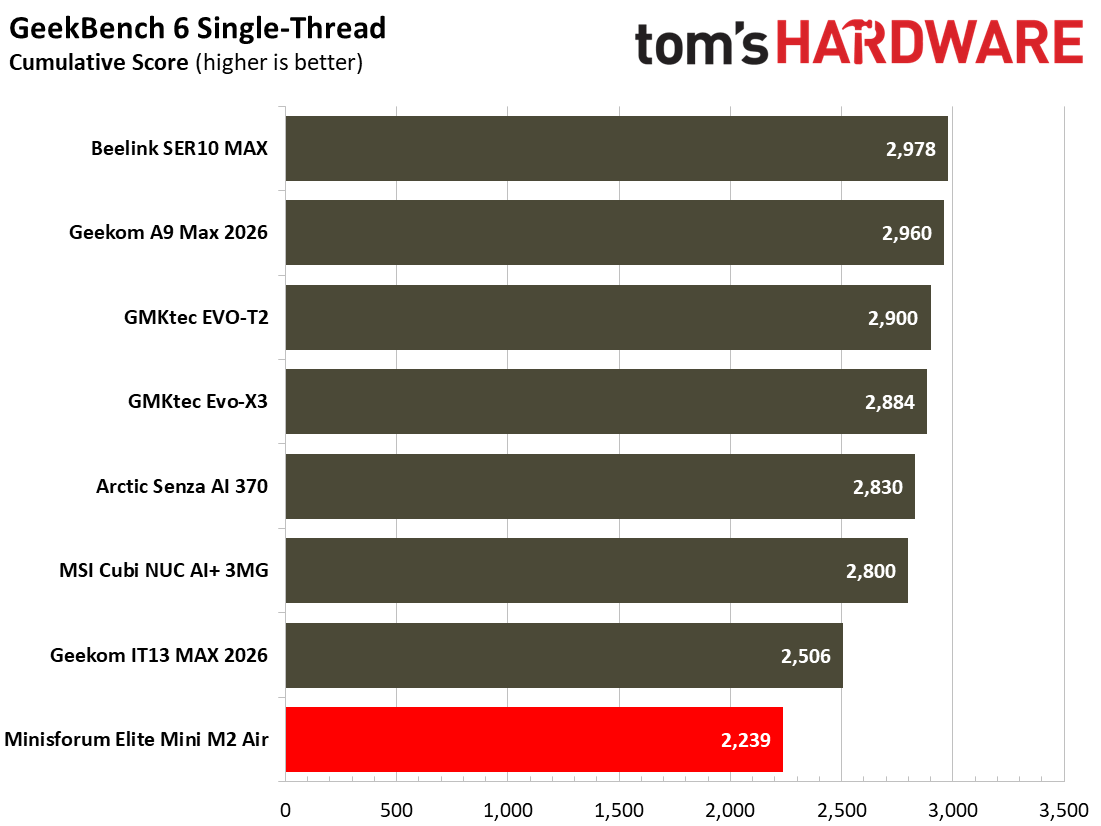
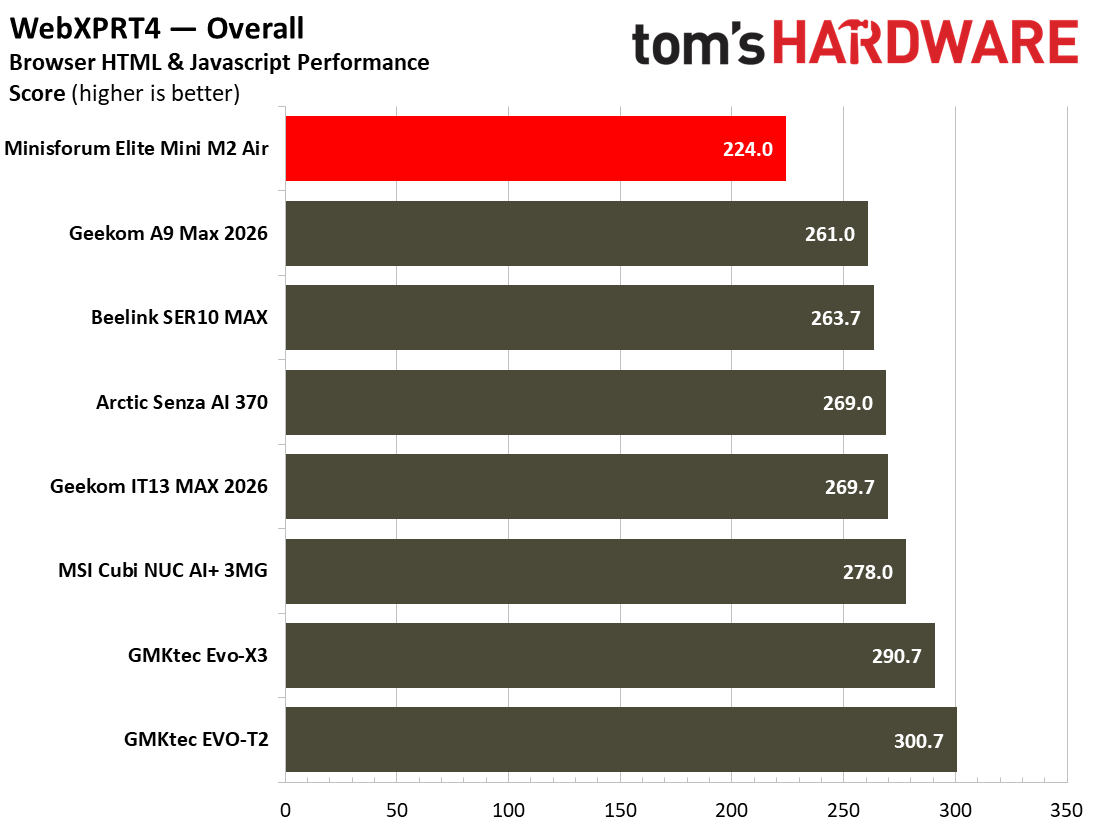
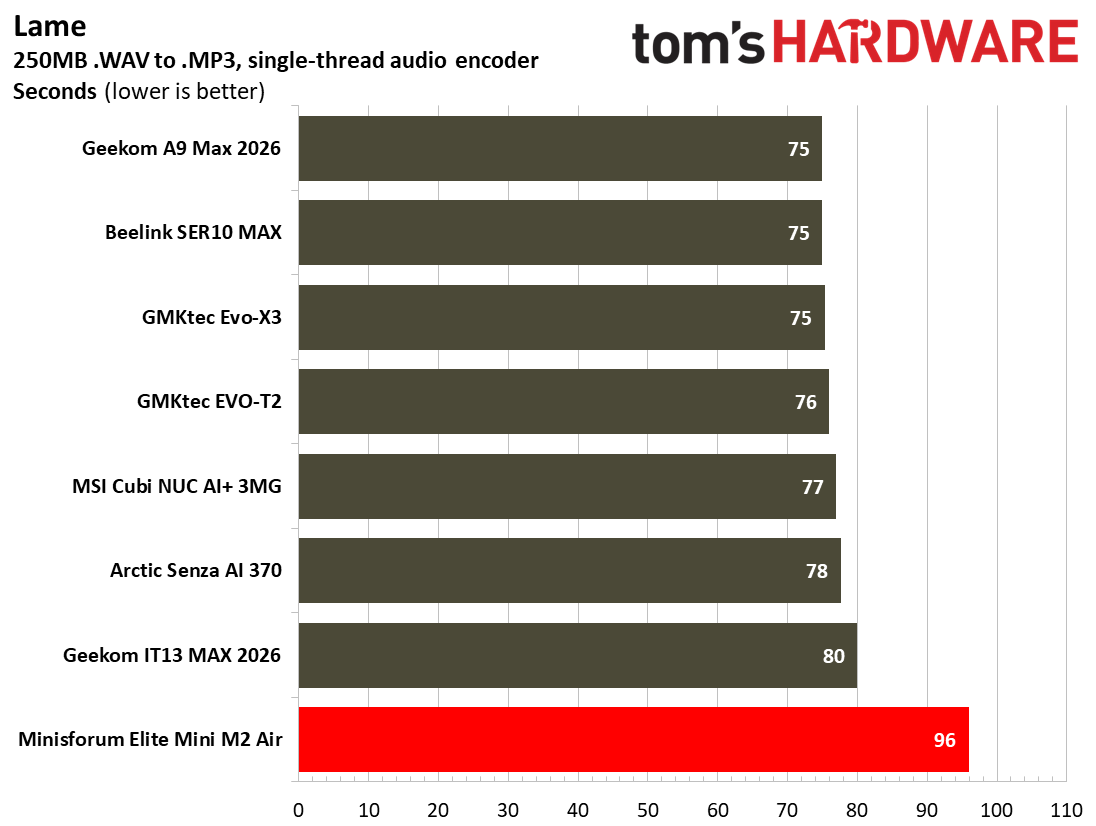
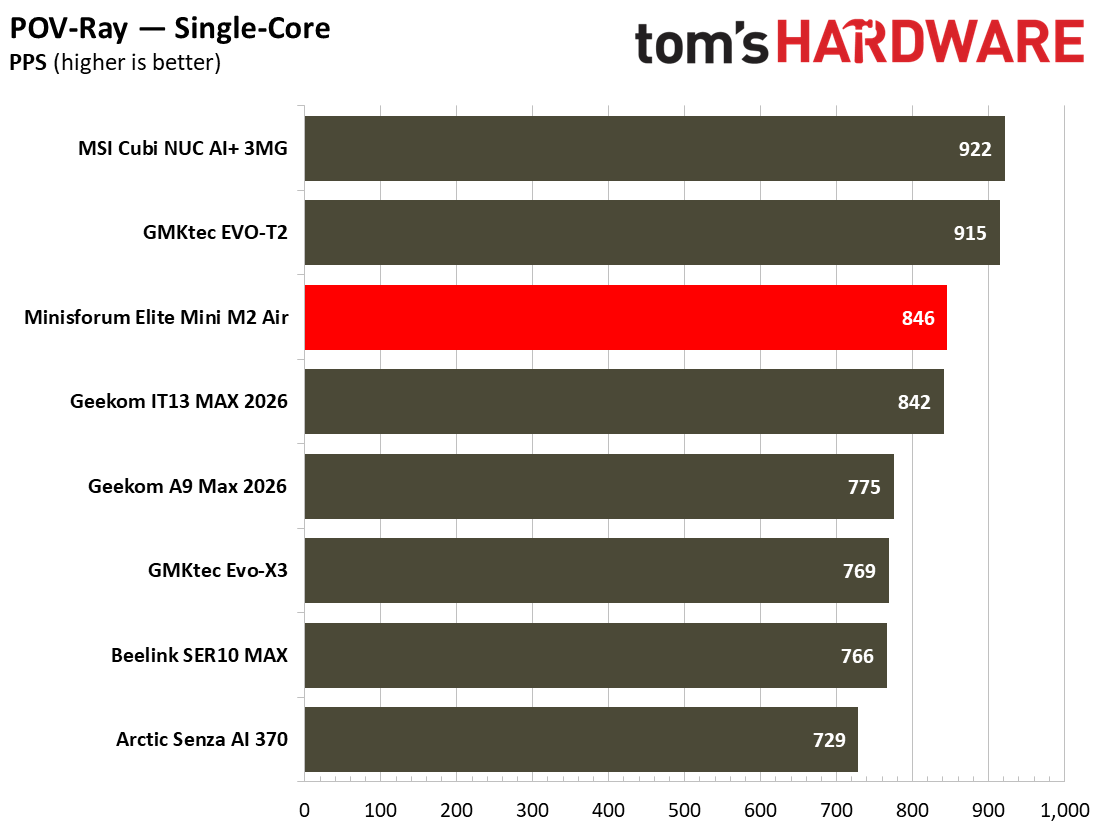
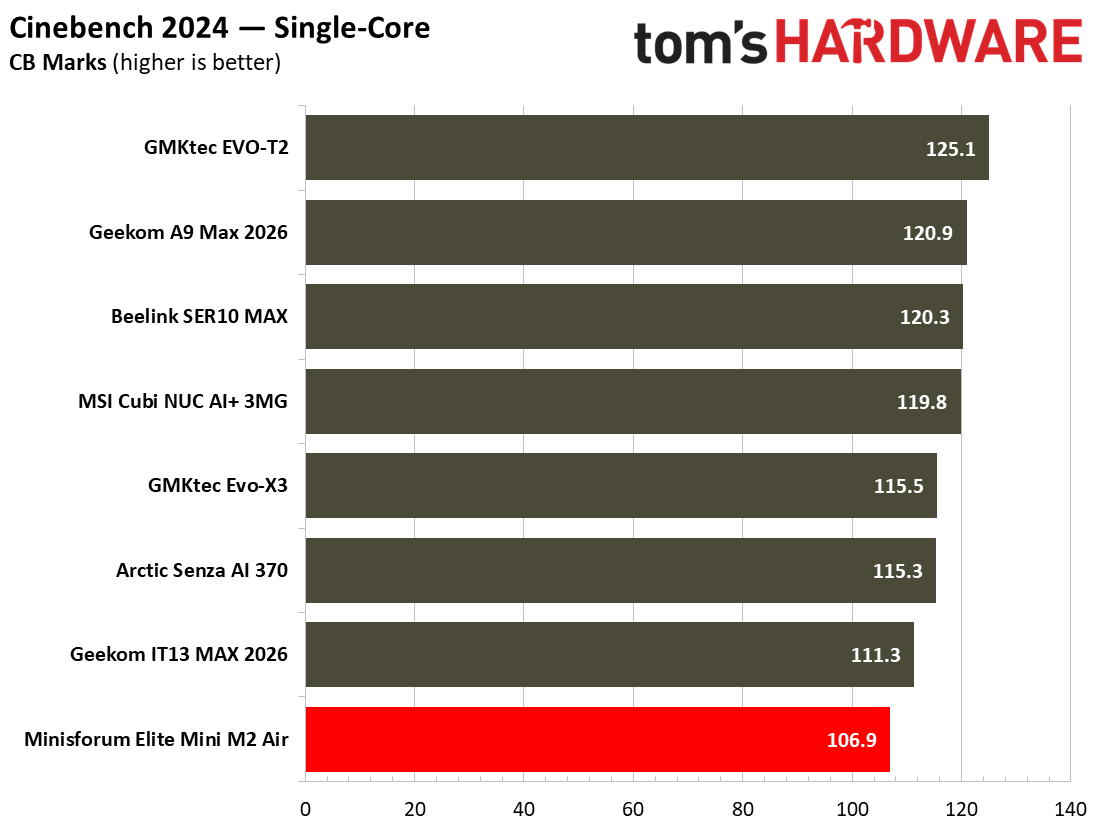
As we expected, the single core tests show Wildcat Lake has some bite. It easily beats its AMD-based rivals in the POV Ray single core rendering tests, for example. Moreover, in tests like Cinebench 2024 single core, the Mini M2 Air might trail the pack, but not by very much. It's roughly 107 points is actually within touching distance of the 120 points scored by high performance' mini PCs like the Beelink SER10 MAX (Gorgon Point) and MSI Cubi NUC AI+ 3MG (Panther Lake).
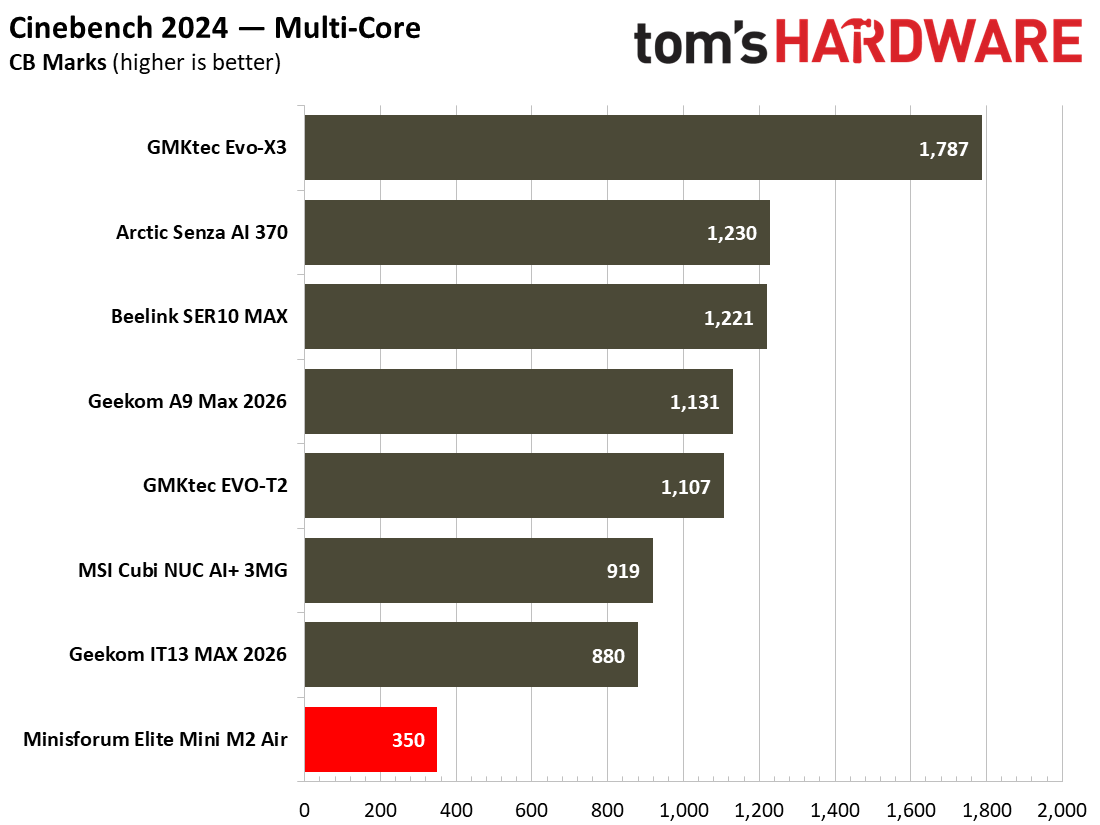
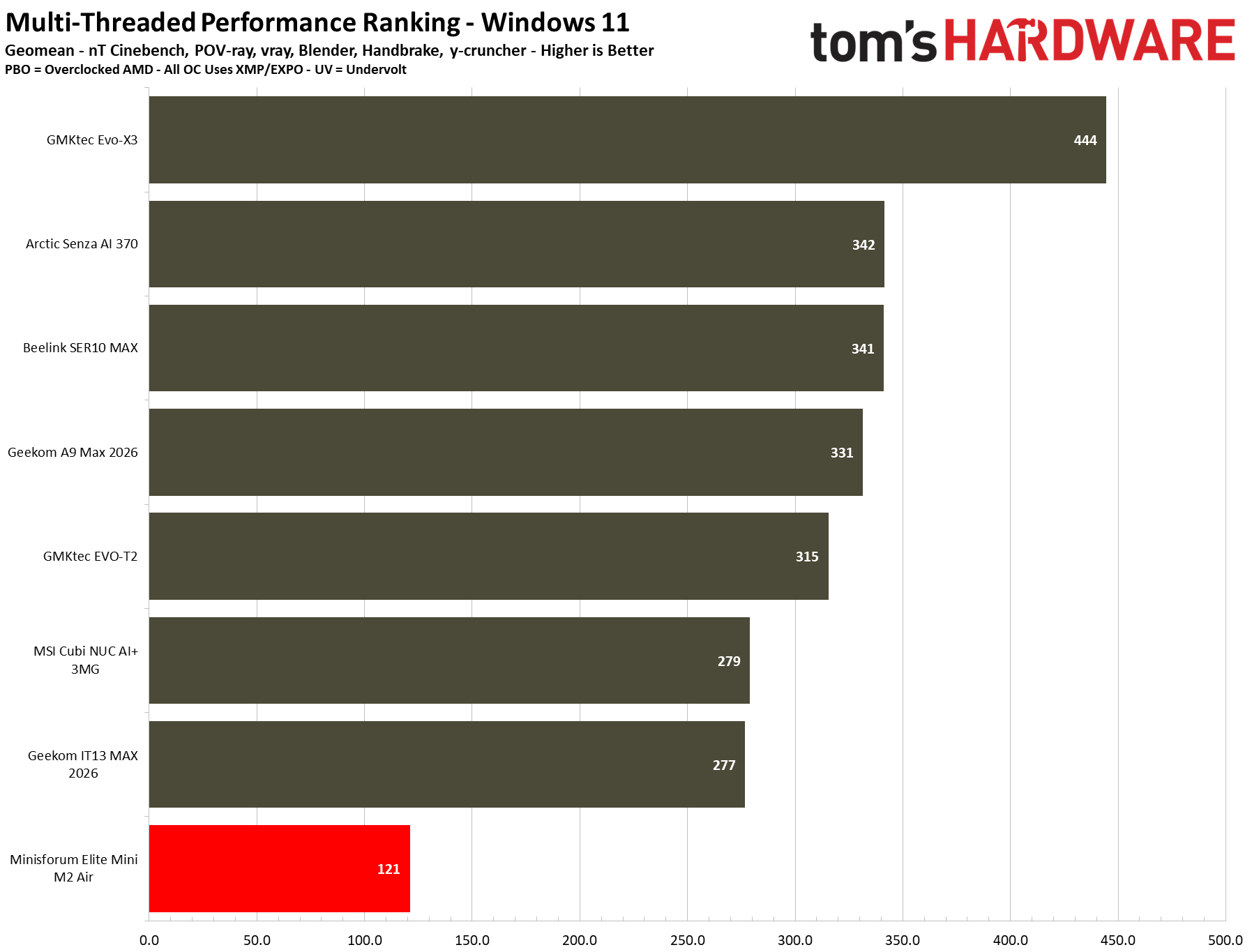
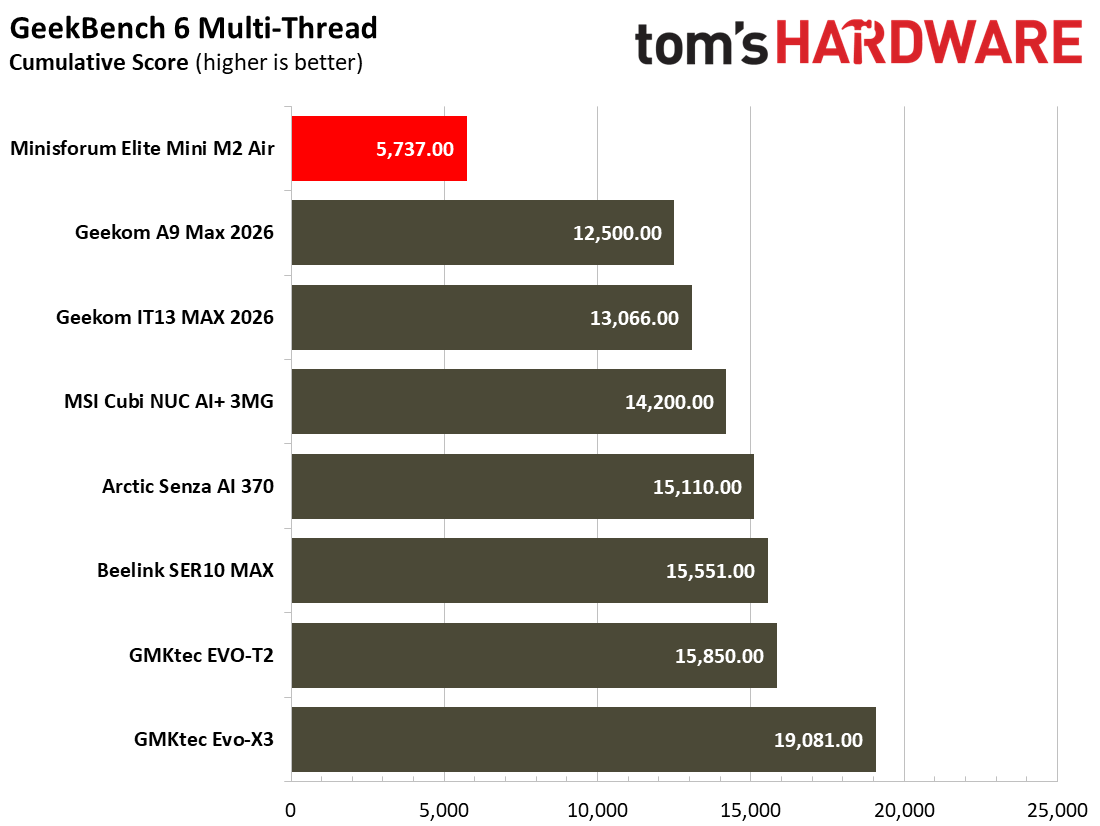
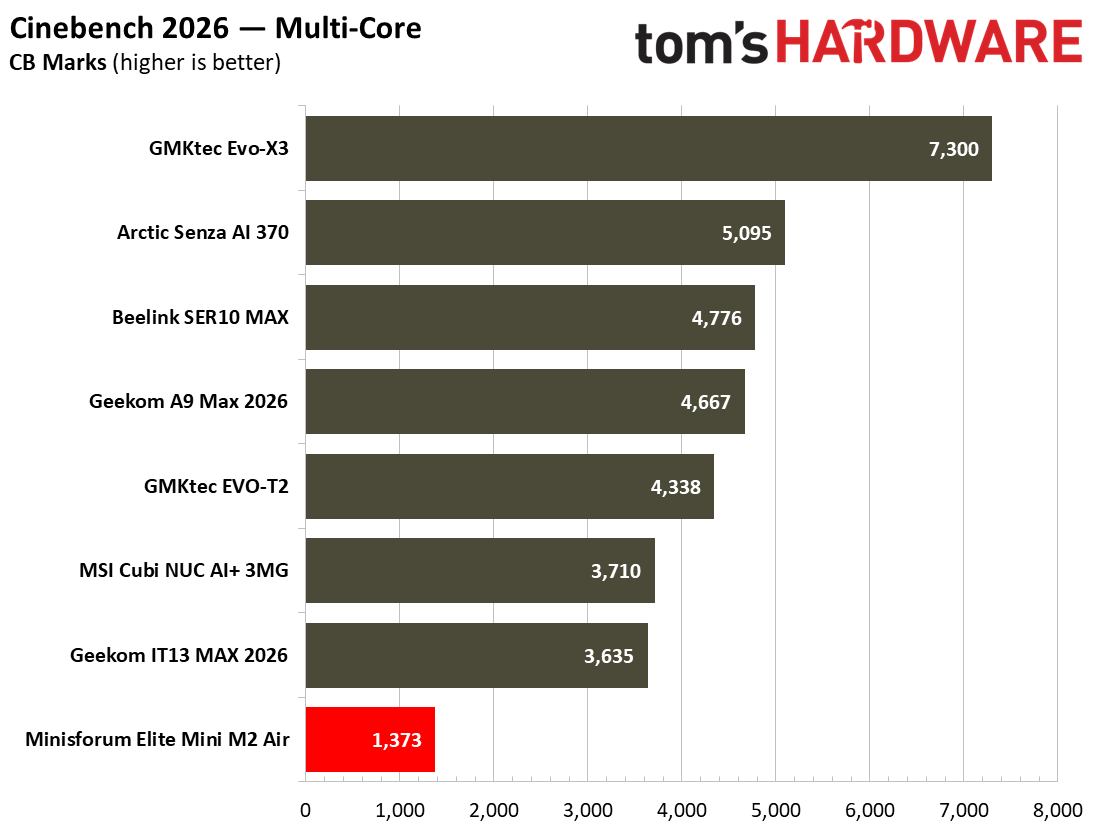
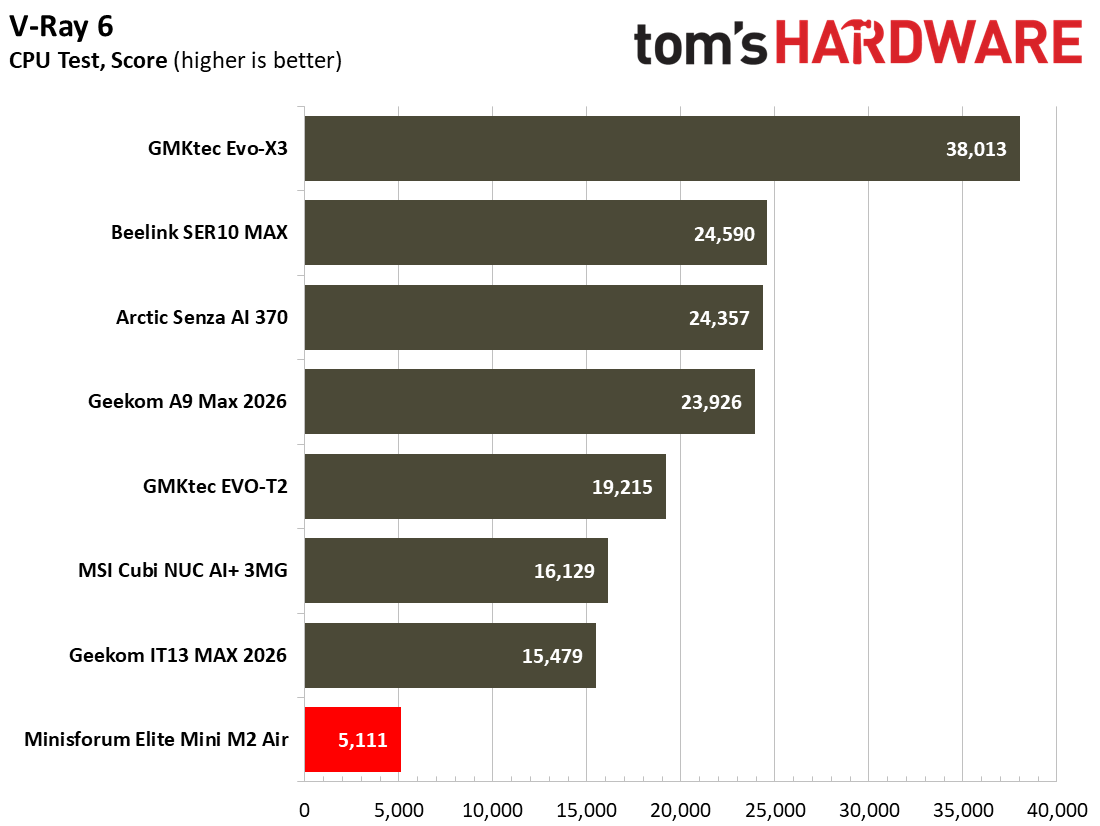
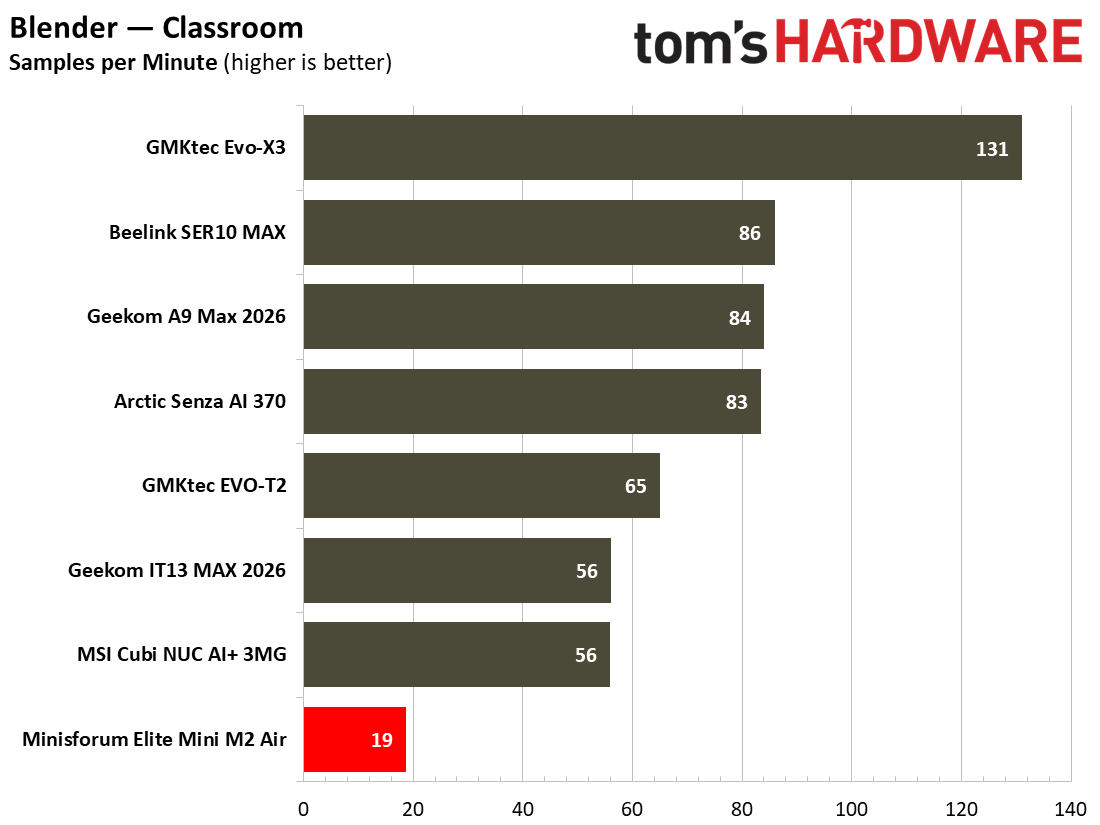
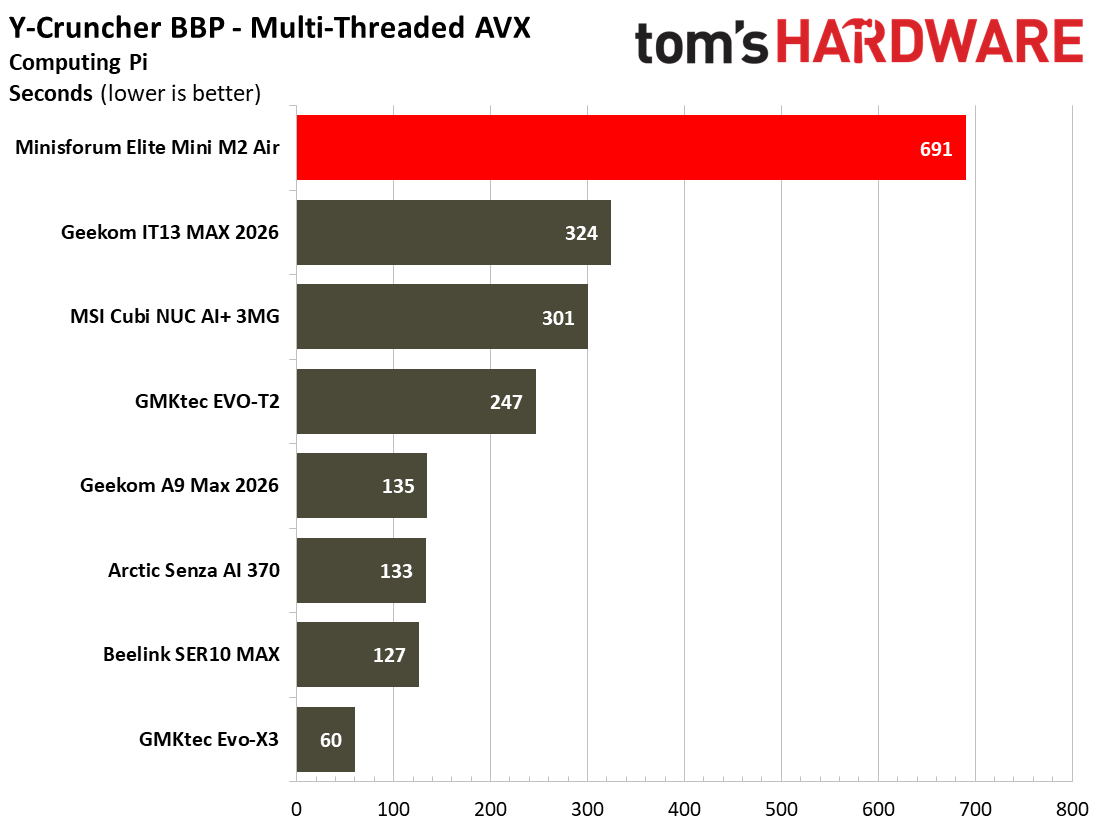
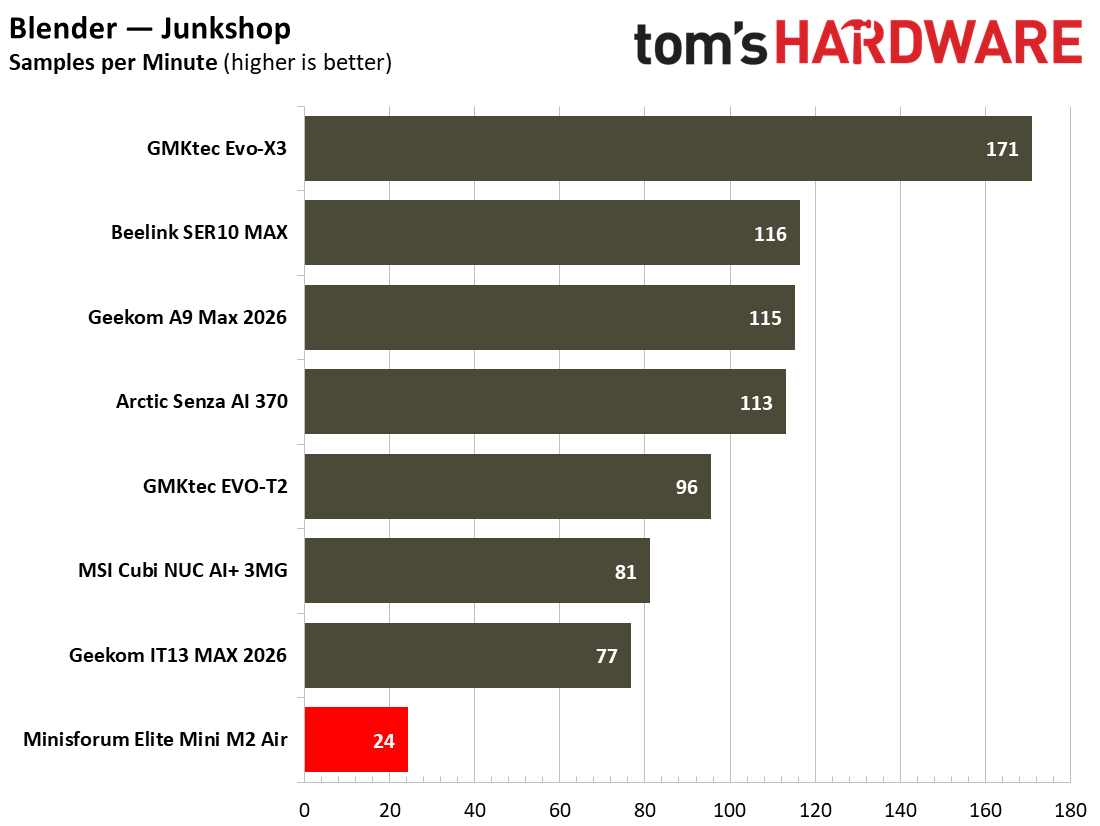
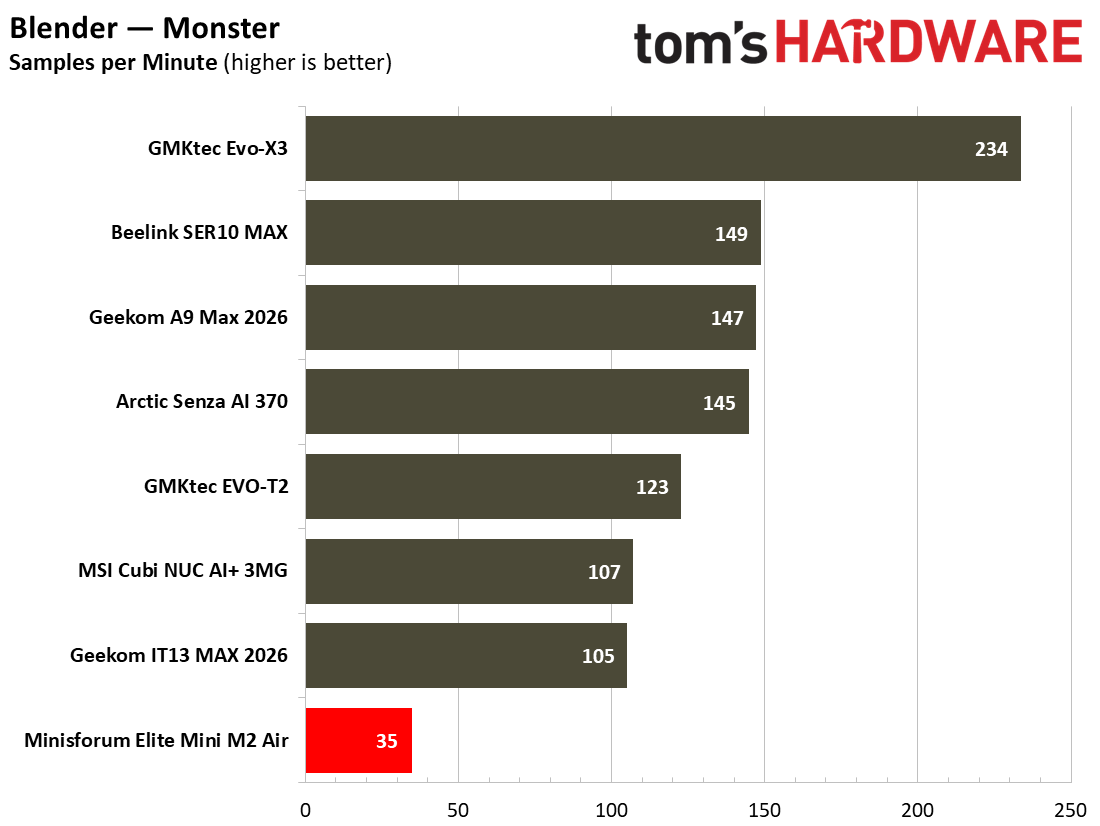
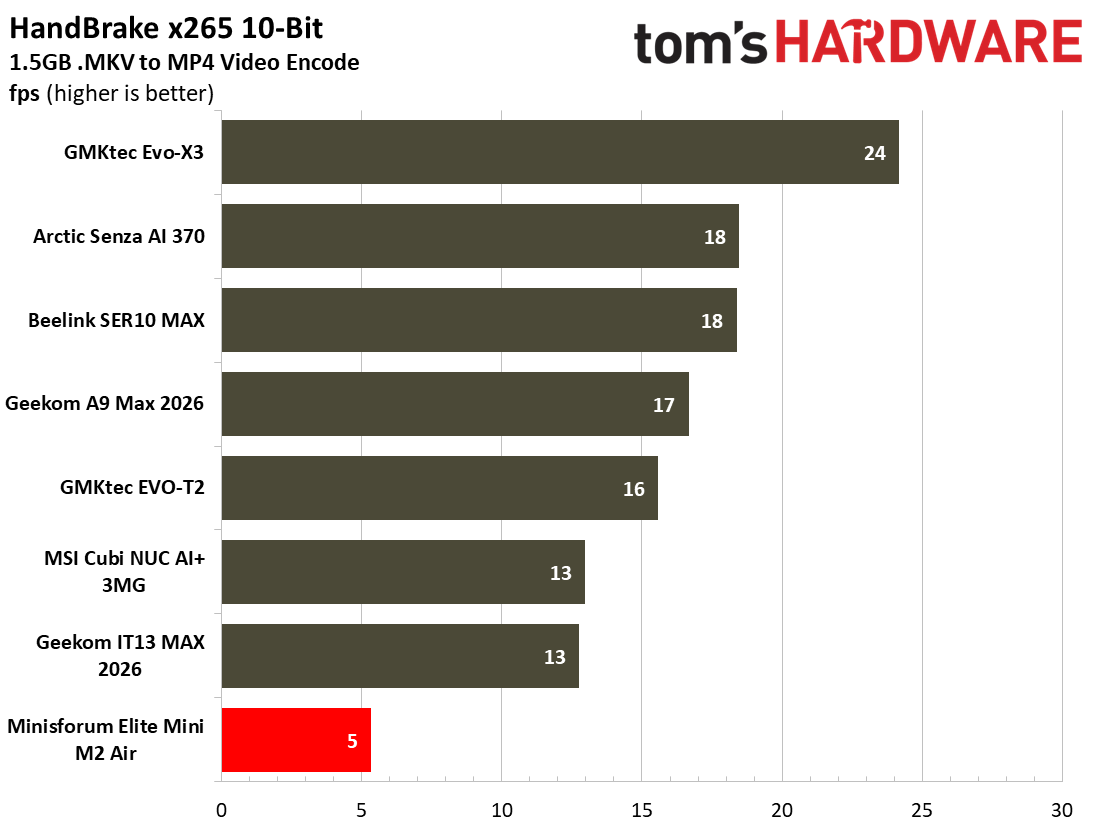
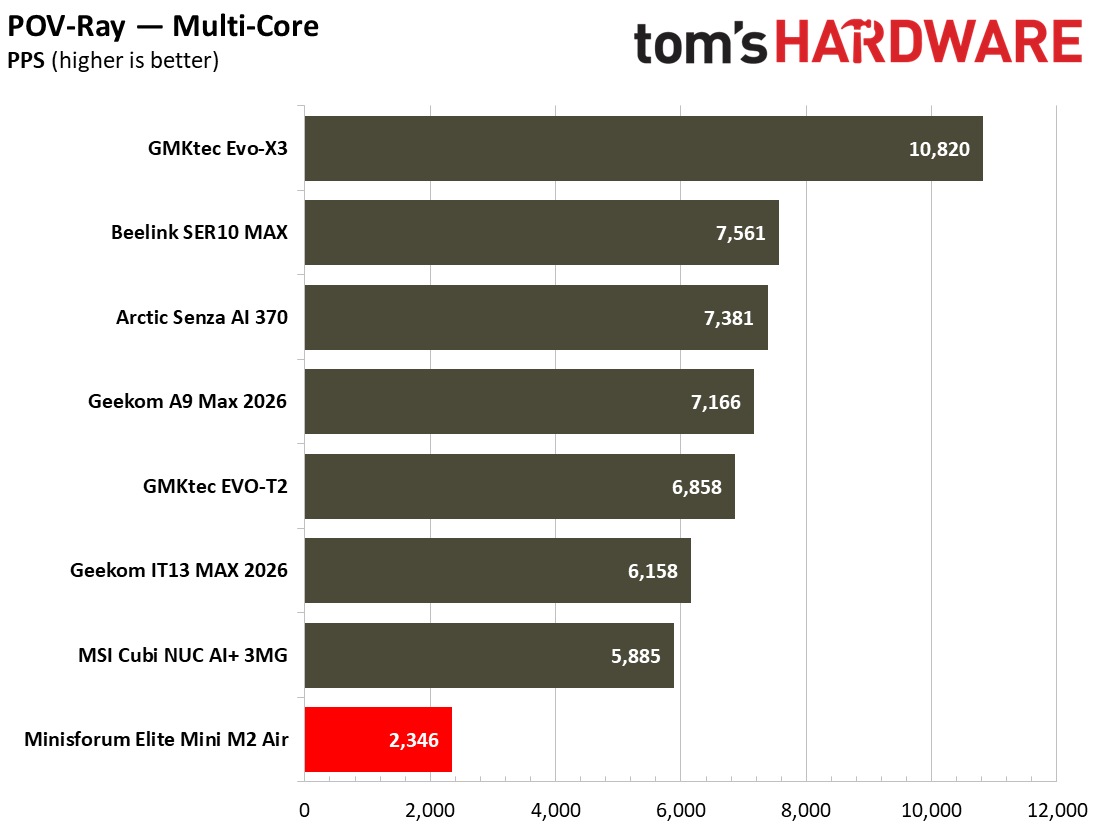
Multicore tests exposed obvious weaknesses of the 5C/5T CPU configuration with single-channel RAM. All the other mini PCs we've tested this year come with 12C/24T (AMD) or 16C/16T (Intel), so the productivity benchmarks we run which can take advantage of multithreading for demanding rendering or encoding tasks make the Minisforum here seem weak. However, it might still be acceptable for transcoding a short video or two, occasionally, as long as you aren't in a rush. If you are coming from an older, less efficient desktop sporting something like an i7-7700K or i5-10400, this 15W Wildcat Lake chip is an improvement in both single and multicore performance.
During our demanding tests, the Minisforum Elite Mini M2 Air-304 stayed cool and quiet thanks to its 15W processor and capable cooling.
Gaming and Graphics on the Minisforum Elite Mini M2 Air-304For anything other than the most casual gaming or emulation of older consoles you should look at other devices. We've looked at Intel 300 silicon powered devices with iGPUs packing 12 Xe3 cores, and four Xe3 cores, but this just has one, and it is further hampered by sharing the single-channel system RAM.
Prepare to see some low frame rates / scores in our standard tests. I felt that some of these tests probably shouldn't be run on this mini PC, but did it anyway, for completeness. However, some 3DMark benchmarks simply wouldn't run, as Intel has pruned the features that work on this iGPU due to limited resources. For example, 3DMark Solar Bay doesn't run on this system, and neither does Speed Way. Error messages about unsupported hardware pop up when you try these tests.
Steel Nomad ran, though, and the Minisforum and its solo Xe3 core achieved a score of 135. The aforementioned Evo-T2 with Intel CoreUltraX7358H and (B390) iGPU with 12x Xe3 cores scored 1,624. That's incredibly close to 12x faster than the Core 3 304's Intel Graphics.' A score of 135 means Steel Nomad ran at just a little more than 1 FPS, which actually doesn't hurt your eyes to watch as much as 10 FPS.
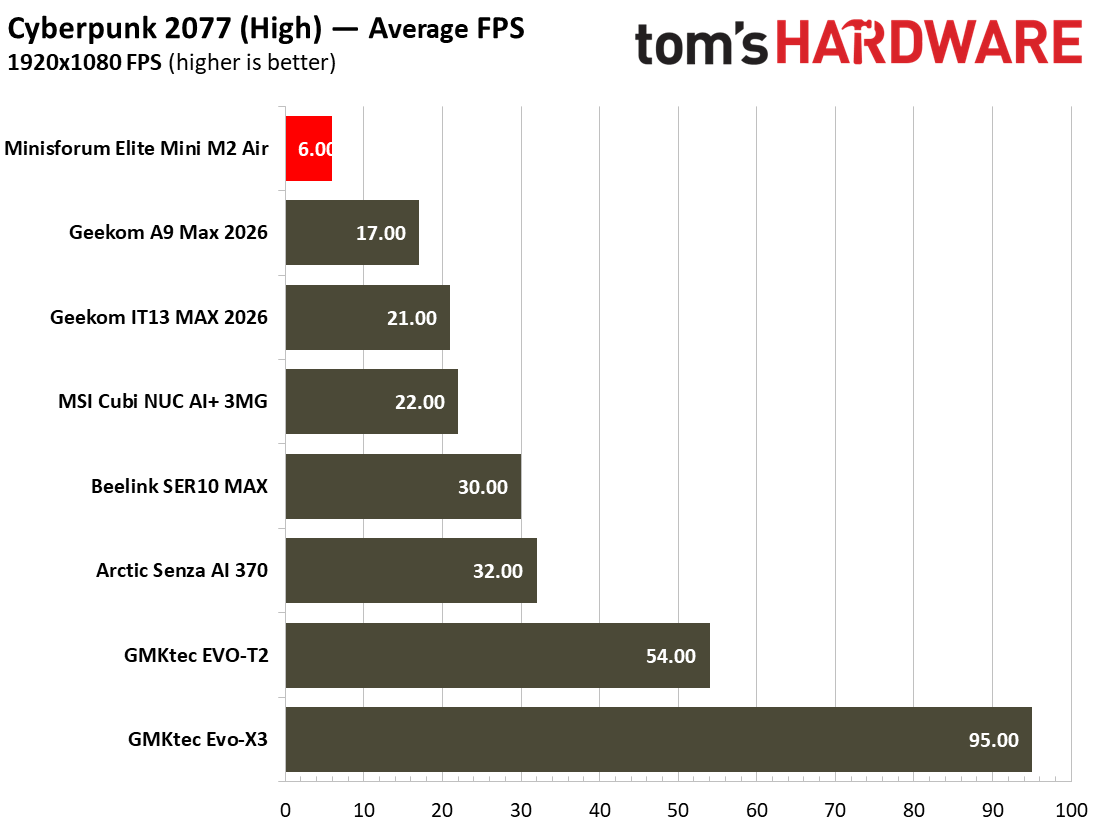
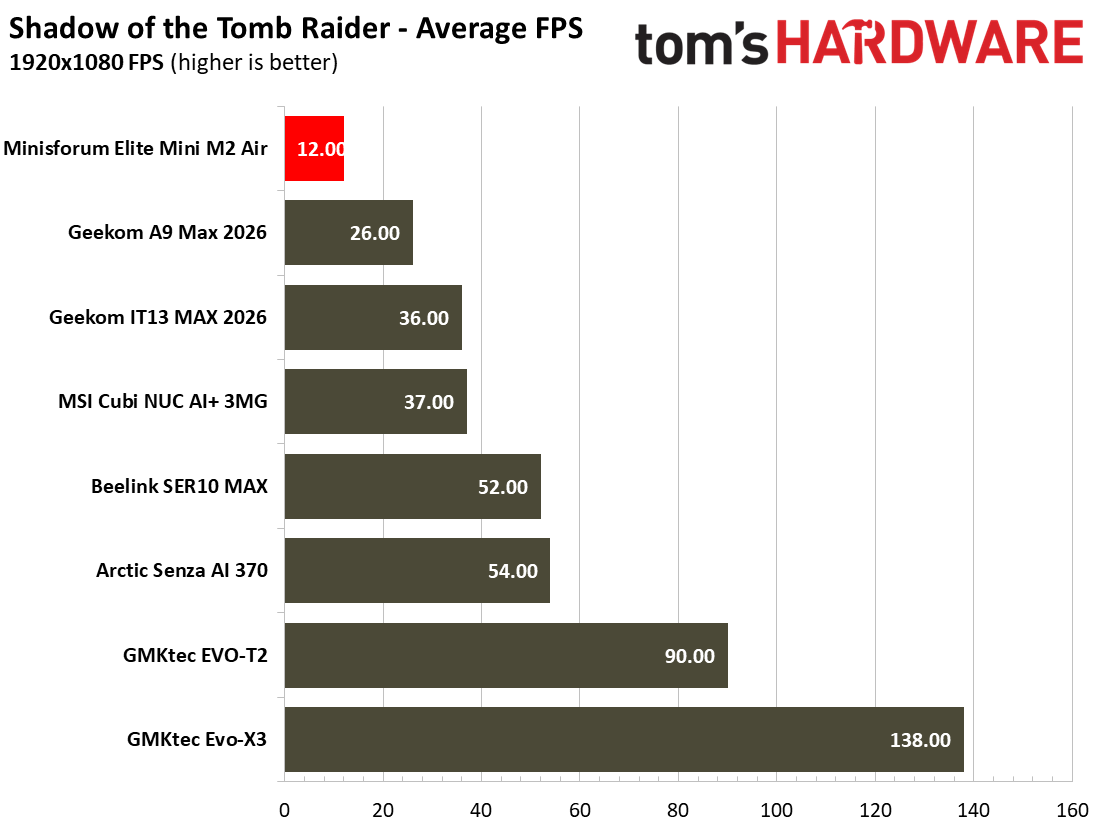
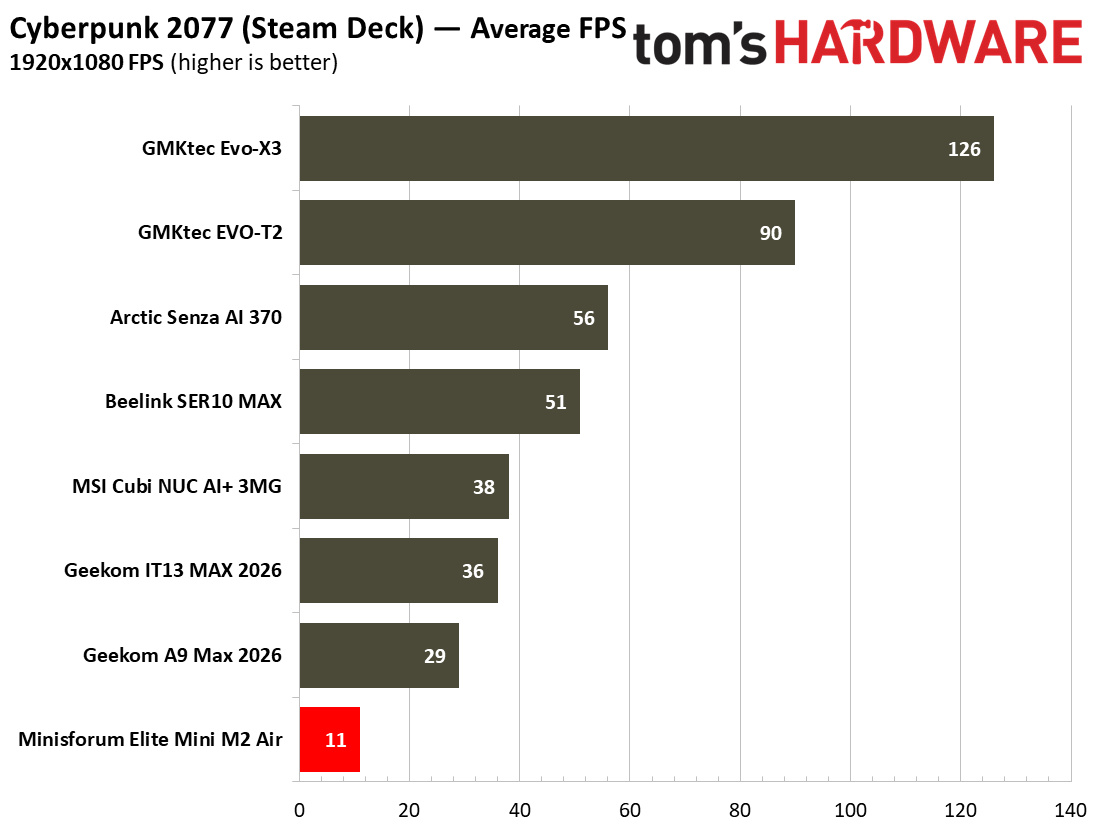
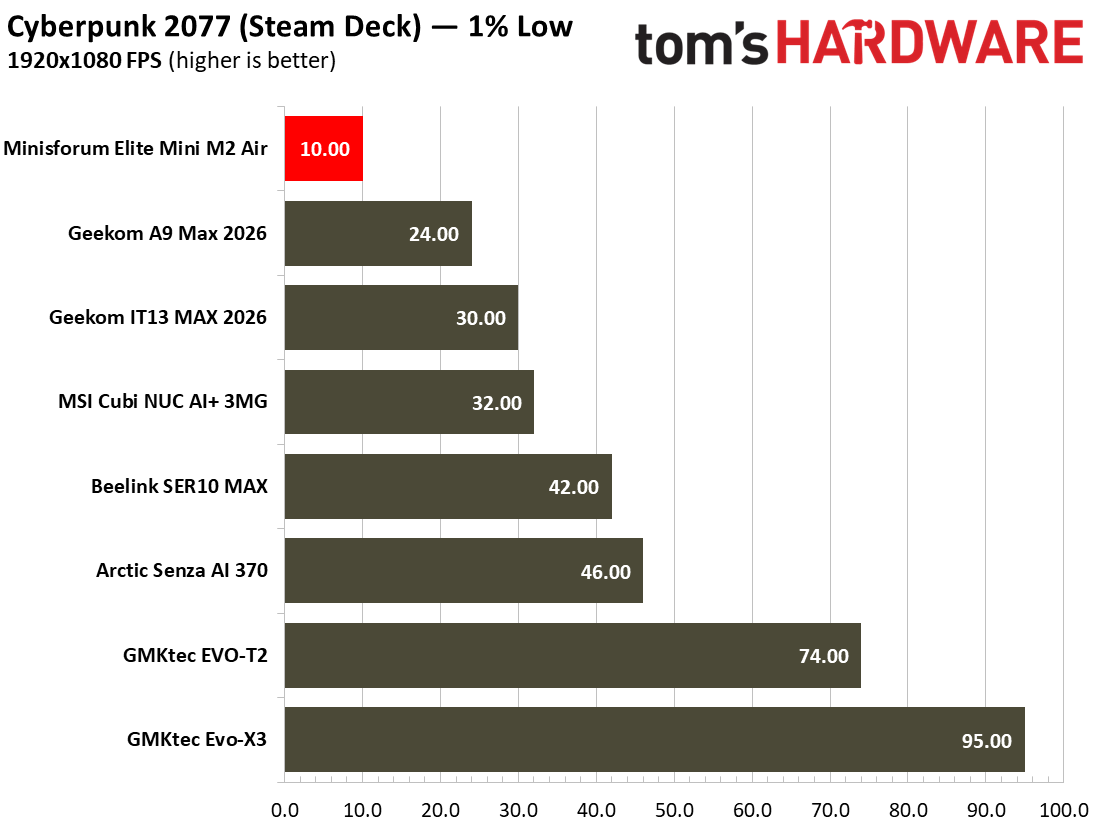
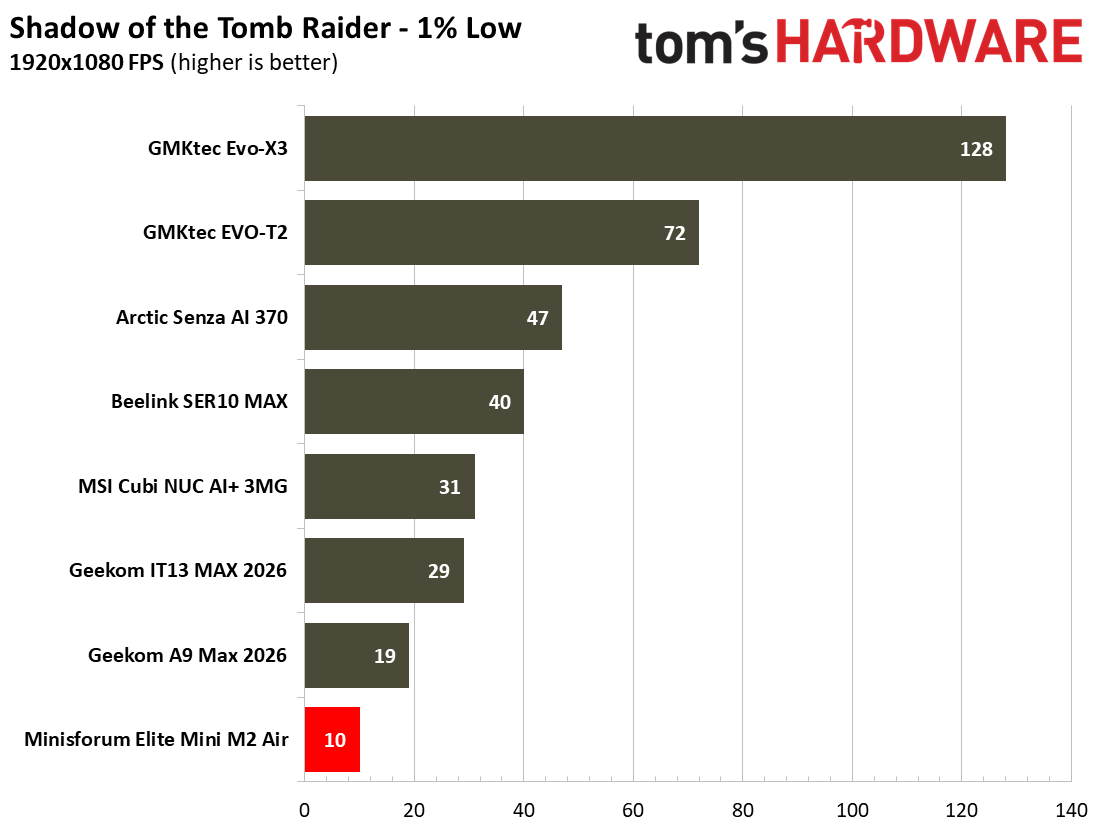
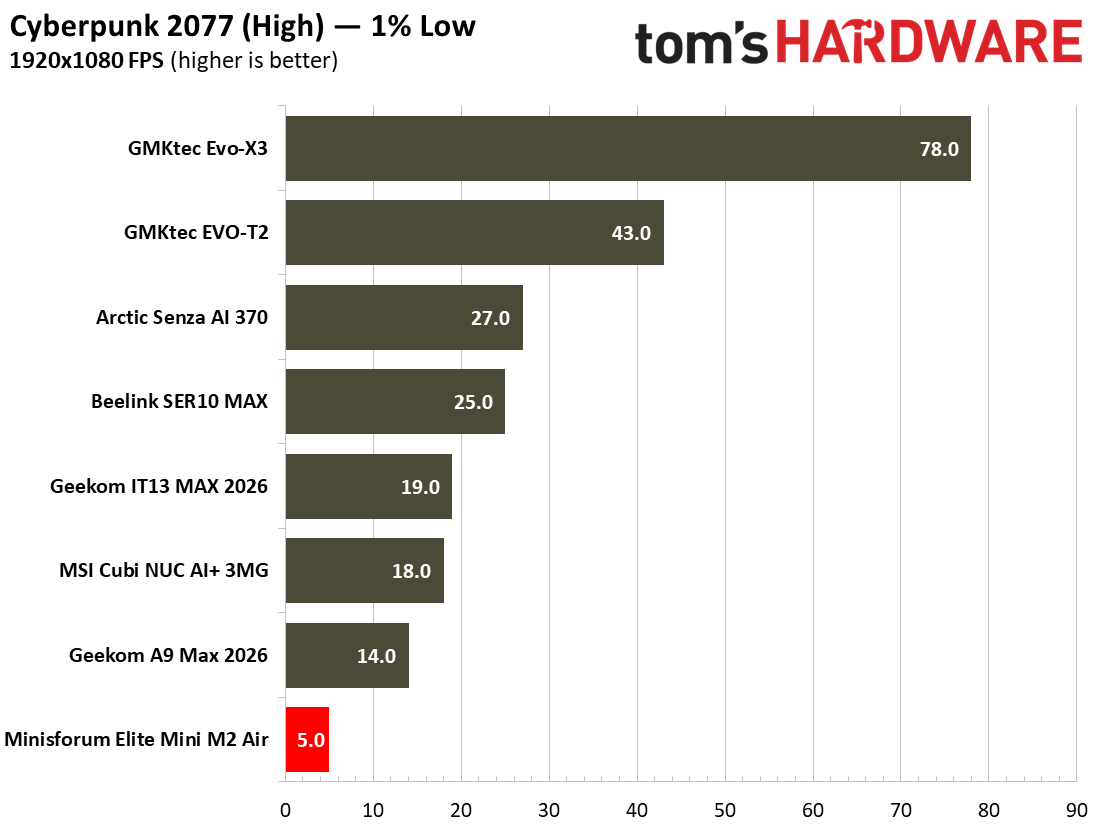
Using the multi-scene benchmarks built into Shadow of the Tomb Raider and Cyberpunk 2077 using our standard settings selections resulted in some unpleasant experiences. Performance of no better than 10 or 12 FPS was observed in these tests. To achieve 25 or even 30 FPS in these titles I found that reducing the game resolution to 720p and low/lowest settings would just about get there.
 Tom's Hardware
 Tom's Hardware
 Tom's Hardware
 Tom's Hardware
 Tom's Hardware
 Tom's Hardware
So, for some actual fun on the Mini M2 Air I decided to try the latest version of the Sony PSP emulator PPSSPP and play some Wipeout Pure. I managed to run this game on my 1440p monitor with a 6x render resolution, and it achieved a nice steady 60 FPS, delivering an enjoyable futuristic racing experience. It would also therefore likely be good for retro emulation of similar era and older consoles as well as home computers.
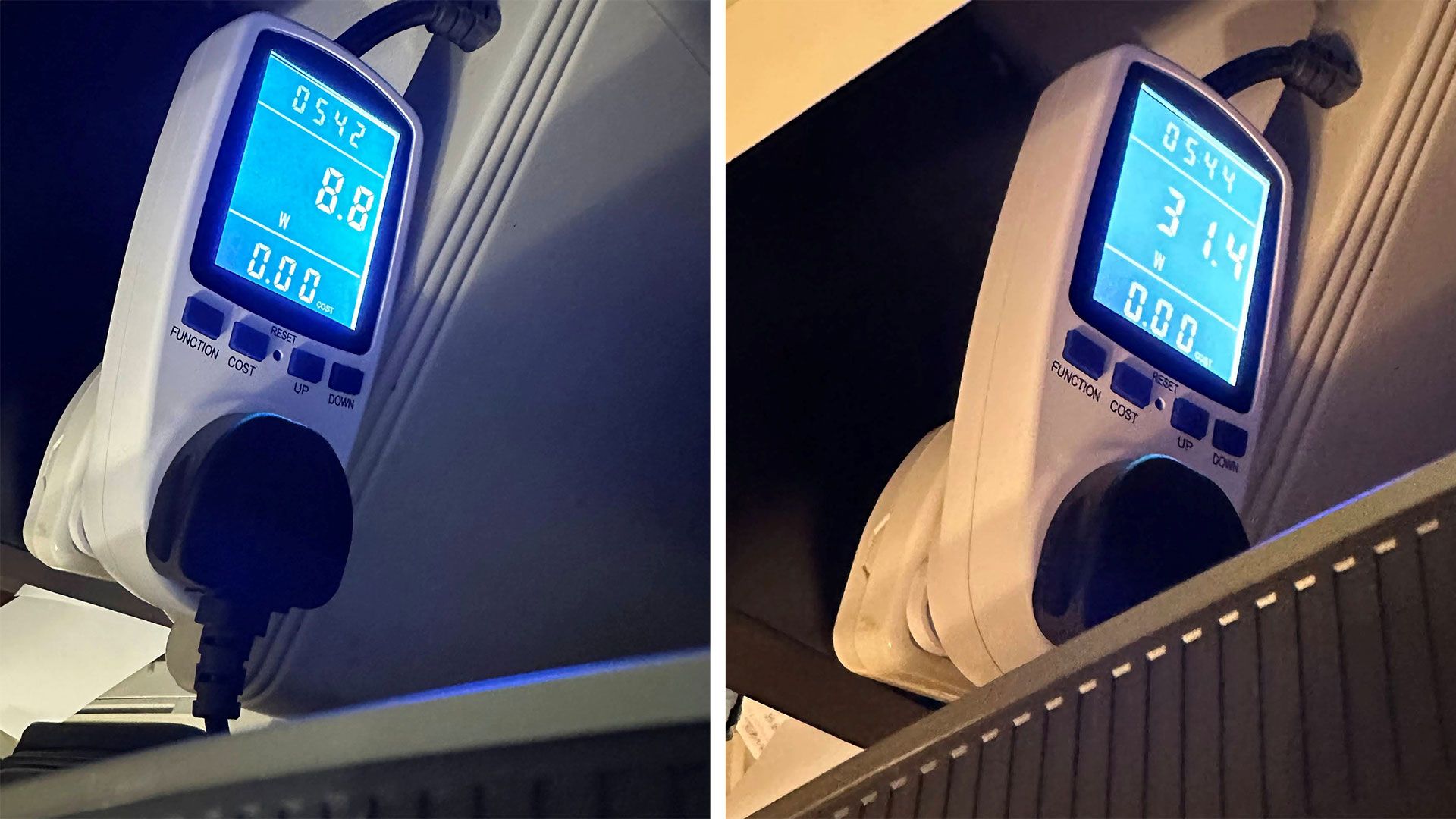
Power, Heat, and Noise when using the Minisforum Elite Mini M2 Air-304During my day-to-day use, the Minisforum system consumed around 9W when idling on the desktop. When under the heaviest loads I threw at it, the highest system power consumption I saw was around 31W.
I didn't find it surprising that this low-power system ran cool and quiet. System tools showed that during light activities like browsing the web the CPU temperature remained in the low 30s Celsius. Playing games or benchmarking for length periods, I never saw the reported CPU temperature rise beyond the low 70s Celsius.
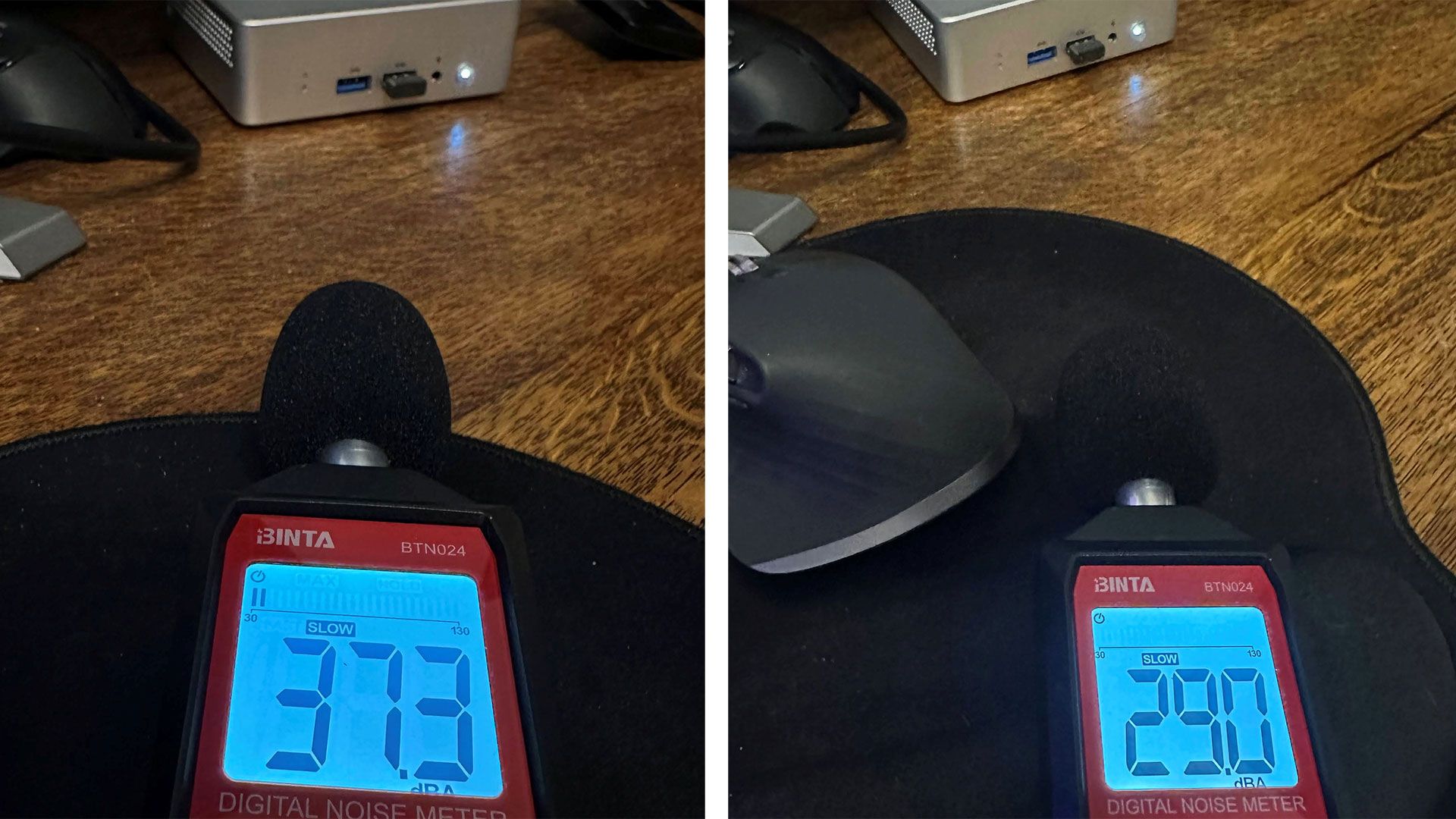
Minisforum's tiny mini PC was a quiet operator at idle and under load. My measurements from about half a foot in front of the device show noise levels under 30 dBA at idle, which is very quiet and actually said to be beneath the measurement threshold of my meter. Stressing the system with simultaneous CPU and GPU loads I managed to observe just a reading of a little over 37 dBA from the system.
Software and Warranty on the Minisforum Elite Mini M2 Air-304The Mini M2 Air ships with Windows 11 Pro installed in the configuration we received. I found no pre-installed bloatware. The official specs don't mention compatibility with other OSes like Linux.
Minisforum sells this mini PC with a two-year warranty and a 30-day money-back guarantee.
Minisforum Elite Mini M2 Air-304 configurationsMinisforum sells only two Elite Mini M2 Air-304 configurations in the U.S. There's a barebones model, or the configuration we tested with pre-installed RAM, SSD, and OS.
At the time of writing our 16GB / 500GB / Windows 11 Pro configuration is listed by the mini PC maker at $559 but the product page says the price is normally $699. The barebone model is currently $263, discounted from $329. We don't know when the prices might get adjusted. However, we've noted U.S. retailers like B&H Photo are now selling the 16GB / 500GB model at $729.
Bottom Line
Though the Mini M2 Air's performance may lack in performance, it also probably the smallest cheapest, and least power-hungry mini PC we've tested all year. If these kinds of qualities are important to you, the Minisforum might be appealing.
It is admirable that this mini PC is so small but leaves RAM and storage upgrades on the table for later. Other positives are the sturdy build, despite the use of plastic for the top shell, and a good port selection considering its size. In addition to being easy to hide due to its small stature, and supplied VESA mount, you probably won't hear it very much, either.
Of course, the performance is a weakness that can't be ignored, especially in the context of our ever-growing tested mini PCs chart from 2026. It is great to see this latest-gen processor barebones at just over $260 direct from Minisforum. If you have a spare DDR5 SODIMM and SSD, perhaps from a laptop upgrade or wherever, this might help you get a new mini PC system up and running cheaply. However, the 16GB RAM and 500GB SSD (and Windows 11 Pro license) currently more than doubles the list price (it adds $296). That's a bit painful.
Furthermore, if the Minisforum Elite Mini M2 Air ever rises to its apparent MSRP of $699, we'd definitely look elsewhere. Around this price, especially during sale periods, you can shop for mini PCs employing far more powerful previous-gen processors. One good alternative candidate might be the Geekom IT13 Max 2026 we reviewed in August at $799. Price trackers show this Core Ultra 185H machine with 24GB RAM has been available for under $600 with discount / coupon over the last few months. There are also a lot of capable older gen AMD mini PCs to ponder over at attractive prices.