A guide to finding your new favorite Chromebook keyboard!
Once upon a time, Chrome OS only came on laptops that had a keyboard built-in, but now we have Chromeboxes, Chromebits, and Chrome tablets. No matter what form your device seems to take, one thing remains clear: a good keyboard is essential! Chrome OS plays well with most keyboards on the market and whether you're looking for a travel-friendly keyboard to replace your Chromebook's sticking keys or need a wireless keyboard to use in bed, we've got a keyboard for everyone!
Made for GoogleLogitech K580 Wireless Keyboard, Chrome OS EditionStaff pick
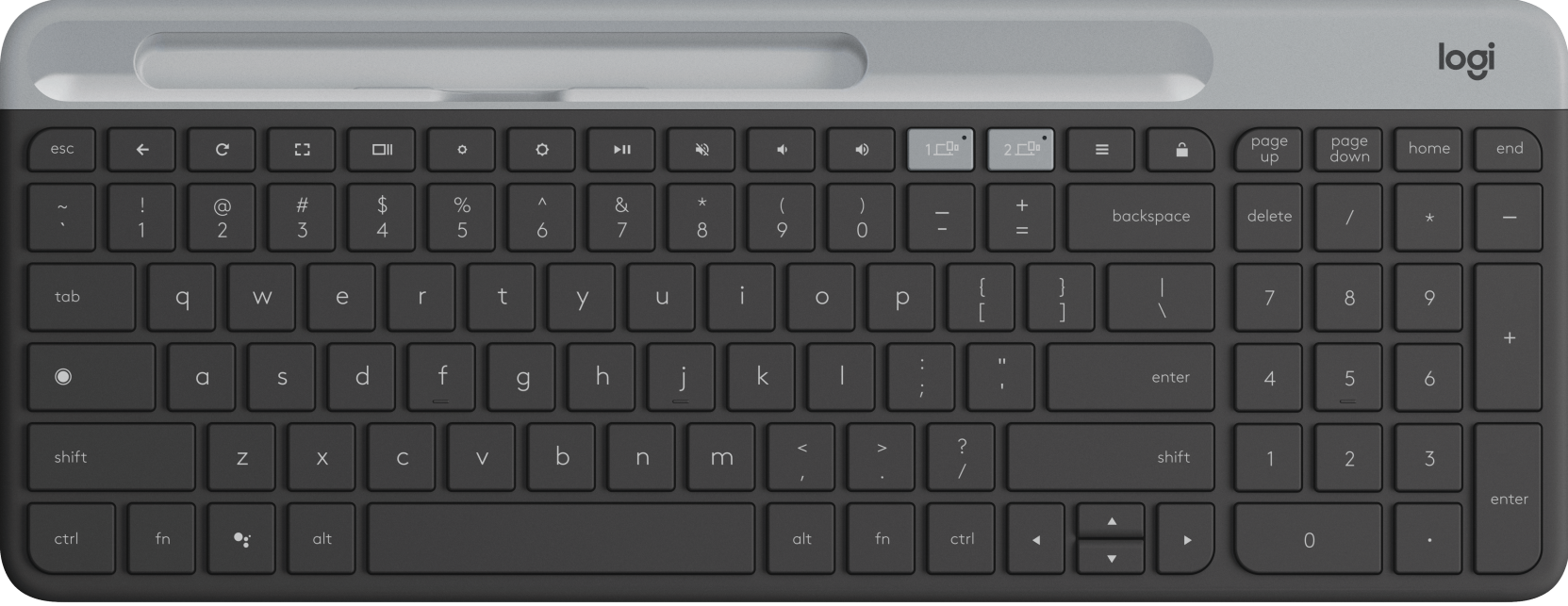
You can swap between two devices quickly on this slim keyboard, which has Chrome OS function keys up top, as well as a number pad with page up/down, home, and end keys. The layout takes getting used to but the connection is strong and the key travel is a good depth.
Best on a budgetDell Multimedia Keyboard for Chrome
Want a simple wired keyboard with the Chrome OS key layout that doesn't cost an arm and a leg? This Dell keyboard has the layout we want - and a number pad! - without the fuss of Bluetooth or added complexity of backlighting.
Premium lookBrydge C-Type Bluetooth Wireless Keyboard
Brydge made a couple of Chrome OS keyboard options for the Pixel Slate a year ago, but the Brydge C-Type works well with any Chromebook, has the Chrome OS function keys and layout, and a six-month battery life. If it had backlit keys, it'd be perfect.
Go mechanical!AUKEY KM-G3 Mechanical Keyboard
This is the wired keyboard I use with my Chromebooks at my standing desk. With its clicky Blue switches and RGB lighting, it has served me quite well for the last two years. Just be mindful that Blue switches are loud!
Great for students and travelersiClever Wireless Folding Keyboard with 3-Color Backlight
Most folding keyboards have gaps, shrunken keys, no stability, or all three, but not iClever! The tri-colored backlighting is a nice touch, but being a regular-sized, solidly stable keyboard that can fold up compactly packs well, and works hard more than earns it a spot in our gear bags.
Good for sharingLogitech K380 Multi-Device Bluetooth Keyboard
The Logitech K380 is a long-standing favorite replacement keyboard because of its long battery life and near-universal compatibility. It also can switch back and forth between three devices quickly, which allows you to easily hand it off between family members.
Pick your switchesDIERYA DK61 Pro Mechanical Keyboard
Mechanical keyboards are great long-term investments, and this one is extra-compact thanks to its 60% sizing. You can get it in four different switch styles: clicky Blue, tactile Brown, linear Black, and gamer-favorite Red. It also works over Bluetooth or with a USB-C cable.
By the numbersKasono Wireless Number Pad
Most Chromebook keyboards do well on their own, but if you tend to put in a lot of grades or spreadsheet figures, you might want to add on a numpad like this one. It can be used wirelessly or via USB-C, and when it's plugged in, it can double as a basic USB hub with two USB-A ports.
Go wireless or go homeWhether you intend to use this keyboard at home or on the go, a wireless keyboard is the best bet. They're great for using on the couch, on the bed, or in a home office that's already overrun with cables. For a long time, Bluetooth keyboards with specific Chrome OS key layouts were almost impossible to find, but we've now finally got an option from the first name in keyboard-makers with the Logitech K580. The K580's key spacing can take a bit of getting used to - especially since the function keys up top are smaller to make room for the Device 1 and Device 2 keys - but I'm happy to have the number pad here since very, very few Chromebooks have them on their built-in keyboards
I'm personally very happy to have an AUKEY mechanical keyboard to clickety-clack away on at home plugged into my USB-C hub-turned-docking station. Since this is a keyboard that's made for Windows computers, you'll need to remember what function each of the F keys correspond to, but it's not too hard to remember and as someone who does a lot of late-night typing, the RGB backlighting comes in very handy.