Asus ROG Strix XG32UQWMS 4K OLED gaming monitor review: Fast and flexible performance
Asus' ROG Strix line of products is known for high performance and high value. It also regularly boasts new models, with monitors being no exception. Though the best OLED gaming monitors still represent a premium category, many newcomers are vying for attention.
If you want a premium 32-inch 4K OLED, expect to spend around $1,000 for something with maximum performance and perhaps not every single bell and whistle. The XG32UQWMS has all the speed and smoothness of the flagship Swift displays but gives up minor bits like LED lighting and internal speakers. You still get 240 Hz, frame rate boost to 480 Hz in FHD resolution, Adaptive-Sync, DisplayHDR 500 True Black and Tandem OLED tech for a super wide color gamut. Let's take a look.
Asus ROG Strix XG32UWQMS SpecsPanel Type / Backlight | Tandem Organic Light Emitting Diode (Tandem OLED) |
Screen Size / Aspect Ratio | 32 inches / 16:9 |
Max Resolution and Refresh Rate | 3840x2160 @ 240 Hz |
1920x1080 @ 480 Hz | |
FreeSync and G-Sync Compatible | |
Native Color Depth and Gamut | 10-bit / DCI-P3+ |
Response Time (GTG) | 0.03ms |
Brightness (mfr) | 330 nits full screen |
1,500 nits 3% window | |
Contrast | Unmeasurable |
Speakers | None |
Video Inputs | 1x DisplayPort 1.4 |
2x HDMI 2.1 | |
Audio | 3.5mm headphone output |
USB 3.2 | 1x up, 2x down |
Power Consumption | 40.5w, brightness @ 200 nits |
Panel Dimensions WxHxD w/base | 28.3 x 17.8-22.3 x 7.4 inches (719 x 452-566 x 188mm) |
Panel Thickness | 2.9 inches (74mm) |
Bezel Width | Top: 0.28 inch (7mm) |
Sides: 0.39 inch (10mm) | |
Bottom: 0.47 inch (12mm) | |
Weight | 14.33 pounds (6.5kg) |
Warranty | 3 years, includes burn-in |
Asus expands the XG32UQWMS's color gamut with Tandem OLED tech rather than Quantum Dots. The twofold advantage is that you get more light output with lower power consumption, and you get the same color coverage. The XG32UQWMS easily tops 600 nits in HDR mode when measuring a 25% window pattern. A 3% window gets up to 1,500 nits. Color coverage is over 108% of DCI-P3, which puts it just ahead of most of the Quantum Dot OLEDs I've tested.
This version of Asus' Tandem OLED has four layers, which not only make the panel brighter, but it also runs cooler, consumes less energy, and lasts longer. Asus estimates 60% longer panel life, equating to over 30,000 hours. That's a really long time, as in over a decade with the panel going six hours a day.
The XG32UQWMS adds flexibility with a 240 Hz 4K panel and a frame rate boost feature that doubles the speed to 480 Hz and reduces resolution to 1920x1080. You can also reduce blur at low frame rates by opting for ELMB (black frame insertion) instead of Adaptive-Sync. As you'll see in my response and lag tests, the XG32UQWMS is one of the quickest and smoothest 4K OLEDs you can buy.
To ensure no ambient light can spoil the image, Asus employs a screen coating called TrueBlack Glossy. Though the panel is shiny, it doesn't pick up light from top or side angles easily. This does indeed keep blacks true.
To protect the panel, there are multiple OLED care options like pixel orbiting and refresh. You also get logo and perimeter dimming. A proximity sensor blanks the screen when you leave your desk. And the XG32UQWMS is backed by a three-year warranty that includes burn-in. All these features can be controlled from a comprehensive OSD or with Asus' Display Widget Center app.
The port complement is stacked with two HDMI 2.1 and a DisplayPort 1.4 with Display Stream Compression. Peripherals can be connected to the two downstream USB ports while a single upstream port makes the XG32UQWMS a hub. There are no internal speakers, but headphones can be plugged into the provided 3.5mm jack.
I didn't have firm pricing information at this writing, but indications are that the XG32UQWMS will cost $1,099 to start. That puts it firmly in the thick of the high bang-for-the-buck genre against competitors like Acer, Dough, HP and MSI. The great part is that all the latest OLEDs are stellar displays. How does this new ROG Strix stack up? Let's see what the tests say.
Assembly and AccessoriesLike all ROG Strix products, the wrapper is plain brown and devoid of the colorful graphics found on Swift cartons. However, the contents are no less capable. The XG32UQWMS is packed in crumbly foam and ships in three parts. Assembly does not require tools. You get a solid stand and a thick steel mounting bracket with 100mm VESA lugs for use with aftermarket solutions. A zippered pouch contains an IEC power cord and a DisplayPort cable. A sheet of ROG stickers is there for those who like to decorate.
Product 360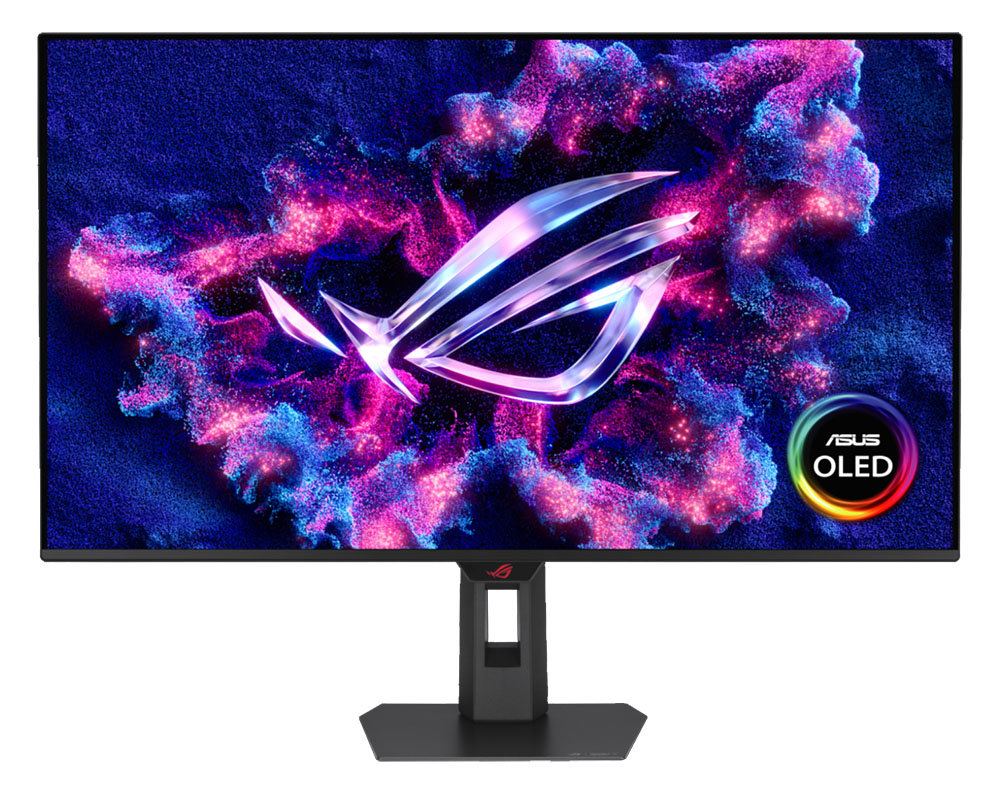 Asus
Asus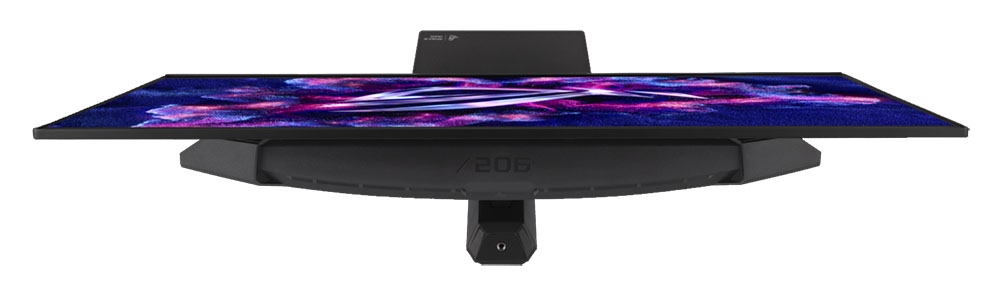 Asus
Asus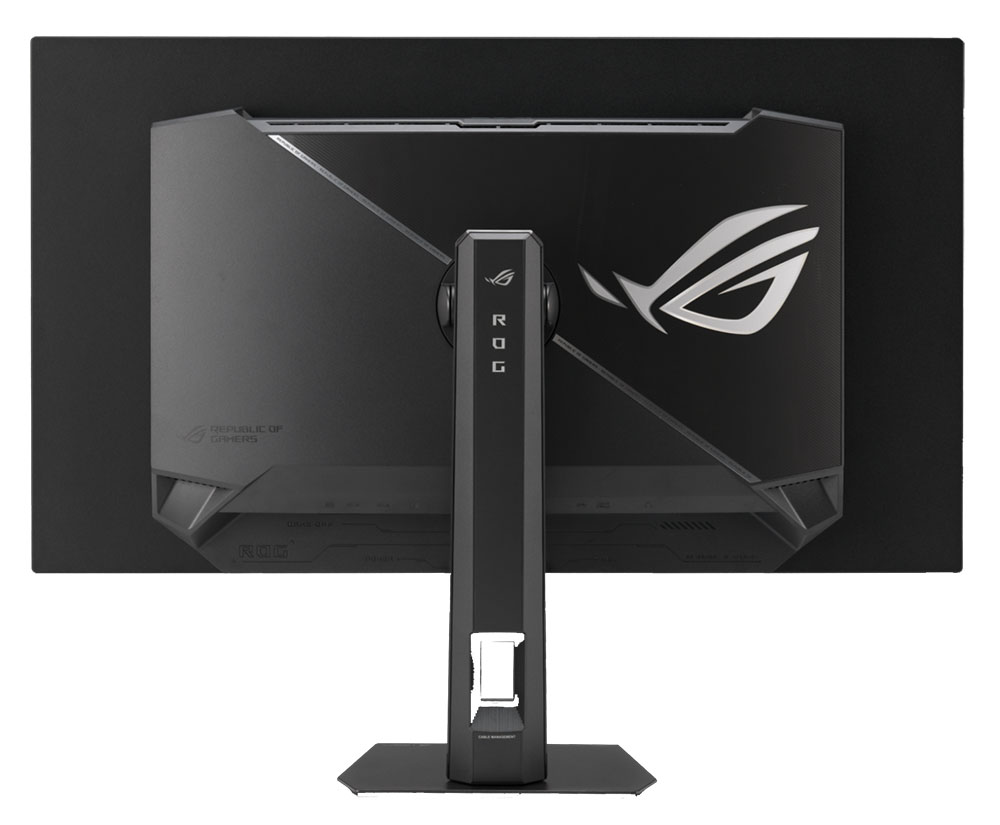 Asus
Asus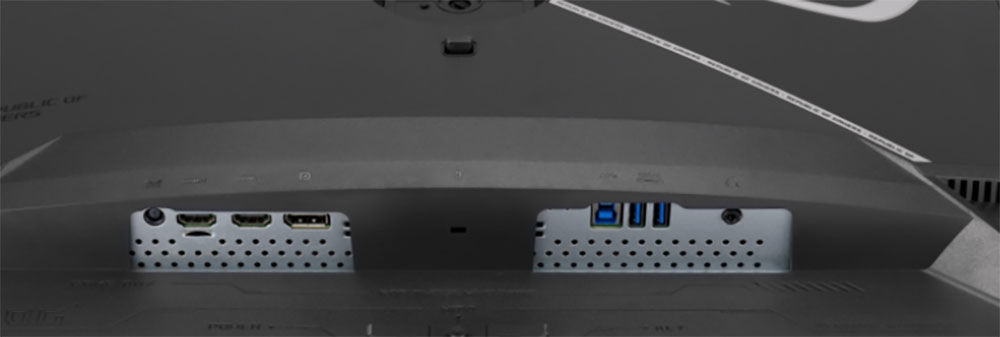 Asus
AsusAsus styles the Swift and Strix lines similarly with a thin metal-backed OLED panel attached to a component bulge which creates a two-box design. The profile of the thin part is just five millimeters. This isn't just for show; it improves cooling with the metal backing acting as a heat sink. More heat sinks inside take care of the control boards and processors. This means no fans are required; temperature control is fully passive.
In the back are the familiar ROG graphics but without LED backlighting. They reflect enough light to glow white without any emitters required. In the top view, you can see a quarter-inch threaded fitting at the top of the stand, which is useful for headphone hooks, webcams, and the like.
The base is small but sturdy and made from a thick metal plate. The stand has a 4.5-inch height range plus 5/20 degrees tilt and 25 degrees swivel. There is no portrait mode. Movements are smooth and firm with quality on par with any premium display I've reviewed.
The I/O panel is on the bottom center and faces downward. You get two HDMI 2.1 and one DisplayPort 1.4 with Display Stream Compression (DSC). There are three USB 3.2 ports, one upstream and two downstream. And a 3.5mm headphone jack provides external audio. There are no built-in speakers.
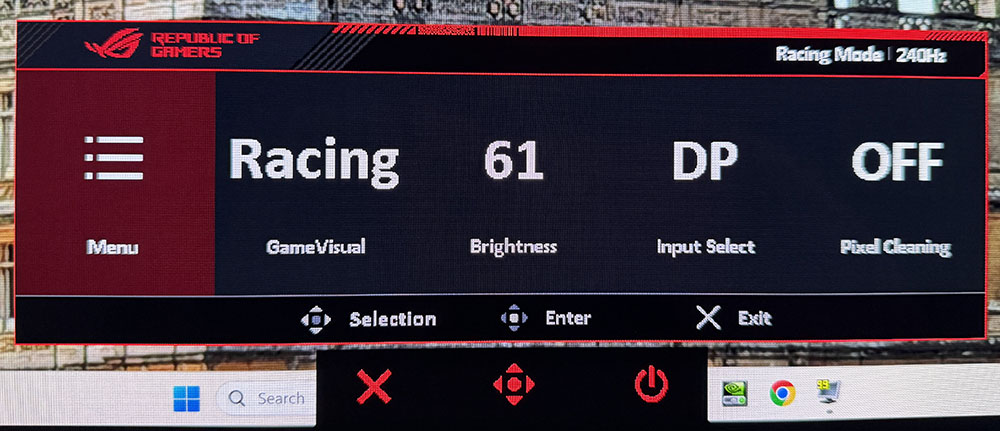
OSD FeaturesThe XG32UQWMS OSD is nearly identical to what I've seen from Asus ROG previously, except that a convenient quick menu has been added. It has four programmable functions with signal and picture mode info at the top.
 Tom's Hardware
 Tom's Hardware
 Tom's Hardware
 Tom's Hardware
 Tom's Hardware
 Tom's Hardware
 Tom's Hardware
The XG32UQWMS's quick menu is large enough to see from across the room, which might suggest that a remote control would be useful, but there isn't one. No matter because the joystick and two control buttons take care of business just fine. The OSD can be viewed in two different sizes though...
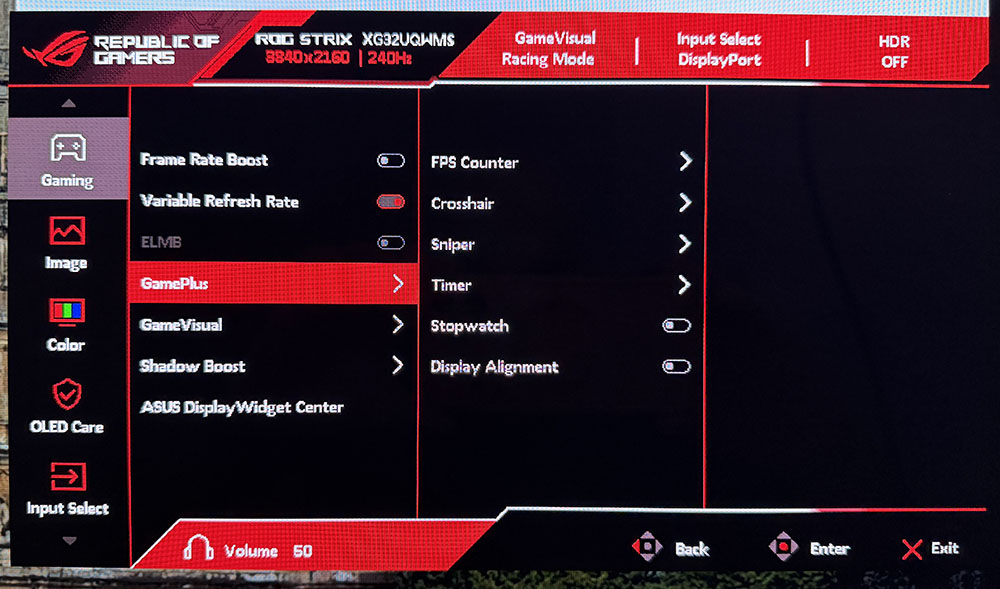
A second press of the joystick brings up the familiar Asus menu with its eight sections. Gaming is up first with Frame Rate Boost (refresh rate switch), VRR toggle, ELMB, GamePlus enhancements, GameVisual picture modes and Shadow Boost. Frame Rate Boost is most easily done by pressing the leftmost button for a one-click mode change. I would usually tell you that a visit to Nvidia or AMD Control Panel is required for a one-time setup, but that was not an issue this time. The XG32UQWMS communicated with my Windows 11 PC and configured itself automatically for the fastest refresh rate settings.
ELMB (Extreme Low Motion Blur) is a black frame insertion feature, similar to backlight strobing in an LCD. It's useful at low frame rates, and indeed, it only works at 120 Hz or less, and cancels Adaptive-Sync in the process. It's another option to keep resolution at 4K and still have decent motion resolution. If you can keep the frame rate above 200fps in 4K, the XG32UQWMS won't need any help to look amazing.
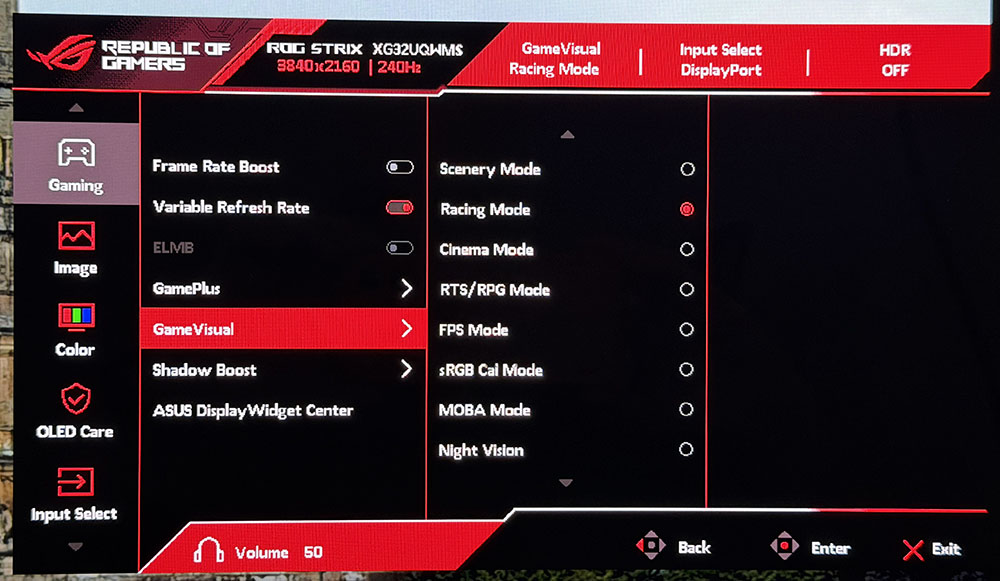
GamePlus includes a full set of extras with a frame rate counter, aiming points, sniper modes, timer, stopwatch and display alignment marks. GameVisual offers nine picture modes, of which Racing is the default and best choice. It can be calibrated for color temp and gamma, and there are gamut selections too.
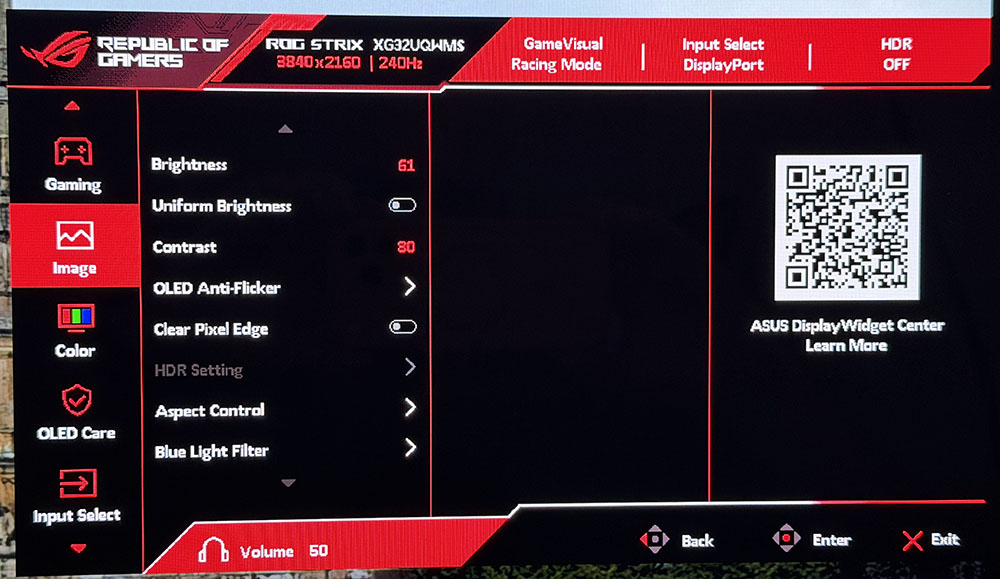
In the Image menu, you'll find standard luminance controls along with Uniform Brightness. Turning this off means smaller peak areas of the screen will be brighter, which adds some punch to highlights. You can expect around 550 nits in SDR mode and as much as 1,500 nits for HDR content. For workday tasks, leaving it on maintains steady output regardless of picture content. It peaks at around 327 nits.
HDR signals get four additional presets which can be adjusted for brightness and contrast. In testing, the XG32UQWMS shone brightest in True Black 500 or Gaming HDR mode with Adjustable HDR turned on and brightness set to 100%.
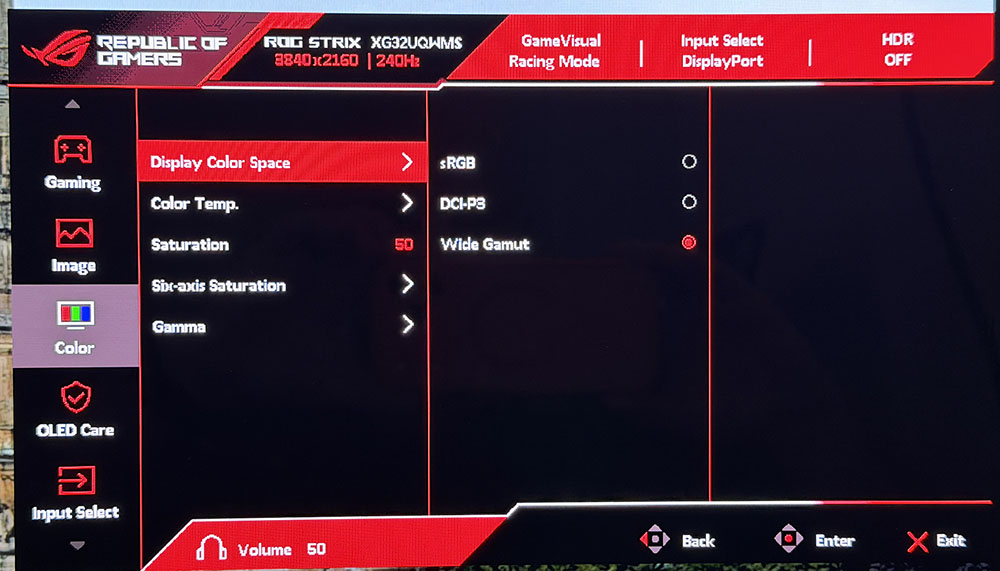
For color adjustments, you get three color space options plus color temperature presets and a user mode with RGB sliders. You can also adjust saturation globally or for each color. And five gamma curves range from 1.8 (lighter) to 2.6 (darker).
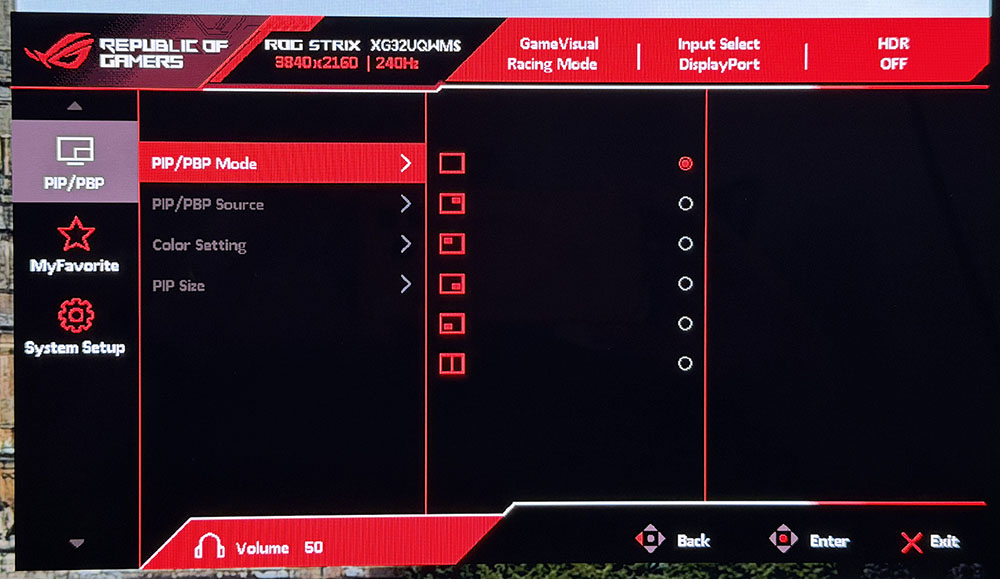
The XG32UQWMS has flexible PIP and PBP settings when you want to view two sources at once. The PIP window can live in any corner of the screen and have independent color settings.
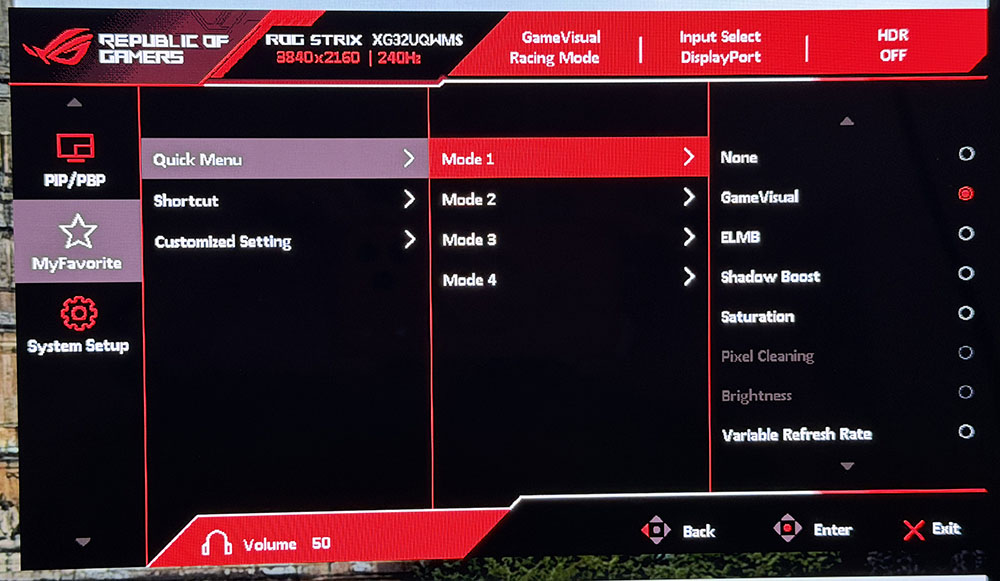
The quick menu shown in the first photo above has four user slots that can be set to a variety of functions like GameVisual, ELMB, and others. You can also customize the behavior of the four joystick directions and the left control key. That one is set by default to frame rate boost, and it is the easiest way to switch refresh rates with a single button press. Finally, there are two memories where settings can be saved for later recall.
Asus ROG Strix XG32UQWMS Calibration SettingsInitial testing of my XG32UQWMS sample showed that it did not require calibration. I tried the user color temp and found a small gain that was barely visible in actual content. This is a very accurate monitor, albeit one with a huge color gamut that covers over 108% of DCI-P3. If you're OK with that for SDR content, it is very colorful if not strictly accurate. If you'd rather use sRGB for SDR, you can either choose the sRGB Cal mode or select sRGB from the color space options in Racing mode. I did the latter to retain access to the calibration controls. My recommended settings are below. I noted that I could use the same brightness values whether Uniform Brightness was on or off.
For HDR content, there are four additional modes, all of which can be adjusted for brightness and contrast. Gaming HDR or True Black 500 are the best choices there.
Picture Mode | Racing |
Brightness 200 nits | 61 |
Brightness 120 nits | 34 |
Brightness 100 nits | 22 |
Brightness 80 nits | 13 |
Brightness 50 nits | 13 (min. 9 nits) |
Contrast | 80 |
Gamma | 2.2 |
Color Temp User | Red 98, Green 100, Blue 99 |
If you're looking for the speediest possible gaming monitor, meaning smoothest and most responsive, nothing can hang with an OLED. I've experienced many 360 and 500 Hz LCDs, and while they are fast, they aren't as smooth as an OLED running above 200fps. 4K resolution makes it even better by rendering an image that is super realistic and tactile.
The first time I powered on the XG32UQWMS, it prompted me to run the pixel refresh routine, which took about five minutes. I have encountered other OLED panels that benefited from an initial refresh to make the screen more uniform in tone.
Since I can keep the frame rate above 200fps with a GeForce RTX 4090, I did not need the XG32UQWMS's frame rate boost feature, but I gave it due diligence. In my case, it only served to soften the image. It wasn't any faster or more responsive. Indeed, in testing, the screen response and lag times are barely different. So, you won't gain much from 480 Hz if you can already run at 240. Where it helps is with slower PCs where 4K would drag the rate down below 160fps. That's where blur starts to show. Switching rates keeps motion smooth, but there's no hiding the reduced pixel density, especially with a 32-inch monitor in front of you. 70ppi is visibly softer than 140. But at those lower frame rates, motion blur is enough that aiming accurately becomes more difficult.
Unlike many OLEDs, the XG32UQWMS includes ELMB in the form of black frame insertion. It's another way to combat motion blur at low frame rates, and indeed, it is capped at 120 Hz. It also takes Adaptive-Sync out of the equation. But at those speeds, frame tears are the least of your problems. It's nice to have options and the XG32UQWMS gives you more than anyone else. If you plan to pair it with a less stout video card, it can adapt and still deliver a good gaming experience.
Playing at the XG32UQWMS's full capability is an impressive thing, even if you are spoiled by fast gaming screens like me. Moving and aiming is so much easier when motion is this smooth. Precision is automatic and requires no effort other than to pay attention to one's surroundings. And that's easy to do with such a large monitor. Though ultra-wide displays encompass more of the user's peripheral vision, a 32-inch 16:9 panel has more height. That means you can fill your view and sit as close as you like thanks to the 4K resolution.
The picture in both SDR and HDR modes is stunning. There's so much color available and it's bright. You can crank the XG32UQWMS well past the point of visual fatigue, but setting it to 200 nits and turning off Uniform Brightness delivers highlights that make the image truly three-dimensional. You can see the glistening of blood and sweat on your enemies as you apply the chainsaw. It looks so good that I found myself using it more than other weapons just to get close-up views of the alien monsters in Doom Eternal. This monitor has an addictive quality.
Being a 32-inch 16:9 flat panel, the XG32UQWMS is ideal for any task, work or play. My everyday screen is the same size, so I'm used to its ability to display multiple documents and windows. This monitor size was made for multitasking and side-by-side comparisons. If you work with a lot of graphics and photos, it's an ideal format for keeping lots of toolbars open in Photoshop.
To keep the price down, the XG32UQWMS doesn't have quite all the bells and whistles of a Swift display. But it gives up nothing in performance. You don't get the LED lighting or internal speakers. But you get everything else and a nice savings in cost.
Takeaway: The XG32UQWMS delivers addictive gameplay along with versatility and capability for every task or form of entertainment. It has a stunning picture that is unmatched by other panel technologies and stands out among OLEDs with high brightness and rich color. The True Black Glossy screen coating keeps ambient light from spoiling the party, and its styling and build quality will remind you why you never regret buying the best.
MORE: Best Gaming Monitors
MORE: How We Test PC Monitors
MORE: How to Buy a PC Monitor
I'm stacking the XG32UQWMS up against a group of 32-inch 4K OLEDs to compare input lag scores. They are Asus' PG32UCDM3, Acer's X32 X3, Dough's Spectrum Black 32, MSI's MPG 322UR X24, and HP's Omen 32.
Pixel Response and Input LagClick here to read up on our pixel response and input lag testing procedures.
 Tom's Hardware
 Tom's Hardware
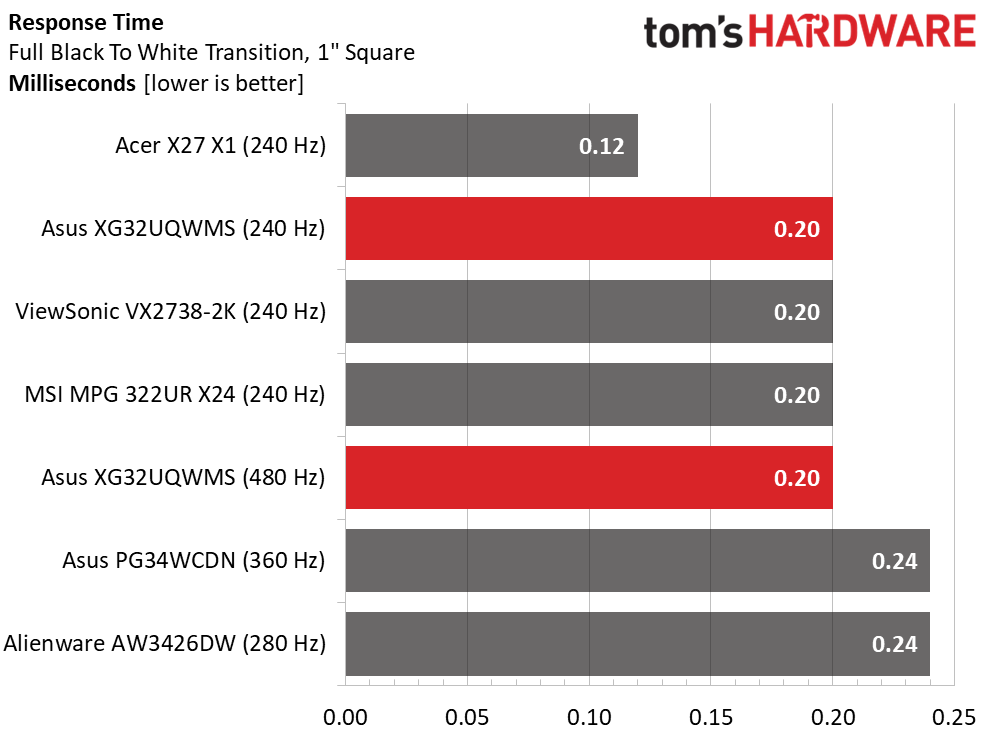
For the response test, I didn't have enough 32-inch 4K OLEDs from my Nvidia LDAT tests, so I mined the latest OLED monitors from the database. I've observed super close times from monitors running between 240 and 360 Hz. They're so close that the human eye cannot tell a difference in smoothness. That said, the XG32UQWMS is a tad quicker than some at 0.20ms gray-to-gray. I noted that increasing the frame rate to 480 did not change the response time. This suggests that panel draw times may have reached their limit at 240 Hz, meaning faster OLEDs won't render smoother motion resolution.
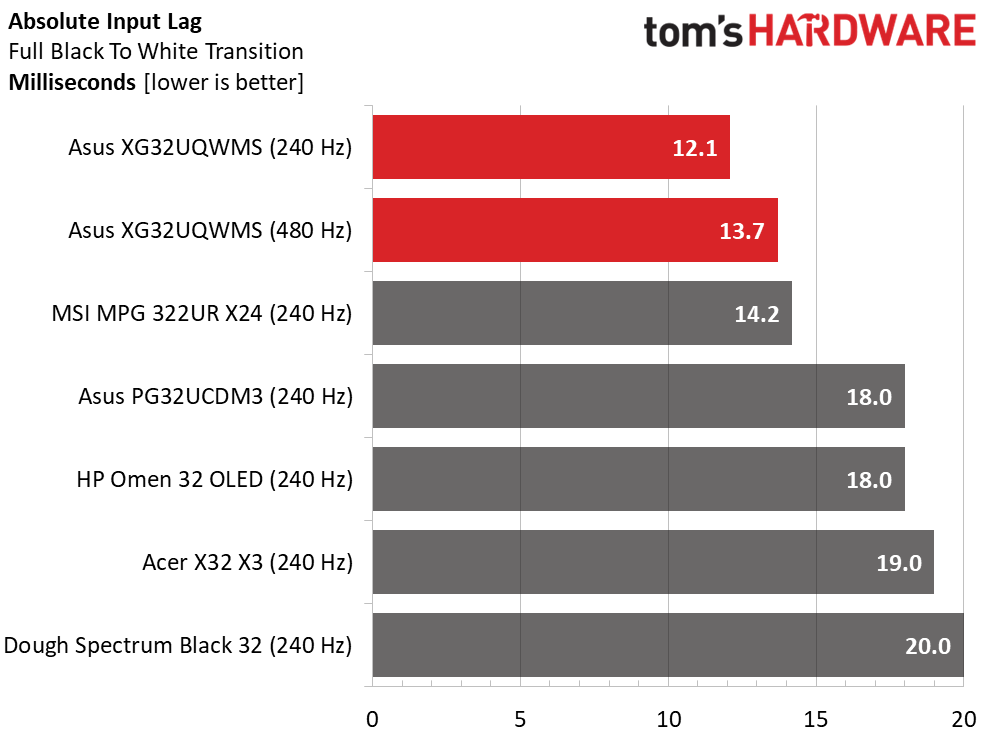
In the input lag test, the XG32UQWMS is quickest for both refresh rates, with 12.1ms at 240 Hz and 13.7ms at 480 Hz. This tells me that switching to 480 does not provide a significant advantage in speed or response. The dual mode switch is useful when 4K frame rates are lower, say below 160fps. But you can also smooth things out with ELMB at rates below 120 Hz.
Test Takeaway: The XG32UQWMS is one of the quickest and most responsive 4K OLED displays I've tested. While you can get a tad less input lag from LG's and Philips' 360 Hz models, it isn't enough to make a perceivable difference. Among the 240 Hz screens I've tested, the XG32UQWMS is the king of speed.
Viewing Angles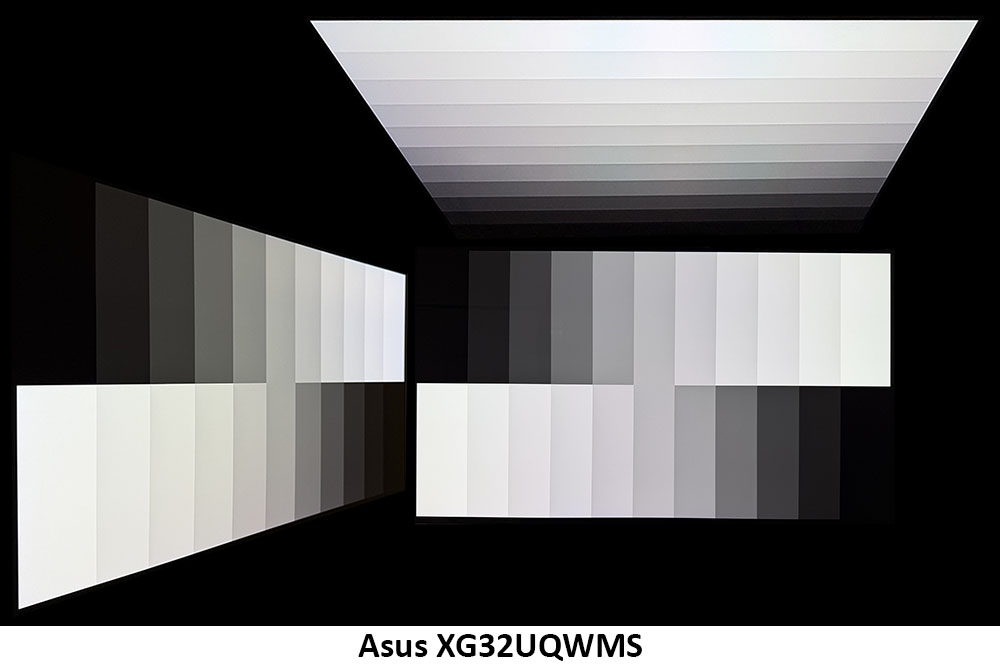
The XG32UQWMS has excellent off-axis image quality that is on par with other OLED displays. There is a slight color shift at 45 degrees to the side, but the difference is more visible in a test pattern than in content. There is no change to gamma or brightness. The top view is also bright but with reduced gamma that washes out the image.
Screen UniformityTo learn how we measure screen uniformity, click here.
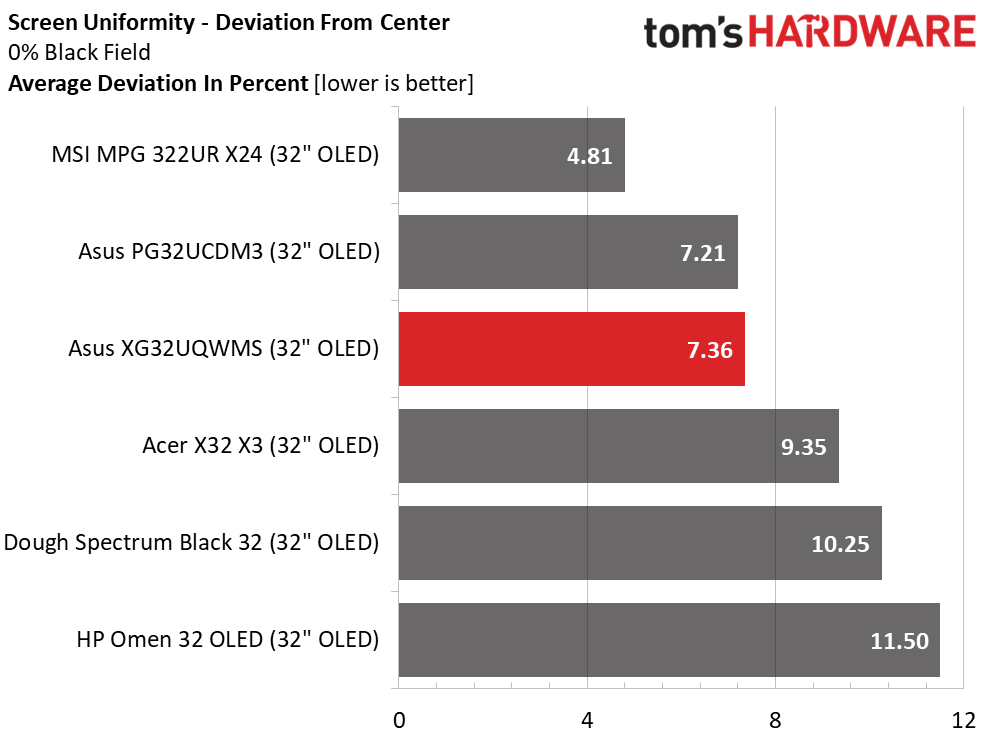
OLED screens generally have excellent screen uniformity, but it seems that 32-inch flat panel models have slightly higher numbers than most of their 27-inch counterparts. This is nitpicking for sure because anything under 10% means you can't see an issue. The XG32UQWMS is right in the middle at 7.36% deviation from the center zone. I noted that this was an improvement from the 11.56% I measured before running the panel refresh routing for the first time. This is recommended when you power it up for the first time.
MORE: Best Gaming Monitors
MORE: How We Test PC Monitors
MORE: How to Buy a PC Monitor
To read about our monitor tests in-depth, please check out Display Testing Explained: How We Test PC Monitors. We cover brightness and contrast testing on page two.
Uncalibrated - Maximum Backlight Level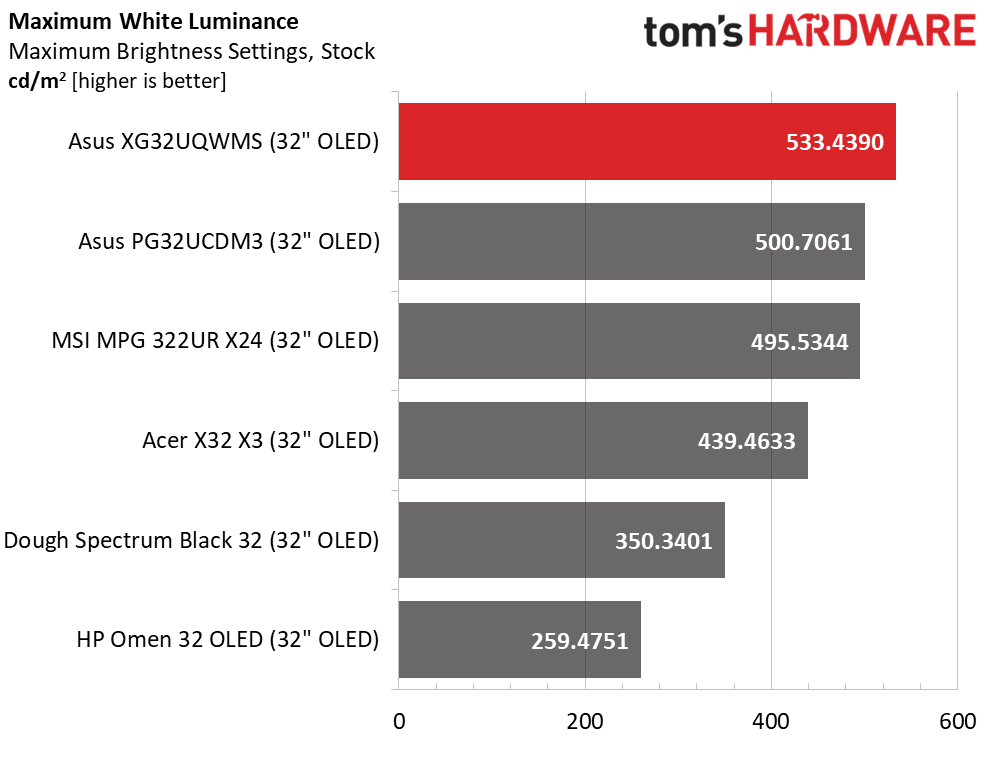 Tom's Hardware
 Tom's Hardware
 Tom's Hardware
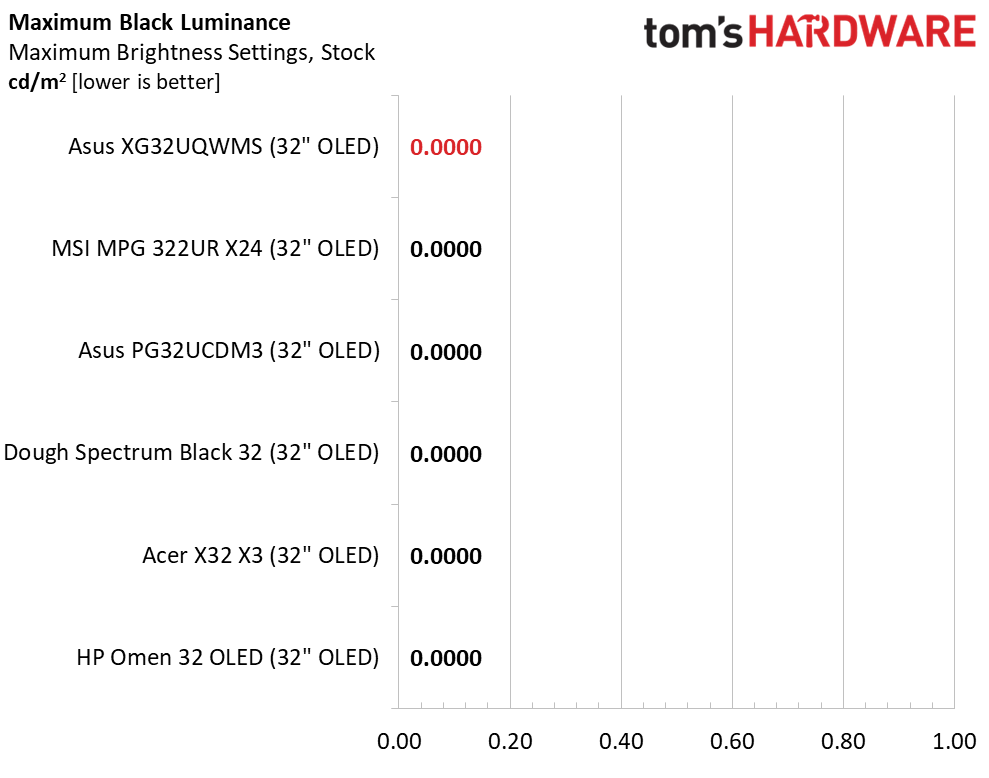
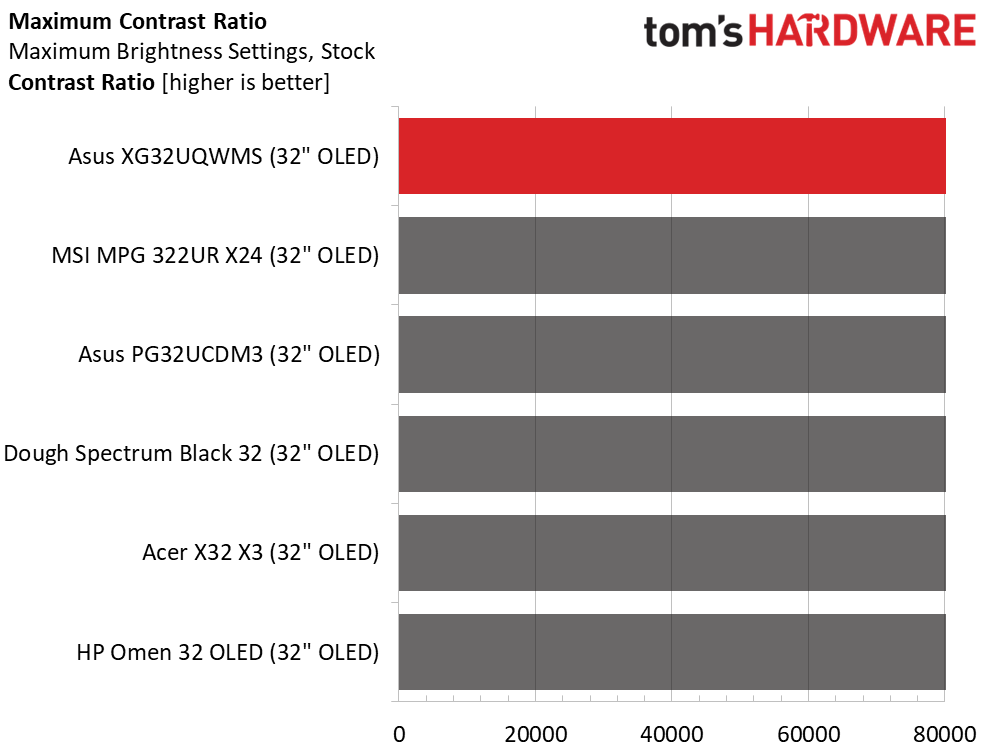
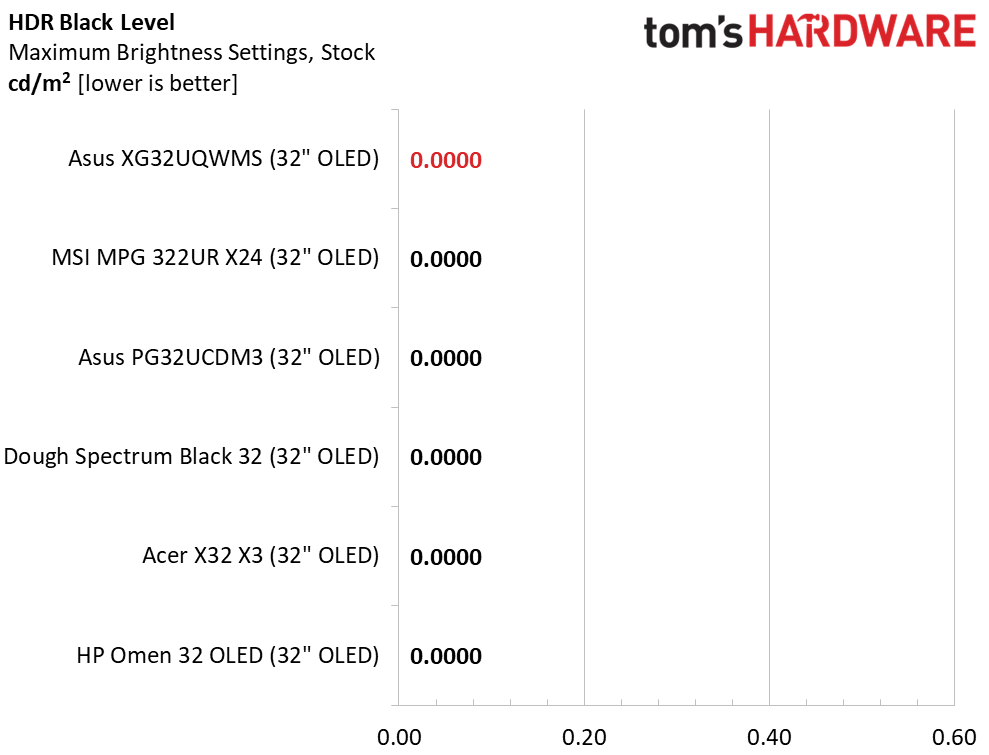
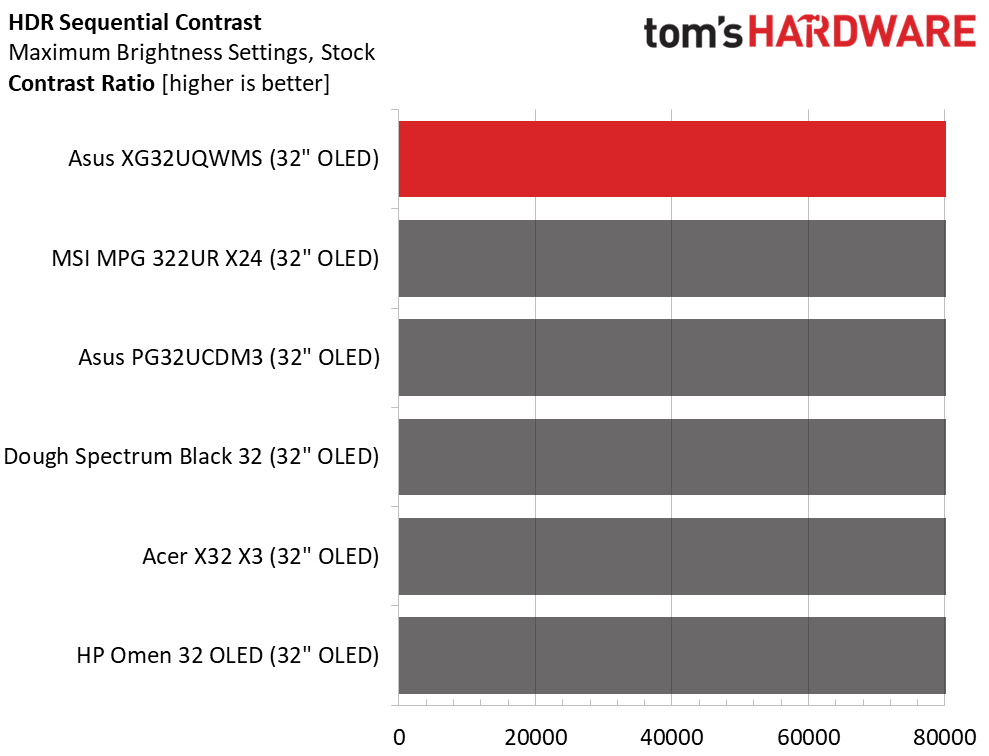
The XG32UQWMS is one of the brightest OLEDs I've tested, with a 25% window pattern measuring 533 nits peak. A full field comes in at 327 nits. To get the 533-nit result, I turned Uniform Brightness off. You'll want to do this for HDR content, but SDR images are less fatiguing to view when Uniform Brightness is engaged. As always, OLEDs have unmeasurable black levels so no contrast ratio can be calculated.
After Calibration to 200 nits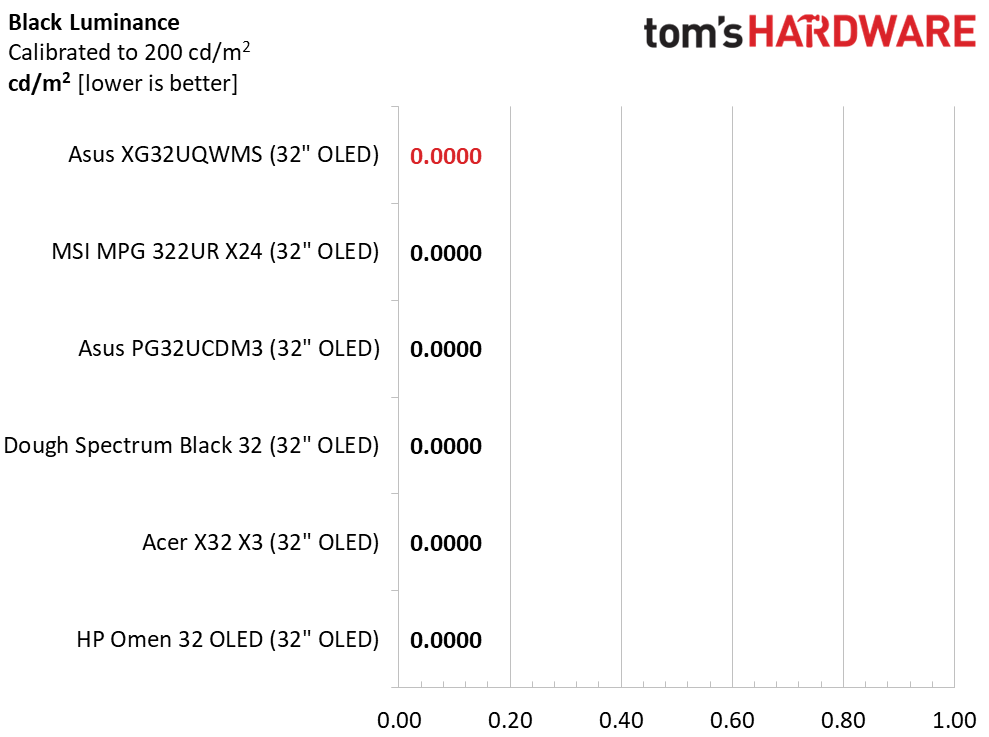 Tom's Hardware
 Tom's Hardware
 Tom's Hardware
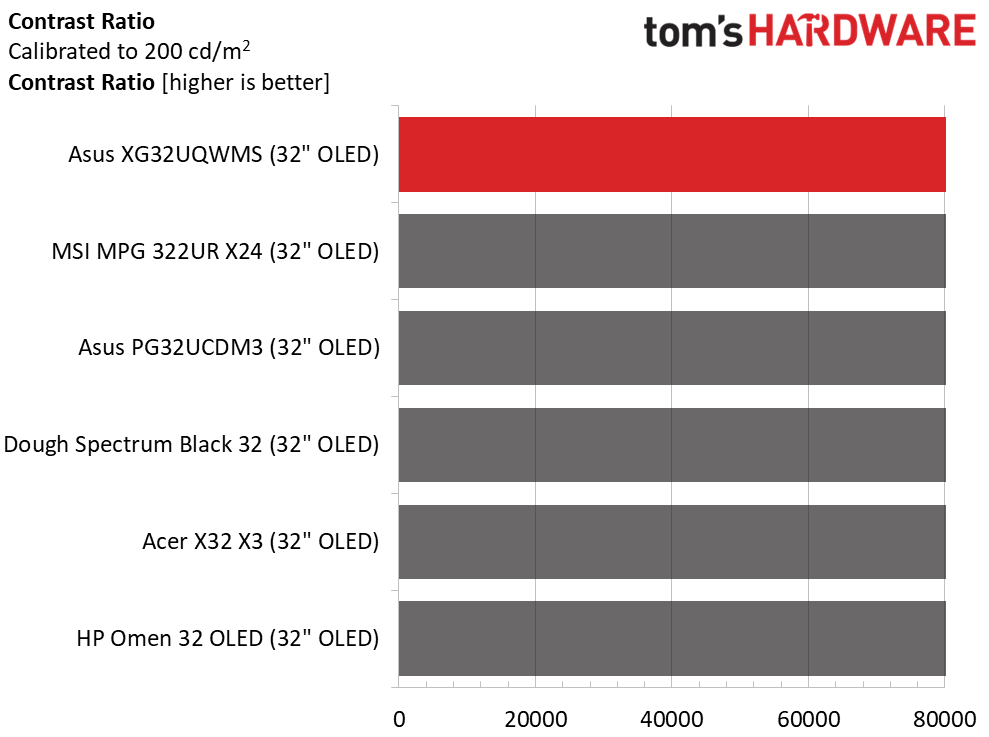
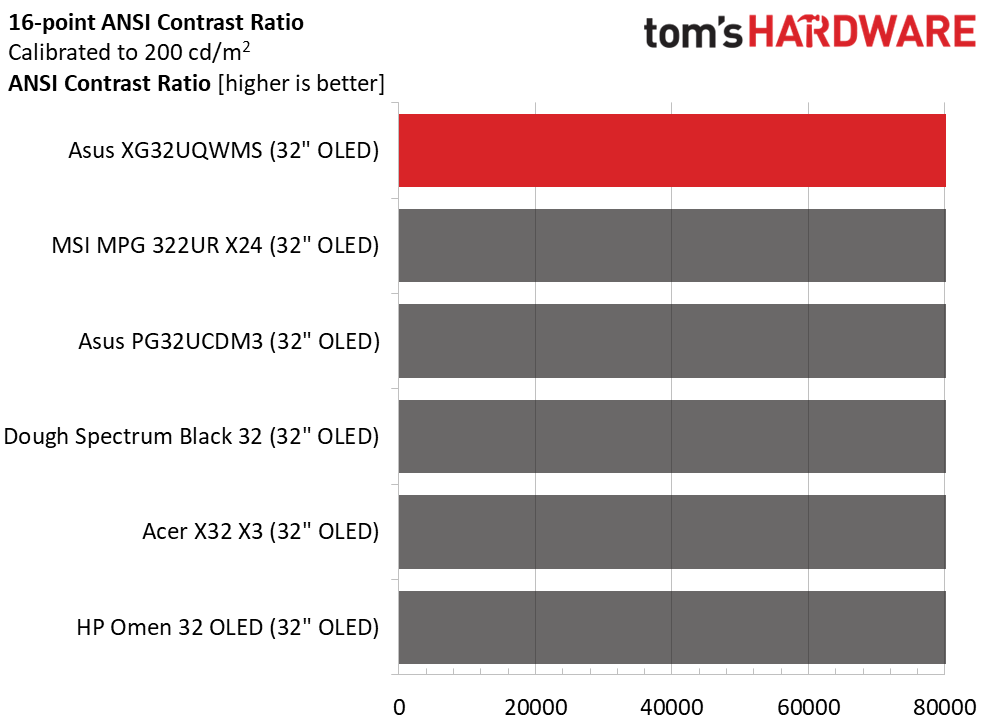
Calibration doesn't change the result. The XG32UQWMS still has undetermined contrast. I noted that I could use the same brightness values whether Uniform Brightness was on or off. This makes it easier to equalize peak luminance when switching modes. The ANSI test is also incalculable.
Test Takeaway: The XG32UQWMS has the same infinite contrast as any OLED but is brighter than most for both full field and window patterns. When toggling between Uniform Brightness on or off, it lets you set the same brightness value, which automatically equalizes light output between modes. Though I could not measure an effect from the screen's TrueBlack Glossy coating, I did note that the panel was more tolerant of ambient room light.
MORE: Best Gaming Monitors
MORE: How We Test PC Monitors
MORE: How to Buy a PC Monitor
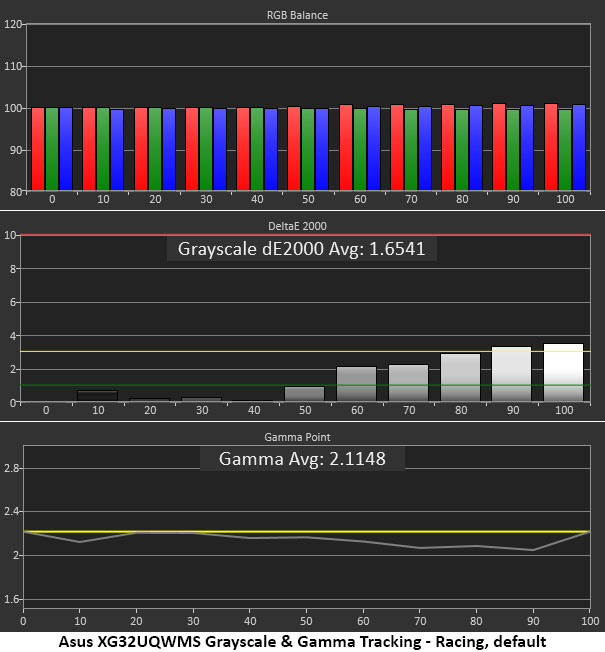
The XG32UQWMS ships in its Racing picture mode, which allows access to all calibration controls, gamma, color temp, and color space.
Grayscale and Gamma TrackingOur grayscale and gamma tests use Calman calibration software from Portrait Displays. We describe our grayscale and gamma tests in detail here.
 Portrait Displays Calman
 Portrait Displays Calman
 Portrait Displays Calman
As you can see in the first chart above, the XG32UQWMS does not require calibration out of the box. Gamma is a tad light but runs close to the reference line. The grayscale values just crack 3dE at 90 and 100% brightness, but I could not see any problems in either test patterns or actual content.
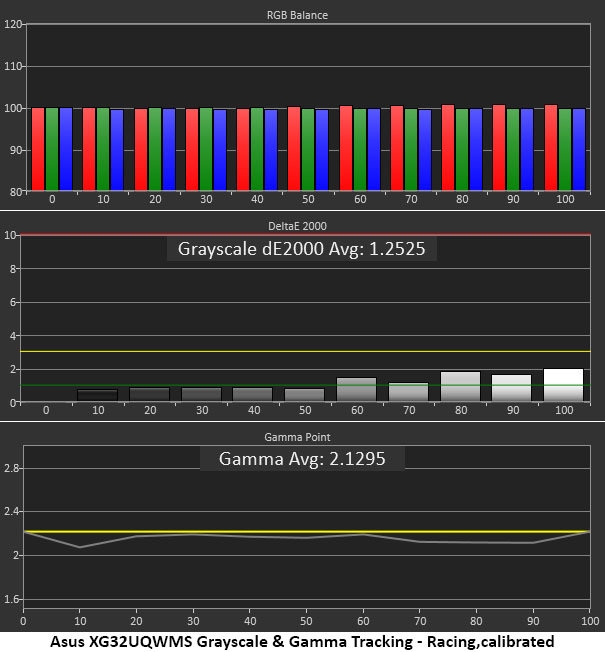
Calibration reduced the grayscale number slightly, but there was no visible difference. Gamma also got a tad darker, and that was a difference I could see, so the adjustments were worth making. This is excellent performance.
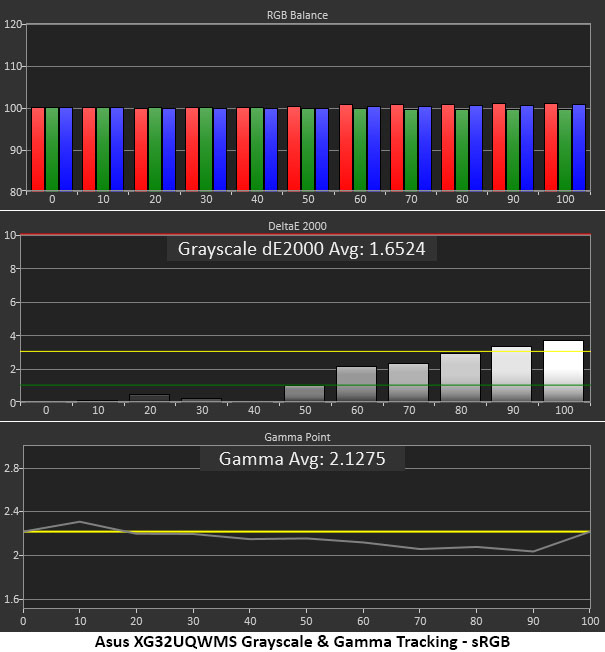
If you want sRGB for SDR content, there are two options. Either select the sRGB Cal mode or keep access to calibration by choosing sRGB from the Color Space options. In either case, gamma is a tad wonky with a slightly dark value at 10% and light values from 60% to 100%. This is a minor error that will not significantly affect content. But if you're using the XG32UQWMS for color-critical tasks, an external lookup table might be a good idea.
Comparisons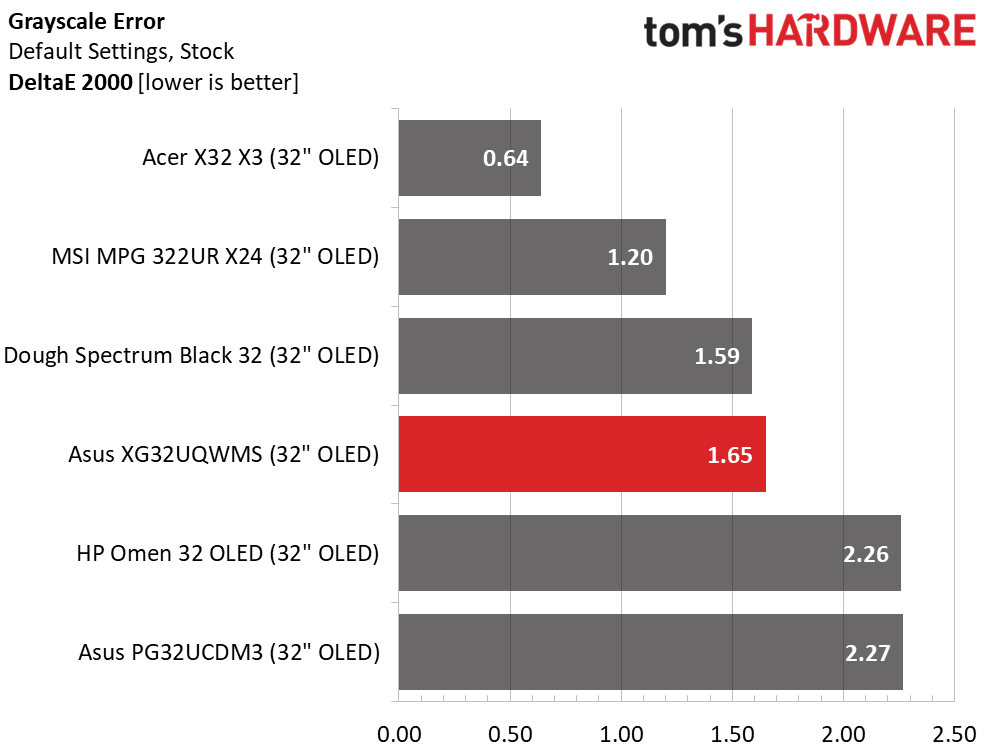 Tom's Hardware
 Tom's Hardware
 Tom's Hardware
 Tom's Hardware
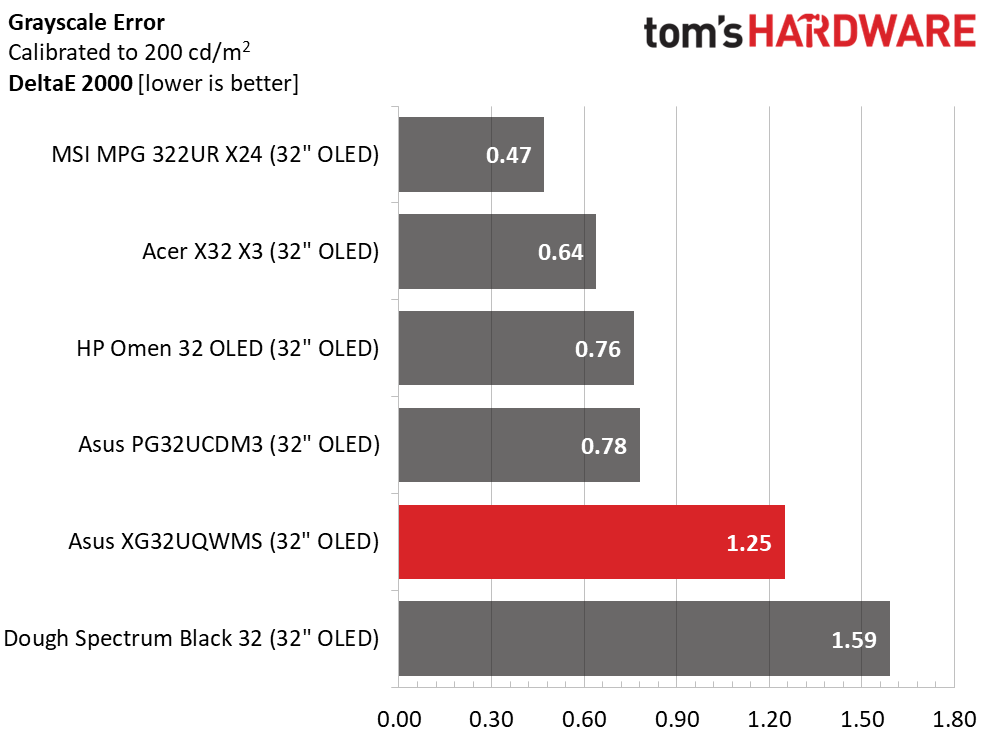
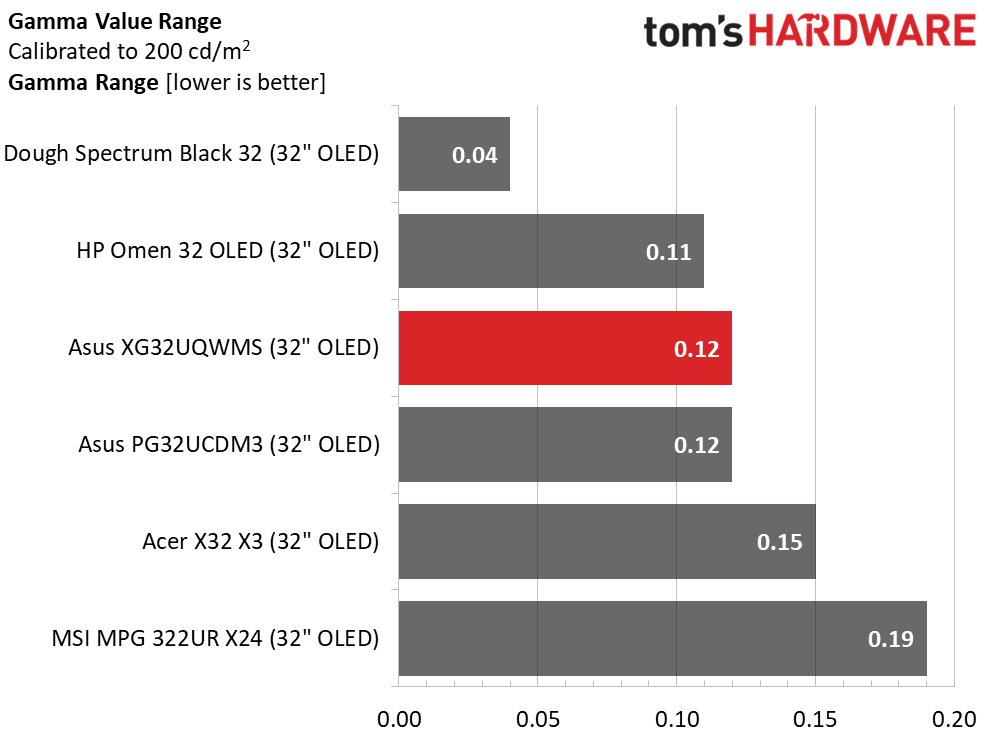
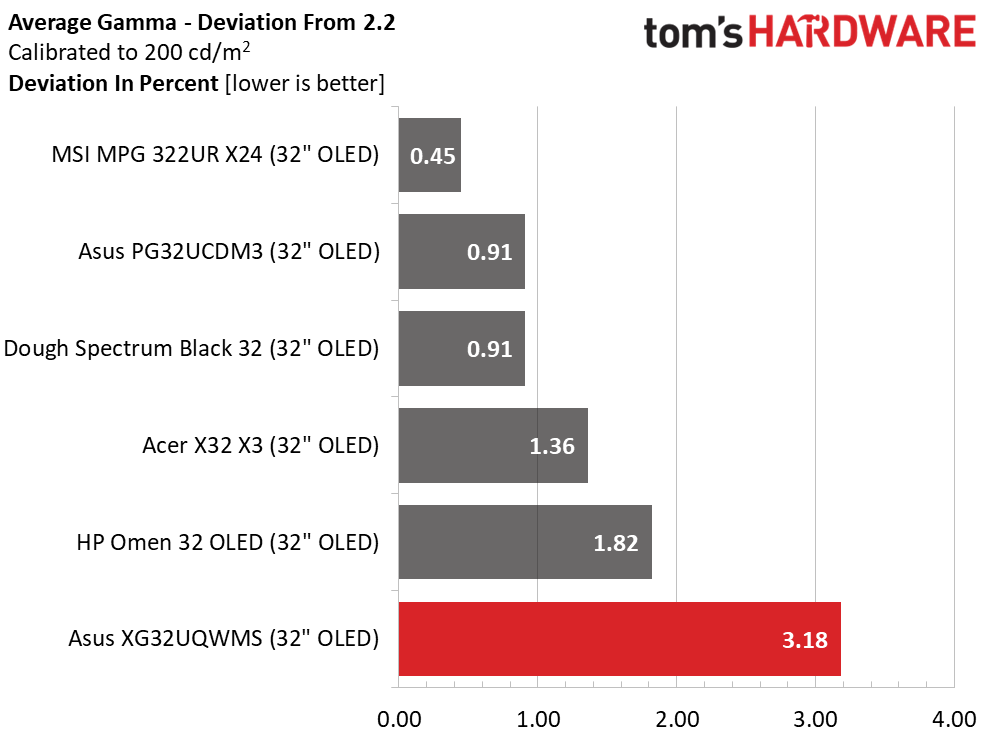
OLEDs as a category are very color accurate, so the XG32UQWMS's middle tier results aren't a problem. With 1.65dE out of the box and 1.25dE after adjustment, there is nothing to complain about. In the gamma test, the range of values is very small at just 0.12 from lowest to highest. The deviation is 3.18%, equating to an actual score of 2.13. Gamma is a shade light, but values are in a tight range which mitigates the error.
Color Gamut AccuracyOur color gamut and volume testing use Portrait Displays' Calman software. For details on our color gamut testing and volume calculations, click here.
 Portrait Displays Calman
 Portrait Displays Calman
 Portrait Displays Calman
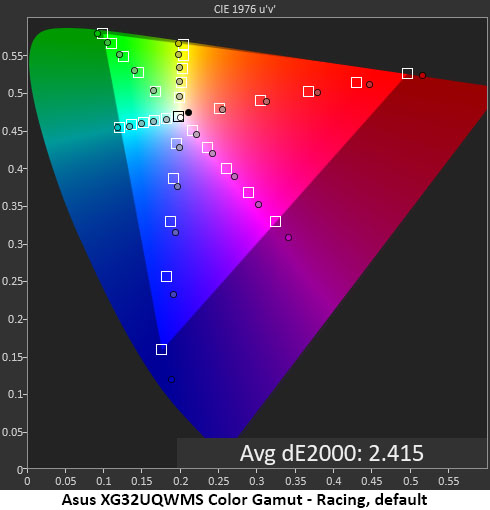
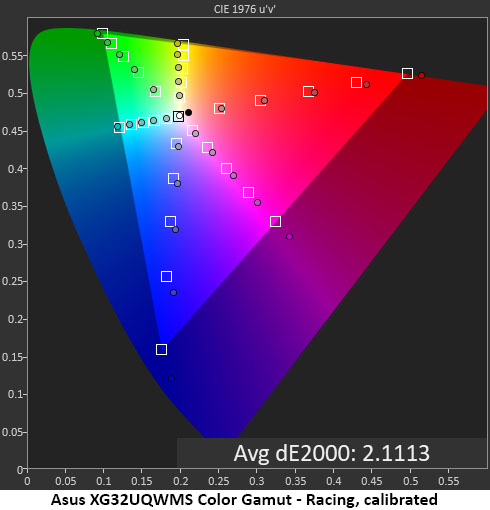
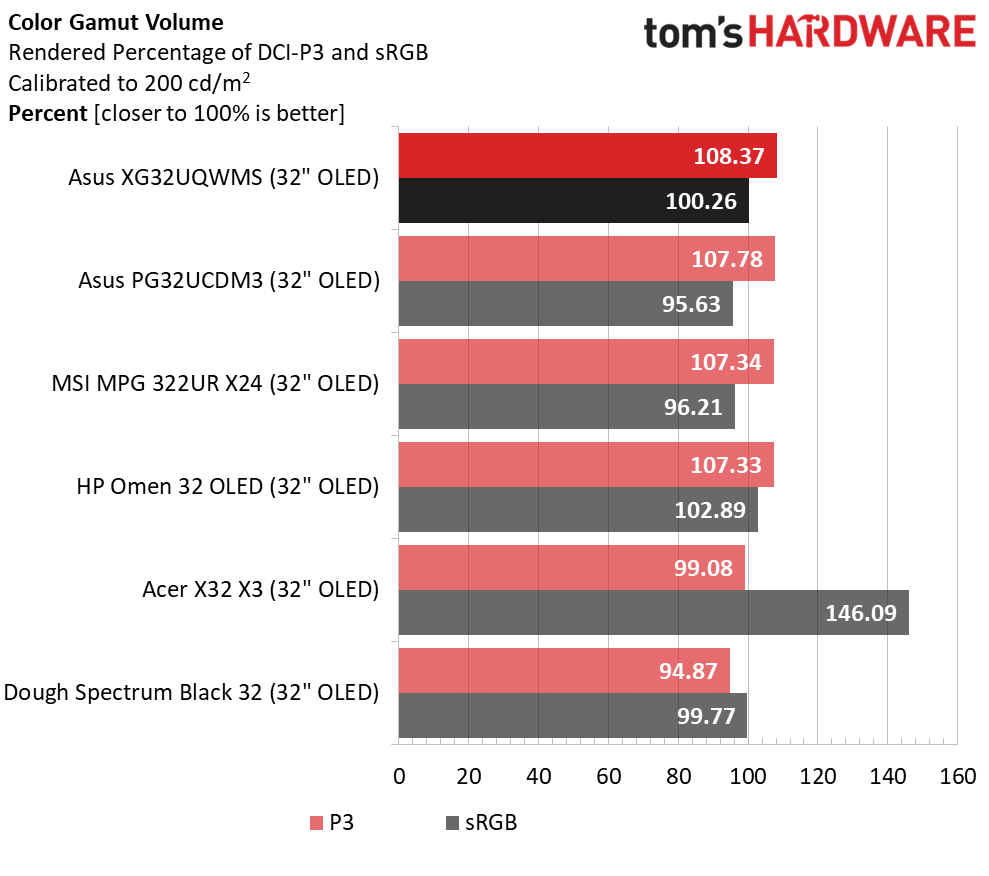
The XG32UQWMS is a very colorful monitor with DCI-P3 coverage that's a tad greater than the competition. You can see slight oversaturation in red and green and more in blue where the color is extremely vivid. The points are in line, though, which means the image is very colorful but not unnatural. Calibration barely made a difference in the chart and no difference to the eye. This is excellent performance.
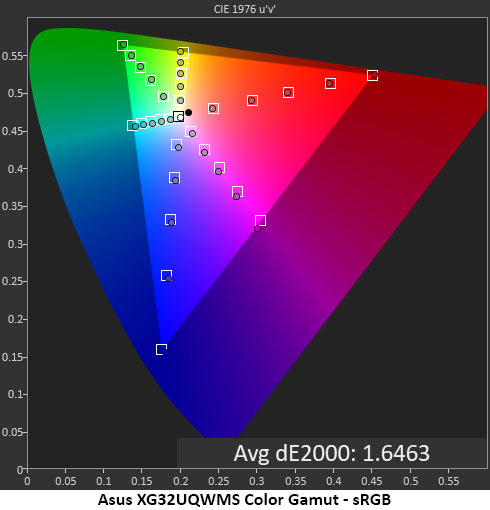
The sRGB gamut result is almost perfect with just some slight hue errors in magenta. The numbers are well below the visible threshold of 3dE, so there's nothing to see here but excellent color.
Comparisons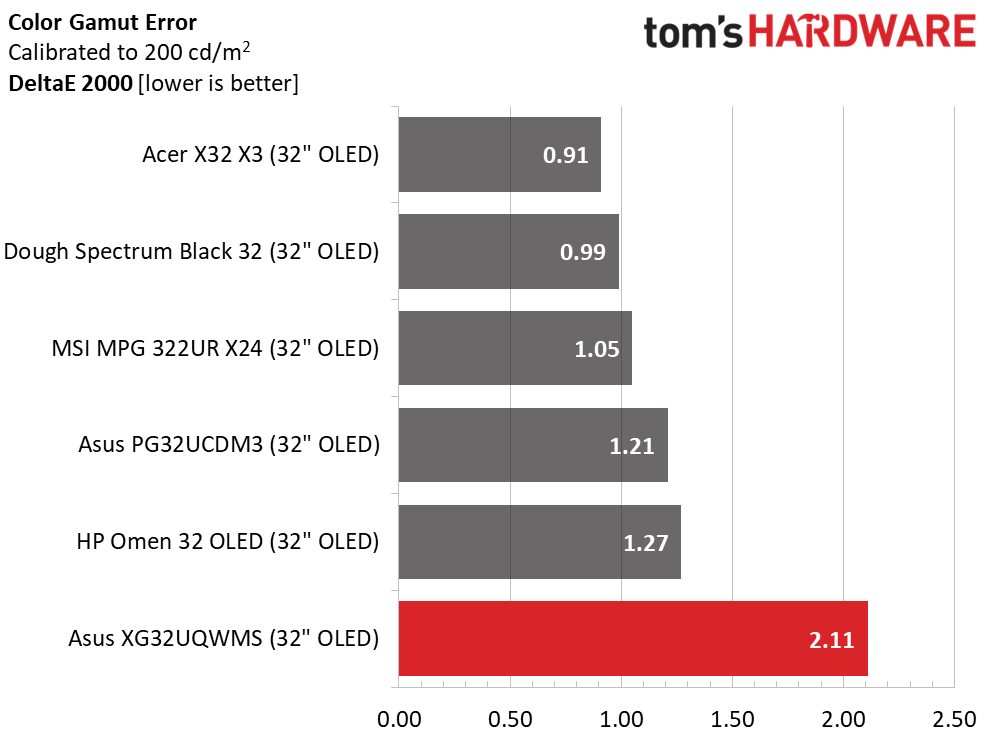 Tom's Hardware
 Tom's Hardware
Ordinarily, the XG32UQWMS's last place finish in the comparison would be a bummer, but since the number is 2.11dE, well below the visible threshold, there's nothing to be sad about. OLEDs are a competitive category for color accuracy, which is great because you will be hard-pressed to find a bad one. The big win comes in the volume calculation where the XG32UQWMS renders more color than all the other screens. Though the margin of victory is small, it's significant because it is achieved without Quantum Dot technology. Asus' use of Tandem OLED is very effective and is brighter too. With ideal 100.26% coverage of sRGB, the XG32UQWMS can be used for color-critical tasks, though it would be best to use a software lookup table to compensate for the light gamma.
Test Takeaway: Aside from slightly light gamma, the XG32UQWMS displays excellent color accuracy both before and after calibration. It has the largest color gamut in the 32-inch 4K OLED category by a small margin, and it covers an ideal 100% of sRGB. Calibration is possible but only produces tiny gains.
MORE: Best Gaming Monitors
MORE: How We Test PC Monitors
MORE: How to Buy a PC Monitor
Our HDR benchmarking uses Portrait Displays' Calman software. To learn about our HDR testing, see our breakdown of how we test PC monitors.
The XG32UQWMS supports HDR10 signals with an automatic switch and four specific picture modes. By turning on a switch in the OSD, you can adjust brightness and contrast and toggle the Uniform Brightness option.
HDR Brightness and Contrast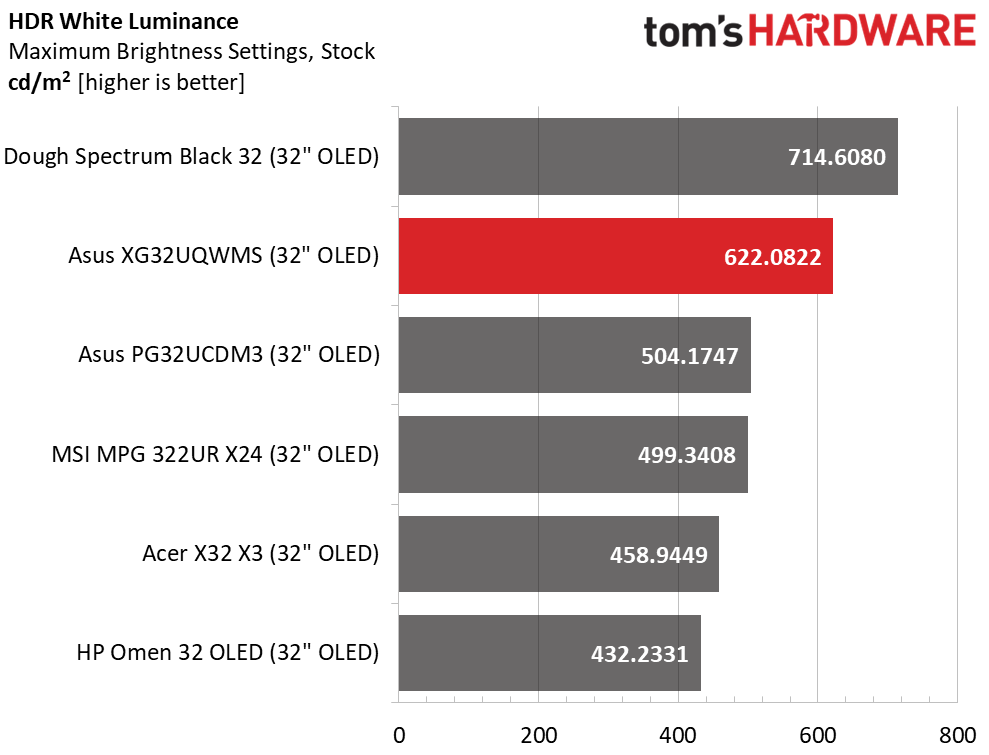 Tom's Hardware
 Tom's Hardware
 Tom's Hardware
In the 32-inch 4K category, only the Dough Spectrum Black 32 is brighter than the XG32UQWMS. At 622 nits, it is brighter than other Asus monitors and easily outshines the MSI, Acer, and HP. I measured a 25% window pattern to get this result. Asus' claims of 1,500 nits for a 3% window are not in doubt. You can see the difference between screens in a side-by-side comparison where the XG32UQWMS's highlights have more pop and texture. Ultimately, this broadens dynamic range and gives HDR content more impact.
Grayscale, EOTF and Color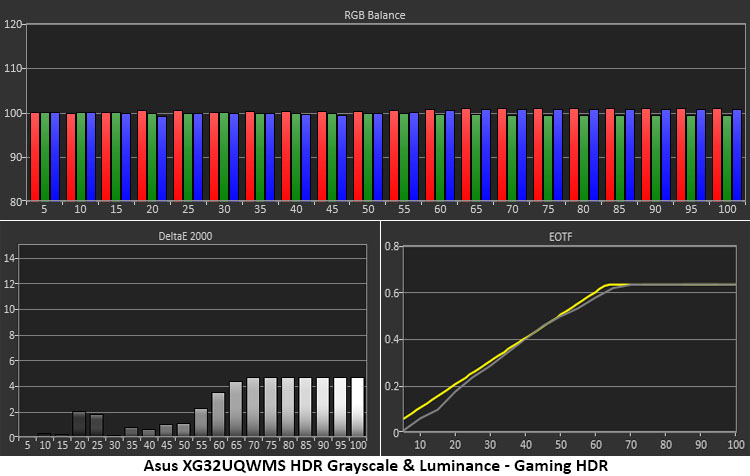 Portrait Displays Calman
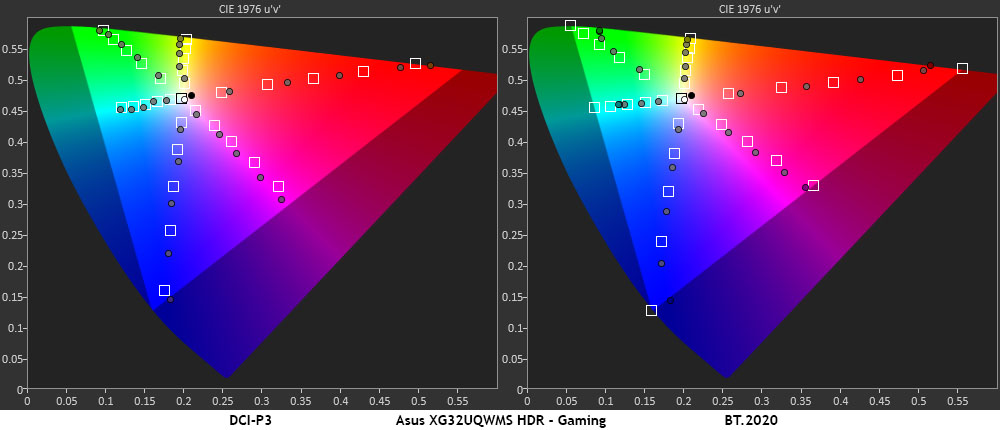 Portrait Displays Calman
The XG32UQWMS shows excellent grayscale tracking in both Gaming and True Black 500 HDR modes. There are slightly visible errors at 60% brightness and higher, but they are very hard to spot in actual content. The EOTF tracks the reference closely with slight darkness from zero to 25%. The tone-map transition point is at 65%, which is correct for the measured black and white levels.
In the color tests, the XG32UQWMS is a tad oversaturated in both the DCI-P3 and BT.2020 color spaces. This adds to HDR's impact without going too far. Color is bright and vivid but also natural and smooth. Hue points are on target except for yellow and magenta, which are a tad off-line. Again, this isn't a significant error. In the 2020 test, the XG32UQWMS runs out of color at 90% red, 80% green, and 98% blue. It has more green and blue than nearly every HDR monitor I've tested. This is excellent performance.
Test Takeaway: The XG32UQWMS is a benchmark HDR monitor with high brightness, adjustability, and more color than its direct competitors. The image is punchy and vivid without becoming overblown or cartoonish. If you play HDR games or want to watch HDR content, you won't find a better OLED gaming monitor.
MORE: Best Gaming Monitors
MORE: How We Test PC Monitors
MORE: How to Buy a PC Monitor
OLEDs remain premium priced, but their capabilities are such that in my mind, they're more than worth the money. $1,100 is a lot for a 32-inch monitor, but when it has unmatched sharpness, contrast, brightness, and gaming performance, spending that money brings no regret.
Asus isn't the most or the least expensive, but it always offers value when you shop the ROG Strix line. These displays offer the same performance as their flagship Swift cousins and only leave out a couple of minor features. And nothing that affects gameplay is missing. When you're mowing through enemies or exploring virtual worlds, you won't know the difference between Swift and Strix.
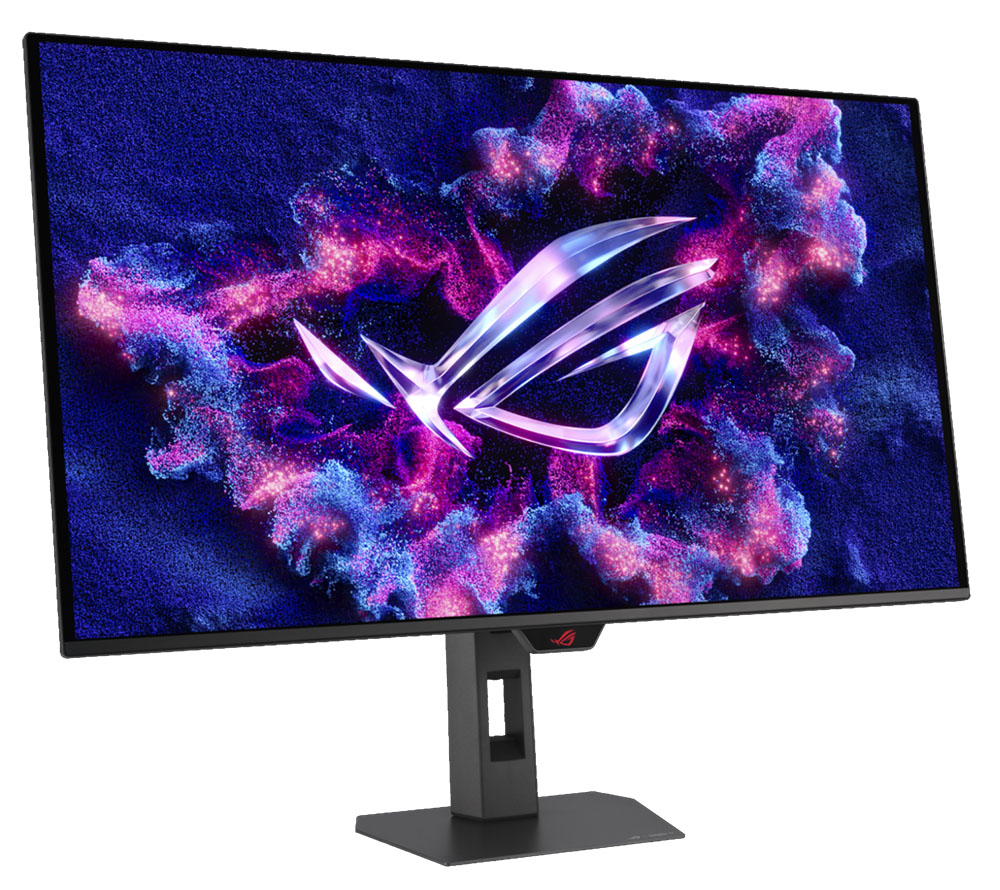
The XG32UQWMS is the latest in a long line of excellent OLED displays. It has a stunning picture that's brighter and more colorful than its competitors. It isn't unique in offering 240 Hz at 4K resolution, but the inclusion of frame rate boost to 480 Hz in FHD and ELMB blur reduction makes it more flexible. You can pair it with a wide variety of systems and enjoy smooth, responsive play.
(Image credit: Tom's Hardware)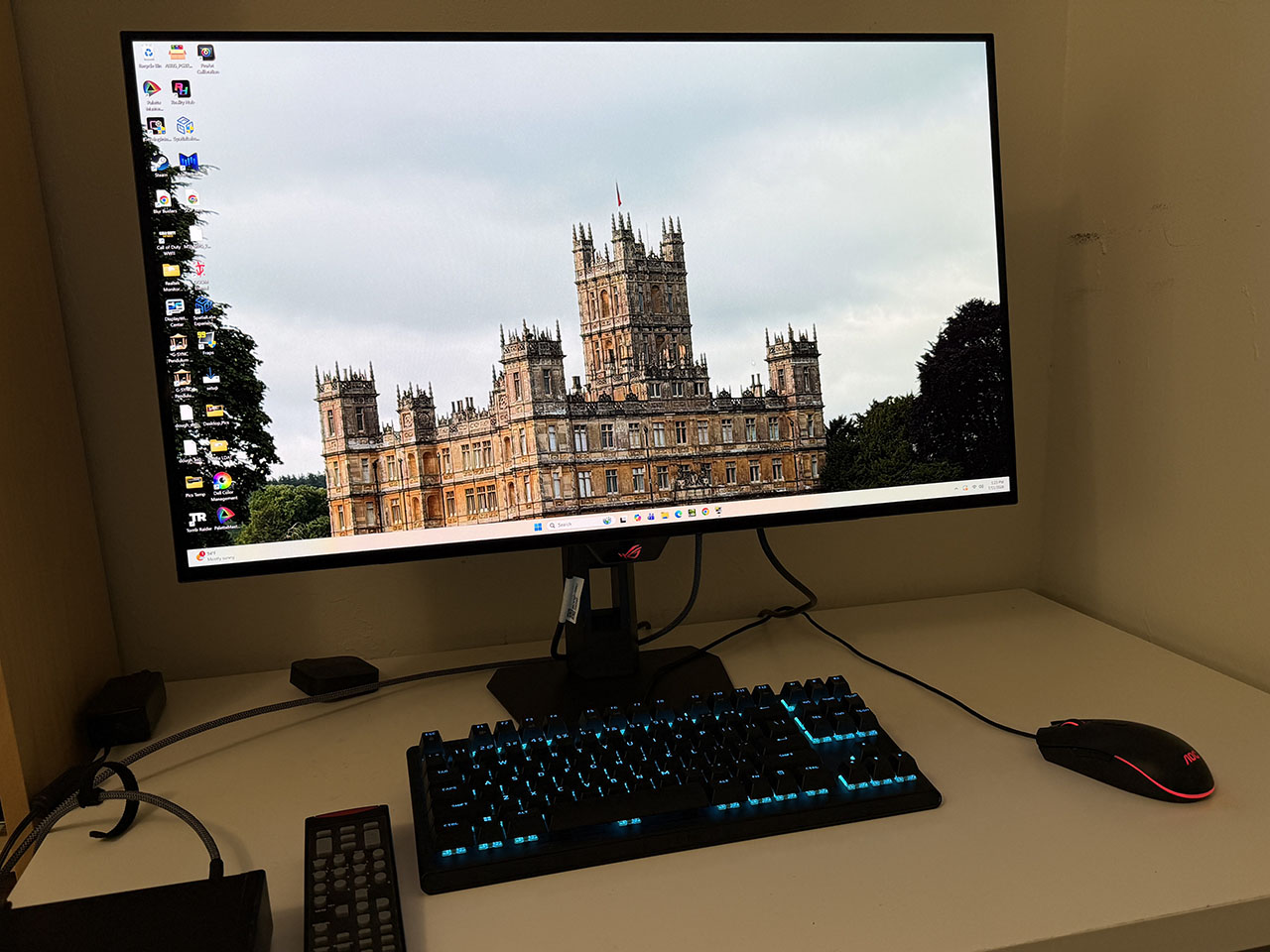
With over 108% coverage of DCI-P3 and HDR peaks between 600 and 1,500 nits, the picture is dazzling and textural with natural color that has an addictive quality. And there's added sharpness from the True Black Glossy coating.
If you have $1,100 to spend on a 32-inch 4K OLED, the Asus ROG Strix XG32UQWMS is one of the best you can buy at this writing. Definitely check it out.
MORE: Best Gaming Monitors
MORE: How We Test PC Monitors
MORE: How to Buy a PC Monitor