Chuwi UniBook Review: A budget rival to the MacBook Neo and Dell XPS 13
Finding a good budget laptop under $500 has always been challenging, and rising component costs have pushed even the most basic models over that mark. Chuwi's UniBook, for $449, looks tempting on paper, pairing Intel's latest entry-level Core processor with a thin metal chassis, a backlit keyboard, and more ports than many of the best laptops. But as with most bargain notebooks, the question is whether spending more is worthwhile, and our overall experience is that the extra you'd spend for the Dell XPS 13 or MacBook Neo gets you a markedly better laptop experience.
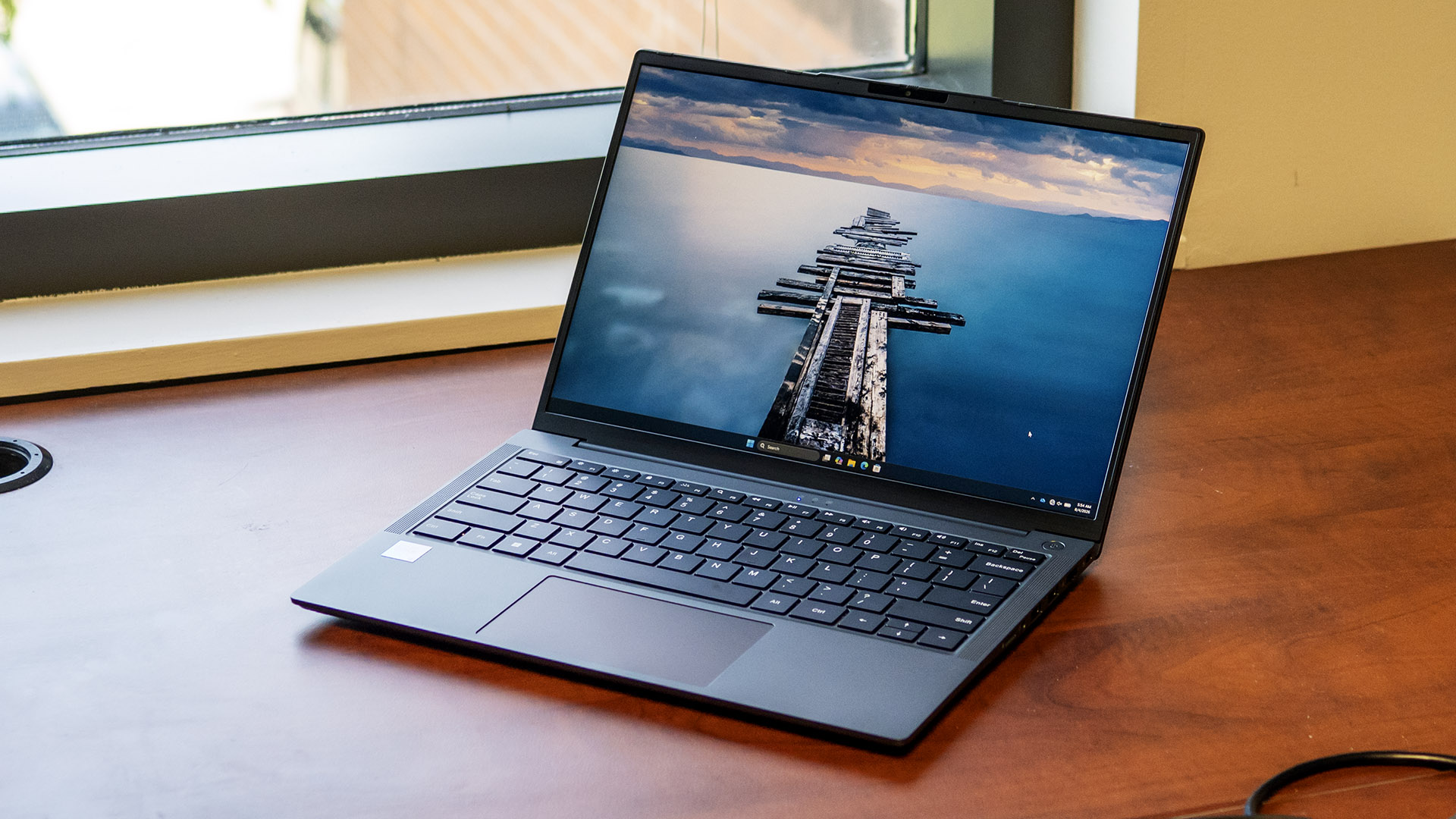
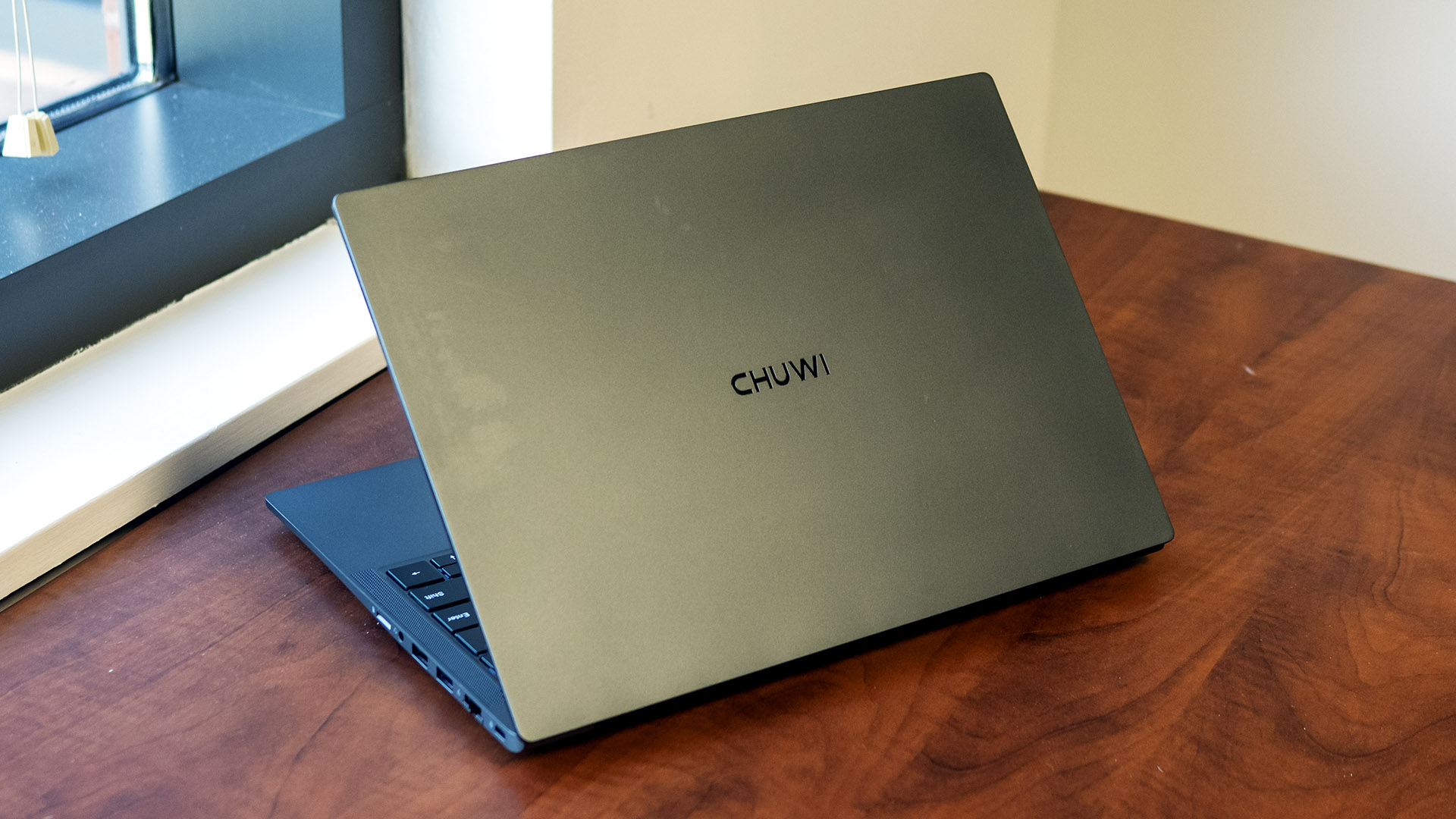
Design of the Chuwi UniBookThe UniBook looks more expensive than its $449 price tag suggests. Its aluminum alloy lid and bottom cover give it clean, modern look, while the slim profile helps it blend in with far more expensive ultraportables. It feels solid, with little evidence of flex.
 Tom's Hardware
 Tom's Hardware
Its compact 0.65-inch profile and 2.64-pound weight make it easy to slip into a bag, and its understated design would look at home in almost any environment. Both the MacBook Neo and the Dell XPS 13 are thinner, and the latter considerably lighter (2.2 pounds), but both are more expensive.
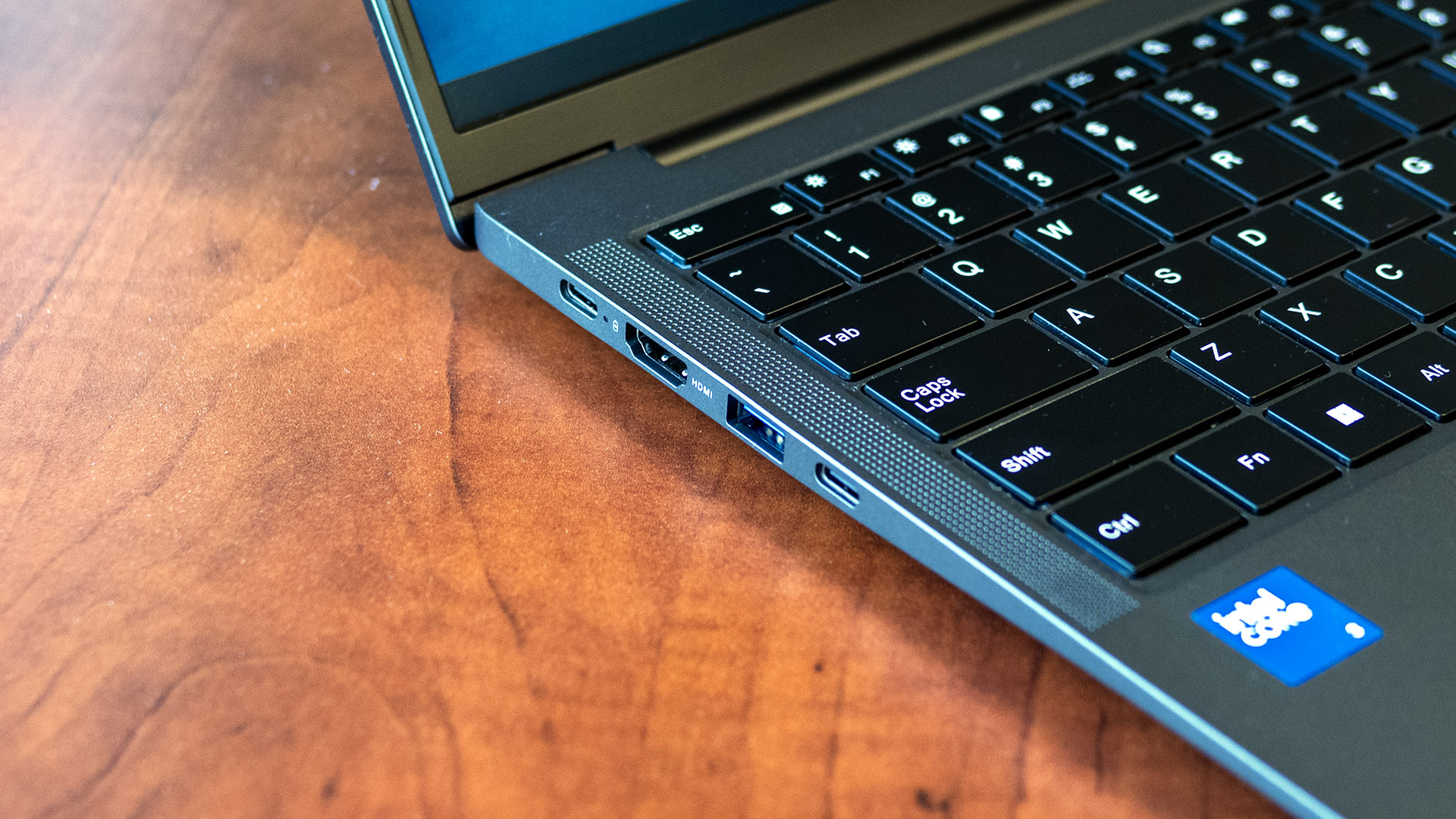
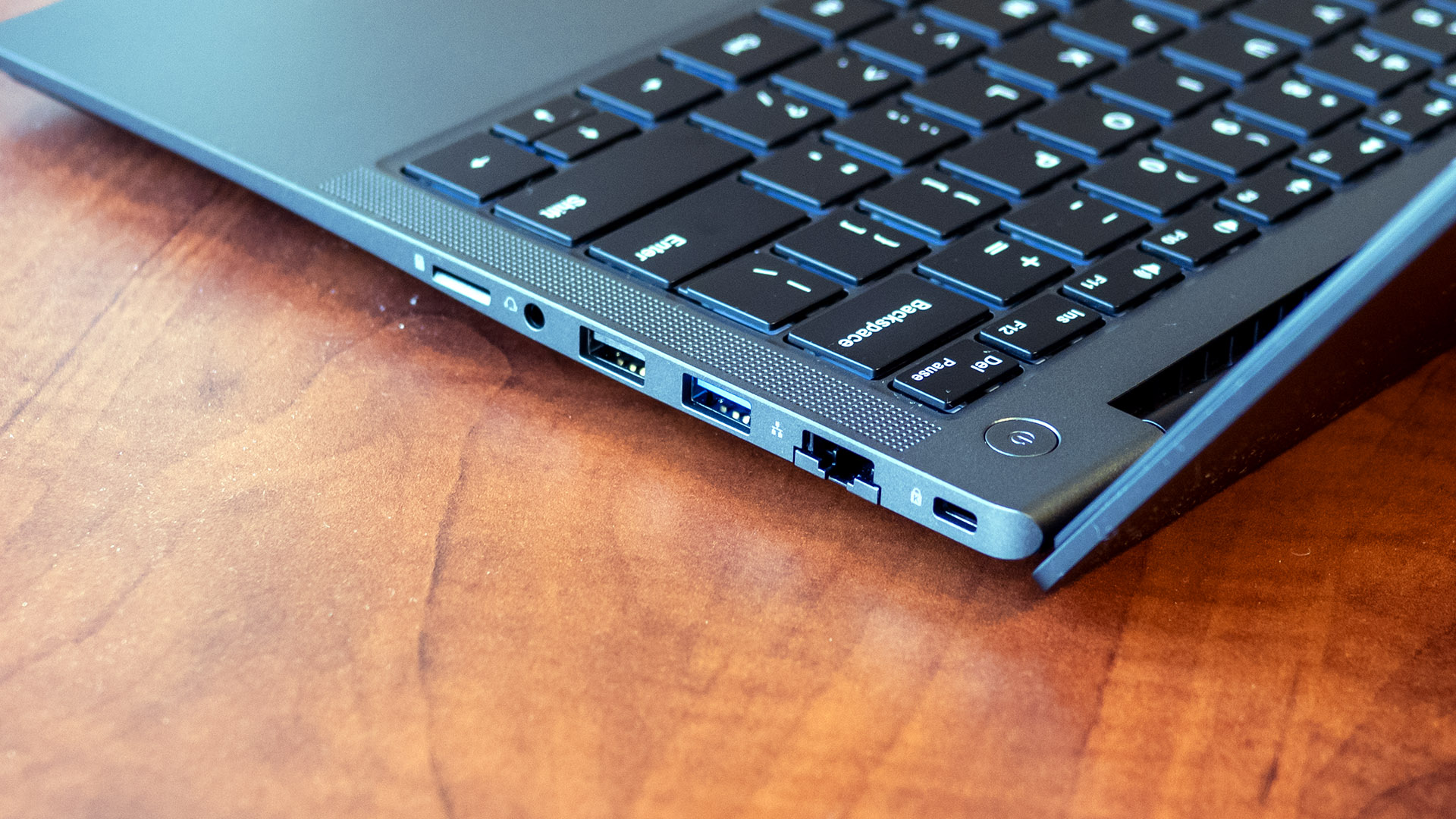
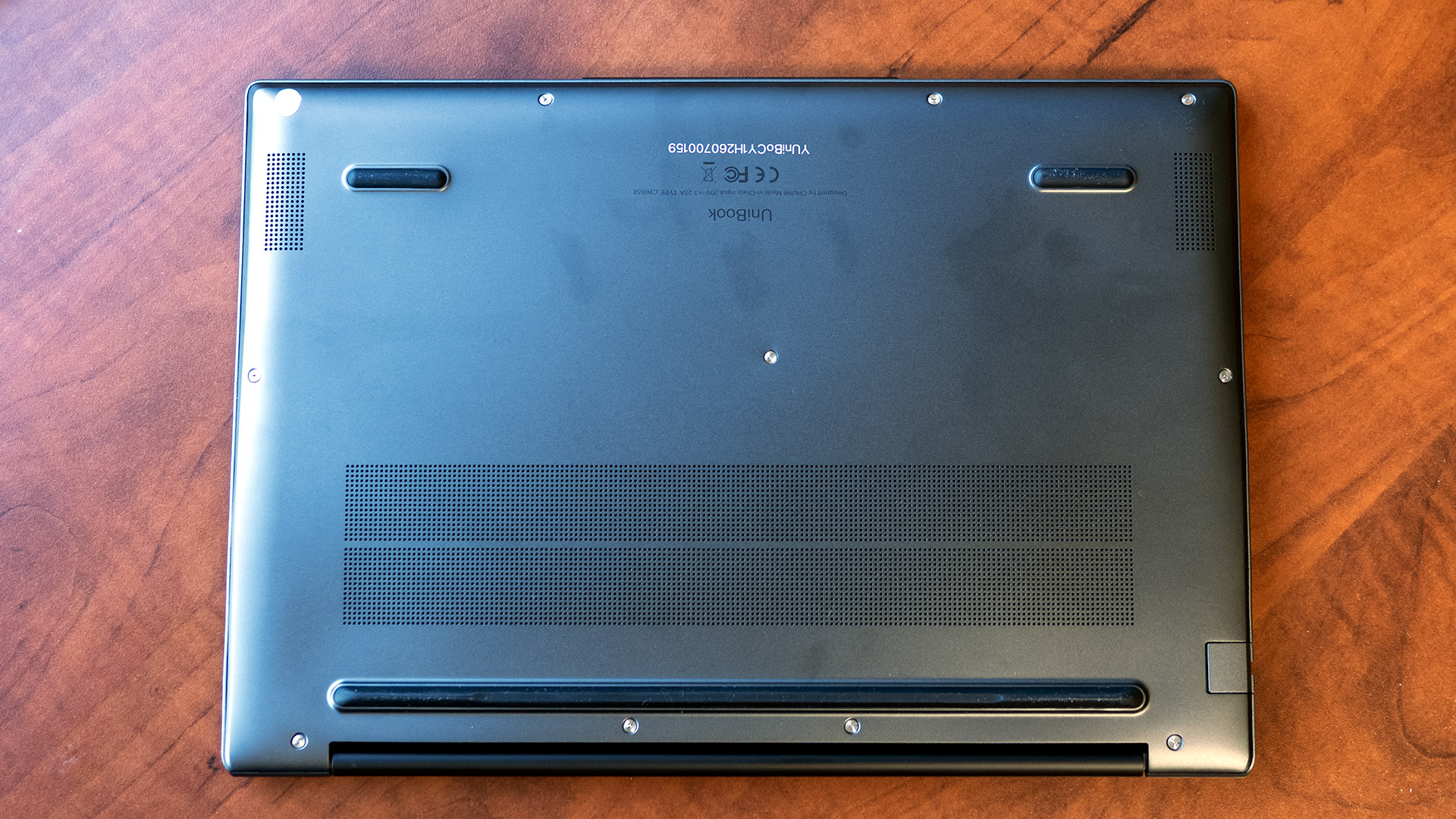
Port selection is the biggest surprise. While many thin-and-light laptops reduce connectivity, Chuwi went the opposite direction, with two USB-C 3.2 Gen 1 ports (both supporting power delivery and DisplayPort), three USB-A ports (two 3.2 Gen 1 and one 2.0), HDMI 1.4b, Gigabit Ethernet, an audio jack, and even a micoSD card slot. Compare this to the USB-C-only selection on the MacBook Neo (which also features a headphone jack) and XPS 13.
 Tom's Hardware
 Tom's Hardware
Internally, the UniBook's Wi-Fi 6 and Bluetooth 5.2 standards aren't the newest, but are perfectly adequate for this laptop's intended use.
Chuwi UniBook SpecificationsCPU | Intel Core 3 304 |
Graphics | Intel Graphics |
Memory | 8GB LPDDR5-6400 |
Storage | 256GB PCIe 3.0 SSD |
Display | 14-inch, 1920 x 1200, IPS, 60 Hz |
Networking | Wi-Fi 6, Bluetooth 5.2 |
Ports | 2x USB-C 3.2 Gen 1 (PD, DisplayPort out), 2x USB-A 3.2 Gen 1, USB 2.0, HDMI 1.4b, Gigabit Ethernet, TF card slot, 3.5 mm audio |
Camera | 720p |
Battery | 53.38 Wh |
Power Adapter | 65W USB Type-C |
Operating System | Windows 11 Home |
Dimensions (WxDxH) | 12.4 x 8.7 x 0.65 inches (315 x 221 x 16.4 mm) |
Weight | 2.64 pounds (1.2 kg) |
Price (as configured) | $449.00 |
We evaluated the Chuwi UniBook with an Intel Core 3 304 processor, Intel Graphics, 8GB of LPDDR5-6400 memory, and a 256GB PCIe 3.0 SSD.
Our comparison lineup consists of the Apple MacBook Neo and Dell XPS 13. Both laptops start at $699.99 before education discounts, and pack more powerful hardware. The UniBook's Core 3 304 processor, featuring one performance core and a 4.3 GHz boost, is at a disadvantage next to the Dell's Core 5 320 processor, which offers two performance cores and a 4.6 GHz boost. Meanwhile, the MacBook Neo uses a smartphone-grade but very capable A18 Pro chip.
 Tom's Hardware
 Tom's Hardware
 Tom's Hardware
 Tom's Hardware
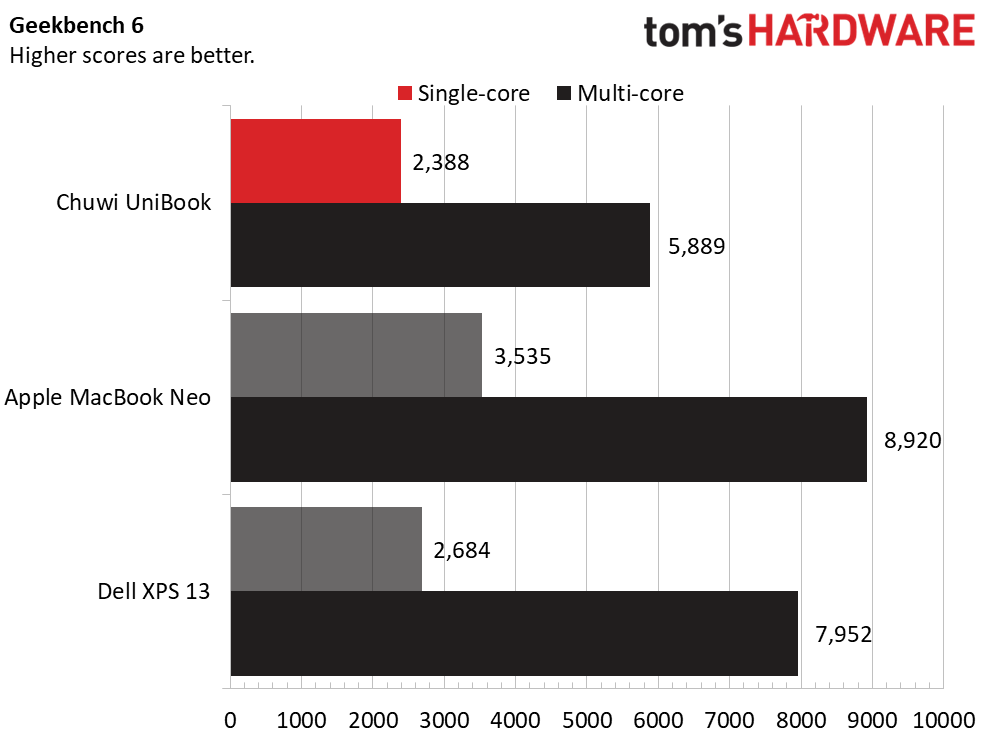
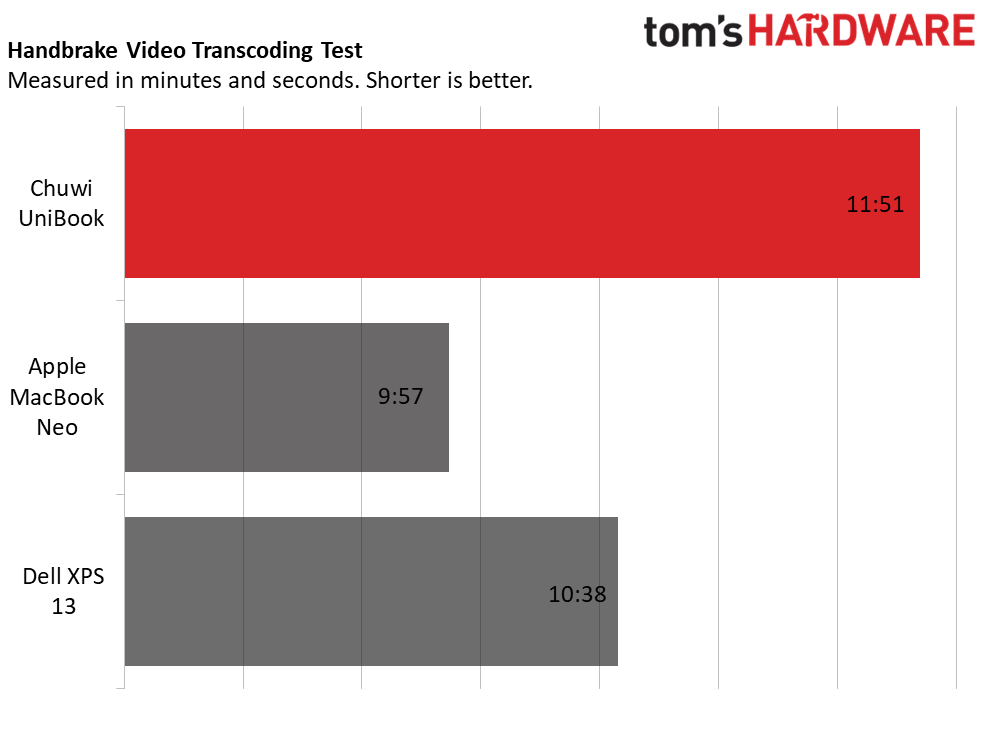
The UniBook trailed the XPS 13 and MacBook Neo across the board. Some of this was expected - for instance, its Geekbench multi-core score of 5,889 points was well south of the XPS 13's 7,952 and the MacBook Neo's 8,920, a product of its weaker CPU. This followed into its last-place Handbrake showing.
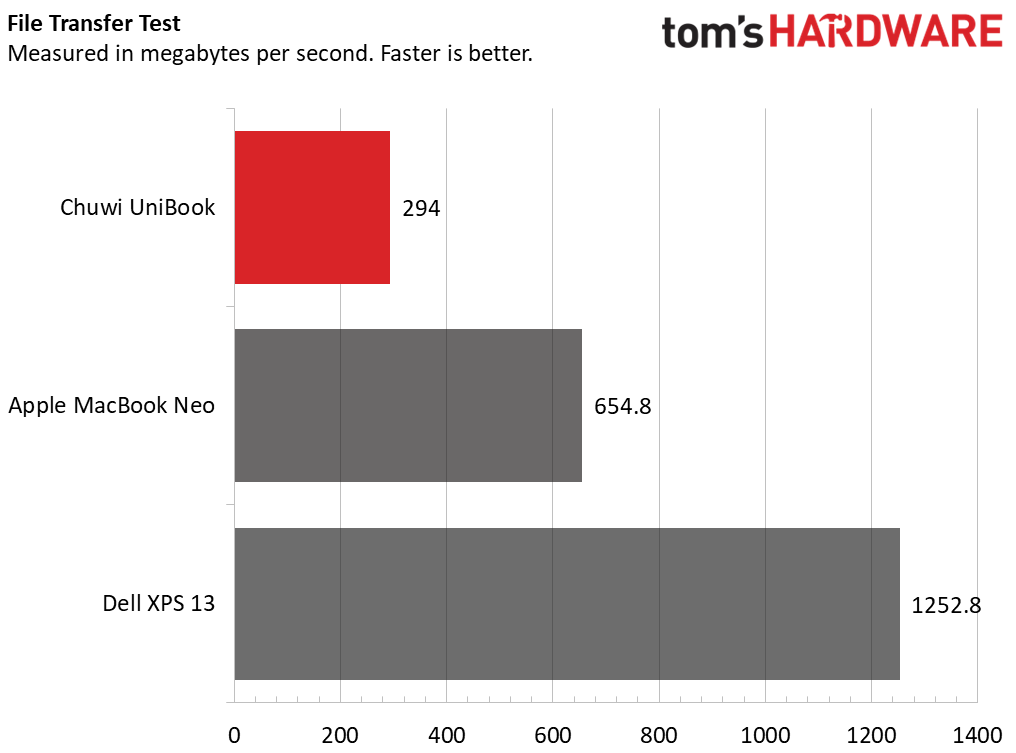
However, its 294 MBps average speed in our 25GB file transfer test was particularly low even for a budget laptop, with less than half the throughput of the MacBook Neo and not even one quarter of the XPS 13's. You could tell on paper this would happen, givenit's using the older PCIe 3.0 technology.
In daily use, the slow storage drive and single performance core didn't hamper basic usage. The laptop booted without delay and webpages loaded quickly. With just 8GB of RAM (which can't be upgraded), multitasking will be limited, but this laptop isn't aimed at power users.
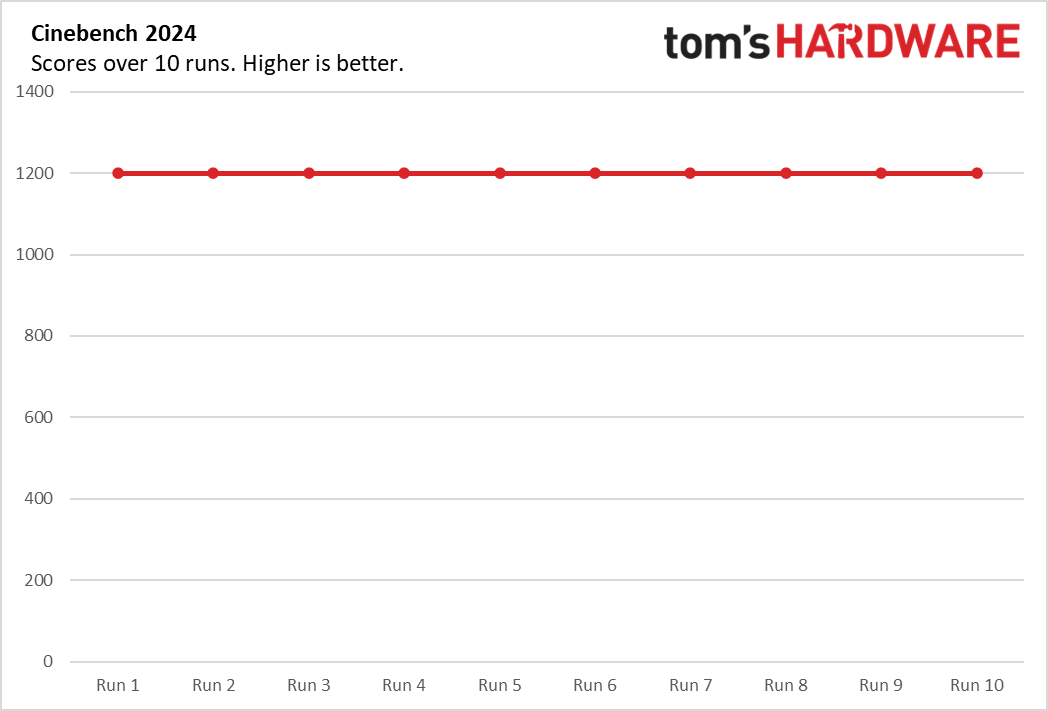
We normally run 10 loops of Cinebench 2024 or 2026 to stress-test productivity laptops, but both refused to run the UniBook - 2024 cited a GPU memory allocation issue and 2026 crashed at startup. The system's 8GB of RAM may have been the culprit. As an alternative, we reran our Handbrake video transcoding test. During the test, the Core 3 304 operated at average frequencies of 3.46 GHz on its P-core and 3.1 GHz on its E-cores.
Display on the Chuwi UniBookThe UniBook's 14-inch, 1920 x 1200 display is serviceable, but it's also one of the clearest reminders that this is a budget laptop. Though its IPS technology provides wide viewing angles and it benefits from a practical anti-glare surface, dull colors and lack of contrast produce a washed-out picture. Brightness is adequate for indoor use only. In Captain America: Civil War, scenes that should have looked bright and punchy instead appeared subdued, with colors that felt muted rather than lively. For instance, the red on Captain America's shield skewed more towards orange than red.
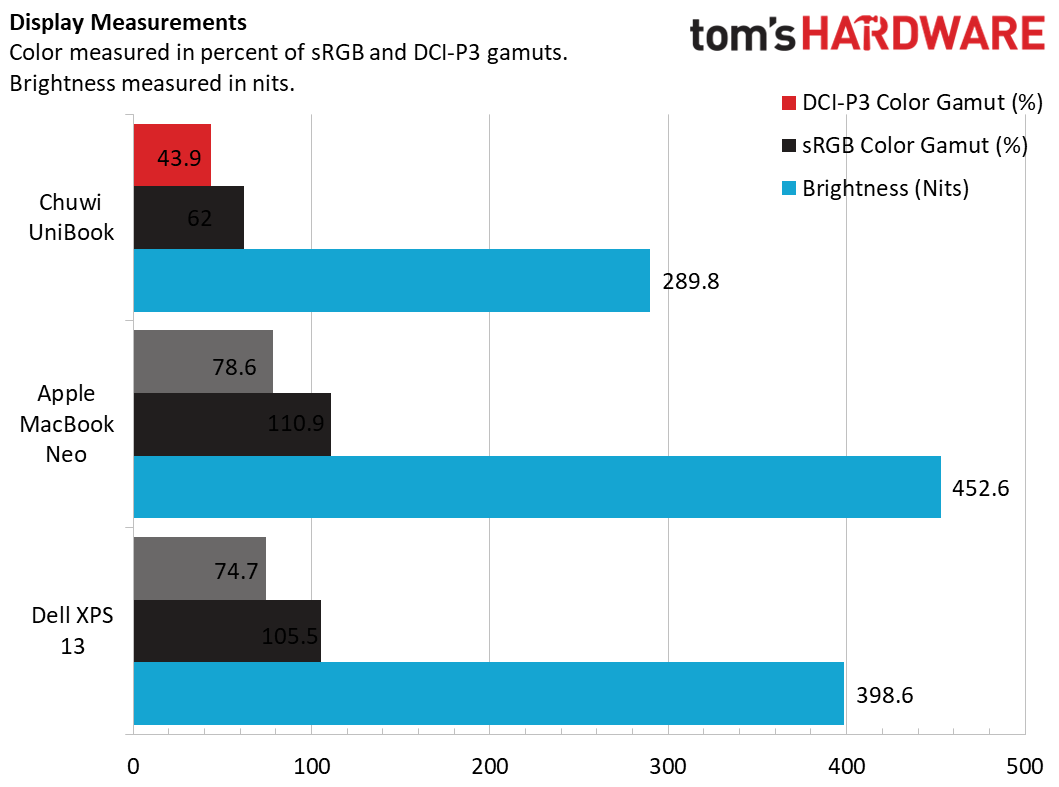
The UniBook's panel covered just 62% of the sRGB color gamut and less than half of DCI-P3, putting it well behind the MacBook Neo and Dell XPS 13. Brightness was also modest at 298.8 nits, more than enough for typical indoor work but not ideal near bright windows or outdoors. For writing, browsing, and streaming casual video, the display is acceptable; for anything else, it is a compromise.
Keyboard and Touchpad on the Chuwi UniBookThe UniBook's keyboard is one of its highlights. Chuwi includes white backlighting, a welcome addition that's often omitted on budget laptops. (Notably, it's missing from the MacBook Neo.) The keys are comfortably sized and spaced, making it easy to settle into a comfortable typing rhythm. I reached 120 words per minute with perfect accuracy on Monkeytype during my initial run - it felt predictable and responsive, though some keys exhibited occasional rattling that detracted from an otherwise positive typing experience.
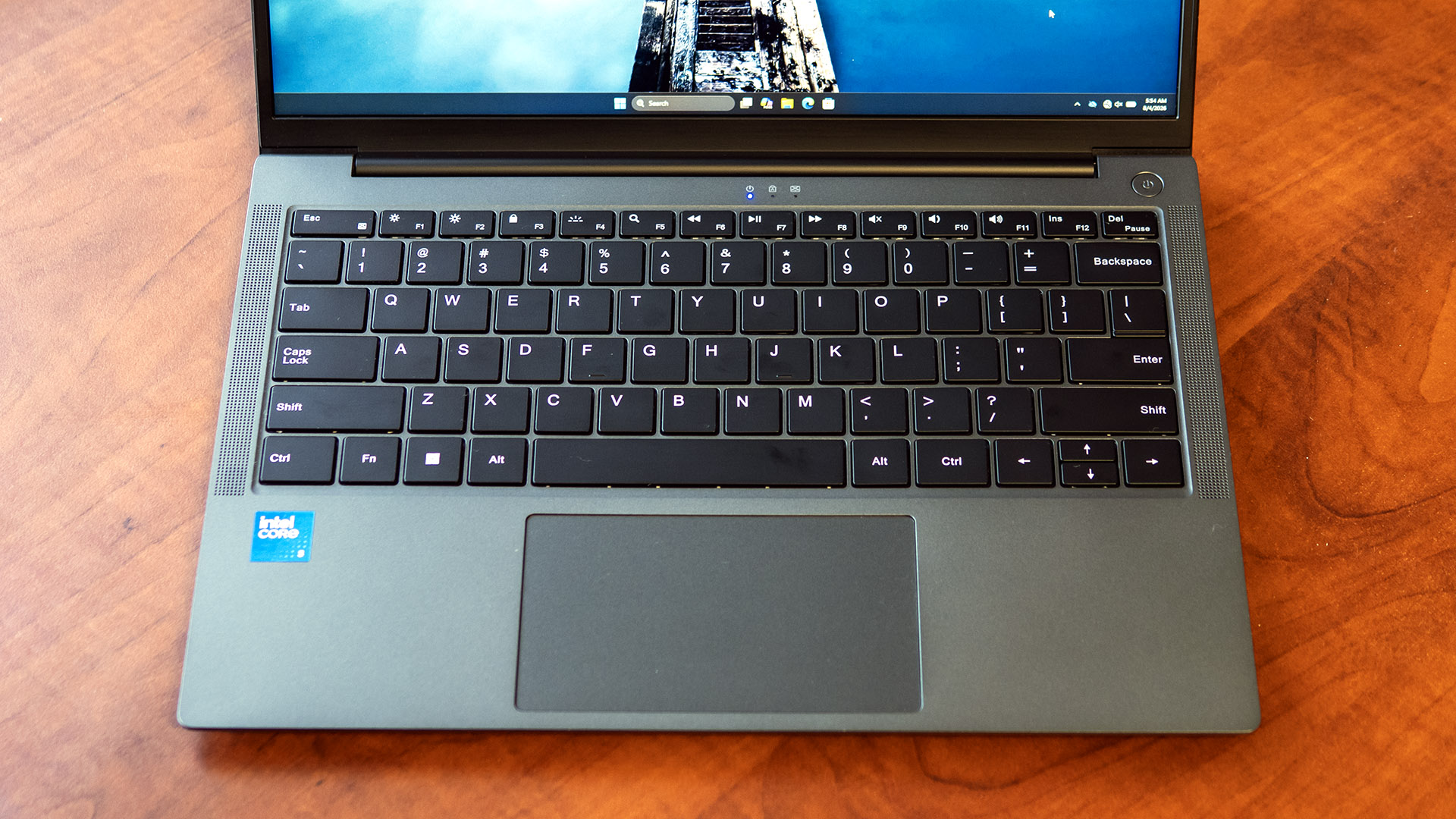
The touchpad is compact but responsive and accurate. Its main drawback is the loud mechanical click mechanism, which is noisier than I expected and can become noticeable in quiet environments. Everyone within earshot will know you're clicking. Otherwise, using the touchpad is comfortable and predictable.
Audio on the Chuwi UniBookAudio performance is one of the UniBook's weaker areas. While usable for voice calls, with sufficient volume and clarity, they struggle with entertainment. The sound is thin and lacks bass response, leaving music sounding flat and lacking impact. Listening to Phil Collins' Don't Lose My Number", for example, I heard almost no bass and the vocals lacked depth. The laptop doesn't include an audio tuning app with equalizers.
Speaker positioning is also a problem. Because the speakers fire downward from the underside of the chassis near the palm rests, they only perform well when the laptop is on a hard surface. The sound is noticeably muffled if the laptop is in your lap or on a couch or bed.
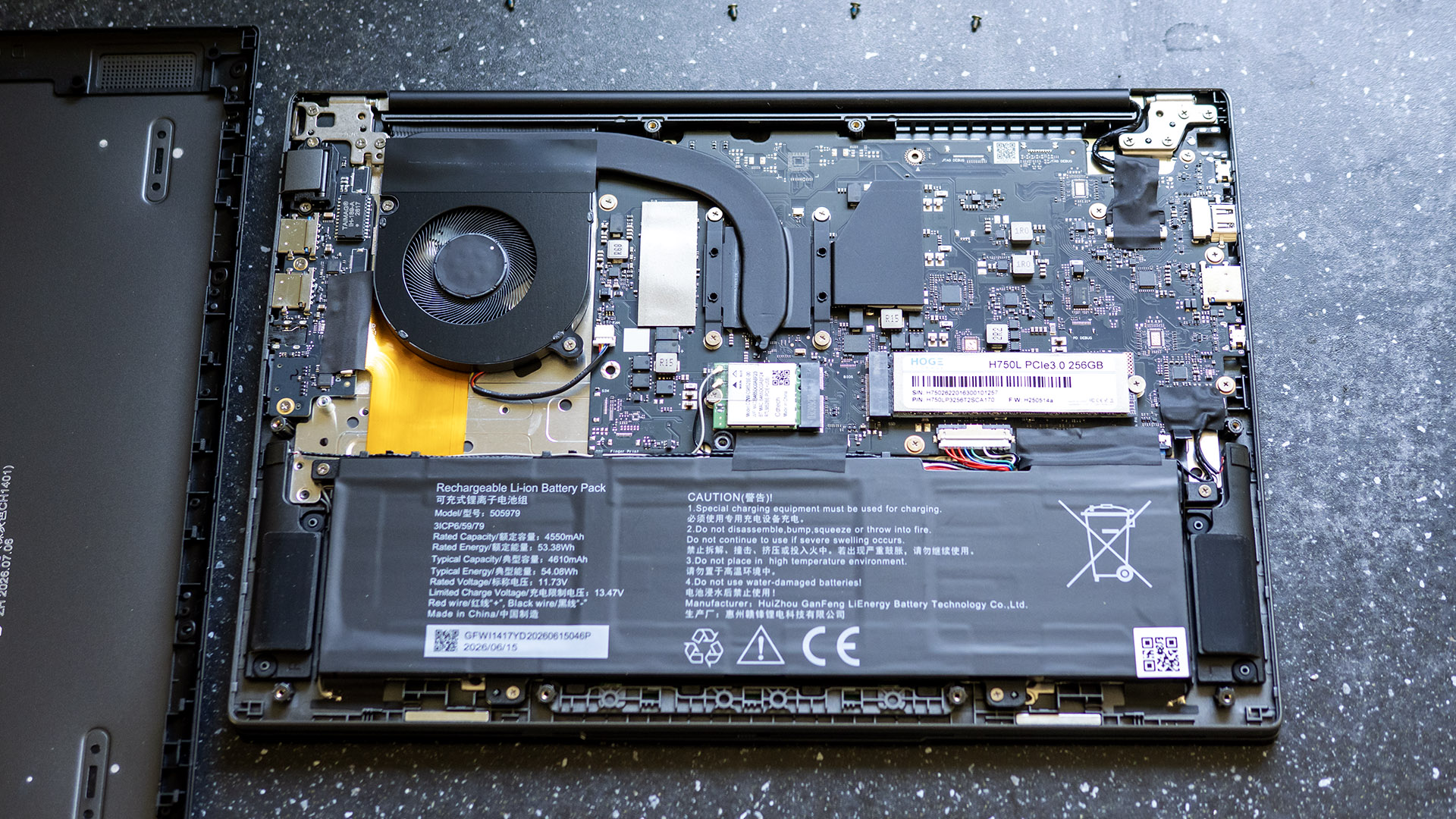
Upgradeability of the Chuwi UniBookThe Chuwi UniBook offers reasonable upgradeability: the M.2 2280 SSD, M.2 2230 wireless card, and battery can all be changed out by removing the bottom panel. Removing the panel is straightforward, though two different sizes of Philips-head screws are used. The clips on the back edge can then be popped using a plastic pry tool, followed by the sides.
 Tom's Hardware
 Tom's HardwareBattery Life on the Chuwi UniBook
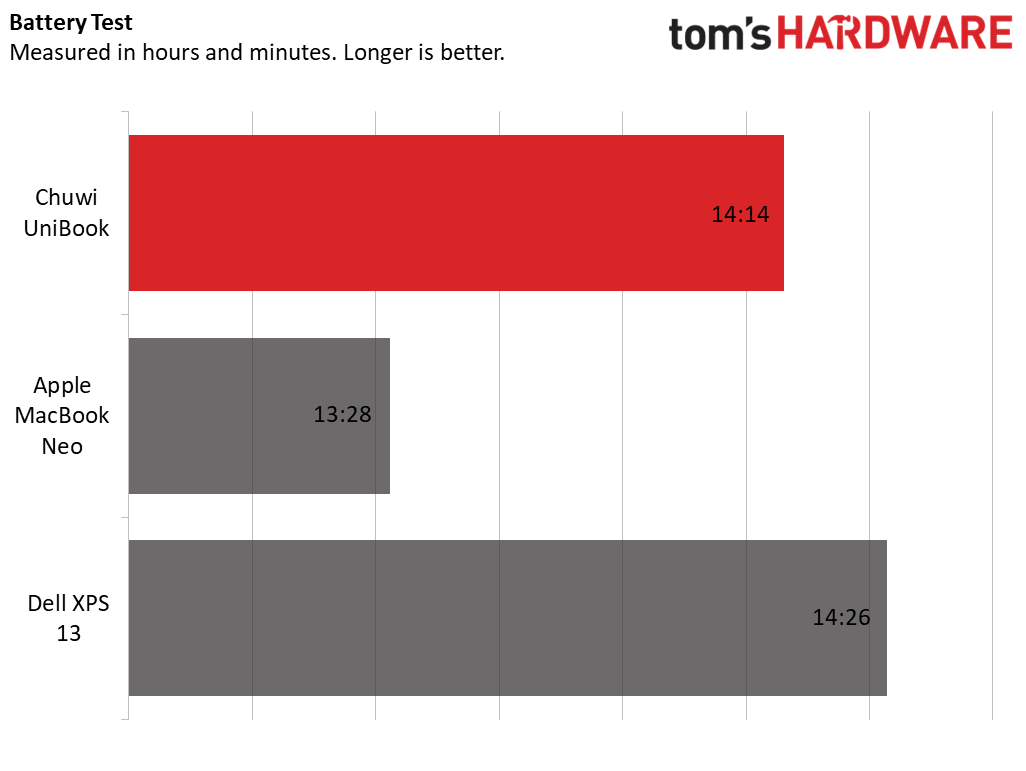
Our battery testing consists of web browsing, running OpenGL tests, and streaming videos with the screen at 150 nits while connected to Wi-Fi. The UniBook's time of 14 hours and 14 minutes is an excellent result for a budget laptop. It practically tied the XPS 13 (14:28) and nosed past the MacBook Neo (13:28).
We normally measure peak laptop surface temperatures while running 10 loops of Cinebench, but that benchmark wouldn't run on the UniBook. We substituted it with our Handbrake video transcoding test, which fully stressed the CPU for about 12 minutes. The UniBook's surfaces didn't stray far from room temperature - we recorded 80 degrees Fahrenheit on the touchpad, 88 F between the keyboard G and H keys, and 92 F on the bottom near the exhaust vents.
Internally, the Core 3 304 ran at an average temperature of 73 degrees Celsius. The exhaust fan was audible but restrained.
Webcam on the Chuwi UniBookChuwi's webcam isn't great - with just a 720p sensor, images have a soft focus and lack detail. I couldn't read my wristwatch when I held it more than two feet away. On the bright side, it does offer a privacy shutter, which sometimes even pricier laptops leave out.
Software and Warranty on the Chuwi UniBookBeyond the usual apps included with Windows 11 Home, Chuwi preloads no other software onto the UniBook.
The laptop is backed by a one-year warranty. Sending the laptop for warranty repairs could prove costly as it will need to be shipped to Hong Kong or Germany at the owners' expense. (See Chuwi's warranty policy.)
Chuwi UniBook ConfigurationsWe reviewed the Chuwi UniBook featuring a Core 3 304 processor, Intel Graphics, 8GB of LPDDR5 memory, a 256GB SSD, and a 14-inch IPS 1080p display. It was listed at $449 on Chuwi's online store at the time of this review, discounted from its $569 MSRP.A second configuration with an Intel Core 5 315, 12GB of RAM, 512GB of storage and a 1080p display that the company claims will cover 100% of the sRGB gamut was listed late in our testing process. As of this writing, the company told us this system is in production but doesn't have a price or release date.
Bottom LineFor buyers seeking a basic ultraportable, the Chuwi UniBook gets a few of the fundamentals right. Solid port selection and respectable battery life stand out in a price bracket where there are typically many compromises. Unfortunately, the compromises stack too quickly: performance that trails far behind machines like the Dell XPS 13 and MacBook Neo, a below-average display, weak speakers and webcam, and the ongoing risk of costly outofwarranty repairs. So while its savings look good on paper, the many downsides and possibility of expensive service make it worthwhile to stretch your budget for a MacBook Neo or XPS 13, both of which are safer long-term investments.