Typo-squatting attacks with major domains are still viable
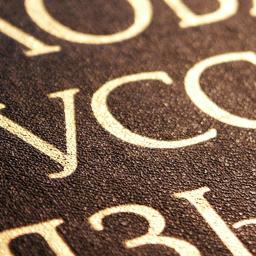
When the IETF decided to allow Unicode characters in domain names, many techies saw the move as commendable, but also fraught with danger, as hundreds of unique characters can look similar or identical across multiple alphabets. This can be used for typosquatting attacks, wherein bad actors create functioning websites with deliberately misspelled web addresses that look identical to the real URL, thus launching attacks against unsuspecting visitors who land on the site due to search results generated when the user mistypes an address. The Chromium browser has the most advanced ruleset for finding and preventing mischievous domains masquerading as legitimate ones, but even the best code has odd edge cases, as a blog post from Have I Been Squatted (HIBS) explains in great detail.
Using ".com" as an example - which is in fact not identical to the real "apple.com" - the researchers show how specific combinations of characters can still evade multiple layers of protection, thanks to the particular circumstances surrounding the use of specific Cyrillic characters. This alphabet has lookalikes for many Latin letters. For example, a, e, o, p, and c. We forgive you if you can't spot the differences.
Trying to sneak the one homoglyph into the middle of standard Latin ones triggers Chromium's safeguards and makes the browser display the domain name in its Punycode format. For example, using the Cyrillic "" with "pple.com" would show up as "xn--pple-43d.com". With few exceptions, domain names with non-Latin characters ending in .com only pass the check if they're all from the same alphabet.
Having said that, opting to try ".com," using all Cyrillic lookalikes, would also go bust. Chromium keeps a list of 29 Cyrillic characters that routinely masquerade as their Latin counterparts, and composing a domain name using only characters from that list is a no-no.
So how does ".com" pass? Allow us to illustrate with bigger text below. Note how the right-hand Cyrillic character is actually an oval with a line across it.
[e] []As you can surmise by now, the "" character is not in that special list of 29. While a more recent release of Chromium can and probably will add it, this reveals the difficulty of the problem: since there's no one-size-fits-all solution for detecting typo-squatting, even the best set of rules will sooner or later end up on the wrong side of a corner case.
It takes many watchful eyes to play Unicode Pokemon and catch'em' all, especially given the character set continually evolves and now counts nearly 173,000 entries - though only a subset of those are eligible to be used as domain names or TLDs in practice.
Chromium is reportedly the best browser at detecting domain lookalikes, as a 2020 study showed that it caught 64.1% of the attempts, with Firefox and Safari trailing behind. As a reminder, Chromium underpins the Chrome, Edge, and Brave browsers.
Besides many other rules and per-alphabet verifications, Chromium keeps a list of over 8,000 popular domains bound to be typo-squatted, and runs stronger checks against 836 of them. Domain registries, likewise, make reasonable efforts to prevent typo-squatting, like having strict rules about what characters can go into which TLDs, but that's not nearly enough to fully solve the problem.
All things considered, HIBS recommends that companies afraid of impersonation try to register any lookalike domains and try to encourage passkey use by users. Passkeys are always tied to a specific domain, so a user wouldn't be able to log in to a sneaky website with them.