Our first step at defining a CPU benchmark for agentic AI
Agentic AI has set off a firestorm in the world of CPUs over the past six months, yet it's an area of performance that still doesn't have solid, repeatable benchmarks to evaluate where the latest hardware falls. We've been working on an internal set of tests to evaluate at least one aspect of contentious agentic loops end-to-end, isolating CPU and memory performance from the accelerator to understand how these components contribute to the agentic loop.
This is still a work in progress, but we wanted to bring Tom's Hardware Premium readers behind the scenes to understand how we're going about tackling this problem, our methodology for testing, and detail what we've learned about agentic loops along the way. We've prototyped the test and settled the central design, but there's still work to do before the numbers it produces hold up to scrutiny.
Given that this area of computing is bleeding-edge and rapidly evolving, we undoubtedly have blind spots here. That's OK. The testing we're doing is built to look at how agentic performance scales across the CPU as sessions increase, providing an ideal throughput for each chip that provides as many agent sessions as possible while remaining interactive.
Toward the end of this article, we've included a section on some of the shortfalls of this approach, as well as some ideas we're toying with to tackle things like multi-turn agentic flows. And keep in mind that these tests aren't meant to replace our other testing of local AI, but to supplement it. As this space continues to evolve and the hardware characteristics are better defined, we'll be able to make more informed decisions about where this testing goes in the future.
Defining an agentic AI loops"AI agents" imply some little workers that, strapped with an LLM, can go and handle whatever task you throw at them. It's a fine description, but we'll need a bit more a technical definition if we're going to benchmark the performance of agentic AI.
There are two parts here that are important. First are functions. With agentic AI, we give the LLM access to tools, which, in the case of popular agentic frameworks like LangGraph, are Python functions. The tool may be reading or writing a file, querying a database, running tests on code, or just about anything else you can define in a function. Here's a basic example.
@tool def run_command(command: str) -> str: """Run a build or test command in the repository root. Allowed: make [targets], python -m pytest [args].""" return traced("run_command", {"command": command}, lambda: ws.run_command(command))This is how you write a tool call with LangGraph inside of Python, and it's an example of a tool call that the we've given the LLM access to through our LangGraph persona. We identify the function as a tool the LLM can call with "@tool," and then we define the function like normal Python with "def run_command," passing through the command as an argument. The extra "-> str" on the end notes that the argument will be a string, and the function should return a string.
That's followed up by a description of the tool that the LLM can read (triple quotes just allow you to space this across multiple lines in Python). We're prompting the LLM that it can run build or test commands using make or pytest. For this example, we wrap the function up with the anonymous lambda function and pass it back to an overarching trace function. That's not important right now, however. The goal is to illustrate what a tool call looks like.
This is only one of a handful of tools available to our coding agent. It can also read and write files, edit files, and search code using regular expressions, all defined in the same way with Python functions. Agentic AI is often described as a "loop," however, and that's because the task often requires calling a tool multiple times and/or calling different tools.
If we're working a Python project, for instance, we may prompt the LLM to "debug this Python script." It may call the "list files" tool to evaluate what Python script we're talking about first. Then, it will call the "read file" tool to understand it, or maybe "search code" to find a spot to start troubleshooting. Then it might run "edit file" and "run command," and if the file isn't fixed, it may loop back over these tools a few times.
This is the agentic loop. We prompt the LLM, it evaluates and starts calling tools it needs to form an answer. Then, it gets back the information from the tool calls, it re-evaluates, and then it may call more.
Starting with concurrency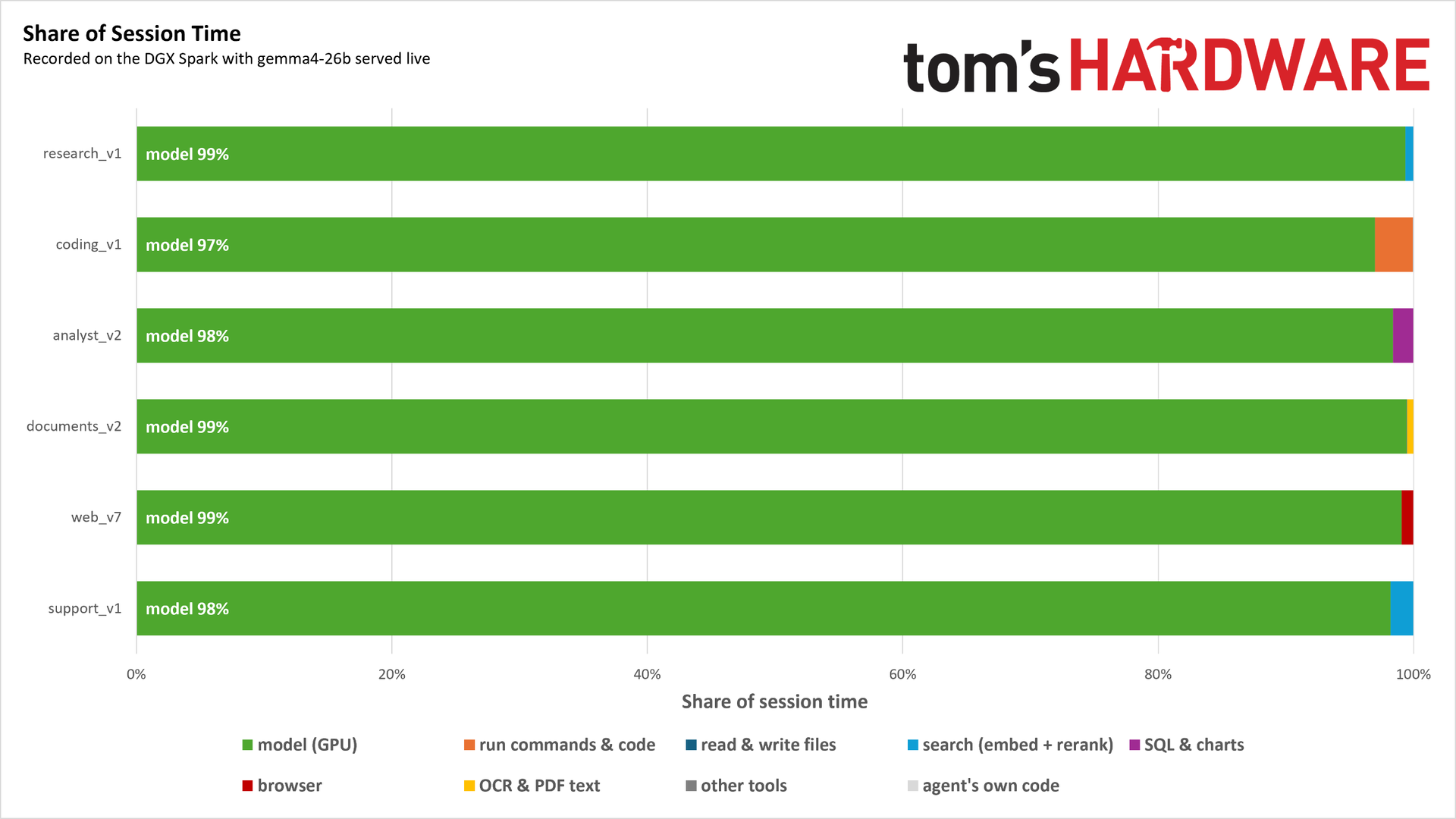
We'll dig into the specific tests and what they're doing later in this article, but it's good to set the stage with why our benchmark is designed the way it is. We developed the test on an Nvidia DGX Spark (GB10) featuring 128 GB of unified memory, a Blackwell GPU, and the relatively weak Arm-based Grace CPU. Above, you can see the time spent running these agent loops on the GB10 with gemma4-26b-a4b. The model isn't super important here as long as we're able to call tools, and we're able to re-record the tests using different models as they continue to release.
The point here is the share of time spent, not the model or the specific work the agents are doing (though that does provide useful context). Each result here is a list of sequential tasks for the agent to execute against the model, and nearly all of the time is spent on the GPU. Even relatively demanding CPU tasks, like with our coding agent, represent just a small fraction of the computational time. Running one or even a few agents isn't a problem for the CPU when we have access to a large, powerful GPU with a sufficiently large model running on it.
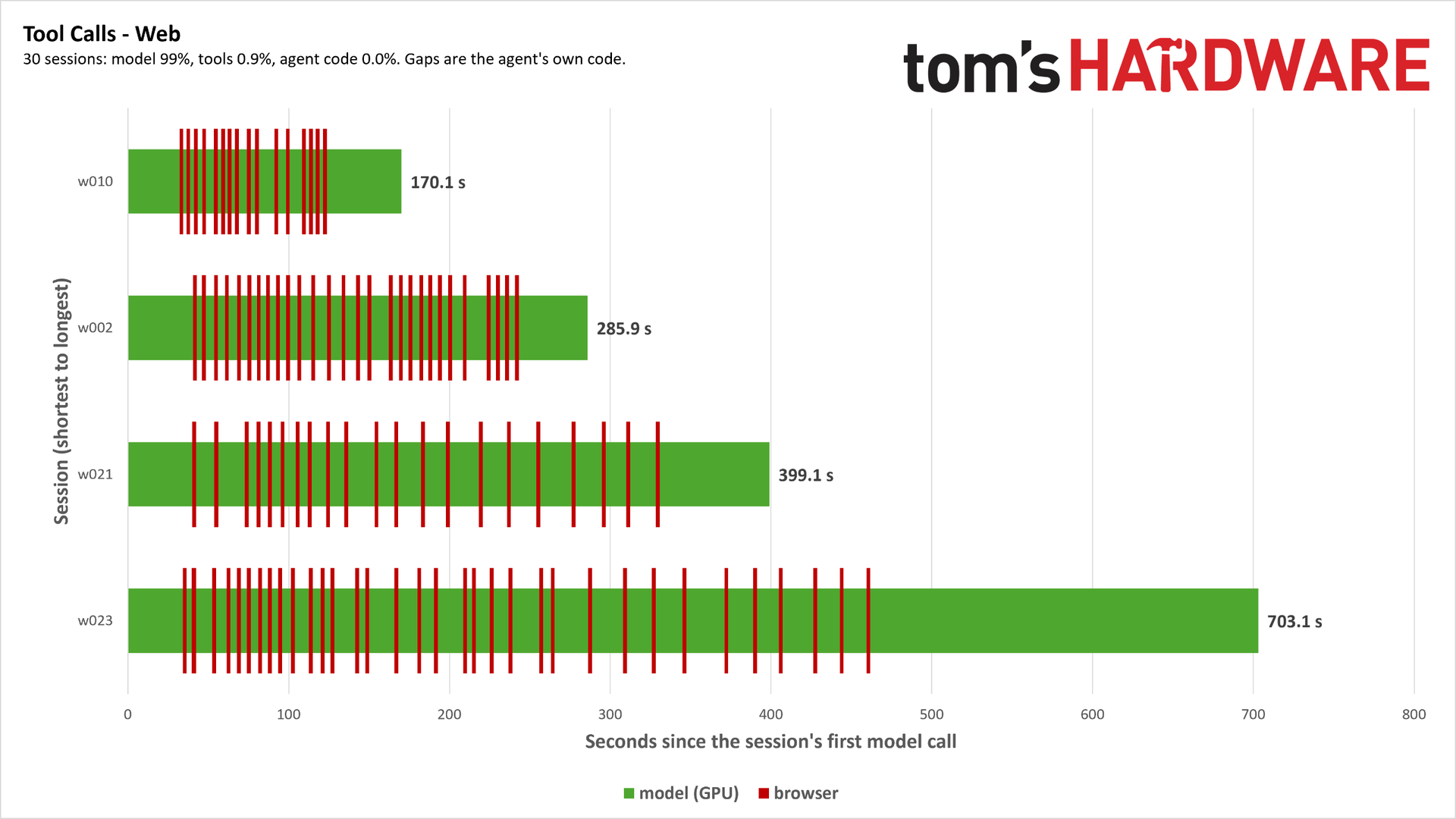
Looking closer at one specific set of tasks, you can see that there are plenty of tasks for the CPU to execute during the window, but those tasks happen so quickly that it barely registers in the overall time spent.
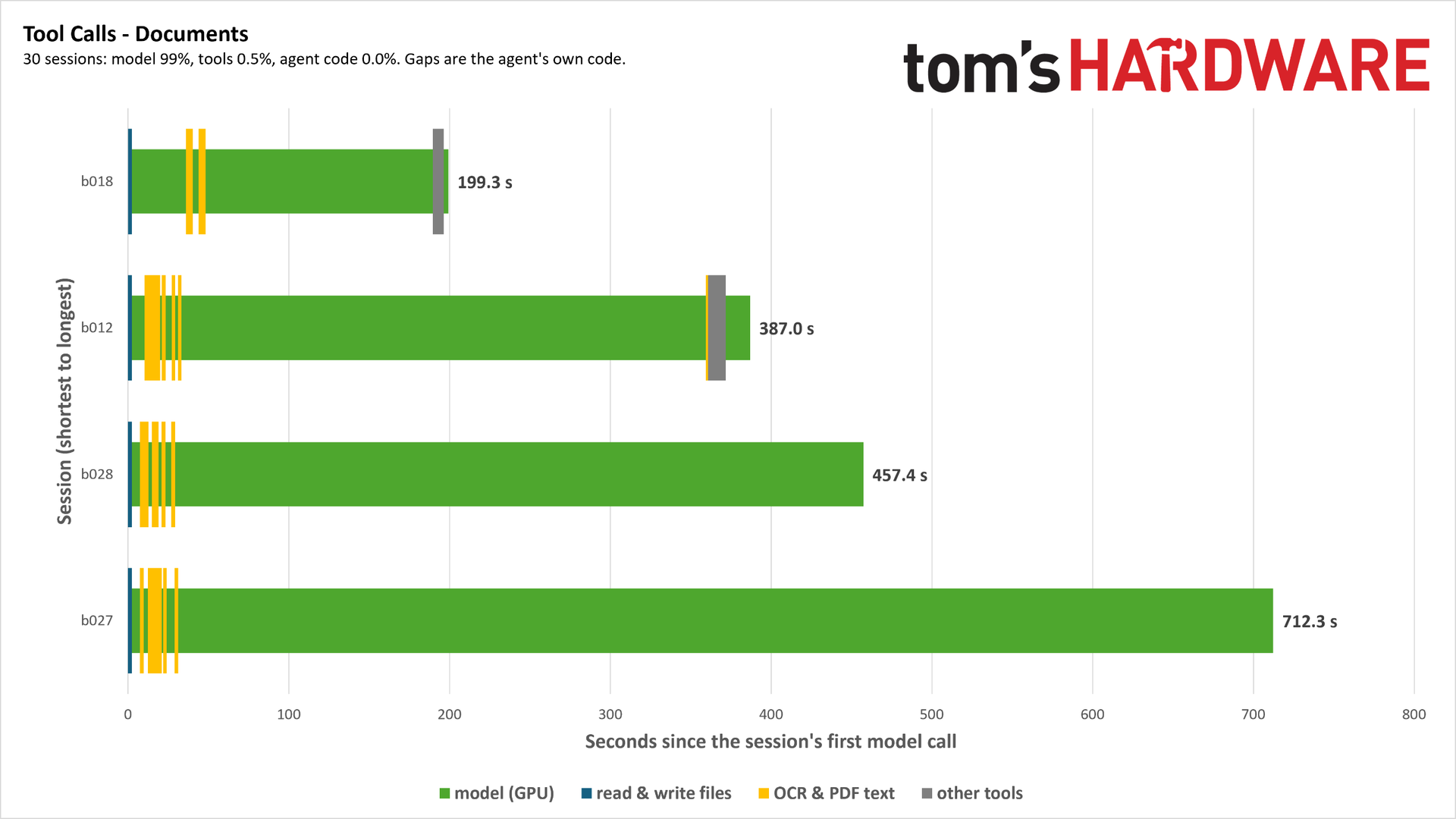
These tasks aren't evenly spaced, either. Depending on when the agent needs to call tools, the shape of the workload can look very different. Above, for example, you can see our document agent, which is tasked with scanning and extracting information from a set of PDF files. Nearly all of the agent time is spent at the very beginning of the task, after which it's almost pure GPU inference.
Obviously, a more powerful GPU will churn through the inference step faster, but we'd have to create a severe imbalance between the CPU and GPU for the CPU portion of a single agentic loop to create a bottleneck - at least with these common tools. Agents don't just handle a sequential list of tasks, however. They spawn sub-agents, and if multiple sessions are running on the same system in sandboxed environments, contention for limited resources becomes a real issue.
Instead of designing the test platform in such a way that creates a severe CPU/GPU imbalance, we looked toward concurrency. The idea is to sweep across the chip with concurrent sessions running a list of tasks in a loop in their own processes. As the sweep scales up, contention across the CPU starts to appear, and minor differences in tool calls, code execution and compilation, web browsing, and the variety of other tasks our agents do pile on.
How the benchmark worksWith concurrency as our north star, we can start breaking down the design of the benchmark and how it works internally. The overall design is simple. Custom agents built with LangGraph have a list of 30 tasks to execute in sequence against a llama.cpp server running gemma4-26b-a4b. Instead of going directly to the server, however, the agents go through a proxy server that records a trace.
During live recording, the agent communicates with the proxy server, which passes a live call to the llama.cpp server. The proxy server meanwhile writes every logged request to the LLM and the response from it to an overarching JSON. Tool calls bypass the server chain and are logged to their own JSON files. Finally, for each task, a correct response is generated, hashed, and stored as its own JSON.
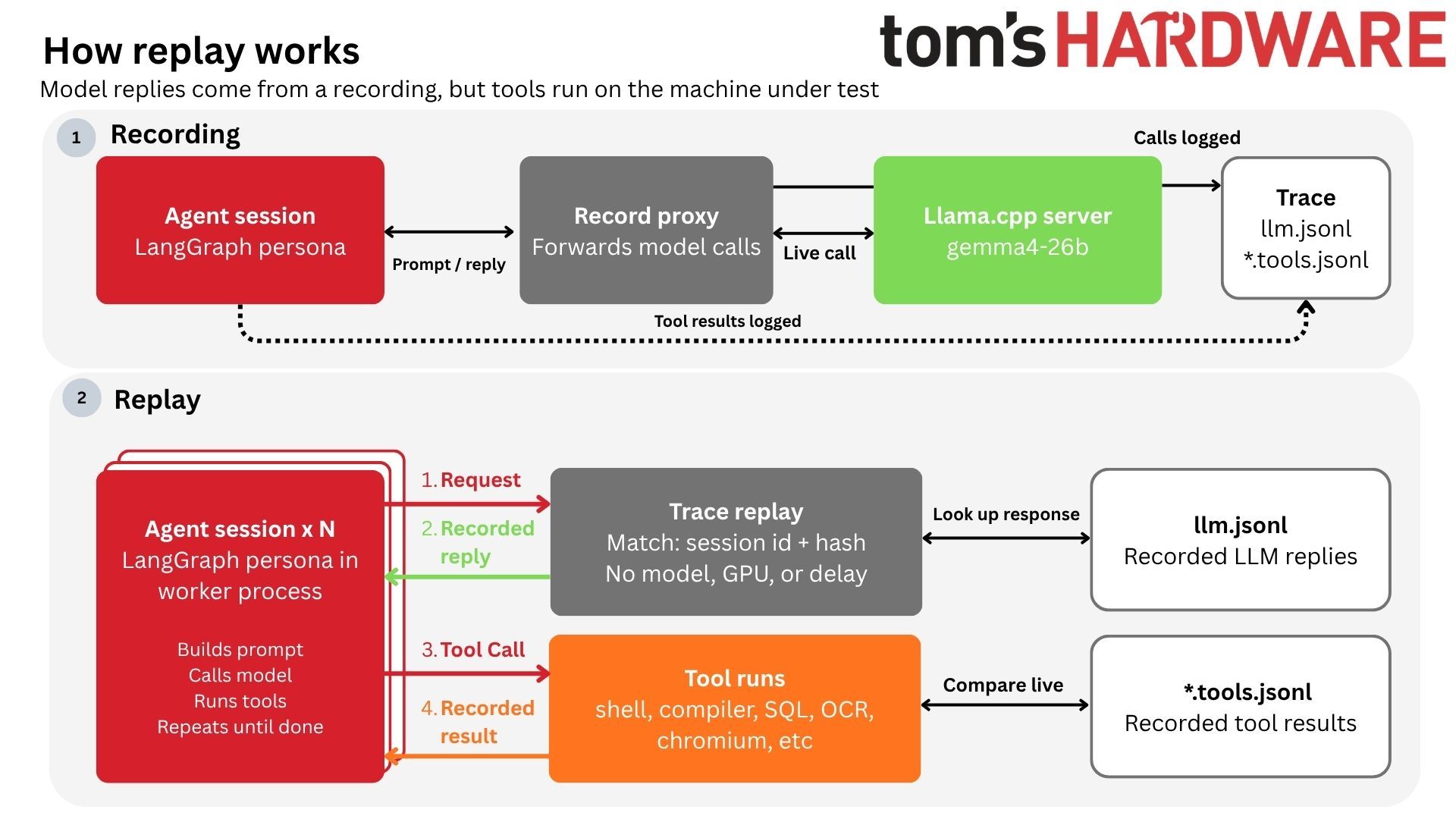
Recording everything allows us to remove the live model entirely from the equation. The agents still run as normal, but instead of running against a live LLM, they run against that proxy, replaying the traces captured. The requests and tool calls are all happening live, but the agents are immediately handed back a response from the trace based on the live inference capture.
Starting with the request from the agent, it's matched by session label and hash to ensure it's accurate before the response is looked up in the master JSON. If there's a mismatch, the run stops and is marked as invalid. If everything checks out, the response is passed back, and the agent session(s) call the tools they need. The tool calls are compared to the JSONs generated during recording, and the recorded result is passed back. This is critical.
The test compares the live tool call to the recorded result, but it always passes back the recorded result to keep the test from drifting, even if the tool call is correct. True tool mismatches are logged. The test proceeds, but it's marked as invalid for each level with tool mismatches.
This setup makes redesigning and expanding the benchmark simple. We can write a new persona in Python using LangGraph, or expand to other frameworks like CrewAI. Additionally, we can rerecord traces against different models in the future, perhaps some with expanded capabilities. As long as we're communicating over an OpenAI-compatible endpoint, we can mix and match pieces of our testing to represent a broader range of workloads.
The test starts at a single worker process and scales up to the maximum thread count of the CPU, running three repeats per level. Each worker process operates off a list of 30 tasks, with new worker processes starting at the next point in the list. So, worker session one would start at task one, worker session two would start at task two, and so on. Tasks do not take an equal amount of time, so this offset creates imbalanced contention as tasks overlap.
What this actually measuresThe metric we get out of the test is sessions per second. A session is a single task completed from end-to-end, and we measure the number of sessions completed per second at each level. Naturally, at lower levels, we complete fewer sessions per second, often falling below 1, meaning the task takes longer than one second to complete. The tasks are completed sequentially. What we're looking for is how chips diverge as sessions increase, measuring the throughput of agentic work on the CPU.
We derive two headline scores from the sweep. First is peak throughput, which is the highest sessions per second we recorded, as well as the concurrency level at which it was recorded. Next is ideal throughput, which is the point at which the slowest 5% of sessions take no longer than 1.5x the time it takes for a single session to complete at the base concurrency level. We expect that tasks will take longer as the number of sessions increases, but past that 1.5x mark, the length of the task gets significantly longer, and depending on the processor's topology, throughput can start to degrade.
It's worth highlighting again that there is no GPU delay in this concurrency sweep. We've removed the GPU entirely, throwing as much concurrent work at the CPU as possible to determine where that peak throughput point lies. However, the GPU still plays a significant role, so the results should be viewed in a realistic context.
As more agents work on the CPU, they'll compete for resources on the chip, but this balance can easily shift. If there isn't enough GPU horsepower, agents may queue for a slot, and that's not effectively utilizing the compute on either processor. Our testing is more than theoretical throughput from napkin math, but it's less than a true end-to-end system. There are too many variables to account for in that setup for us to produce any useful numbers that are broadly applicable.
However, we can run the sweep with live inference to evaluate system-level performance. For live runs, the responses handed back to agents are still served from the recording to keep runs equal. However, the request is recorded by the llama.cpp server, which generates the same number of tokens before being discarded. This accounts for the normal inference pipeline, including prefill, decode, and cache performance, as well as agents queuing for a slot.
Both numbers are important. Live sweeps are a realistic look at local AI across the entire system, while frozen replays measure the peak throughput a CPU is capable of with access to all the GPU compute (theoretically) that it could want.
Our starting agent personasWe've defined six agent personas. A persona" is a Python script built with LangGraph that defines what the agent can do. The agents tool calls are Python functions, defined in that main script that connects our LangGraph nodes. Each persona is working off its own unique list of tasks from local documents. For example, the research persona is able to answer questions by searching in a Wikipedia corpus of about 50,000 articles.
Persona | Sub-Tasks | Description | Tools |
Analyst | Planner, analyst, writer | Answer questions about a fake retail company by searching DuckDB with SQL and write a report. | List tables, describe tables, run SQL query, make chart from query |
Coding | Coder, reviewer | Fix bugs in one of four small projects (two C, two Python) from an issue report. | List files, read files, code search, file edits, command execution, test review |
Documents | Intake, extractor, auditor | Scans purchase orders, invoices, and other accounting documents and matches invoices against purchase orders. | List documents, extract text from PDF, extract tables from PDF, Tesseract OCR, basic arithmetic |
Research | Planner, researcher, writer | Searches local English Wikipedia corpus to answer questions. | Query corpus |
Support | Triage, researcher, responder | Answer support tickets for a fictional company using a knowledge base. | Knowledge base search, read articles |
Web | Planner, browser agent, writer | Find products that meet specified criteria in a headless Chromium session. | Open URL, click web element, enter text, select option, go back, read more of page |
Above, you can see an overview of each persona. For five out of the six, we start with some sort of planning stage, followed by the main agent loop, and finish with a report. For the analyst persona, for instance, the planner takes the questions and splits them into structured output with two to four steps. Analysts then run in parallel, searching the database, and the writer turns those findings into a response.
The one exception is the coder persona, which works a bit differently. It's working off four projects, attempting to address a bug from an issue report (similar to a GitHub issue report). The coder finds the bug, runs tests to confirm the fix, and then passes it off to a reviewer step. The reviewer step (naturally) reviews the fix before applying it.
For each of the personas, the current test setup looks at single-turn tasks. Agents make multiple loops to the LLM depending on the task, and often use tools several times, but it's all to resolve a single task with no previous context. For instance, when a customer support query comes up, the agent may take multiple passes at the knowledge base to answer that query. However, once the agent has answered the query and moved on to the next, it's treated as a separate action without context from the first query.
This is not completely representative of agentic workflows, which are often multi-turn processes. We're able to script multi-turn tasks, but that creates greater divergence risk, as well as risk of a crash. Running this locally, it's not hard to spill over the context window after a few turns of complex interactions. It's possible to do, but it's not on the top of our list of priorities right now.
We won't cover all of the tasks the current personas do because, frankly, it's a lot and most of it isn't that interesting. Still, we want to provide at least one example for each persona so you can get an idea of what's going on under the hood.
Persona | Example Task | Source of Truth |
Analyst | How do discounts affect gross margin across categories?" | DuckDB warehouse |
Coding | Invoice project - Saturday due dates move to Sunday, not Monday | PyTest, make |
Documents | Approve correct invoices from purchase orders based on a price from a list of six documents across four scans. | Faux PDF invoices, purchase orders, and goods received notices with errors planted |
Research | What causes earthquakes and how are they measured?" | 50,000-article English Wikipedia corpus |
Support | How long a two-factor code stays valid" | Knowledge base for fictional smart home company |
Web | Highest-rated 55L backpack and lightest waterproof boots | Local website for an outdoor gear store |
All of the other tasks are very similar to what you can see in the examples above. With the documents persona, for example, the agent is always approving the correct invoices, but the mix of documents and types of errors change between sets. Similarly, the support persona is always answering support questions, but they focus in different areas. Some ask to troubleshoot error codes, others (like the example above) ask about policies, and more still include multiple questions within one query, tasking the agent with piecing together multiple areas of the knowledge base.
Shortcomings of the current approachAlthough we've tried to create a broad range of agentic work here, there are some shortcomings of the current version of this test. Most notably, our testing and recordings only come from two types of systems: a 64-core Threadripper test bed with 128GB of DDR5-6000 RDIMMs, and a DGX Spark.
As we continue to test other platforms, we may need to adjust the tests, rerun recordings, or swap the model. We'd have to re-gather all of our results if we make those changes. By other platforms, we're not just talking about an Intel system, either. We've seen a variety of different local AI setups, from Mac Studio clusters to GPU-ridden workstations. The load on the CPU completely changes depending on the GPU performance, model, quantization level, and server settings.
The other shortcoming is API performance. The test is designed in such a way that we can easily connect to any model from a frontier lab through their API. Although that model runs in the cloud, the tools themselves run locally unless you're using an entirely cloud-based sandbox. If you're working through an AI-assisted development workflow on a budget laptop, for instance, all of the compilation, testing, and agent code still runs on your machine.
Although we have plans to look into this hybrid model with a weaker host PC and a cloud API, we didn't explore it too much during initial development. API usage is expensive, and we don't want to be throwing away tokens trying to get the initial test suite set up correctly.
Finally, sandboxing. The current test is isolated through a Docker image, which introduces negligible overhead (<2%) compared to a bare-metal run. We'll need to explore the overhead of sandboxing local agents via different means in the future, which is an area we really haven't explored much in this test.
Continuing to learnAgentic AI is rapidly evolving, so much so that you'll get different definitions of what characterizes agentic workloads and hardware built for agentic workflows depending on who you ask. Add on top of that rapid hardware and model changes, and it's obvious that we could never define a bulletproof benchmark that can stand the test of time. That's a fool's errand. What we have here is our starting point, which we will continue to build on top of.
From what we have now, the next steps are to get the first real numbers. We've done some basic tests to ensure the system is set up correctly (for instance, running a free-threaded version of Python to test GIL impact within a single session), but the focus here was getting the basic system in place to record traces and replay them.
We're also relying exclusively on LangGraph here. We need to explore other frameworks like CrewAI, as well as the "one-click" agents like Hermes and OpenClaw.