Windows 10 Creators Update can block Win32 apps if they’re not from the Store
Enlarge (credit: Vitor Mikaelson)

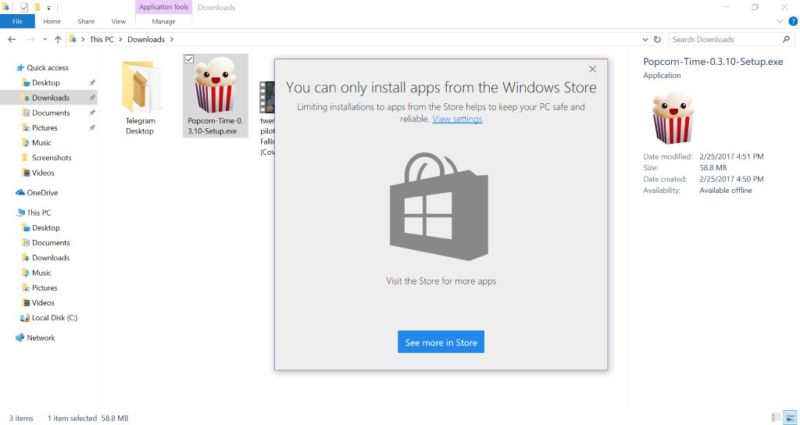
The latest Windows 10 Insider Preview build doesn't add much in the way of features-it's mostly just bug fixes-but one small new feature has been spotted, and it could be contentious. Vitor Mikaelson noticed that the latest build lets you restrict the installation of applications built using the Win32 API.
The Settings app has three positions: allow apps from anywhere (the default), allow apps from anywhere but prefer apps from the Store, and only allow apps from the Store. Put in its most restrictive third position, this setting will block the installation of traditional Win32 applications; only those shipped through the Store using the Project Centennial technology will work. Interestingly, the switch only appears to govern installation. Changing the setting to "Store apps only" will allow existing Win32 applications to work, only preventing new ones from being installed.
@JezCorden @itsmichaelwest just this finally working pic.twitter.com/V8jBa61Tg5
- Vitor Mikaelson (@vitorgrs) February 26, 2017
Microsoft is late to offer this option; macOS has had a similar toggle as part of its Gatekeeper system since 2012.
Read 2 remaining paragraphs | Comments