OpenBSD 7.9 arrives, a diamond in the rough proud of every sharp edge
by from www.theregister.com - Articles on (#75VMG)
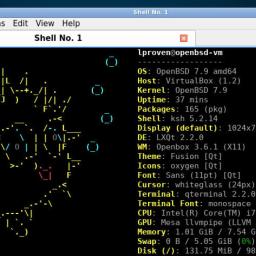 HANDS ON Even after 60 releases, to borrow Carlsberg's slogan, OpenBSD is probably the most secure FOSS Unix-like OS in the world. OpenBSD 7.9 arrived just a couple of days after project lead Theo de Raadt's birthday. Our congratulations to both. The last four months or so have seen the fastest succession of security issues in Linux that we can remember in the project's existence so far, but OpenBSD sails on serenely. Back in March, Anthropic announced that its Claude Mythos LLM had found a successful OpenBSD attack - but it wasn't a hole. A TCP/IP packet with malformed Selective Acknowledgement options could crash the kernel. This was a real problem, and the bug that caused it went back 27 years, but it doesn't let anyone in. The OpenBSD developers had already included a fix for the bug two weeks earlier, so OpenBSD 7.8 users would get it the next time they ran sysupdate, and it is of course fixed in this version. The new features in version 7.9 are relatively modest. On x86-64 machines - which it terms amd64 - 7.9 now supports a maximum of 255 processor cores, and fixes a bug on machines with over 512 GB of RAM. It can also handle up to 52 partitions per disk. Internally, there can be up to 64, but the limit is now the number of lowercase and uppercase letters of the Roman alphabet, which it uses in labels. On x86-64 and Arm64, the CPU scheduler now understands heterogeneous CPU cores with different performance levels, and can assign processes to four different performance levels described by the letters S-P-E-L, denoting SMT, performance, efficient, and lethargic. This should improve power management, and another feature called "delayed hibernation" can also help. Rather than letting a suspended laptop simply turn off if its battery runs out, when power levels get very low, the machine will wake up then immediately hibernate - a process that ends with it turning completely off. OpenBSD still doesn't have a journaling file system. It uses FFS2, an improved version of the original Berkeley Fast File System developed by Kirk McKusick. This used to include a performance enhancement called soft updates (McKusick's own explanation) but these were removed in 2023. That means that turning off a running machine without shutting it down could cause disk corruption. Delayed hibernation will help prevent one cause of that, at least. The release announcement also lists other changes, including improved support for RISC-V boards, basic support for Wi-Fi 6, the graphics driver stack from Linux kernel 6.18, and even more optimizations to the already-low-latency sound driver stack. There are various tweaks and bug fixes for the various RISC platforms it supports. Version upgrades include LibreSSL 4.3.0, OpenSSH 10.3, and many improvements to the Berkeley Packet Filter (bpf) and Packet Filter firewall (pf), including source and state limiters. Desktop use is not the primary goal of OpenBSD, but you certainly can. It includes multiple window managers and desktops, as documented in its handbook - although this is slightly out of date. Version 7.9 includes GNOME 49, KDE Plasma 6.6, MATE 1.28, Xfce 4.20, LXQt 2.2, and various more minimal window managers. It has its own X11 server, Xenocara, based on X.org 7.7 and Xserver 21.1.21, but you can also run XLibre with some manual effort, and some desktops support Wayland. There is also a downstream project to build a live bootable medium called FuguIta, although it hasn't caught up with the new release just yet. OpenBSD releases are each accompanied by a unique banner painting and theme tune. This time, it's a swinging jazz instrumental called Diamond in the Rough [MP3], which we really enjoyed. It's by Bob Kitella, who along with de Raadt is one of the team at the Alberta internet exchange YYCIX. Calling OpenBSD a diamond in the rough seems quite appropriate. It does have some significant gaps in its functionality, but it is small, clean, and secure. We very much enjoyed a recent essay on ascetic computing by Dave "Ratfactor" Gauer, in which he discusses why his OS of choice is OpenBSD. Out there in the chaos of the open source communities on the social networks that this vulture visits, we often encounter great resistance when we tell people that they're experiencing problems because of their poor choice of equipment. For an easy life and a reliable computing experience, we advise against wireless devices (peripherals or networks), Bluetooth audio devices, and so on. The vicissitudes of Nvidia support on Linux have long been well understood, and eloquently conveyed by Torvalds himself. Avoid this stuff, use devices with plain old cables, and things tend to work more easily and more reliably. Here, we are coming to appreciate the OpenBSD stance on Bluetooth, for instance: it simply does not support it at all. This approach reminds us of the way that Python sliced through the Gordian knot of indentation styles. For instance, this C style guide [PDF] identifies 14 named indentation systems. Python dispenses with all that by making indentation syntactically significant, ending the flame wars at a stroke. Of course, many veterans howl their dismay and rage at this - and yet Python consistently ranks as the world's favorite language, over and over and over again. OpenBSD cuts through some of the complexities of Linux and the other BSDs in a broadly similar way. There has been some controversy recently over OpenBSD's inclusion of code written with AI assistance. The OS includes the tmux terminal multiplexer - and recently, the tmux developers accepted some LLM-assisted code, including the recent DECSET 2026 support. This is now also in OpenBSD, and it's not the only one. No LLM-created code has been committed directly into OpenBSD as yet - and it looks unlikely, if only for copyright reasons, as de Raadt laid out in March. The tmux changes were grandfathered in indirectly because OpenBSD has included tmux in its base system since 2009. We've looked at the changes and they seem small, clean, and innocuous to us. Arguably, the objection is an ideological one of purity. We fear that OpenBSD may end up on the Open Slopware list we mentioned in January. When we reported recently on Fedora and Ubuntu's AI moves, we mentioned the Stop slopware site and the No-AI Software Directory. This probably means OpenBSD won't appear on the latter either, but we suspect that the team will not care. OpenBSD version upgrades are relatively simple, straightforward, and well documented. So, to take 7.9 for a spin, we first tried it in a VirtualBox VM. Although it's a small OS, it wants a large virtual drive because by default it creates nine separate partitions, and because of their different permissions, they're a key part of the OS's enviable security. Worse still, their sizes cannot be dynamically adjusted. Since the installation program is a very low-tech plain-text affair, it offers no help with customizing the layout: if you don't like its proposal, then you must devise your own completely from scratch. It really would help massively if OpenBSD had some kind of simple Logical Volume Manager. Give it enough space, though, and installation goes smoothly. We also tried on the bare metal of an old Lenovo ThinkPad X220, with its own dedicated 128 GB SSD. This threw up an interesting wrinkle: it found the machine's Wi-Fi controller no problem, identifying it as an Intel Centrino Advanced-N 6205 - but because the necessary firmware was not included on the 761 MiB ISO download, it couldn't activate the device, even though it let us enter our WLAN credentials. That's a problem, as the installer defaults to fetching the installation file sets from the internet. We plugged in an Ethernet cable, and then installation continued and finished successfully. The installer automatically installed the required firmware package, so on our first reboot, the Wi-Fi connection came online all on its own. Installing this vulture's preferred desktop environment was as simple as logging in as root and entering pkg_add xfce. Selecting it is not quite so easy, though: OpenBSD's display manager, xenodm, lacks the ability to choose a desktop environment. To fix that, we needed a one-line, two-word script: create an ~/.xsession file containing exec startxfce4, and that was it - a fully working graphical desktop. We added a second monitor, and it was detected, added, and enabled automatically, and we could set it to portrait mode in Xfce's display settings. Although the X11 section of the OpenBSD Handbook says that KDE's recently replaced SDDM is available, as far as we can tell, it has been removed from 7.9 - as has Ubuntu's LightDM. Even so, just saying "yes" when the installation program asks if you want GUI results in a working Fvwm 2.2.5 environment. The Reg FOSS desk has been exploring OpenBSD since version 7.1 in 2022, including 7.2, 7.5, 7.6, 7.7, and 7.8. It's still not an easy OS to install, but if you can dedicate a computer to it, installation is much easier. We recommend avoiding complexities like dual-booting and multiple drives. As a small bonus, it boots and installs perfectly from a Ventoy multi-OS USB key. OpenBSD still supports x86-32, there's no trace of systemd and never will be, and if you really want GNOME or KDE, you can have them. Bringing up a GUI-based system remains substantially easier than it does on FreeBSD. If you're prepared to obtain the hardware it wants, rather than hoping that it will support whatever kit you happen to already have, this is an excellent way to improve your Unix skills - as well as starting to enjoy computing again, free of the distractions of shinier FOSS OSes. (R)