Linux Lite 8.0 sheds Chrome, slims down, and finds its name fits better than ever
by from www.theregister.com - Articles on (#7678P)
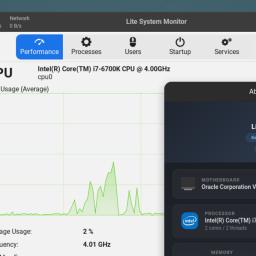 Linux Lite 8.0 is now available, rebuilt atop Ubuntu 26.04 and with its custom helper apps rewritten around GTK4. It arrives almost exactly two years after we looked at Linux Lite 7, itself two years after Linux Lite 6.0. The regularity of the release cycle is a sign of its maturity: the project is now 14 years old. Version 8 is based on Ubuntu 26.04 Resolute Raccoon, but it eliminates the vexed question that many distros pose: which desktop to use. Linux Lite uses version 4.20 of the Xfce desktop, which in our opinion is an excellent choice. While Ubuntu continues to pile on the pounds, this release of Linux Lite is slightly smaller than its predecessor - the download is 410 MB less. As ever, it includes neither Snap nor Flatpak, which should help users to keep it slim and light. Each major version number of Linux Lite is rebased on a new LTS version of Ubuntu, and will be followed by point releases - very similarly to Linux Mint. Linux Lite 8.x sees some substantial changes, although to be fair, some of these first appeared late in the 7.x release series. The default web browser is now Mozilla Firefox - Google Chrome has got the boot. We can't help but wonder if this is at least in part inspired by Google silently embedding a 4 GB LLM, or perhaps the restrictions that stopped uBlock Origin working from 2024. One of the benefits of Linux Lite for less experienced or technical users, who don't know where to go to do things like changing system settings, installing drivers, and so on, is its selection of handy pre-installed helper applications. The release notes list 15 of these that have been rewritten for this version, and now they use GTK4. The announcement also mentions "end-to-end GTK4 theming." That sounds great, but there's always a cost, and this time, it is that GTK4 no longer supports what the GNOME developers consider tired old UI metaphors like menu bars. So the new Lite apps have fondleslab-style hamburger menus instead, and the primary or default button appears in the title bar. Even years after GNOME 40, we find that a bizarre and unintuitive location. Some of these custom apps are important tools. For instance, Lite Terminal replaces Xfce Terminal. The announcement says it is a "super light, responsive built from the ground up terminal. Beautiful font rendering, predictive auto-complete, a slew of right click options," and calls out "a title bar that turns light red when you are in sudo" (which the new GNOME terminal Ptyxis does too). That's all good, but this vulture would rather just have a menu bar that responds to keyboard controls. The Lite Software app now replaces the venerable Synaptic. It's true, there's been little visible development in Synaptic for years, but we don't find Lite Software capable enough to replace it: for instance, it can only sort by name, not by any other columns - such as whether packages are installed or not, or by version. These changes mean that the new GTK4 apps aren't consistent with the rest of Xfce and its traditional menu bar/toolbar layout. Personally, this vulture doesn't care much about performance or appearance or fonts or themes; we care much more about a consistent working UI that can be driven by the keyboard alone. These GNOME-isms creeping in, such as disappearing menu bars, are not welcome - any more than they are in Linux Mint. Google Chrome has been ousted, but AI hasn't. There's a new MyAI function in Firefox (rather than as a standalone app), which offers a choice of local LLM tools. The announcement devotes over 100 words and eight big screenshots to this, saying: Yes, we understand that AI is a polarising topic. With an estimated 1.2 billion people using it, we felt a responsibility to provide the option, but in a way that respects people's choice rather than forcing it on them. So, yes, points for awareness, but we still feel that generative AI is a profoundly and irredeemably unethical and harmful technology - even privacy-centric local models with open weights burned huge amounts of resources in their training, using material from people who never got offered the choice of consent. We are saddened to see it installed by default in any FOSS-adjacent product. Saying that, we did appreciate the note at the end: If you don't want it: sudo apt purge myai Right click, Delete Bookmark in the Toolbar in Firefox. Good for the team for that concession. The docs also clearly state that it doesn't support Secure Boot: Secure Boot is not supported on Series 8. You must disable Secure Boot in firmware before installing. We made this call so the system stays simple and reliable for everyone - no MOK enrolment, no shim quirks, no surprise breakage after a kernel update. That's a good call, although some guidance on how to do that would be much better. It's not trivial. For all that many corporate coders like it, this jaded old hack feels that Richard Stallman's position on "Secure Boot" was right: Truly secure boot means YOU specify what system is allowed to run in your computer. On the desktop is a link called "Wiki," pointing to the project's online documentation. That's good, but it won't help someone to get online in the first place, and we felt its title in former releases, "Help Manual," was more informative. There are other significant changes. This version uses the Calamares cross-distro installer in place of Canonical's Ubiquity or Subiquity: it is clear and works well, although we've seen reports of problems on very low-end machines, and the release notes warn it could have problems on "potato computers." There are some handy additional tools, such as a junk-files cleaner. There's a one-click Lite Game Center: "Press the big button and it installs Steam, Lutris, Proton, Wine, game controller support and a few popular helpers all in one go." There are also kernel performance-testing tools and a choice of a lower-latency kernel. There are tools to strip the distro down to the core essentials too, and to remaster your own customized version. There's an OEM installation mode, so the end-user can create their own user account from the first boot. There's a custom system monitor app, an informative About applet, and in the shell, btop replaces htop. Version-to-version in-place upgrades are now supported, so it's possible to upgrade Linux Lite 7.x to 8.x - conspicuously absent in earlier releases. We've covered Linux Lite enough in previous reviews, so this is just an overview of the highlights in the new version 8. The additional tools are of real value: things like software updates, driver installers (adopted from Linux Mint), easy point-and-click installation of native packages of popular apps from Audacity to Zoom. Linux Lite adds a lot of polish and improved fit-and-finish over even rivals such as Zorin OS or Linux Mint, and comfortably surpasses what you get with Ubuntu, or even Xubuntu. Post-install, it detected some 160 available updates. We installed them, which showed a friendly if not very informative progress bar: it went straight to 100 percent and then stayed there for many more minutes as it worked away. After a reboot, it found over 40 more. It has some very nice less-obvious customizations, such as the Starship custom shell prompt for bash. The default search engine is the project's own instance of SearXNG. Thanks to the appalling enshittification of Google in the mid-2020s, a custom search engine is more useful than ever. We installed it in a current VirtualBox release, and the driver installer didn't offer the FOSS guest additions - but then that tool is borrowed from Linux Mint, and it never offers them either. Post-update, a full install used 7.8 GB of disk space and idled on 897 MB of RAM - which is almost exactly the same as Xubuntu, while offering a lot more help, guidance, and useful supplementary tools. It's not perfect. We're not delighted by the new Gtk4 Lite apps, and would have preferred the developers favored a consistent classic-Windows like UI over new shiny. There's nothing wrong with the Xfce terminal, Synaptic, and other time-polished tools, or indeed, with Gtk3: better to embrace the classics, and find ways to add value elsewhere. The customizations are great, but could go further: for instance, Xfce's Docklike Taskbar gives a lovely panel that resembles the Windows 7 one, and the fish shell would complement the Starship prompt nicely. These minor criticisms aside, this is one of the best offerings in the greater Ubuntu market. As of version 8, Linux Lite has finally grown into its name. By modern full-fat desktop standards, such as Ubuntu itself, or other downstream distros such as Zorin OS and Linux Mint, it is a lightweight distro - and yet, it offers more assistance and guidance for Windows migrants than any of them. (R)