Haiku OS rises / Beta 6 sails open web / Virtual winds fly fast
by from www.theregister.com - Articles on (#784ZH)
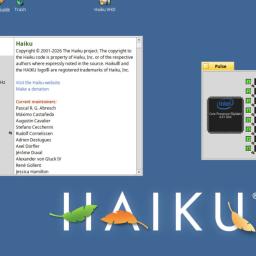 The sixth beta of the Haiku OS is here, now with more choice of web browsers and a working hardware-accelerated hypervisor. Haiku OS beta 6 came out just a week after the project's 25th birthday. We have been trying it on several different machines around the Irish Sea wing of Vulture Towers, and enjoying the experience very much. The release notes contain a lot of changes and some significant new features, although many of them are not immediately obvious. The built-in WebPositive browser is now based on the WebKit rendering engine, which means it handles even demanding web apps such as Gmail perfectly. On Windows and Linux, Google's Blink dominates, but its ancestor WebKit is a major browser engine in its own right, with first-class support in almost all web apps - mainly thanks to a billion or so Apple iDevices. If you want a big-name browser, though, there is a complete port of Firefox, with official Mozilla branding. What's more, the project isn't sticking to the slower-moving ESR version - since we installed beta 6, Firefox has been updated to the latest Firefox 155. You can also choose other Mozilla-family browsers, such as Waterfox, LibreWolf, or Floorp. GNOME Web is still there as well, but now that WebPositive is so capable there's less need for it. We did notice a flickering mouse pointer with a square outline around it in Firefox, but this is just a cosmetic glitch. While we're on Mozilla tools, there's also IceDove, which is Thunderbird 153 ESR without Mozilla branding (and its browser companion IceWeasel, plus IceWeasel ESR). There are plenty of other email clients to choose from, including Balsa, Claws, and the terminal-based Mutt. The other change that could make this a more viable option is significantly faster virtualization. Haiku B6 now has hardware-accelerated VMs, thanks to a port of the NVMM hypervisor. Although NVMM was originally written for NetBSD, it's not specific to that OS: first it was ported to Dragonfly BSD, and now Haiku thanks to a GSoC project. NVMM makes it possible to start QEMU VMs using the native virtualization features of Intel and AMD CPUs. Both NVMM and Firefox (and relatives) are only available on the x86-64 version of Haiku. The same Beta 6 release is also available for 32-bit x86, and while this doesn't have some of the new features, it does boast binary compatibility with the original BeOS. Haiku isn't completely tied to the Intel architecture, though: there are at least three active RISC ports - one for RISC-V 64, one for Arm64, and the experimental PowerPC version. The latter is the oldest, in part being a return to the roots of Haiku's direct ancestor BeOS - whose original native hardware was the dual-PowerPC BeBox. Although there has been recent progress on the Arm64 and PowerPC versions, this is in part thanks to the use of AI coding assistants. As a result, they are unlikely to be merged back upstream. Sadly, one of the developers working on the Arm64 version halted all their efforts because the Haiku project would not accept AI-generated contributions. The other is now called Tabby-PPC by Sean Malseed, better known on YouTube as ActionRetro. Malseed seems happier to remain an independent fork. Haiku's AI-free stance is emphasized by the default search engine in WebPositive - https://noai.duckduckgo.com/. Beta 6 has been tightened up in multiple places: it's a bit smaller, significantly faster in some places, and should use a little less memory than before. Given that it was already quite small and fast, this is impressive. In our testing, it worked well on a UEFI-based Thinkpad X220 with a Core i5, and on an older BIOS-based Thinkpad X200 with a Core 2 Duo. It runs well in 8 GB of RAM, and should be perfectly usable in less. It's an excellent candidate if you have a very old, low-end PC lying around that you'd like to revive. We have seen comments from some fans of FOSS Unix-like OSes who don't see the appeal - for instance, we've seen multiple comments that it lacks containers. This is true, it does, but this is a graphical desktop OS for a single-user machine. There isn't even a login screen, and user accounts are purely cosmetic. It's your computer, and you are the administrator at all time. Haiku is not attempting to be a server OS - there are plenty of those if that's what you want. What's more, servers constitute a role for which Linux and the BSDs are very well suited. The hardcore Unix folks may never understand, much like Xkcd's tech support line. Haiku is not a Linux distribution, nor is it a BSD. It is its own thing, implemented from the bare metal upwards, mostly in C++. It doesn't use X11 or Wayland. It has a pretty good app catalog these days - and because it has strong POSIX compatibility, many of those apps are Linux ports. That's no bad thing: it fixes one of the key problems BeOS had. There are native versions of Firefox, LibreOffice, VLC, and so on in the repositories. There are clients for Discord, Matrix, and more, plus Chat-o-Matic, a libpurple-based multiprotocol chat client that can use Pidgin connectors. There are quite a few games and emulators. The HaikuDepot app is a friendly GUI front-end to the software repository, with automatic dependency resolution. It's also the software updater. If you are interested in a different flavor of Unix, this is probably not the OS you're looking for. On the other hand, if you want something fast, lightweight, which supports quite a lot of commodity hardware and runs well on old, low-end machines that would struggle to run any modern Linux, then take a look. We love its 1990s-style subtly 3D-shaded GUI, which we find a delightful and refreshing change from the flat translucent look of most modern GUIs. Haiku is a recreation of BeOS, and Be was founded by former Apple exec Jean-Louis Gassee, so there's a strong Classic MacOS feel to the GUI. (Haiku doesn't have much resemblance to modern macOS - as in OS X - though. Those switching from modern Macs will be a little lost at first.) The Tracker desktop combines the best aspects of Classic MacOS with the best aspects of the Windows 95 Explorer - for instance, the floating Deskbar at top right can be placed along the bottom edge of the screen, where it works perfectly as a taskbar. Menu bars are inside windows, where most people seem to prefer them, but like Classic MacOS, the contents of menus change on the fly when you hold down modifier keys. The Reg FOSS desk has been covering Haiku for some years: in 2022, when it got a port of WINE, then again at beta 4 in 2023, at beta 5 at the start of 2025, plus its new hardware 3D support later that year. It is our favorite modern x86 OS by a wide margin, even though it's not quite ready to be our daily driver. Quite a lot of things don't work yet. For example, there's next to no multihead support - just a couple of ancient graphics cards can do this. However, compared to the level of fit and finish in many Linux and indeed BSD distros we've seen, if we were in charge of Haiku, we would have had no hesitation in calling this Version 1.0. In terms of the smoothness and completeness and coherence of its user experience, it is streets ahead of any desktop Linux that there's ever been - or, we suspect, ever will exist. Like the Haiku devs, this vulture is not an AI user: we avoid it completely. We have seen other AI skeptics expressing concern on social media: What if the entire Linux distro world turns to AI slop, or even implodes? Where else is there to go? It is a clear and present danger: the Linux kernel team is embracing AI. So are many distros: Ubuntu is leaning in to AI tooling, then Debian voted not to limit its use, and of course Red Hat is all-in. We like to imagine a world of Haiku clients, talking to NetBSD back-end servers, and nothing but feature-phones - maybe running a revived Symbian. No AI, no Electron apps anywhere. A sky as clear and blue as the Haiku desktop, with no trace of a Cloud to be seen. That sounds idyllic to us. If it does to you as well, we think you might enjoy trying Haiku. (R)