by Igor Bonifacic from Engadget is a web magazine with obsessive daily coverage of everything new in gadgets and consumer electronics on (#72716)
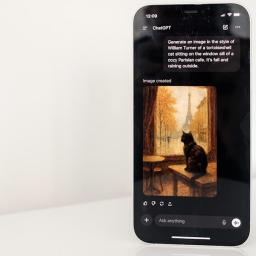
Following the release of GPT-5.2 last week, OpenAI has begun rolling out a new image generation model. The company says the updated ChatGPT Images is four times faster than its predecessor. If you're a frequent ChatGPT user, you'll know it can sometimes take a while for OpenAI's servers to create images, particularly during peak times and if you're not paying for ChatGPT Plus. In that respect, any improvement in speed is welcome.The new version is also better at following instructions, including when you want to edit something the new model just generated. You can ask the system to add, subtract, combine, blend and even transpose elements.At the same time, OpenAI says the update offers better text rendering. That's something many image models have traditionally struggled with, but according to the company, the new ChatGPT Images is capable of handling denser and smaller text. As part of the today's model update, OpenAI is additionally adding a dedicated Images section to the ChatGPT sidebar. Here you'll find preset filters and prompts you can look to for inspiration.A portrait of Sam Altman, in the style of Johannes Vermeer's Girl with a Pearl Earring. OpenAIThe new ChatGPT Images arrives just as Nano Banana Pro is responsible for a surge in Gemini usage. In October, Google said its chatbot had 650 million users, up from 450 million just a few months earlier in July. Nano Banana Pro has proven so popular, the company recently limited free users to just two image generations per day. For OpenAI, a strong response to Nano Banana Pro probably wasn't as important as ensuring it came out swinging against Gemini 3 Pro, but ChatGPTImages is a big part of why there are 800 million ChatGPT users."We believe we're still at the beginning of what image generation can enable," OpenAI said. "Today's update is a meaningful step forward with more to come, from finer-grained edits to richer, more detailed outputs across languages."OpenAI is rolling out the new ChatGPT Images to all users starting today. If you're one of those people who miss GPT-4o, you'll be happy to learn you can continue to use the older version of the tool through a custom GPT.This article originally appeared on Engadget at https://www.engadget.com/ai/chatgpt-image-generation-is-now-faster-and-better-at-following-tweaks-180000750.html?src=rss