by Sam Chapman from Engadget is a web magazine with obsessive daily coverage of everything new in gadgets and consumer electronics on (#72QQ6)
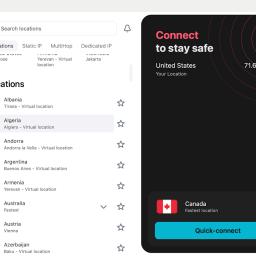
Chances are that you're here because you've heard a virtual private network (VPN) can change your virtual location, and want to know what that means. If you know already, head over to my best VPN list to learn which services I recommend for changing your location. But if you're clueless, read on.Whenever any device connects to the internet - whether it's a laptop, a phone or a smart Lego brick - it's assigned a unique IP address that other devices can use to identify it. Think of the name you give the barista at a coffee shop, except instead of a hot beverage, you're being served websites and digital audio and video.That's the upside. The downside is that a device's IP address can be used to find its location in the real world. That means service providers can show you local weather reports - as well as targeted local ads. More ominously, however, it means service providers can restrict what you see online based on where you are physically. That impacts everything from the fun (what Netflix has available to stream) to the serious (what information gets censored on the government's behalf).A VPN gets around that downside by running all your online activity through a middleman server before sending it to its destination. Instead of your real IP address, everyone sees the address of the VPN server, along with its geolocation. That means you can subvert any local restrictions getting in your way: You're actually in Houston, but so far as the website you're viewing is concerned, you seem to be coming from Amsterdam. Here's how to do it.How to change your virtual location with a VPNWith so many excellent commercial VPNs on the market, changing your virtual location is a lot easier than it sounds. You don't need to be a hacker - just find a good VPN app and connect to a server in your desired location. On almost any VPN, this is a simple matter of opening the app or desktop client and choosing the server location from a list.On Proton VPN, for example, you can switch locations by clicking the name of any country in the list on the left.Sam Chapman for EngadgetHowever, as with any technology, there are some potential pitfalls. For reference, I've laid out the steps below for both desktop and mobile devices.How to change location on Windows or MacUse these steps to change the virtual location of any desktop or laptop device running macOS or Windows. There may be slight variations, but in general, this process works for any top VPN.